











DIY home security installation usually costs less at the beginning. That does not automatically make it the cheapest option over five years.
The equipment price is only one part of the calculation. Monitoring, video storage, cellular backup, replacement batteries, service visits, additional sensors and contract charges can eventually cost more than the original system.
Professional installation carries a higher upfront cost, but it may include system planning, device placement, configuration, testing, user training and maintenance support. Those services can be valuable when the property is large, the system is wired or an installation error would be expensive to correct.
The correct comparison is not simply:
DIY kit price versus professional installation fee.
It is:
The complete five-year cost of owning, operating and maintaining two systems that provide comparable coverage.
Before choosing either route, review the physical vulnerabilities described in our guide to common home security mistakes. A professionally installed alarm cannot compensate for a damaged door frame, and a cheap DIY camera cannot correct a window that does not lock.
Quick Answer:
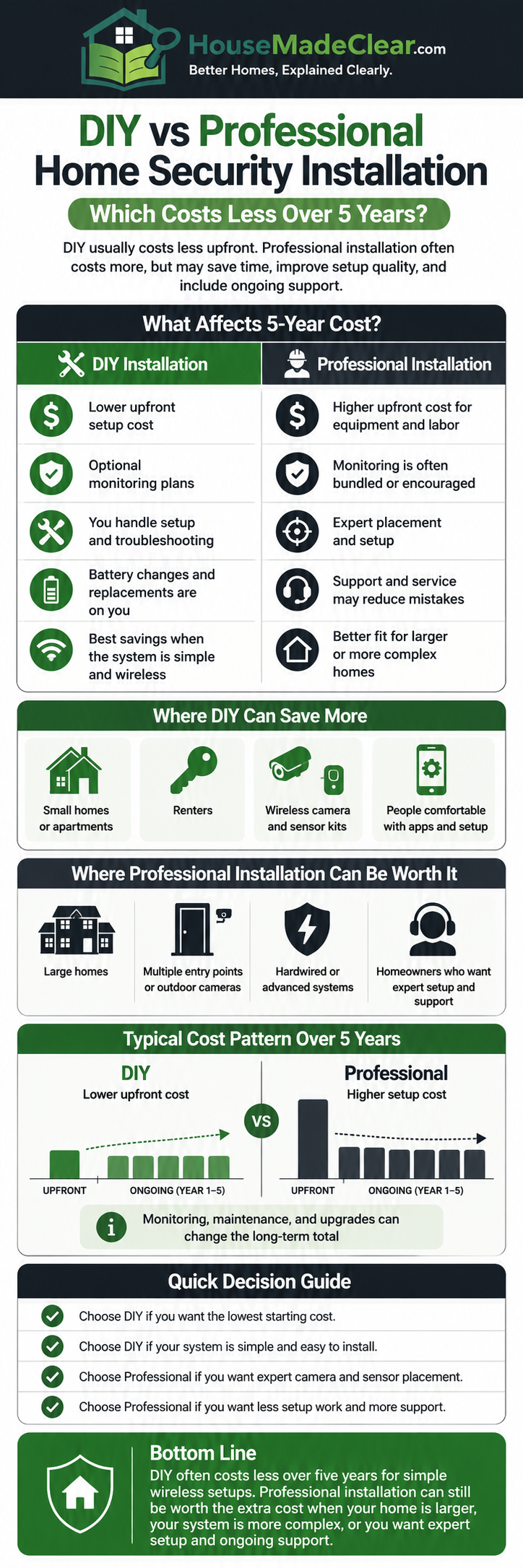
DIY installation normally wins on upfront cost and flexibility. Professional installation may provide better value for larger homes, wired systems, complex camera layouts, monitored alarms and properties requiring recognised certification or documentation. A hybrid approach—installing simple devices yourself while hiring professionals for locks, wiring or cameras—is often the most economical middle ground.
DIY and Professional Installation Are Not Two Fixed Packages
The term “DIY security system” can describe several different arrangements.
A homeowner may install the equipment and monitor every alert personally. Another homeowner may install the same equipment but subscribe to professional monitoring. A professionally installed system may be self-monitored, while another may include a multiyear monitoring and maintenance agreement.
Installation and monitoring are separate decisions.
Fully DIY and Self-Monitored
In a fully DIY system, the homeowner or renter:
- Selects the equipment
- Installs the devices
- Configures the application
- Creates user accounts
- Tests the system
- Responds personally to alerts
- Maintains and replaces devices
This model usually has the lowest recurring cost when the system provides useful functionality without a paid subscription.
The trade-off is responsibility. If an alert arrives while the user is asleep, travelling, driving or without internet access, no monitoring centre automatically reviews it.
DIY Installation With Professional Monitoring
Many consumer systems allow homeowners to install their own equipment and purchase optional professional monitoring.
This arrangement can reduce labour costs while still providing:
- Monitoring-centre review
- Cellular backup on some plans
- Emergency dispatch where supported
- Alarm verification
- Extended event history
- Additional application features
The equipment may remain identical; the monthly or annual plan changes the service.
DIY Equipment With Optional Professional Installation
Some DIY-oriented systems allow buyers to pay for installation of selected devices.
This can work well when the homeowner can install:
- Entry sensors
- A plug-in hub
- Indoor cameras
- Keypads
but needs assistance with:
- A smart lock
- Wired doorbell
- Outdoor camera
- Network equipment
- High mounting positions
- Door or frame repairs
Professionally Designed, Installed and Monitored
A traditional security provider may offer:
- Property survey
- Security-risk assessment
- System design
- Equipment supply
- Installation
- Configuration
- Testing
- Monitoring
- Maintenance
- Emergency support
- Compliance documentation
These services vary substantially between companies. Paying for professional installation does not guarantee that a detailed assessment, good camera placement or useful training will be included.
Ask what the installer will actually do.
DIY vs Professional Home Security Installation
| Factor | DIY installation | Professional installation |
|---|---|---|
| Initial labour cost | Usually low or zero | Charged directly or included in a package |
| Equipment choice | Controlled by the buyer | Recommended or supplied by the installer |
| System design | Buyer’s responsibility | May include a property survey |
| Installation time | Depends on experience and troubleshooting | Completed during a scheduled appointment |
| Wiring | Better suited to simple wireless equipment | More suitable for complex or wired systems |
| Camera placement | Buyer decides | Installer may assess height, angles and coverage |
| Configuration | Buyer handles accounts and integrations | May be completed by the installer |
| Troubleshooting | Buyer handles first-line issues | Provider may offer support |
| Monitoring | Optional and separate | Often offered, but not always required |
| Maintenance | Buyer’s responsibility | May be available through a service agreement |
| Contracts | Frequently optional | More likely to include minimum terms |
| Equipment ownership | Usually purchased outright | May be purchased, financed or leased |
| Moving the system | Often easier | Depends on provider and contract |
| Best suited to | Straightforward wireless systems | Complex properties, wiring and monitored systems |
These are general category differences. The quotation and contract determine what an individual buyer actually receives.
The Correct Way to Compare Five-Year Cost
A starter-kit price is not a complete home security budget.
Use this formula:
Five-year cost = equipment + installation + 60 months of monitoring and storage + maintenance + replacements + contract-related costs
Every system should be priced for the same property and level of coverage.
A DIY quote covering three sensors should not be compared with a professionally designed system covering ten windows, four doors, two cameras and an outbuilding.
Costs to Include
Calculate the cost of:
- Base station or control panel
- Door and window sensors
- Motion detectors
- Keypads
- Cameras
- Video doorbell
- Sirens
- Smart locks
- Installation labour
- Activation
- Professional monitoring
- Video storage
- Cellular backup
- Range extenders
- Memory cards
- Replacement batteries
- Service visits
- Replacement devices
- Extended warranties
- Alarm permits or registration
- Contract cancellation
- Moving or reinstallation
Also consider whether the system remains useful after the monitoring plan is cancelled.
Some products retain basic alarms and local controls. Others lose important application, recording or automation features.
Current US Cost Benchmarks
As of July 2026, Angi estimates that US home security system installation projects commonly cost between $300 and $1,238, although the final amount depends heavily on the system and camera count. Its current guide places wireless systems around $200–$2,000, wired installations around $800–$1,600, and professional monitoring around $10–$65 per month. It also warns that basic starter kits may not contain enough equipment for a whole home.
That monthly monitoring range alone represents approximately:
- $600 over five years at $10 per month
- $3,900 over five years at $65 per month
This is why an inexpensive starter kit can become expensive over time.
A Current Monitoring Example
Abode currently lists its professional monitoring plan at $245.99 annually or $26.99 monthly. At the listed annual price, five years would cost approximately $1,229.95. Paying the monthly rate for 60 months would total approximately $1,619.40, before equipment or other services.
This is only an illustration of how billing frequency affects total cost. It is not a recommendation of that provider, and pricing may change.
Current UK Cost Benchmarks
Current UK estimates from Checkatrade place the starting supply-and-installation cost of a basic bell-only system at approximately:
- £500 for a basic wired alarm
- £525 for a basic wireless alarm
- £650 for a smart alarm package
Its March 2026 guide also places alarm-technician labour around £60–£80 per hour, with larger properties, more sensors and complex installation increasing the final price.
Those figures are starting estimates, not complete five-year ownership costs. Monitoring, maintenance, call-outs, batteries and additional equipment may be charged separately.
Illustrative Five-Year US Cost Comparison
The following example is a calculation model, not a quotation or market average.
It assumes a typical wireless system for a modest three-bedroom property.
Assumptions
DIY self-monitored system
- Equipment: $700
- Installation: $0
- Monitoring: $0
- Five-year battery and replacement allowance: $150
DIY system with professional monitoring
- Equipment: $700
- Installation: $0
- Monitoring: $245.99 annually for five years
- Five-year battery and replacement allowance: $150
Professionally installed and monitored system
- Equipment and installation: $1,200
- Monitoring: $35 per month
- Five-year maintenance and replacement allowance: $300
The assumed equipment and monitoring figures fall within current broad US cost ranges, but the model is intentionally simplified.
| Cost category | DIY self-monitored | DIY professionally monitored | Professional installation |
|---|---|---|---|
| Equipment and installation | $700 | $700 | $1,200 |
| Five-year monitoring | $0 | $1,229.95 | $2,100 |
| Maintenance and replacements | $150 | $150 | $300 |
| Five-year total | $850 | $2,079.95 | $3,600 |
In this specific example:
- DIY self-monitoring is the cheapest.
- DIY with professional monitoring costs approximately $1,230 more than self-monitoring.
- The professionally installed option costs approximately $1,520 more than the professionally monitored DIY option.
That does not prove that DIY always saves $1,520.
The result would change if:
- Professional installation were discounted
- Monitoring were cheaper
- The DIY system needed rework
- The professional package included more devices
- The professional provider covered maintenance
- Cameras required separate cloud-storage plans
- The professionally installed system used better equipment
- The DIY user needed paid technical support
The example demonstrates the calculation method—not a universal result.
The Starter-Kit Trap
DIY systems are often advertised using the lowest-cost bundle.
A starter kit may contain:
- One hub
- Two entry sensors
- One motion detector
- A keypad
That may be adequate for a small apartment. It may be inadequate for a detached home with several external doors, accessible windows, a garage and an outbuilding.
Additional costs may include:
- Extra entry sensors
- Outdoor siren
- Additional keypad
- Glass-break detector
- Smoke or carbon monoxide detector
- Cameras
- Video doorbell
- Smart lock
- Range extender
- Local storage
- Professional monitoring
- Cellular backup
Before comparing systems, count the actual entrances and areas that require coverage.
The lowest advertised bundle is irrelevant when it protects only part of the property.
Where DIY Installation Saves Money
DIY installation has the strongest economic case when the system is simple and wireless.
It may suit a property where:
- There are few entrances
- Devices use adhesive or simple screw mounting
- Wi-Fi coverage is reliable
- Cameras can be positioned safely
- No structural work is required
- The household understands applications and passwords
- Self-monitoring is acceptable
- No insurer or authority requires certification
- The buyer expects to move
Labour Is the Most Obvious Saving
Installing sensors and a hub independently removes the direct installer charge.
This saving is most meaningful when the installation genuinely is simple.
Paying a technician to plug in a hub and attach three adhesive sensors may provide limited value unless the service includes:
- Risk assessment
- Better device placement
- System configuration
- Testing
- Training
- Documentation
DIY Can Reduce Contract Dependence
Many DIY systems allow buyers to:
- Purchase equipment outright
- Use free self-monitoring
- Change plans
- Cancel monitoring
- Add devices gradually
- Take equipment to another property
These advantages depend on the specific provider. Some DIY products still place important features behind subscriptions.
DIY Allows Gradual Expansion
A household may begin with:
- Entry sensors
- Motion detector
- Siren
and later add:
- Video doorbell
- Outdoor camera
- Smart lock
- Additional sensors
This can spread the equipment cost over time.
The disadvantage is that piecemeal buying can produce incompatible devices, duplicate applications and several subscriptions.
Where DIY Installation Can Cost More
DIY becomes a false economy when the system has to be installed twice.
Common causes include:
- Poor sensor alignment
- Weak adhesive
- Incorrect camera height
- Large blind spots
- Inadequate Wi-Fi
- Incompatible smart locks
- Incorrect doorbell voltage
- Damaged walls or doors
- Weather exposure
- Constant false alerts
- Incorrect motion-detector positioning
- Failed integrations
- Confusing user permissions
A homeowner may then pay for:
- Replacement mounts
- New sensors
- Wi-Fi extenders
- A different product
- Door or wall repairs
- Professional correction
- Additional subscription plans
Time Is Also a Cost
DIY installation may involve:
- Product research
- Measuring
- Installation
- Charging
- Pairing
- Firmware updates
- Account setup
- Troubleshooting
- Repositioning
- Testing
A technically confident user may complete the work quickly. Another user may spend several evenings correcting avoidable problems.
The right decision depends partly on what the user’s time is worth and how serious the consequences of a mistake would be.
What Professional Installation May Add
Professional installation can provide more than physical fitting.
A competent installer may assess:
- Entry points
- Property layout
- Household routines
- Camera sightlines
- Nighttime lighting
- Network coverage
- Existing wiring
- Pet movement
- False-alarm risks
- Outbuilding coverage
- Backup communication
- Monitoring requirements
The installer may then:
- Select suitable equipment
- Design zones
- Route cables
- Configure alerts
- Test sensors
- Adjust camera angles
- Train household members
- Document the system
- Provide maintenance
Professional installation is valuable when these services reduce real risks.
It is poor value when the provider simply sells an oversized package or charges a large labour fee for work the homeowner could safely complete.
Professional Installation Does Not Eliminate Buyer Responsibility
Buyers should still verify:
- Equipment model numbers
- Device quantities
- Contract length
- Monitoring cost
- Ownership status
- Warranty
- Maintenance terms
- Call-out charges
- Cancellation fees
- Moving conditions
- Data-storage arrangements
- What happens after cancellation
“Professionally installed” describes how the system entered the property. It does not guarantee fair pricing, good equipment or a suitable contract.
Monitoring Is Separate From Installation
A system can be:
- DIY installed and self-monitored
- DIY installed and professionally monitored
- Professionally installed and self-monitored
- Professionally installed and professionally monitored
Installation determines who sets up the equipment.
Monitoring determines who reviews eligible alarm events after installation.
Self-Monitoring May Suit
- Small homes
- Renters
- Households avoiding monthly fees
- Users who keep their phones available
- People comfortable assessing alerts
- Properties with trusted nearby contacts
Self-monitoring places the response burden on the user.
The user must decide whether an event is:
- A household member
- A delivery
- An animal
- A false alert
- A technical fault
- A genuine emergency
Professional Monitoring May Suit
- Frequent travellers
- Second-home owners
- Households that may miss notifications
- Users needing cellular backup
- Properties with higher risk
- People wanting monitoring-centre support
Professional monitoring does not guarantee police attendance or a particular response time. Response depends on the provider, alarm verification, local policy and the event itself.
Which Devices Are Reasonable to Install Yourself?
| Device or work | DIY suitability | Main concern |
|---|---|---|
| Plug-in hub | Usually high | Network position and account security |
| Adhesive entry sensor | Usually high | Alignment and surface condition |
| Freestanding indoor camera | Usually high | Privacy and Wi-Fi |
| Wireless keypad | Usually high | Position and tampering |
| Wireless motion detector | Moderate | Detection zones and false alarms |
| Battery video doorbell | Moderate | Height, charging and theft |
| Wired video doorbell | Moderate to low | Transformer and electrical compatibility |
| Outdoor wireless camera | Moderate | Weather exposure, height and coverage |
| Smart lock | Moderate | Door compatibility and alignment |
| High-mounted camera | Low | Safe access and correct angle |
| Wired alarm panel | Low | Cabling and technical configuration |
| Multi-camera wired CCTV | Low | Network, recording and cable design |
| Fire-door hardware modification | Low | Fire safety and legal compliance |
| Door or frame reinforcement | Low | Structural security and installation quality |
The HouseMadeClear smart lock and deadbolt comparison explains why lock compatibility and door condition should be assessed before choosing DIY installation.
DIY Installation Is Most Suitable When
Choose DIY when:
- The equipment is designed for consumer installation.
- The property is small or straightforward.
- The system is wireless.
- No electrical or structural work is required.
- You can reach installation positions safely.
- You understand Wi-Fi and account security.
- You are willing to test the system.
- You can maintain batteries and software.
- You want lower initial labour costs.
- You may relocate the equipment.
Do not choose DIY only because the installer fee feels expensive. First compare what the installer fee includes.
Professional Installation Is Most Suitable When
Professional help becomes more defensible when:
- The property is large
- Several floors require coverage
- Cameras require cabling
- Outdoor mounting is difficult
- Wi-Fi coverage is inconsistent
- Existing alarm wiring will be reused
- The door or frame is defective
- A multipoint lock is involved
- The entrance is fire-rated
- Monitoring or response documentation is required
- The insurer specifies an approved provider
- The household needs training
- Installation errors would be expensive
The Hybrid Approach
A hybrid approach often delivers the best balance of cost and quality.
The homeowner might install:
- Entry sensors
- Keypads
- Indoor cameras
- Plug-in hub
- Mobile application
while a professional handles:
- Smart lock
- Wired video doorbell
- Outdoor cameras
- Cable routing
- Network upgrades
- Door-frame repair
- Alarm certification
This avoids paying professional labour for every simple component while reducing the risk of mistakes on the most technical work.
DIY vs Professional Installation for Renters
DIY systems are often better suited to renters because many devices are removable.
Potential renter-friendly options include:
- Adhesive entry sensors
- Freestanding cameras
- Plug-in hubs
- Removable sirens
- Interior retrofit locks
- Battery doorbells, where permitted
Renters should check the lease before:
- Drilling
- Replacing lock cylinders
- Altering a shared entrance
- Changing a fire door
- Installing exterior cameras
- Modifying electrical wiring
- Removing landlord-owned equipment
Defective doors, locks and windows should be reported to the landlord or property manager. A removable alarm should not be used to conceal a serious physical defect.
More renter and entry-point considerations appear in our guide to common home security mistakes.
US Cost and Contract Considerations
US security packages may involve:
- Equipment purchase
- Equipment financing
- Installation
- Activation
- Monitoring
- Cellular backup
- Cloud storage
- Alarm permits
- Extended warranty
- Contract cancellation
Current US estimates indicate that activation may cost up to approximately $230 and alarm permits may cost up to about $100 in some locations, although requirements vary.
Questions to Ask a US Provider
Before signing, ask:
- Do I own the equipment?
- Is the equipment financed or leased?
- What is the full installation cost?
- Is monitoring mandatory?
- What is the monthly cost after promotions end?
- What is the minimum contract period?
- What happens if I move?
- Does the system function after cancellation?
- Are camera storage and cellular backup included?
- Who provides repairs?
- Are permits my responsibility?
- What is the early-termination charge?
Request the five-year total in writing.
UK Installation and Certification Considerations
UK homeowners seeking a professionally installed or monitored alarm should examine the installer’s certification and maintenance arrangements.
NSI states that its approved companies are qualified to design, install and maintain systems to recognised standards and can issue a Certificate of Compliance. NSI also notes that some insurers may require installation and maintenance by an approved company.
SSAIB maintains a directory of certificated companies searchable by service and region. It states that third-party certification may be required for systems installed for insurance purposes.
Get More Than One Quotation
NSI recommends obtaining at least three quotations and comparing:
- Installation only versus ongoing service
- Police-response requirements
- Equipment purchase versus leasing
- Routine maintenance
- Service visits
- Emergency call-outs
NSI-approved companies may also perform a risk assessment and needs analysis.
Maintenance Can Affect Long-Term Cost
NSI advises that audible alarm systems should generally be checked annually, while systems signalling to an approved Alarm Receiving Centre require maintenance twice a year.
That means a monitored professional system may carry recurring servicing costs beyond the monitoring fee.
The quotation should state:
- Number of scheduled visits
- Parts included
- Battery replacement
- Emergency support
- Call-out rates
- Monitoring-centre charges
Police Response Is Not Automatic
SSAIB explains that monitored systems do not guarantee police response. It also notes that the installer and monitoring centre must meet relevant requirements where a police unique reference number is needed.
Do not pay a premium merely because a salesperson uses the phrase “police-connected.” Ask exactly:
- How events are verified
- Who receives the alarm
- When police may be contacted
- What happens after false alarms
- Which organisation certifies the installer and monitoring centre
How to Compare Two Quotations Correctly
Do not compare only the totals at the bottom of the page.
Create a side-by-side inventory.
| Item | Quote A | Quote B |
|---|---|---|
| Base station | ||
| Door contacts | ||
| Window contacts | ||
| Motion sensors | ||
| Cameras | ||
| Video doorbell | ||
| Sirens | ||
| Cellular backup | ||
| Cloud storage | ||
| Installation | ||
| Monitoring | ||
| Maintenance | ||
| Contract length | ||
| Ownership | ||
| Warranty | ||
| Call-out fee | ||
| Cancellation | ||
| Five-year total |
Two quotations are not comparable when one protects three entry points and the other protects ten.
Which Option Is Better for Different Properties?
| Property or household | Better starting point | Reason |
|---|---|---|
| Small apartment | DIY | Limited coverage and easier removal |
| Typical wireless home | DIY or hybrid | Many components are straightforward |
| Large detached house | Professional assessment | More entrances and coverage variables |
| Wired camera system | Professional | Cabling and network planning matter |
| Frequent traveller | Either with monitoring | Alert response matters more than installation method |
| Short-term rental | Smart DIY or professional setup | Access-code management is important |
| Older property | Professional assessment | Wiring, doors and network problems may exist |
| UK system needing recognised response | Certified installer | Documentation and maintenance may matter |
| Buyer avoiding subscriptions | DIY self-monitoring | Lowest recurring cost |
| Household uncomfortable with applications | Professional setup and training | Configuration errors may undermine the system |
| Property with one difficult device | Hybrid | Pay only for specialised work |
Decision Framework
Choose DIY Installation When
- Equipment is wireless and consumer-friendly.
- The property is straightforward.
- You understand the instructions.
- You can position devices safely.
- No specialist wiring is required.
- You accept responsibility for testing.
- You want flexibility and lower labour costs.
- You may move the equipment later.
Choose Professional Installation When
- Wiring is required.
- The property is large or unusual.
- Cameras need careful placement.
- Doors or frames need repair.
- The system must satisfy specified standards.
- Monitoring or insurance requirements apply.
- You need documentation.
- You want ongoing maintenance.
- A failed installation would be expensive.
Choose a Hybrid Approach When
- Most devices are easy to install.
- One or two components require specialist skills.
- You want to select your own equipment.
- You need professional camera, lock or wiring work.
- You want professional monitoring without a fully managed installation.
Contractor and Quotation Checklist
Request a written quotation showing:
- Equipment manufacturer
- Model numbers
- Device quantities
- Labour
- Additional materials
- Network equipment
- Monitoring charge
- Storage charge
- Cellular backup
- Contract length
- Equipment ownership
- Warranty
- Maintenance
- Emergency call-out cost
- Cancellation terms
- Moving terms
- Compliance documents
- Taxes
- Full five-year cost
Do not accept “from” pricing as the final cost.
Final Verdict
DIY installation normally costs less upfront.
For a straightforward wireless system, it may also remain the cheapest option over five years—especially when the household self-monitors and avoids unnecessary subscriptions.
Professional installation becomes more valuable as the system becomes more complex.
Its higher cost may be justified when:
- The property needs a proper survey
- Wiring is required
- Cameras are difficult to position
- Doors or frames need specialist work
- Monitoring arrangements require certification
- Documentation matters
- Maintenance support is valuable
The hybrid model is often overlooked. Installing simple sensors yourself while paying for difficult or safety-critical work can reduce labour costs without accepting unnecessary installation risk.
The cheapest system is not the one with the lowest advertised starter-kit price.
It is the system that provides the required coverage, remains affordable to operate and continues to work because the household can maintain it.
This article reflects HouseMadeClear’s whole-home approach to security, design and practical installation. Learn more about the professional perspective behind our content on the Meet Charu page, read about our research process on About HouseMadeClear, and explore additional home security guidance.
Costs, contracts and installation requirements vary. Review the HouseMadeClear Disclaimer before making substantial financial, electrical, structural or security decisions.
Frequently Asked Questions
Is a DIY home security system cheaper?
A DIY system is usually cheaper upfront because the buyer does not pay for full professional installation. The five-year result depends on equipment, monitoring, storage, replacement devices and whether installation mistakes require correction.
How much does professional home security installation cost?
Current US estimates place many home security installation projects between approximately $300 and $1,238, while UK estimates place a basic supplied-and-installed alarm around £500–£525. Larger, wired or camera-heavy systems can cost substantially more.
Can a DIY security system have professional monitoring?
Yes. Many DIY systems allow the homeowner to install the equipment and subscribe separately to professional monitoring. Installation and monitoring should be compared as separate decisions.
Is professional installation worth it for a small home?
It may not be worth the full cost when the property requires only a few wireless sensors and a plug-in hub. It becomes more defensible when cameras, wiring, locks, difficult mounting positions or formal monitoring requirements are involved.
Do professionally installed systems require contracts?
Some do and some do not. Buyers should check whether equipment is purchased, financed or leased, whether monitoring is mandatory, the minimum term and what happens after cancellation.
Can renters install a DIY home security system?
Renters can often use removable sensors, indoor cameras and plug-in equipment, but they should check the lease before drilling, replacing locks, modifying fire doors or installing exterior equipment.
Should security cameras be professionally installed?
Simple indoor cameras are often suitable for DIY placement. Professional installation may be worthwhile for wired cameras, high mounting positions, large properties, complex networks or areas where poor placement would create serious blind spots.
How should I compare two security quotations?
Compare the same number and type of devices, installation work, monitoring, storage, cellular backup, maintenance, ownership, contract terms and five-year cost. Two quotations covering different levels of protection cannot be compared fairly.