















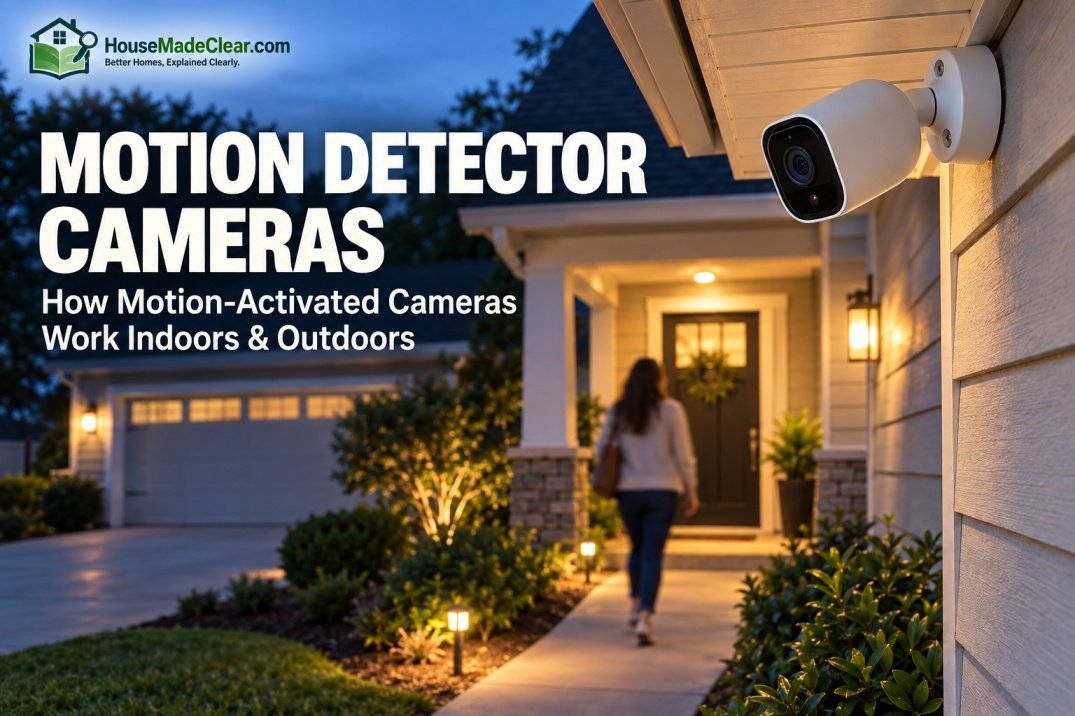
A motion detector camera is a security camera that can detect activity in or around its field of view and then respond by recording video, sending an alert, activating another feature, or marking the event for later review.
Modern motion-activated security cameras do much more than simply notice that “something moved.” Depending on the model, they may use passive infrared (PIR) sensing, video-frame analysis, or a combination of motion detection and software-based object recognition to distinguish relevant activity from routine movement.
For a home, that can mean receiving an alert when:
- Someone approaches the front door
- A person walks onto the driveway
- Movement occurs in the backyard
- Someone enters a room while you are away
- A vehicle enters a selected detection zone
But motion detection is not perfect. Poor placement, overly sensitive settings, moving branches, reflections, headlights, animals, or activity outside the area you actually care about can create unnecessary alerts.
Quick Answer
A motion detector camera detects movement and can use that event to trigger recording or a notification. Cameras generally use one or more of these methods:
- PIR motion detection: senses changes in infrared energy associated with warm objects moving through the detection area.
- Video motion detection: compares changes in the camera image or successive video frames.
- Smart/AI detection: analyzes detected activity further and may classify people, vehicles, animals, packages, or other objects, depending on the system.
For most homes, motion detection works best when the camera has a clear view of an important area, detection zones are limited to places you actually want to monitor, and sensitivity is adjusted so ordinary movement does not generate constant alerts.
A motion-activated camera can improve awareness and provide useful footage, but it does not guarantee that suspicious activity will be prevented.
Motion Detector Camera Basics at a Glance
| Feature | What It Does |
|---|---|
| Motion detection | Identifies movement or changes in the monitored area |
| Event recording | Records when specified activity is detected |
| Push notification | Sends an alert to a phone or other device |
| Motion zone | Limits alerts or detection to selected areas |
| Sensitivity control | Changes how easily motion triggers an event |
| Person detection | Attempts to distinguish people from general motion |
| Vehicle detection | Identifies vehicles on compatible systems |
| Animal detection | Can reduce or categorize pet/wildlife alerts on supported cameras |
| Night detection | Detects events after dark when supported by the camera and installation |
| Local/cloud storage | Determines where recorded events are saved |
| Continuous recording | Records all the time rather than only on motion, if supported |
What Is a Motion Detector Camera?
A motion detector camera combines two functions:
- Video monitoring
- Activity detection
A basic security camera can display or record video.
A motion detector camera adds the ability to recognize when something in the monitored area changes enough to count as an event.
That event can then trigger actions such as:
- Begin recording
- Save an event clip
- Send a phone notification
- Turn on a spotlight
- Activate a siren
- Trigger an automation
- Mark the event on a recording timeline
Axis, for example, documents video motion detection systems that generate an event when a moving object is detected; that event can then be used to trigger recording or notifications.
How Does a Motion-Activated Security Camera Work?
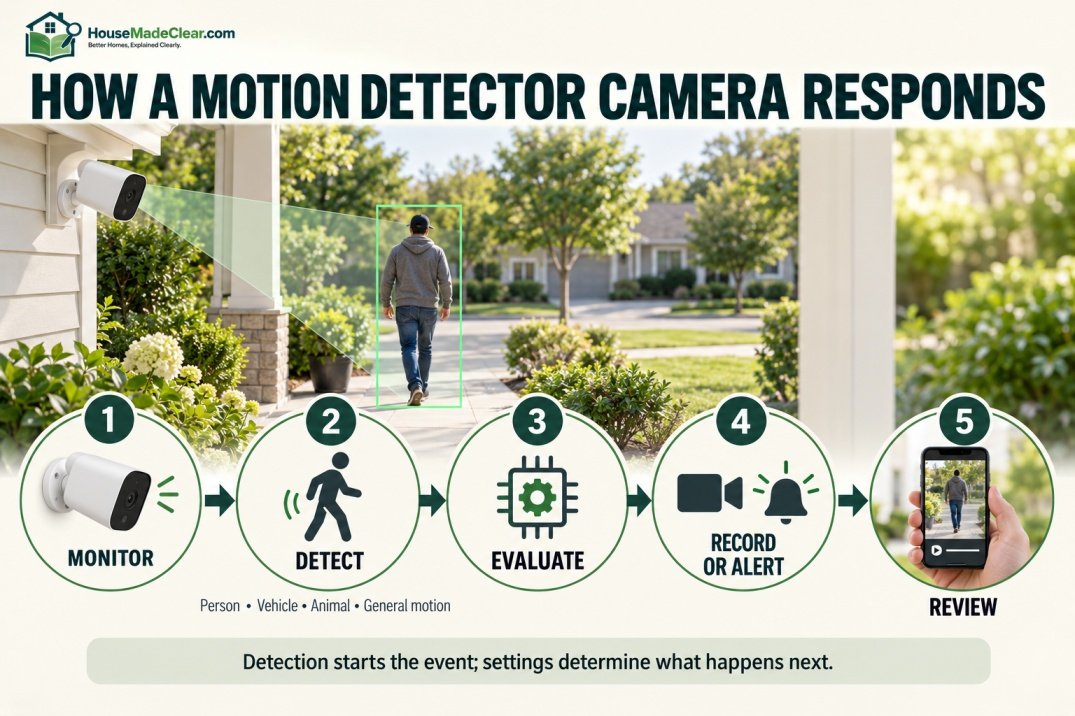
The process usually looks something like this:
Step 1: The Camera Monitors an Area
The camera watches:
- Driveway
- Door
- Yard
- Hallway
- Garage
- Room
depending on its installation.
Step 2: The Detection System Identifies Activity
Depending on the camera, this may involve:
- Infrared changes
- Video-frame changes
- On-device analysis
- Cloud-based analysis
- Multiple detection methods working together
Step 3: The Camera Evaluates the Event
A modern system may attempt to determine whether the movement appears to involve:
- Person
- Vehicle
- Animal
- General motion
The exact classifications vary by device.
Step 4: An Action Is Triggered
The camera may:
- Record
- Send an alert
- Turn on lights
- Trigger a siren
- Save the event to local or cloud storage
Step 5: You Review the Event
Instead of watching hours of uneventful footage, you can usually jump directly to the detected activity.
That convenience is one of the main reasons motion-triggered cameras are useful for residential security.
What Types of Motion Detection Do Security Cameras Use?
The two important concepts to understand are:
- PIR motion detection
- Video-based motion detection
Many newer systems then add another layer of software to classify what the camera sees.
What Is PIR Motion Detection?
PIR stands for:
Passive Infrared.
A PIR sensor detects changes in infrared radiation within its detection area.
When a warm object such as a person moves against a different-temperature background, the change can trigger the sensor.
Reolink describes PIR sensors in its battery-powered cameras as detecting changes in incoming infrared radiation, while Arlo explains that PIR-based cameras detect heat changes associated with objects moving through their detection area.
PIR detection is particularly common in:
- Battery-powered cameras
- Outdoor cameras
- Video doorbells
- Standalone motion sensors
because the sensor can help determine when the camera needs to wake up or begin processing an event.
What Does “Passive” Mean in PIR?
A passive infrared sensor does not need to project a beam into the monitored area and wait for it to return.
Instead, it monitors infrared energy reaching the sensor.
When that pattern changes enough, the device can interpret it as motion.
Does a PIR Camera Detect Movement or Heat?
A PIR camera is effectively looking for changes in infrared energy, not simply visible movement.
That distinction explains why PIR detection behaves differently from video-based detection.
For example:
- A person walking across a driveway can trigger PIR.
- A visual change on a television screen may not affect PIR the same way.
- Movement behind certain glass can be difficult for PIR to detect.
Is PIR Better for Outdoor Motion Detection?
PIR can be very useful outdoors, especially for battery-powered cameras, but “better” depends on the situation.
Potential advantages include:
- Efficient event triggering
- Less dependence on visible image changes
- Useful detection of people and animals moving through the area
However, PIR performance depends heavily on:
- Camera position
- Detection angle
- Distance
- Environmental conditions
- Direction of travel
Some PIR systems are more responsive when a person moves across the detection field than when moving directly toward the sensor. Arlo and Reolink both document this behavior for their PIR-based devices.
What Is Video Motion Detection?
Video motion detection analyzes changes in the camera image.
A simple version compares:
previous video frame
with:
current video frame
and looks for enough visual change to count as movement.
Arlo describes pixel-based motion detection as analyzing changes between video frames, while Google describes basic camera motion detection as first understanding what the normal scene looks like and then detecting when something changes within it.
Modern video motion detection can identify moving objects within selected areas of a camera’s field of view and use those events to trigger recording or notifications.
What Can Trigger Video Motion Detection?
Because it reacts to changes in the image, possible triggers can include:
- Person walking
- Vehicle moving
- Animal crossing
- Tree branches
- Shadows
- Headlights
- Reflections
- Rain or snow
- Changes in lighting
This is why basic motion detection can sometimes produce many alerts.
More advanced software can help filter those events.
PIR vs Video Motion Detection
| PIR Detection | Video Motion Detection |
|---|---|
| Detects infrared changes | Detects changes in video image |
| Common on battery cameras | Common on powered/IP cameras |
| Can help conserve battery | Requires image analysis |
| May struggle through glass | Can sometimes detect image changes through glass |
| Sensitive to detection geometry | Sensitive to shadows, reflections and visual changes |
| Often used as initial trigger | Can analyze movement already visible in frame |
Some security cameras combine multiple methods rather than using only one.
Can a Camera Use PIR and Video Detection Together?
Yes.
A camera can use PIR to detect an initial event and then analyze the video to determine what caused it.
This hybrid approach can help a system:
- Conserve power
- Verify activity
- Reduce some unnecessary alerts
For example, Arlo has documented current models that use PIR as an initial trigger and pixel-based analysis to refine detected activity.
The exact detection method varies by product, so do not assume every “motion camera” works the same way.
What Is Smart or AI Motion Detection?
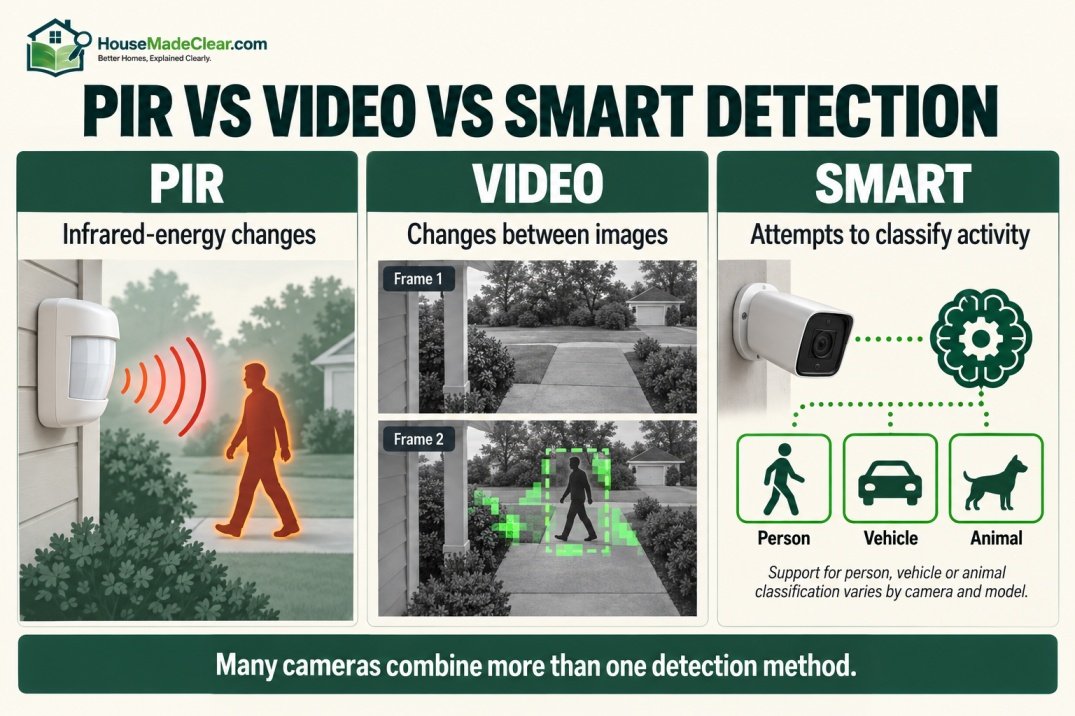
Modern cameras increasingly add software-based classification after motion is detected.
Instead of reporting only:
Motion detected.
a compatible camera may report:
Person detected.
or:
Vehicle detected.
Some systems can also identify categories such as:
- Animal
- Package
- Face
- Specific sound
depending on hardware, software and subscription level.
Google explains that its advanced camera algorithms can analyze motion patterns, shapes and textures to help identify certain types of activity, while Ubiquiti documents AI detection categories including people and vehicles on compatible Protect cameras.
Does AI Detection Mean the Camera Never Makes Mistakes?
No.
Smart detection can reduce irrelevant alerts, but it should not be treated as infallible.
Performance may be affected by:
- Poor lighting
- Obstructed view
- Distance
- Weather
- Unusual angles
- Partial visibility
- Fast movement
A classification should be treated as an aid to monitoring, not an absolute determination of what occurred.
What Is a Motion Detection Zone?
A motion zone, sometimes called an:
- Activity zone
- Detection zone
- Smart detection zone
is a selected part of the camera image where you want the system to pay particular attention.
For example, imagine an outdoor camera can see:
- Your driveway
- Your lawn
- Sidewalk
- Busy street
You may care primarily about:
driveway + front path
and not the road.
A detection zone allows you to focus alerts more closely on the important area. Features such as Activity Zones for security cameras allow you to focus detection on important areas like a doorway or walkway while ignoring busier parts of the scene.
Why Are Motion Zones Important?
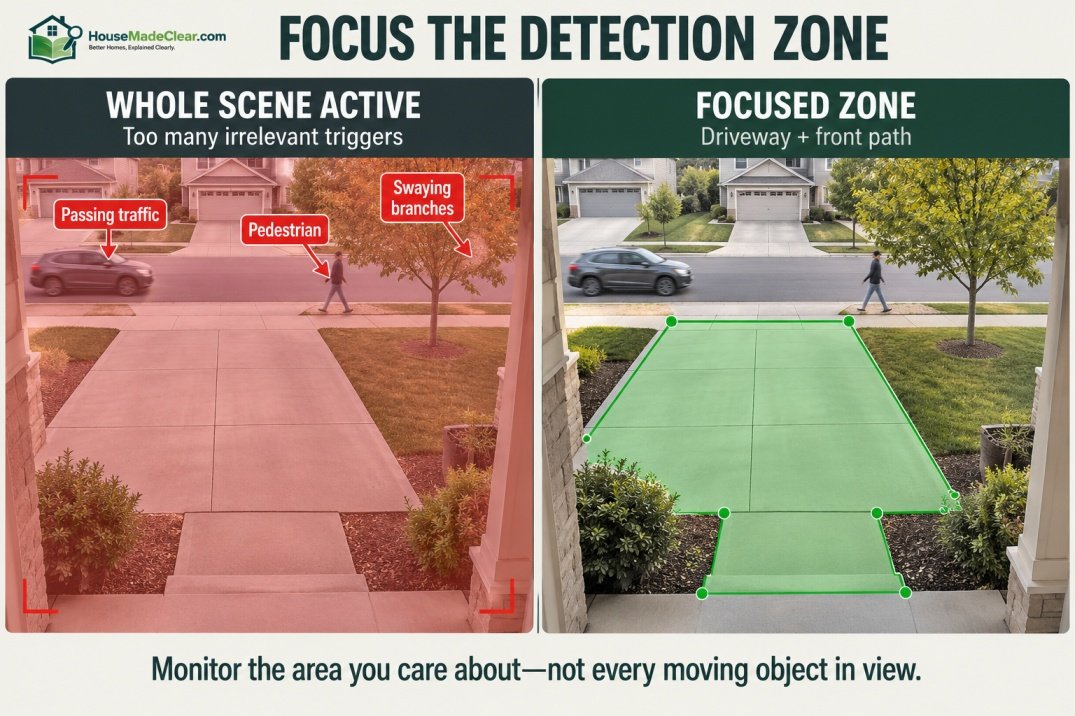
Without zones, a camera facing a busy scene may alert you whenever:
- Car passes
- Pedestrian walks by
- Tree branch moves
- Neighbor enters adjacent driveway
When alerts become constant, users tend to ignore them.
That reduces the practical value of the camera.
Google’s Activity Zones can be used to receive alerts about activity in selected portions of a camera view, while Ubiquiti’s motion and exclusion zones allow users to define areas that should create or suppress detection events. Estimate your camera’s theoretical field of view using free tool available on our website.
Good Areas for Motion Detection Zones
For outdoor cameras, useful zones might include:
- Front walkway
- Porch
- Driveway
- Gate
- Garage door
- Side entrance
- Backyard entrance
For indoor cameras:
- Entry hallway
- Interior door
- Stairway
- Room entrance
Avoid making the entire image a high-priority zone unless all activity within it is relevant.
What Is Motion Sensitivity?
Motion sensitivity controls how easily the camera generates a motion event.
Higher Sensitivity
May detect:
- Smaller movement
- Farther movement
- Subtle scene changes
but can increase unnecessary alerts.
Lower Sensitivity
May ignore:
- Minor movement
- Small animals
- Distant activity
but could also miss events that you wanted to detect.
There is no universally correct setting.
The best setting is the lowest or most selective configuration that still detects activity important to your home.
Why Does My Security Camera Keep Detecting Motion?
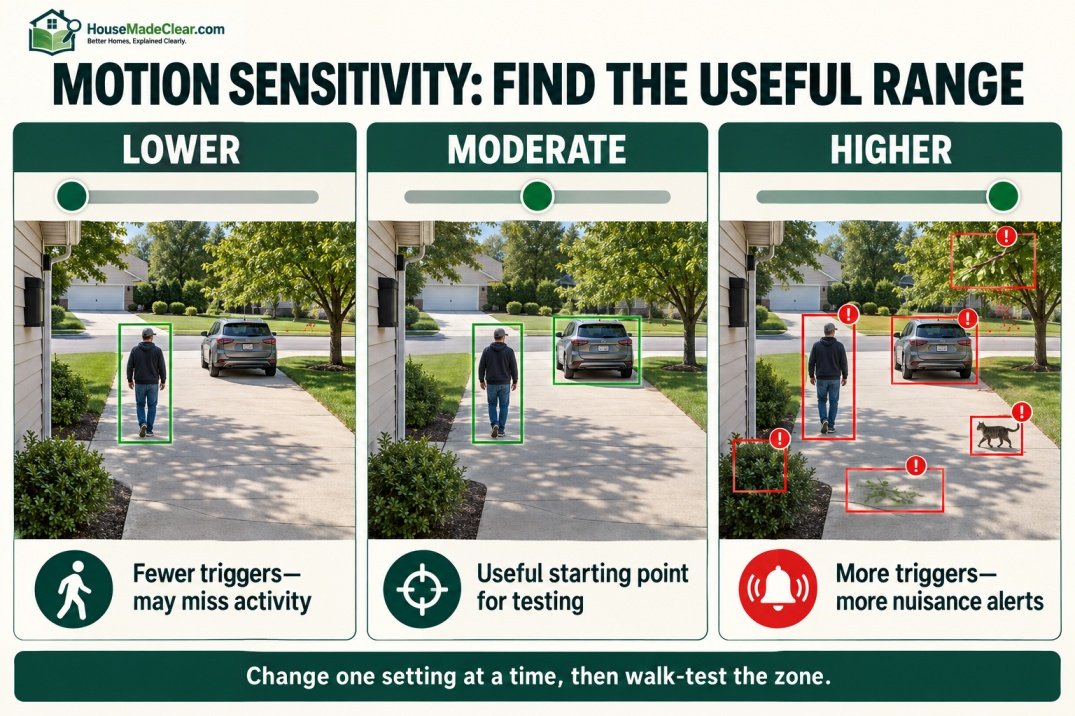
Common causes include:
- Moving trees
- Flags
- Headlights
- Shadows
- Animals
- Busy road
- Pedestrians
- Rain
- Reflections
- High sensitivity
The solution is usually not simply to turn motion detection off.
Try adjusting:
- Camera angle
- Detection zone
- Sensitivity
- Object classification
- Alert settings
Google specifically recommends changing event types and using Activity Zones when users receive too many camera notifications.
What Causes False Motion Alerts Outdoors?
Outdoor environments are challenging because the scene constantly changes.
Potential triggers include:
- Tree branches moving in wind
- Bushes
- Shadows
- Passing vehicles
- Headlights
- Wildlife
- Insects close to camera
- Rain
- Snow
- Reflections
A camera pointed at a quiet front path is much easier to tune than one pointed across:
trees + street + sidewalk + driveway.
Good placement is therefore as important as the camera’s detection technology.
For a complete positioning guide, see where to place home security cameras.
How Do You Reduce False Motion Alerts?
Start with these changes.
1. Tighten the Detection Zone
Remove:
- Street
- Sidewalk
- Neighboring property
where possible.
2. Reduce Sensitivity Slightly
Do this gradually.
Do not immediately move from maximum to minimum.
3. Use Person or Vehicle Alerts
If supported, select the event types you actually care about.
4. Change Camera Angle
A small change can remove moving:
- Branches
- Road traffic
- Reflections
from the main detection area.
5. Keep the Lens Clean
Blur, water spots or debris can reduce the usefulness of captured footage.
6. Test the Camera Yourself
Walk:
- Toward camera
- Across camera
- At edge of zone
to see when detection occurs.
Where Should an Outdoor Motion Detector Camera Be Installed?
Good outdoor locations include:
- Front entrance
- Driveway
- Garage
- Side gate
- Backyard entrance
- Patio access
The exact placement depends on what you want the camera to answer.
For example:
Who approached the front door?
requires different framing from:
Did someone enter the driveway?
A single camera should not necessarily be expected to do both equally well.
Outdoor Motion Sensor Camera Placement
A useful outdoor camera should:
- Have a clear view of the target area
- Avoid unnecessary obstruction
- Remain within supported network range if using Wi-Fi
- Be installed according to manufacturer weather/environment requirements
- Avoid strong backlighting where practical
Google’s camera-placement guidance recommends checking the actual live/recorded view, keeping the monitored area unobstructed and avoiding backlighting that can make subjects appear dark.
Should the Camera Face Someone Walking Toward It?
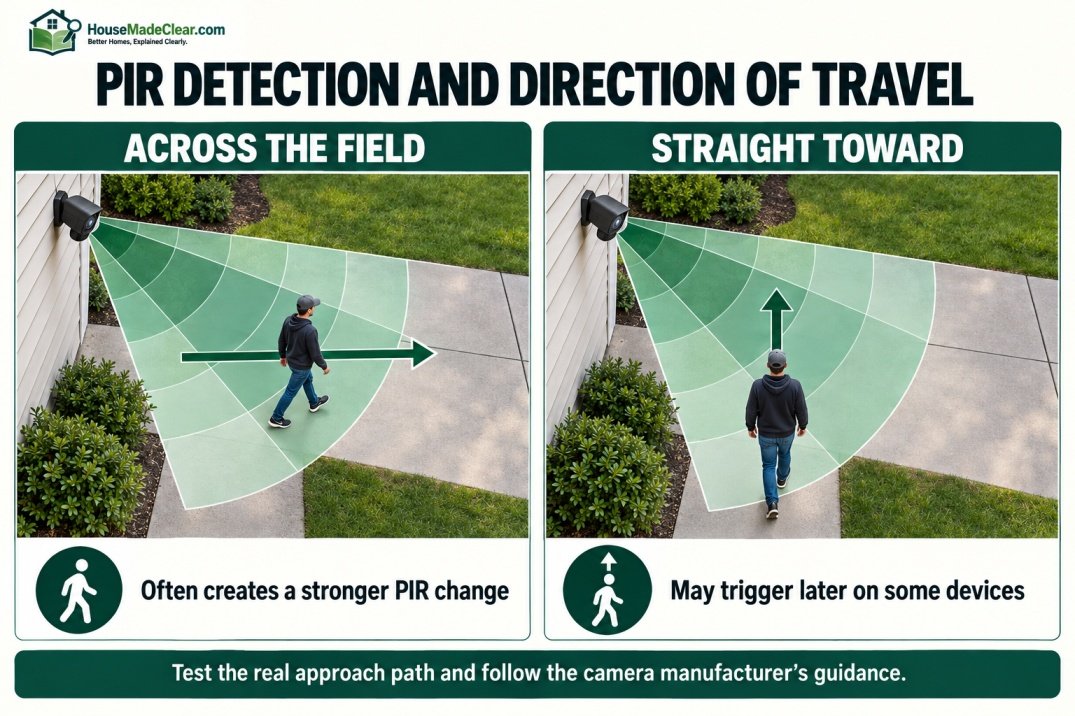
It can, but PIR-based cameras may respond differently depending on movement direction.
Some PIR sensors respond better when movement travels:
across the detection field
rather than:
straight toward the sensor.
This does not mean the camera should point sideways away from an entrance.
Instead, test the actual approach path during installation.
If your camera manufacturer provides PIR positioning guidance, follow it.
How High Should a Motion Detector Camera Be?
There is no one universal mounting height for every camera.
The correct height depends on:
- Camera field of view
- Lens
- Detection range
- PIR geometry
- Desired facial detail
- Location
- Manufacturer instructions
Avoid mounting a camera extremely high simply because it lets you see more area.
A very high camera can provide an excellent view of:
the top of someone’s head
while capturing less useful facial detail.
The best installation balances:
- Coverage
- Identification
- Protection from tampering
Our home security camera placement guide covers location and viewing-angle decisions in more detail.
Indoor Motion Detector Cameras
An indoor motion detector camera can be useful for monitoring:
- Entry hall
- Living room
- Staircase
- Garage interior
- Home office
- Secondary entrance
Indoor placement should be more privacy-conscious than outdoor placement.
Avoid placing security cameras in private areas where monitoring would be inappropriate.
Where Should an Indoor Motion Camera Point?
A strong indoor position usually covers a route someone would need to use after entering the home.
Examples include:
- Main entry hallway
- Room containing an exterior door
- Staircase
- Passage between floors
You usually do not need a camera covering every square foot.
A smaller number of well-positioned cameras can be more useful than numerous cameras with overlapping and intrusive views.
Motion Detector Camera for a Front Door
A front-door camera should ideally show:
- Person approaching
- Door area
- Package area where relevant
- Enough surrounding context to understand the event
Use a detection zone around:
- Porch
- Walkway
rather than the entire street.
If your home already has a video doorbell, consider whether another camera can cover a complementary angle instead of duplicating the same view.
Motion Detector Camera for a Driveway
For a driveway, decide whether your priority is:
- Detect vehicles
- Detect people
- See garage doors
- See cars parked
- See approach from street
Then frame the camera around that goal.
If the road occupies half of the image, traffic can generate unnecessary activity.
Use:
- Detection zones
- Vehicle classification
- Exclusion zones
where supported.
Motion Detector Camera for a Backyard
Backyards often contain:
- Trees
- Animals
- Moving furniture
- Shadows
which can challenge motion detection.
A better strategy is often to focus the camera on:
- Back door
- Gate
- Patio entrance
rather than simply covering the widest possible amount of lawn.
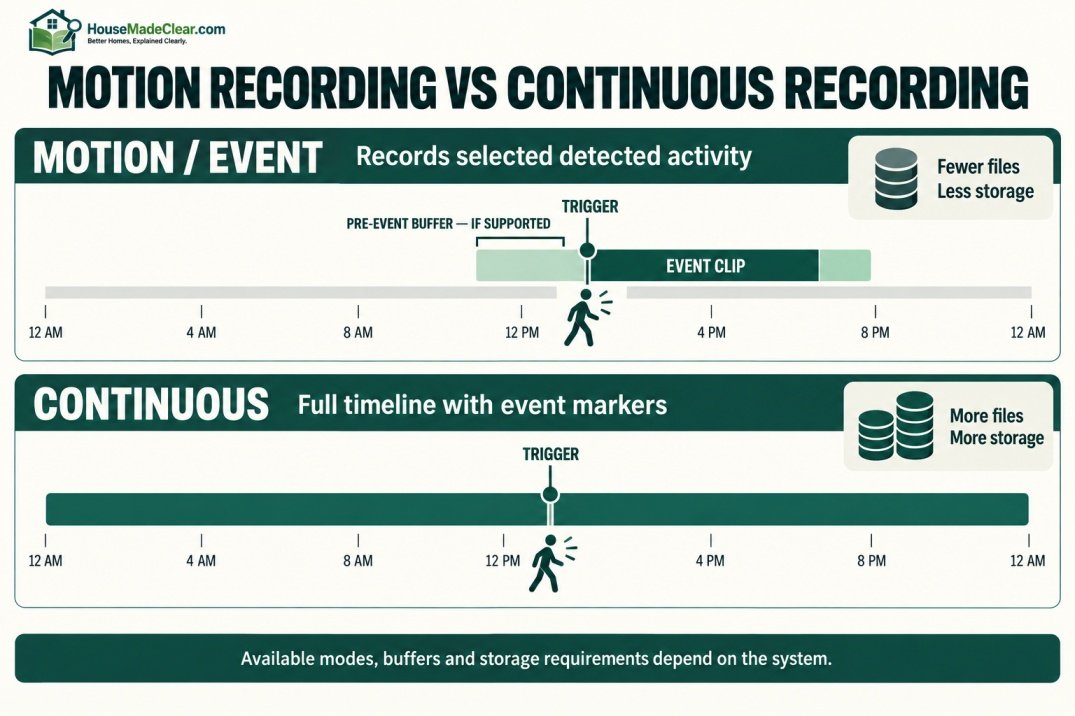
Do Motion Detector Cameras Record All the Time?
Not necessarily.
A motion detector camera may support:
Motion/Event Recording
Camera records when activity is detected.
Continuous Recording
Camera records continuously.
Scheduled Recording
Camera records during selected times.
Hybrid Recording
Continuous recording plus event markers or enhanced event clips.
Ubiquiti, for example, documents both continuous “Always” recording and “Detection Only” recording modes in its Protect system.
The available mode depends on:
- Camera
- Storage
- Power
- Subscription
- NVR/system
Is Motion-Only Recording Better Than Continuous Recording?
Neither is always better.
Motion Recording Advantages
- Uses less storage
- Easier event review
- Particularly useful for battery cameras
- Reduces hours of irrelevant footage
Motion Recording Limitations
- Detection must work correctly
- Event may begin after initial activity on some systems
- Poor settings can miss relevant motion
Continuous Recording Advantages
- Full timeline
- Does not depend entirely on trigger accuracy
- Useful for high-priority areas
Continuous Recording Limitations
- More storage
- Usually higher power/network requirements
- More footage to manage
For important locations, continuous recording with motion-event markers can be a useful combination where the equipment supports it.
What Is Pre-Event Recording?
Some powered cameras keep a short video buffer so the recording can include moments before the motion trigger.
This can help capture:
- Person approaching
- Vehicle entering
- Event beginning
rather than starting the clip only after the system reacts.
Axis documentation provides examples of event rules with a video prebuffer before the detected motion and postbuffer after it.
Whether pre-event recording is available depends on the system.
Do Battery Security Cameras Record Motion Differently?
Battery cameras often have stronger pressure to conserve power.
Keeping the entire camera and processor operating continuously would use substantially more energy.
For that reason, some battery cameras use PIR as part of the process that wakes or triggers the camera.
A battery camera can be a good choice when:
- Wiring is difficult
- Installation flexibility matters
but check:
- Detection performance
- Recharge frequency
- Recording delay
- Storage options
- Cold/heat operating range
before choosing one.
Wired vs Battery Motion Cameras
| Battery Camera | Wired/Powered Camera |
|---|---|
| Flexible installation | Requires power connection |
| Easier retrofit | Better for long-term fixed location |
| Battery management required | No regular charging |
| Often event-oriented | More likely to support continuous recording |
| PIR common | Video analytics often easier to run continuously |
| Useful where outlets/cables are difficult | Good for high-priority monitoring |
This does not mean every wired or battery camera behaves the same way.
Always check the specific model.
Does a Motion Detector Camera Need Wi-Fi?
Not necessarily.
A security camera could connect using:
- Wi-Fi
- Ethernet
- PoE
- Cellular
- Proprietary wireless connection
- Local NVR system
Motion detection itself may happen:
- On the camera
- On a local recorder
- In the cloud
- Through a combination
Some functions can therefore continue locally during an internet outage, while remote alerts or cloud processing may stop.
Check exactly where your chosen camera performs:
- Detection
- Recording
- Storage
Will a Motion Camera Work if the Internet Goes Out?
It depends on the system architecture.
Possible scenarios include:
Local Detection + Local Storage
Motion recording may continue.
Cloud-Dependent Camera
Some features may stop until internet returns.
Local Detection + Cloud Notifications
Camera may detect or store activity locally but cannot send remote alerts.
Do not assume:
Wi-Fi working = internet working
or:
internet down = camera completely useless.
They are separate issues.
Do Motion Detector Cameras Work at Night?
Many security cameras are designed to detect motion after dark.
The actual performance depends on:
- Detection technology
- Camera night-vision system
- Available light
- Distance
- Installation angle
A PIR trigger does not rely on visible daylight in the same way an ordinary camera image does.
However, detecting activity and capturing useful identifiable video are separate questions.
A camera might detect that something moved but still produce poor footage if:
- Subject is too far away
- Scene is poorly illuminated
- Lens is obstructed
- Night image quality is weak
Test nighttime footage after installation rather than assuming daytime performance will carry over.
Motion-Activated Camera With a Spotlight
Some outdoor cameras combine:
- Motion detection
- Camera
- Spotlight
When motion is detected, the light may illuminate the monitored area.
This can improve nighttime video in some situations and make the camera more visible.
However, avoid assuming a spotlight will prevent trespassing.
Lighting can improve:
- Visibility
- Awareness
but should be part of a broader home security approach.
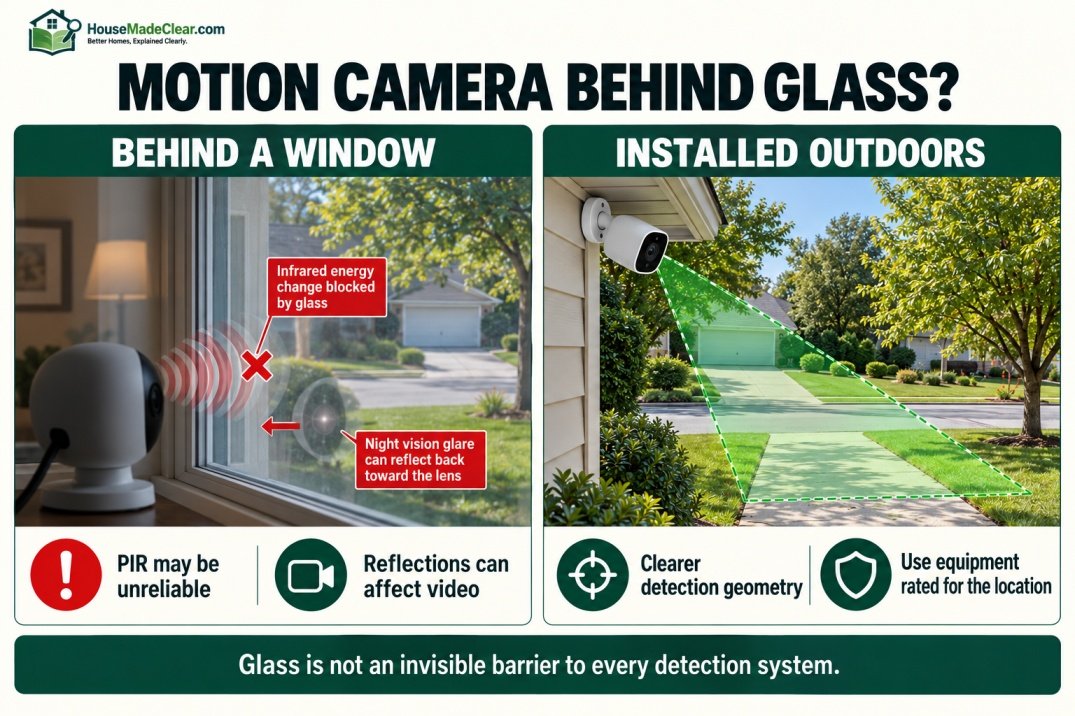
Does Motion Detection Work Through a Window?
This is a common problem.
The answer depends on the detection technology, but placing a motion security camera behind glass is often unreliable.
Arlo explains that PIR detection is inhibited by modern window glass because PIR relies on detecting infrared/heat changes, while frame-based detection may also suffer false positives from reflections in glass.
Therefore, if your goal is to monitor outdoors:
an outdoor-rated camera installed outdoors is usually preferable to placing a PIR-based outdoor camera inside behind a window.
Why Does My Camera Detect Reflections in a Window?
Video-based motion detection can see visual changes.
Glass can introduce:
- Indoor reflections
- Headlights
- Light changes
- Moving objects reflected from behind camera
These visual changes may resemble real motion in the outdoor scene.
Night vision can also interact poorly with glass on some cameras because built-in illumination can reflect back toward the lens.
Use an installation method intended for the camera rather than assuming a window will behave like an invisible barrier.
Can a Motion Camera Detect Pets?
Yes.
A dog, cat or other animal moving through the detection area can trigger motion.
Some newer systems can classify:
- Person
- Animal
and allow you to customize notifications.
But classification is device-specific.
If pet alerts are a problem:
- Adjust zone
- Adjust sensitivity
- Use supported object filters
- Change camera angle
before disabling useful motion detection entirely.
Can Insects Trigger an Outdoor Security Camera?
Yes, especially if they move very close to the lens.
A small insect inches from a camera can occupy a large part of the video frame.
At night, insects may also be attracted to lighting around the camera.
If alerts repeatedly show:
- Bugs
- Spider webs
clean the area around the camera and reconsider nearby lighting.
Can Tree Branches Trigger a Motion Camera?
Yes.
Branches can create:
- Direct visible movement
- Moving shadows
- Changing light patterns
Google specifically notes that advanced detection can help reduce false alerts from events such as swaying branches and changing shadows, but camera placement and zones are still useful.
Try excluding the tree from the active detection area when possible.
Can Headlights Trigger Motion Detection?
They can.
A passing vehicle may create:
- Moving bright areas
- Shadows
- Reflections
across a driveway or wall.
Video-based motion detection may interpret large image changes as activity.
An exclusion zone or different camera angle can reduce this problem.
Can Rain or Snow Trigger Motion Detection?
Depending on the system and conditions, weather can contribute to detection events.
Instead of assuming every outdoor camera will filter weather perfectly:
- Test it in real conditions
- Tune sensitivity
- Use object-specific alerts if available
- Keep important detection zones focused
The objective is not zero alerts.
The objective is useful alerts.
What Is Person Detection?
Person detection attempts to determine whether detected activity resembles a person rather than generic motion.
This can help reduce alerts from:
- Leaves
- Shadows
- Vehicles
when you care specifically about people.
It can be particularly useful at:
- Door
- Side gate
- Backyard entrance
But person detection is not a substitute for good camera placement.
A person who appears only as:
- Tiny distant figure
- Partial body
- Heavily backlit silhouette
may be more difficult to classify accurately.
Motion Detection vs Person Detection
These are not the same thing.
Motion Detection
Answers:
Did something move?
Person Detection
Answers:
Does the detected activity appear to involve a person?
The second is a more specific classification.
For home security, using both appropriately can make alerts more useful.
Motion Detection vs Object Tracking
Some motorized cameras can automatically:
- Pan
- Tilt
- Follow
a detected subject.
That is object tracking, which is different from ordinary motion detection.
Tracking may help keep a person or vehicle within the camera view, but it introduces moving parts and depends on the device’s tracking logic.
A fixed camera can still provide excellent home security coverage when it is positioned correctly.
Motion Detection vs a Home Alarm Motion Sensor
A motion detector camera and an alarm-system motion sensor are related but different devices.
Motion Detector Camera
Provides:
- Video
- Detection
- Recording
- Alerts
Alarm Motion Sensor
Generally provides:
- Motion detection
- Alarm-system trigger
without necessarily capturing video.
A home security system may use both.
That creates two layers:
sensor detects activity
and:
camera provides visual context.
Should a Motion Camera Replace Door and Window Sensors?
Not necessarily.
A camera tells you what it can see.
A contact sensor can tell a security system that:
- Door opened
- Window opened
even if the event is outside the camera view.
Combining different device types often gives better situational awareness than expecting cameras alone to cover every event.
Are Motion Detector Cameras Good for Home Security?
They can be very useful.
A motion-activated camera can help you:
- Know when someone approaches
- Review activity
- Check property remotely
- Record relevant events
- Verify some alerts
But cameras should be considered one layer of home security.
Other layers can include:
- Strong exterior doors
- Appropriate locks
- Lighting
- Door/window sensors
- Alarm system
- Good visibility around entrances
Our guide to improving home security with better locks covers the physical door-security side.
Can Motion Cameras Prevent Burglary?
A camera may contribute to visibility and deterrence, but no camera can guarantee that a burglary or other incident will not occur.
Its strongest functions are:
- Detection
- Awareness
- Recording
- Verification
Poorly installed cameras can also create a false sense of security.
Our guide to common home security mistakes explains why cameras should be part of a broader plan rather than treated as the entire security system.
Should Motion Cameras Be Visible?
There are arguments for both visible and discreet installation.
Visible Camera
May:
- Make surveillance obvious
- Support deterrence
Discreet Camera
May:
- Be less visually intrusive
- Be harder to notice immediately
For a typical residential exterior, visible cameras around main access points are often practical.
But don’t place them where they can be easily:
- Reached
- Blocked
- Knocked down
Privacy and Motion-Activated Cameras
Camera placement should respect privacy.
Before installation, consider what the camera can see beyond your property.
Avoid unnecessarily recording:
- Neighboring private areas
- Spaces where people reasonably expect privacy
Some security systems provide privacy zones that permanently or digitally mask selected parts of the image.
Ubiquiti, for example, documents privacy zones that black out areas so they are not recorded.
Local laws can differ, particularly regarding:
- Audio recording
- Shared spaces
- Neighboring property
so check applicable requirements for your location.
What Should You Look for in a Motion Detector Camera?
When comparing cameras, check these features.
Motion Detection Method
Does it use:
- PIR
- Video detection
- Hybrid detection
Smart Alerts
Can it distinguish:
- Person
- Vehicle
- Animal
Activity Zones
Can you select important areas?
Sensitivity
Can you adjust detection thresholds?
Recording Type
Does it support:
- Motion clips
- Continuous video
- Both
Storage
Does it use:
- Local card
- NVR
- Cloud
Power
Is it:
- Battery
- Plug-in
- Hardwired
- PoE
Night Performance
Can it capture useful footage in your actual nighttime conditions?
Weather Rating
For outdoor use, confirm the camera is rated for the intended environment.
Subscription Requirements
Determine which features require:
- Monthly subscription
- Cloud plan
before buying.
Best Motion Camera Setup for a Front Entrance
A practical setup might look like:
Camera: aimed at approach + door
Detection zone: walkway and porch
Person alerts: enabled
Street: excluded where possible
Sensitivity: moderate starting point
Night test: completed
Recording: event or continuous according to system
This creates a focused monitoring zone rather than treating every visible movement as equally important.
Best Motion Camera Setup for a Driveway
Consider:
Camera view: vehicles + pedestrian approach
Detection zone: driveway boundary
Vehicle alerts: enabled if useful
Road traffic: excluded
Tree movement: excluded where possible
Then test:
- Walking up driveway
- Driving in
- Walking along edge
Adjust after seeing real detections.
How to Set Up a Motion Detector Camera Step by Step
Step 1: Decide What You Need to Detect
Choose one main objective:
- Door approach
- Driveway
- Backyard gate
- Indoor entry
Step 2: Select the Camera Location
Make sure the camera can clearly see the target.
Step 3: Install According to Manufacturer Instructions
Follow requirements for:
- Height
- Power
- Weather exposure
- Mounting surface
Step 4: Check Live Video
Verify:
- Important area is visible
- Faces are not excessively backlit
- Obstructions are limited
Step 5: Configure Motion Detection
Turn on the relevant detection features.
Step 6: Create Activity Zones
Focus on the area you care about.
Step 7: Select Alert Types
If available, choose:
- Person
- Vehicle
- Other motion
according to the location.
Step 8: Adjust Sensitivity
Start around the manufacturer’s normal/default setting.
Step 9: Test Multiple Paths
Walk:
- Across camera view
- Toward camera
- At edge of zone
Step 10: Test at Night
Daytime success does not guarantee nighttime image quality.
Step 11: Review Alerts for Several Days
Look for patterns in unnecessary notifications.
Step 12: Fine-Tune the Setup
Change:
- Zone
- Sensitivity
- Angle
- Alert categories
rather than accepting poor performance.
Common Motion Detector Camera Mistakes
1. Pointing at Too Much Area
Problem:
Camera sees street, trees and neighbor’s property.
Better approach:
Focus on the area you control and care about.
2. Using Maximum Sensitivity
Problem:
Constant notifications.
Better approach:
Tune sensitivity gradually.
3. Ignoring Activity Zones
Problem:
Every movement becomes important.
Better approach:
Create focused zones.
4. Installing Behind a Window
Problem:
PIR may not detect outdoor motion reliably and video detection may struggle with reflections.
Better approach:
Use an outdoor-rated camera outdoors where appropriate.
5. Mounting Too High
Problem:
Wide overview but poor identifying detail.
Better approach:
Balance coverage and useful subject angle.
6. Never Testing the Approach Path
Problem:
Camera misses people approaching from a particular direction.
Better approach:
Walk-test every important route.
7. Ignoring Night Performance
Problem:
Daytime footage looks excellent but nighttime footage is poor.
Better approach:
Review nighttime recordings.
8. Treating Every Motion Alert as a Security Event
Problem:
Alert fatigue.
Better approach:
Use object detection and zones.
9. Depending on One Camera for Everything
Problem:
One wide view lacks detail everywhere.
Better approach:
Give each camera a specific purpose.
10. Assuming Cameras Guarantee Security
Problem:
Other vulnerabilities remain.
Better approach:
Combine cameras with physical and electronic security measures.
Quick Motion Camera Recommendations by Location
| Location | Detection Priority | Useful Setup |
|---|---|---|
| Front door | Person approaching | Person zone around porch/path |
| Driveway | People + vehicles | Driveway zone; exclude road |
| Backyard | People near entrance | Gate/door-focused zone |
| Side yard | Movement through access route | Narrow detection area |
| Garage exterior | Person + vehicle | Garage/driveway coverage |
| Garage interior | Entry/activity | Interior event recording |
| Hallway | Person movement | Entry-route coverage |
| Living room | Movement while away | Schedule/presence-based alerts |
Final Answer: How Do Motion Detector Cameras Work?
A motion detector camera watches an area and uses a detection system to identify activity that may be important.
Depending on the camera, it may use:
PIR motion detection
to detect changes in infrared energy,
video motion detection
to detect changes between images,
or:
smart detection
to classify activity such as people or vehicles.
When relevant motion is detected, the camera can:
- Record video
- Save an event
- Send an alert
- Trigger another device or automation
For most homes, good performance depends less on simply buying the camera with the longest feature list and more on configuring it correctly.
A useful motion camera should have:
- Clear view of important area
- Appropriate detection zone
- Reasonable sensitivity
- Reliable power/connectivity
- Useful nighttime footage
- Alerts that you will actually pay attention to
For outdoor installations, avoid trying to monitor every visible area at once.
Focus on:
- Doors
- Driveways
- Gates
- Other realistic access routes
and use your camera as one part of a broader home-security plan.
Frequently Asked Questions
What is a motion detector camera?
A motion detector camera is a security camera that can detect activity in its monitored area and use that event to trigger recording, notifications, or other configured actions.
How does a motion-activated security camera work?
A motion-activated camera monitors an area for movement. Depending on the model, it may use PIR sensing, video-frame analysis, or both. When activity meets the configured detection criteria, the camera can record and send an alert.
What is the difference between PIR and motion detection?
PIR is one type of motion detection. PIR detects changes in infrared energy, while video-based motion detection analyzes changes in the camera image. Some cameras combine both methods.
Do motion detector cameras record all the time?
Not always. Some cameras record only when motion is detected, while others support continuous recording, schedules, or a combination of continuous video and motion-event markers.
Can a motion detector camera work at night?
Many security cameras can detect motion at night, but performance depends on the camera’s detection method, night-vision capabilities, lighting, distance and placement. Always test actual nighttime footage after installation.
Does motion detection work through a window?
PIR-based motion detection generally does not work reliably through modern window glass, and video-based detection can be affected by reflections. An outdoor-rated camera installed outdoors is usually preferable when monitoring exterior areas.
Can tree branches trigger a motion camera?
Yes. Moving branches, shadows and other scene changes can trigger basic video motion detection. Activity zones, smart object detection and sensitivity adjustments can help reduce unnecessary alerts.
Can animals trigger motion detector cameras?
Yes. Pets and wildlife can trigger motion detection. Some newer cameras can identify animals separately or allow users to filter the types of alerts they receive.
What is a motion detection zone?
A motion detection zone is a selected part of the camera view where activity can trigger recordings or notifications. Zones can help reduce alerts from roads, sidewalks, trees or other areas that are not important.
Is a PIR motion sensor better than video motion detection?
Neither is universally better. PIR is efficient and useful for many battery-powered cameras, while video detection can analyze visible changes within the image. Some cameras combine the two approaches.
Where should I install an outdoor motion detector camera?
Useful locations include the front entrance, driveway, garage, side gate and backyard access points. Choose a position that clearly covers the area you want to monitor without including excessive street traffic or neighboring property.
Are motion detector cameras good for home security?
Yes. They can improve awareness, provide event recordings and help verify activity around the home. However, they should complement rather than replace good locks, lighting, sensors and other appropriate security measures.







[…] Motion Detector Cameras: How Motion-Activated Security Cameras Work Indoors & Outdoors […]
[…] Motion Detector Cameras: How Motion-Activated Security Cameras Work Indoors & Outdoors […]
[…] Motion Detector Cameras: How Motion-Activated Security Cameras Work Indoors & Outdoors […]
[…] Motion Detector Cameras: How Motion-Activated Security Cameras Work Indoors & Outdoors […]
[…] Motion Detector Cameras: How Motion-Activated Security Cameras Work Indoors & Outdoors […]