















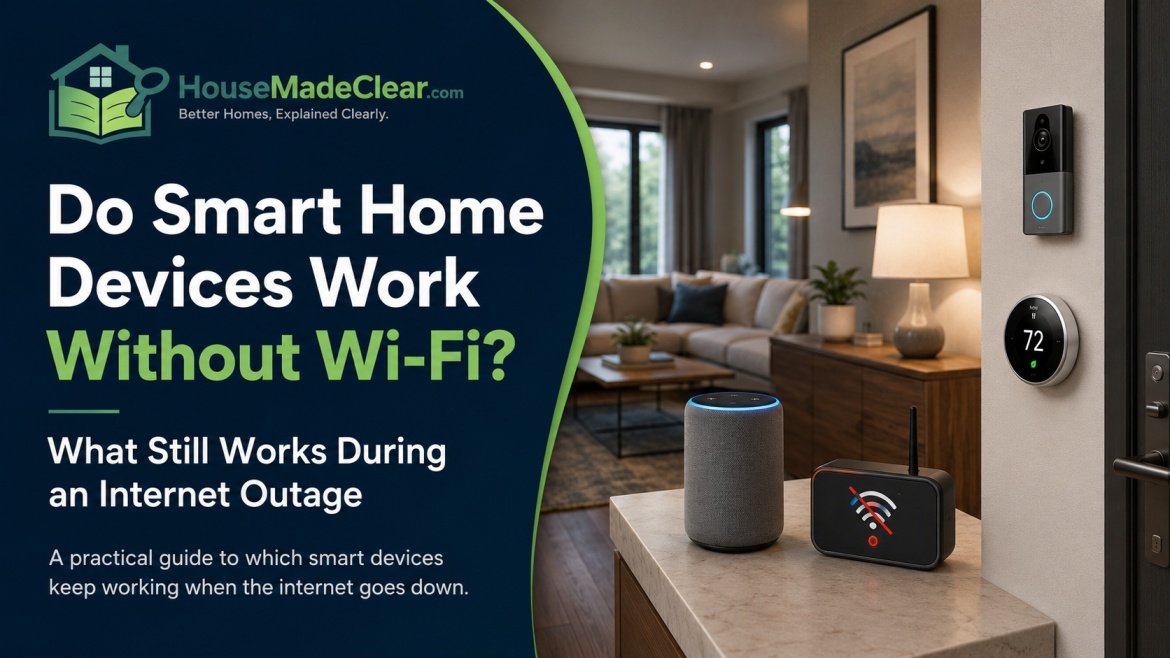
A smart home does not necessarily become a completely “dumb home” when the internet goes down.
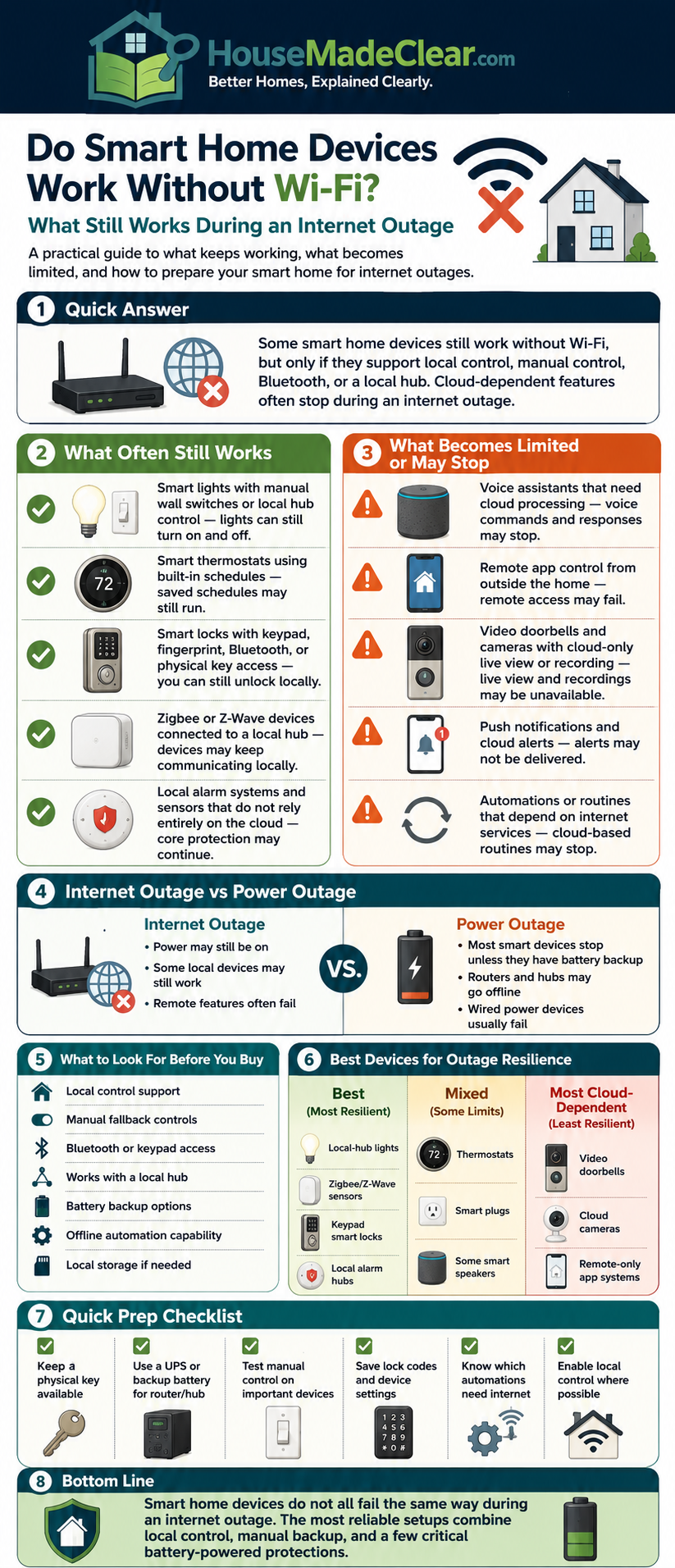
Some smart lights, plugs, locks, sensors and automations can continue working locally. Others may lose app control, voice commands, remote access or cloud-based features until the connection returns.
The difference depends largely on how the device communicates and where its commands are processed.
This is also where one of the most common smart-home misunderstandings appears:
Wi-Fi and the internet are not the same thing.
Your home Wi-Fi network can continue operating even when your internet service provider has an outage. In that situation, some locally controlled smart devices may continue communicating inside the home.
Quick Answer
Yes, some smart home devices can work without an active internet connection, but what continues working depends on the device and ecosystem.
In general:
- Matter devices can support local control over your home network without using the cloud for every command.
- Thread devices communicate over their own low-power mesh network and do not depend on Wi-Fi or an internet connection for local Thread communication.
- Zigbee and Z-Wave devices can continue local communication when supported by a locally operating hub/controller.
- Bluetooth devices can often be controlled directly at short range without internet access.
- Cloud-dependent Wi-Fi devices may lose most smart features when internet access disappears.
Google, for example, states that commands to Matter-enabled devices while you are at home are carried out locally over the home’s Wi-Fi or Thread network without needing the cloud internet connection.
However, remote control from outside the home generally requires internet connectivity, and manufacturer-specific features may still depend on the cloud.
The key question when buying smart-home technology should therefore not simply be:
“Does it use Wi-Fi?”
A better question is:
“What does this device still do if my internet connection fails?”
Wi-Fi and Internet Are Not the Same Thing
This distinction is essential.
Wi-Fi
Wi-Fi is a way for devices inside your home to communicate wirelessly with your local network.
Your:
- Phone
- Laptop
- Smart TV
- Smart plug
- Security camera
may all connect to your Wi-Fi router.
Internet
The internet connection connects that home network to services outside your property.
It is typically provided by:
- Cable
- Fiber
- DSL
- Fixed wireless
- Cellular
- Satellite
You can therefore have:
Working Wi-Fi + no internet
at the same time.
What Happens During an ISP Outage?
Suppose your internet provider goes offline but your router remains powered and operating.
Your home network may still exist.
You may still be able to communicate locally between devices that support local control.
For example:
Phone → local Wi-Fi → Matter controller → Matter light
may continue to work inside the home without requiring the command to travel through an external cloud service.
Google explicitly states that in-home Matter commands can be executed locally over Wi-Fi or Thread without connecting to the cloud over the internet.
But:
Phone outside home → internet → cloud → smart home
cannot work normally if the home has no internet connection.
What Happens if the Wi-Fi Router Itself Stops Working?
This is a different failure.
If the router loses:
- Power
- Wi-Fi functionality
- Local network functionality
then ordinary Wi-Fi devices may no longer communicate with each other.
Some other smart-home networks may continue operating.
For example:
- Certain Zigbee automations
- Z-Wave automations
- Thread communication
- Direct Bluetooth control
may remain functional depending on the controller and system design.
So you should distinguish between:
Internet Outage
Internet unavailable, local network still working.
Router/Wi-Fi Failure
Local Wi-Fi itself unavailable.
Power Outage
Many routers, hubs and powered smart devices shut down entirely unless backed by batteries or another power source.
These three events can produce very different smart-home behavior.
Why Some Smart Devices Stop Working Without Internet
Many early and inexpensive smart devices were designed around cloud processing.
A command may work like this:
You tap app → command goes to manufacturer’s server → server sends command back to your smart device
Even when your phone and smart plug are in the same room, the command may still travel through the internet.
If the internet connection fails, that route disappears.
The device may still function manually, but smart controls can stop.
What Is Local Smart-Home Control?
Local control means commands can be processed within your own home network instead of requiring an external server for every action.
A simplified example:
Phone → home controller → light
instead of:
Phone → internet → manufacturer’s cloud → internet → light
Local control can provide several advantages:
- Faster response
- Reduced dependence on internet outages
- Less reliance on vendor cloud availability
- Better resilience for routine automations
However, even a locally controlled system can still use the internet for:
- Remote access
- Software updates
- Voice services
- Weather information
- Notifications
- Cloud backups
Local and cloud control are not mutually exclusive.
A device can support both.
Which Smart Home Devices Can Work Without Internet?
There is no universal answer based only on device type.
Two smart plugs from different manufacturers may behave completely differently during an outage.
But the following table gives a useful starting point.
| Technology | Requires Wi-Fi? | Requires Internet for Local Control? | Offline Potential |
|---|---|---|---|
| Wi-Fi | Yes, for Wi-Fi communication | Device-dependent | Varies widely |
| Matter over Wi-Fi | Yes | Not necessarily | Good with local controller |
| Matter over Thread | No traditional Wi-Fi radio on end device | Not necessarily | Good |
| Thread | No | No for local Thread network | Good |
| Zigbee | No | No for local network | Good with suitable controller |
| Z-Wave | No | No for local network | Good with suitable controller |
| Bluetooth | No | Usually no for direct control | Good at short range |
| Cloud-only Wi-Fi | Yes | Often yes | Limited |
| Cellular device | No home Wi-Fi needed | Requires cellular service | Device-dependent |
The important word is potential.
The product’s actual implementation ultimately determines what continues working.
Do Matter Devices Work Without Internet?
Matter was designed with local connectivity as a core feature.
The Connectivity Standards Alliance describes Matter as a local connectivity technology, while remote access generally requires an internet-connected controller in the home.
Google similarly explains that Matter commands issued from within the home can be carried out locally over Wi-Fi or Thread rather than through the internet cloud.
This means a properly configured Matter device may continue responding locally during an ISP outage.
Examples can include:
- Lights
- Plugs
- Switches
- Locks
- Sensors
depending on the device and ecosystem.
Does Matter Mean Everything Works Offline?
No.
Matter does not guarantee that every feature offered by every manufacturer works without internet access.
A Matter device may have:
Standard Matter Functions
Available locally.
Manufacturer-Specific Features
Available only through the manufacturer’s app or cloud.
For example, a smart thermostat might continue allowing:
- Temperature adjustment
locally while losing:
- Cloud reports
- Remote access
- Weather-based features
until internet connectivity returns.
The same principle can apply to other devices.
Matter Is Not Another Wireless Radio
This is an important distinction.
Matter is not the same type of technology as:
- Wi-Fi
- Thread
- Bluetooth
Matter is the smart-home application/interoperability layer.
Matter devices can communicate over IP-based networks including:
- Wi-Fi
- Ethernet
- Thread
Google’s current Matter guidance specifically lists Wi-Fi, Ethernet and Thread as ways Matter-enabled devices can communicate over the home network.
So you may have:
Matter over Wi-Fi
or:
Matter over Thread
These can behave differently if your Wi-Fi infrastructure fails.
What Is Thread?
Thread is a low-power IP-based mesh networking technology built specifically for connected devices.
Unlike conventional Wi-Fi, Thread does not depend on a home Wi-Fi connection for devices within its mesh to communicate.
The Thread Group states that Thread technology is not reliant on a home internet connection or Wi-Fi and instead provides a dedicated network for connected devices in the home.
That makes Thread particularly useful for devices such as:
- Door sensors
- Motion sensors
- Smart locks
- Smart plugs
- Lights
- Thermostats
where low power and reliable local communication matter.
Does Thread Work if the Internet Goes Down?
The Thread network itself can continue operating locally.
Thread Group documentation specifically explains that Thread’s local mesh is not dependent on internet connectivity and can continue communication even when the internet goes down.
However, internet-dependent functions can still stop.
For example:
Local light automation: potentially continues.
Remote control while you are at work: requires external connectivity.
Cloud-based weather automation: may fail.
What Is a Thread Border Router?
A Thread Border Router connects the Thread network to other IP networks such as:
- Wi-Fi
- Ethernet
and provides a path toward internet services when required.
Thread Group describes the Border Router as the component that connects Thread to Wi-Fi, Ethernet and the internet.
Many modern smart-home devices can provide Thread Border Router functionality, depending on the ecosystem.
But a Thread Border Router should not be confused with a proprietary traditional hub.
Do Zigbee Devices Work Without Wi-Fi?
Yes, Zigbee itself does not require Wi-Fi.
Zigbee uses its own wireless mesh networking technology.
The Connectivity Standards Alliance states that Zigbee provides local connectivity that continues working if the internet is down and does not require cloud communication for local networking.
Many Zigbee installations use a hub or coordinator.
A common structure looks like:
Zigbee bulb → Zigbee hub → home control system
The Zigbee devices can continue communicating locally if the hub and its local automation engine remain operational.
Does Zigbee Need a Hub?
Traditional consumer Zigbee systems often use:
- Hub
- Gateway
- Coordinator
However, the ecosystem is evolving.
Zigbee Direct enables certain supported Zigbee products to be onboarded and controlled through compatible Bluetooth Low Energy devices, and the Connectivity Standards Alliance describes configurations where Zigbee Direct can operate without a conventional hub.
For ordinary homeowners, however, you should check the requirements of the specific Zigbee system you intend to buy.
Do Z-Wave Devices Work Without Internet?
Z-Wave also uses its own wireless network rather than normal Wi-Fi.
The Z-Wave Alliance describes Z-Wave as capable of remaining operational without depending on an internet or Wi-Fi connection for local device communication.
A Z-Wave system generally uses a controller or hub.
If that controller processes automations locally, things such as:
- Sensors
- Locks
- Switches
- Lighting routines
may continue working during an internet outage.
Remote app access will generally still require internet connectivity.
Do Bluetooth Smart Devices Work Without Wi-Fi?
Many Bluetooth devices can work without Wi-Fi because your phone communicates directly with the device over Bluetooth.
For example:
Phone → Bluetooth → smart lock
may work even if:
- Router is offline
- Internet is unavailable
Bluetooth SIG materials describe systems capable of direct local communication without requiring internet or cloud platforms for operation.
The limitation is usually range.
Bluetooth is more appropriate for nearby control than whole-home or remote access unless another device acts as a gateway.
Do Smart Plugs Work Without Wi-Fi?
It depends heavily on the smart plug.
A Wi-Fi smart plug may fall into one of three categories.
Type 1: Cloud-Dependent Smart Plug
Without internet:
- App control may stop
- Voice commands may stop
- Remote control stops
The physical button may still work.
Type 2: Locally Controlled Wi-Fi Plug
If the router remains working:
- Local app control may continue
- Local automation may continue
while:
- Remote access stops
Type 3: Matter, Zigbee, Z-Wave or Thread Smart Plug
Depending on the ecosystem, local control and automations may continue without internet.
This is why the communication technology matters when choosing a plug.
House Made Clear’s guide to where smart plugs are actually useful covers practical places to use them around the home.
Do Smart-Plug Schedules Work Without Internet?
Sometimes.
The schedule may be stored:
On the Plug
Likely to continue locally.
On a Local Hub
May continue if hub remains powered.
In the Manufacturer’s Cloud
May stop until internet connectivity returns.
Unfortunately, product descriptions do not always make this distinction obvious.
Before buying, check whether the manufacturer specifically says:
- Local schedules
- Offline schedules
- Hub-based automation
- Cloud automation
Do Smart Lights Work Without Wi-Fi?
Again, it depends on the technology.
Wi-Fi Bulb
Offline behavior varies by manufacturer.
Zigbee Bulb
Can generally communicate on the Zigbee network without internet.
Thread/Matter Bulb
May support local control through the Matter ecosystem.
Bluetooth Bulb
May support direct nearby control.
Regardless of smart functionality, most smart bulbs should still respond to the physical wall switch as normal electrical lighting—although switching power off obviously removes their smart connectivity.
Will Smart Lights Stay in Their Current State During an Outage?
During an internet outage, powered lights generally remain:
- On
- Off
in their current electrical state unless an automation changes them.
During a power outage, the situation is different.
The bulb itself loses electricity.
When power returns, behavior depends on the bulb’s power-recovery setting.
Some may:
- Return to previous state
- Turn on
- Stay off
depending on manufacturer settings.
Do Smart Switches Work Without Wi-Fi?
A properly installed smart wall switch should generally retain its basic physical switching function, but smart features vary.
For example, during an internet outage:
Press switch physically → light turns on
may continue normally.
But:
Voice command → cloud service → switch
may stop.
Matter, Zigbee, Thread and Z-Wave switches may retain more local automation capabilities when paired with a suitable local controller.
Do Smart Locks Work Without Wi-Fi?
Many smart locks can still be unlocked without internet access.
Possible local access methods include:
- Physical key
- Keypad PIN
- Bluetooth
- Fingerprint
- Local Matter/Thread control
depending on the model.
What usually stops during an internet outage is:
- Remote unlocking
- Remote status checking
- Cloud notifications
- Remote code management
This is one reason a smart lock should be evaluated as both:
physical lock + connected device
House Made Clear’s smart lock vs traditional deadbolt comparison explains this distinction in more detail.
Should a Smart Lock Have an Offline Backup?
Yes, it is worth considering.
Before buying one, ask:
- Can I use a physical key?
- Does keypad work without internet?
- Does Bluetooth work locally?
- What happens if battery dies?
- What happens if Wi-Fi fails?
- What happens if manufacturer’s cloud is unavailable?
A lock is an important entry-control device, so you should understand every failure mode.
Do Security Cameras Work Without Wi-Fi?
Some do; some do not.
Security-camera architectures vary significantly.
Cloud-Dependent Wi-Fi Camera
May lose:
- Live view
- Cloud recording
- Notifications
without internet.
Camera With Local Storage
May continue recording to:
- microSD card
- Local NVR
- Local hub
even when internet is unavailable.
Wired PoE Camera System
A local network video recorder may continue recording cameras inside the property without external internet access.
Remote viewing still generally requires connectivity.
Will a Security Camera Record Without Internet?
Potentially, if recording is local.
Look for features such as:
- microSD storage
- NVR
- Local hub recording
- NAS compatibility
A camera that only records to a manufacturer’s cloud may lose recording capability when the internet path disappears.
If continuous security recording matters to you, this should be checked before purchase.
For positioning once the system is installed, see House Made Clear’s guide to home security camera placement.
Do Video Doorbells Work Without Wi-Fi?
Many video doorbells are highly dependent on Wi-Fi and cloud services.
Without network connectivity, you may lose:
- Live video
- Push notifications
- Two-way communication
- Cloud recordings
The physical doorbell chime may still work on some installations.
Some doorbells also support:
- Local storage
- Home hubs
but this varies substantially.
Check the manufacturer’s outage behavior before depending on the doorbell as a major security layer.
Do Smart Thermostats Work Without Wi-Fi?
Most properly designed smart thermostats should continue performing basic thermostat functions if the internet disappears.
Your HVAC system still needs:
- Heating setpoint
- Cooling setpoint
- Temperature control
However, internet-dependent features can stop.
These may include:
- Remote app changes
- Weather integration
- Energy reports
- Cloud scheduling
- Utility integrations
Locally stored schedules may continue depending on the thermostat.
Would Losing Wi-Fi Turn Off My Heating or Cooling?
Normally, loss of internet alone should not shut down basic thermostat control.
But you should verify this for your specific model.
A thermostat is more important than a decorative smart bulb, so understanding offline behavior is especially valuable before installation.
Do Smart Speakers Work Without Internet?
Smart speakers are often among the most internet-dependent devices in a smart home.
Cloud-based voice assistants generally rely on online services for many commands.
During an outage, you may lose:
- General voice queries
- Music streaming
- Cloud routines
- Remote services
Some ecosystems can still support limited local control of compatible smart-home devices, but this depends on:
- Speaker
- Ecosystem
- Device
- Command
Do not assume every voice command will work offline.
What Happens to Alexa, Google Assistant or Siri Without Internet?
Voice assistants rely heavily on internet-connected services.
The exact offline capabilities change over time and depend on hardware.
For a resilient smart home, it is better to ensure important devices also have:
- Physical controls
- Local app controls
- Local automations
rather than relying exclusively on voice commands.
Do Smart Sensors Work Without Internet?
Motion, contact, temperature and leak sensors can often continue detecting events locally when they use:
- Zigbee
- Z-Wave
- Thread
and are connected to a local controller.
But what happens after detection is what matters.
For example:
Water sensor detects leak locally
may continue.
But:
Cloud sends push notification to your phone
requires external connectivity.
Local automation could still potentially:
- Sound siren
- Flash lights
- Close compatible valve
if the system is designed to process those actions locally.
Do Smart Alarms Work Without Wi-Fi?
Alarm systems vary widely.
Some systems may include:
- Local siren
- Cellular backup
- Battery backup
- Professional monitoring
A system with cellular backup may continue communicating externally even when household broadband fails.
Others may rely entirely on internet connectivity.
For security systems, always review:
- Internet failure behavior
- Power failure behavior
- Cellular backup
- Battery backup
rather than assuming “smart” means resilient.
Local Automation vs Cloud Automation
This is one of the most important differences when designing a reliable smart home.
Local Automation
The rule is stored and processed within the home.
Example:
Motion detected → hallway light turns on
The command may be executed by a local hub.
Cloud Automation
The event is sent to an external service.
Example:
Motion detected → internet → manufacturer cloud → automation service → internet → light
If the internet fails, this chain can break.
Which Is Better?
For critical or everyday automations, local processing usually offers better outage resilience.
Examples:
- Motion lighting
- Door sensors
- Leak response
- Basic lighting schedules
Cloud services remain useful for:
- Remote access
- Complex integrations
- Data processing
- Voice assistants
A good smart home can use both.
Will Automations Work Without Internet?
Ask where the automation lives.
Stored on Device
Good chance it continues.
Stored on Local Hub
Good chance it continues while hub is powered.
Stored in Cloud
Likely needs internet.
Depends on Cloud Data
May fail even if automation engine is local.
For example:
Turn porch light on at 7 p.m.
may work locally.
But:
Turn porch light on 20 minutes before today’s cloud-fetched sunset
could behave differently depending on the platform.
What About Smart-Home Scenes?
The same rule applies.
A scene such as:
Good Night
that locally turns off:
- Lights
- Plugs
and locks:
- Door
may continue on a local system.
If some of those devices require separate cloud services, part of the scene may fail.
Mixed ecosystems can therefore have mixed outage behavior.
What Happens to Remote Access Without Internet?
Remote access is one of the first things you should expect to lose.
When away from home, your phone needs some pathway back to the property.
Typically:
Phone → internet → smart-home platform → home controller/device
Without an internet connection at the house, that pathway is broken.
The CSA explains that Matter remote access requires an internet-connected controller in the home, while local Matter control itself does not inherently require cloud connectivity.
Will Push Notifications Still Work?
Usually not if your home cannot reach the internet.
A door sensor may still detect:
Door opened
but sending that event to a phone outside the home typically requires:
- Internet
- Cloud service
- Cellular connectivity
unless the security system has another communication path such as cellular backup.
Can a Smart Home Work Completely Offline?
Yes, it is technically possible to build a largely local smart home.
You could use:
- Zigbee
- Z-Wave
- Thread
- Matter
- Local controller
- Local automations
for many functions.
But completely avoiding the internet introduces tradeoffs.
You may lose or complicate:
- Remote access
- Firmware updates
- Voice assistants
- Cloud integrations
- Weather data
- Vendor support
For most homeowners, a better goal is not:
“No internet ever.”
It is:
“Important functions continue locally when the internet temporarily fails.”
Do You Need a Smart Home Hub?
Not every smart home does.
A few Wi-Fi devices can work directly through apps.
But a hub or local controller becomes more useful when you want:
- Local automation
- Zigbee or Z-Wave
- Matter coordination
- Multiple device brands
- Better outage resilience
The word hub can also mean different things depending on the ecosystem.
A:
- Matter controller
- Thread Border Router
- Zigbee coordinator
- Z-Wave controller
performs different networking roles.
Does a Hub Guarantee Offline Operation?
No.
Some hubs perform automation locally.
Others depend heavily on cloud services.
Before buying a hub, look specifically for:
- Local control
- Local automation
- Offline operation
rather than assuming “hub” automatically means local.
Smart Home Without Wi-Fi: Which Technologies Are Best?
If by “without Wi-Fi” you literally mean you do not want smart devices using your Wi-Fi network, several technologies can help.
Thread
Good for:
- Sensors
- Locks
- Plugs
- Lighting
Thread uses a dedicated low-power mesh and does not rely on Wi-Fi for the Thread device network itself.
Zigbee
Mature mesh technology used widely for:
- Lights
- Sensors
- Switches
- Plugs
The CSA states that Zigbee’s local connectivity continues when the internet is down.
Z-Wave
Common in:
- Security
- Sensors
- Locks
- Home automation
Z-Wave Alliance materials describe local operation as independent of Wi-Fi or internet connectivity.
Bluetooth
Useful for direct nearby device control without router involvement.
Wi-Fi Still Has Advantages
This does not mean Wi-Fi smart devices are bad.
Wi-Fi is especially useful for high-bandwidth products such as:
- Security cameras
- Video doorbells
- Smart displays
- Speakers
Thread Group notes that Wi-Fi is designed for high-bandwidth data such as audio and video, while Thread is optimized for lower-power connected-device communication.
The technologies are complementary rather than direct substitutes for every use case.
Thread vs Wi-Fi for Smart Home Devices
| Feature | Thread | Wi-Fi |
|---|---|---|
| Home Wi-Fi required | No | Yes |
| Internet required for local network | No | Not inherently, but device may require cloud |
| Mesh design | Yes | Depends on Wi-Fi infrastructure |
| Low-power devices | Excellent use case | Less ideal |
| Video streaming | Not intended for it | Strong |
| Smart sensors | Strong | Possible |
| Security cameras | Not typical | Common |
| Battery efficiency | Designed for low power | Generally higher consumption |
Thread is not a replacement for all Wi-Fi.
Each has different strengths.
Matter vs Thread: What Is the Difference?
This is frequently misunderstood.
Matter
Defines how compatible smart-home devices communicate at the application level.
Thread
Provides a network that some Matter devices can use to move those communications.
Think of it roughly like:
Matter = common smart-home language
Thread = one of the roads that can carry that language
Matter can also travel over Wi-Fi and Ethernet.
Matter vs Zigbee
Zigbee combines its own networking and application ecosystem.
Matter is IP-based and can operate across:
- Wi-Fi
- Ethernet
- Thread
Some existing Zigbee products can also be exposed to Matter ecosystems through compatible bridges.
The technologies therefore increasingly coexist rather than requiring homeowners to replace every Zigbee device.
What Happens During a Power Outage?
A power outage is much more disruptive than an internet outage.
Most:
- Routers
- Hubs
- Smart plugs
- Smart bulbs
- Cameras
require mains power.
If electricity fails, they stop operating unless:
- Battery powered
- Connected to UPS
- Supported by backup system
Battery-operated devices such as:
- Door sensors
- Some locks
- Leak sensors
may remain powered, but they may lose communication if their controller or router shuts down.
Internet Outage vs Power Outage
| Event | Local Wi-Fi | Powered Smart Devices | Remote Access |
|---|---|---|---|
| ISP outage | Usually yes | Yes | Usually no |
| Router failure | No Wi-Fi | Yes | Usually no |
| Power outage | Usually no | Most lose power | No unless backup systems |
| Cloud-service outage | Yes | Yes | Platform-dependent |
This distinction makes troubleshooting much easier.
Can a UPS Keep a Smart Home Working?
A small uninterruptible power supply can potentially keep certain networking equipment running temporarily.
Possible devices include:
- Modem
- Router
- Smart-home hub
However, it cannot keep all household smart devices working unless those devices also have power.
A UPS may be especially useful when brief power interruptions otherwise cause:
- Router reboot
- Hub reboot
- Automation interruption
Choose backup-power equipment based on actual electrical requirements.
What Happens When a Manufacturer’s Cloud Goes Down?
This can produce an outage even when:
- Your electricity works
- Your router works
- Your internet works
If a device depends entirely on the manufacturer’s server, that service becomes another potential point of failure.
Local control reduces this dependency.
That is one reason products supporting local standards such as Matter can be appealing.
What if the Manufacturer Stops Supporting the Device?
Cloud-dependent hardware can become particularly vulnerable to discontinued services.
Before buying smart-home equipment, consider:
- How long company has supported products
- Whether local operation exists
- Whether standard protocols are supported
- Whether basic physical functionality remains without cloud
This matters more for permanent devices such as:
- Switches
- Locks
- Thermostats
than for inexpensive accessories you can easily replace.
What Should You Check Before Buying a Smart Device?
Do not stop at:
“Works with Alexa”
or:
“Works with Google Home.”
Check these questions instead.
1. Does It Support Local Control?
Look for explicit documentation.
2. What Happens Without Internet?
Does the manufacturer explain it?
3. What Happens if Wi-Fi Fails?
Can it still be operated manually?
4. Where Are Automations Stored?
Device, hub or cloud?
5. Does It Support Matter?
This may improve local ecosystem interoperability.
6. What Network Does It Use?
- Wi-Fi
- Thread
- Zigbee
- Z-Wave
- Bluetooth
7. Does It Have a Physical Control?
Important for:
- Switches
- Locks
- Thermostats
8. Does It Need a Subscription?
Which features disappear if subscription ends?
9. Is Local Storage Available?
Particularly important for cameras.
10. What Happens During Company Server Outages?
Look for documented offline behavior.
Best Devices to Prioritize for Offline Operation
Not every smart-home device needs the same level of resilience.
I would prioritize local/offline capability for devices that control essential household functions.
High Priority
- Door locks
- Lighting
- Thermostat
- Leak sensors
- Alarm sensors
- Garage access
Medium Priority
- Smart plugs
- Shades
- Fans
Lower Priority
- Decorative lighting
- Smart speakers
- Entertainment devices
If an essential device becomes unusable whenever broadband fails for 20 minutes, the “smart” design may be too dependent on the cloud.
Smart Locks Need Manual Backup
A connected lock should not require a functioning internet service simply to enter your own home.
Look for appropriate backup options such as:
- Key
- Local keypad
- Bluetooth
- Other manufacturer-supported local entry
For physical lock security itself, see House Made Clear’s guide to how to improve home security with better locks.
Smart Lighting Should Retain Normal Controls
A smart-lighting installation is easier to live with when:
- Wall switches still make sense
- Local controls remain available
- Guests can operate lighting
Avoid designing a house where ordinary lighting requires:
- Phone
- Cloud account
- Voice command
every single time.
Smart functionality should usually enhance basic usability, not remove it.
Security Systems Need Multiple Communication Paths
Security is one area where outage planning matters especially.
If possible, evaluate whether the system provides:
- Local alarm
- Battery backup
- Cellular backup
- Local recording
depending on your security requirements.
House Made Clear’s common home security mistakes explains why relying on one security layer can leave gaps.
A Practical Offline-Friendly Smart Home Setup
You do not need to become a home-automation engineer.
A resilient everyday setup might look like:
Lighting
Matter/Thread, Zigbee or locally controlled switches.
Smart Plugs
Local schedules where available.
Door Lock
Physical/keypad access plus smart features.
Cameras
Local recording plus optional cloud access.
Sensors
Zigbee, Z-Wave or Thread connected to a local controller.
Automations
Process important routines locally.
Internet
Used for:
- Remote access
- Notifications
- Voice services
- Updates
rather than every basic household action.
Example: What Happens During an Internet Outage?
Imagine your internet provider goes offline at 8 p.m.
Your router still works.
A well-designed system might behave like this:
Hallway Motion Sensor
Detects motion.
Hallway Light
Turns on through local automation.
Smart Plug
Runs its stored schedule.
Smart Lock
Keypad still works.
Thermostat
Maintains temperature.
Security Camera
Continues local recording.
What might stop?
- Remote camera viewing
- Push notifications
- Cloud voice assistant
- Weather-based routines
- Remote smart-lock control
That is a much better failure mode than having the entire house stop responding.
Example: What Happens if the Router Dies?
Now imagine the Wi-Fi router itself loses power.
Wi-Fi Smart Devices
May become unreachable.
Thread Network
May continue local Thread communication, but control paths depend on which Border Routers/controllers remain powered.
Zigbee
May continue if its hub/controller remains powered.
Z-Wave
May continue if its controller remains powered.
Bluetooth Lock
May still work directly from nearby phone.
This demonstrates why network diversity and local controls can improve resilience.
Common Smart-Home Wi-Fi Misconceptions
1. “No Internet Means No Wi-Fi”
Incorrect.
Your local Wi-Fi can remain active without internet access.
2. “All Wi-Fi Devices Stop Working Without Internet”
Not necessarily.
Locally controlled Wi-Fi devices may continue.
3. “Matter Requires the Cloud”
Not for normal local control. Matter is designed as a local connectivity technology.
4. “Thread Is Just Another Wi-Fi Network”
No.
Thread uses a dedicated low-power mesh network and does not rely on Wi-Fi for its local mesh communication.
5. “Zigbee Stops When Internet Stops”
Zigbee’s local network can continue without internet connectivity.
6. “A Hub Means Everything Works Offline”
Not automatically.
Some hubs still rely heavily on the cloud.
7. “Smart Locks Need Wi-Fi to Unlock”
Many provide local options such as keypad, key or Bluetooth.
8. “Security Cameras Need Internet to Record”
Some cameras can record locally without internet.
9. “Voice Assistants Are Local”
Many voice functions remain cloud-dependent.
10. “Power Outage and Internet Outage Are the Same”
They are completely different failure scenarios.
Step-by-Step: Test Your Smart Home Without Internet
You do not need to wait for an actual outage.
Step 1: Make a Device List
Include:
- Lights
- Plugs
- Locks
- Cameras
- Thermostat
- Sensors
- Doorbell
Step 2: Write Down Essential Functions
For example:
Front-door lock → must still unlock
Step 3: Disconnect Internet, Not Router Power
If you understand your network setup, temporarily disconnect the WAN/internet connection while leaving the local router active.
Step 4: Test Local Controls
Try:
- Physical switches
- Apps
- Automations
- Schedules
Step 5: Test Cameras
Check whether local recording continues.
Step 6: Test Smart Lock
Verify local entry options.
Step 7: Test Thermostat
Make sure basic heating/cooling adjustments remain available.
Step 8: Record What Stops
This tells you which devices rely on cloud connectivity.
Step 9: Restore Internet
Confirm all services reconnect normally.
Do not change unfamiliar router settings simply for testing if you are not comfortable restoring them.
Smart Home Offline Capability Checklist
When evaluating your current setup, ask:
- Wi-Fi network works without ISP?
- Matter controller available?
- Thread Border Router available where needed?
- Zigbee hub supports local automation?
- Z-Wave controller processes routines locally?
- Smart-lock keypad works offline?
- Physical key backup available?
- Smart plug schedules stored locally?
- Lighting works from physical switches?
- Thermostat works offline?
- Cameras have local storage?
- Alarm has local siren?
- Security system has backup communication?
- Important automations process locally?
- Voice assistant is not the only control method?
- Router/hub backup power considered?
- Manufacturer cloud dependence understood?
- Subscription dependency understood?
Quick Comparison: What May Still Work Without Internet?
| Device | Likely Basic Function | Cloud Features |
|---|---|---|
| Smart light | Often yes | May stop |
| Smart switch | Physical control usually yes | Remote control may stop |
| Smart plug | Physical button usually yes | App/cloud varies |
| Smart lock | Local key/PIN often yes | Remote access may stop |
| Thermostat | Basic HVAC control usually yes | Reports/remote access may stop |
| Zigbee sensor | Local detection can continue | Remote notifications may stop |
| Z-Wave sensor | Local detection can continue | Remote notifications may stop |
| Thread device | Local network can continue | Remote/cloud services may stop |
| Wi-Fi camera | Model-dependent | Cloud recording/viewing may stop |
| Local-storage camera | Local recording may continue | Remote viewing may stop |
| Smart speaker | Limited | Many functions stop |
| Video doorbell | Basic behavior varies | Video/notifications often affected |
Always verify the specific model.
Should You Avoid Wi-Fi Smart Devices?
No.
Wi-Fi remains extremely useful.
The goal is not to remove Wi-Fi from the smart home.
Instead, use the right technology for the job.
Wi-Fi Makes Sense for:
- Video cameras
- Doorbells
- Displays
- Speakers
- High-bandwidth devices
Thread/Zigbee/Z-Wave Can Be Strong Choices for:
- Sensors
- Locks
- Lights
- Plugs
- Switches
A balanced smart home can use several technologies.
Is an Offline-Capable Smart Home More Private?
Local processing can reduce the need for certain commands to leave the home.
However, privacy depends on much more than the networking protocol.
You should still review:
- Manufacturer privacy practices
- Cloud features
- Account security
- Microphones/cameras
- Data collection
- Software updates
“Local” should not automatically be interpreted as “completely private.”
Is an Offline Smart Home More Secure?
Not automatically.
Local operation can reduce cloud dependence, but cybersecurity still matters.
Protect:
- Router
- Smart-home accounts
- Hubs
- Controllers
with:
- Strong unique passwords
- MFA where available
- Current software
- Secure network configuration
Physical security matters too.
A locally controlled smart lock still needs a sound:
- Door
- Frame
- Lock mechanism
Should Beginners Worry About Zigbee, Thread and Matter?
You do not need to memorize every protocol before buying your first smart bulb.
For beginners, focus on four questions:
Does it work locally?
What stops if internet goes down?
Does it have a manual backup?
Will it work with the ecosystem I already use?
Those questions are often more useful than comparing technical specifications alone.
Best Approach for a Beginner Smart Home
Start small.
A sensible progression might be:
Step 1
Smart plug or smart light.
Step 2
Learn how schedules and automation work.
Step 3
Choose an ecosystem deliberately.
Step 4
Add sensors or switches.
Step 5
Consider Matter/Thread or a local hub as the system expands.
Avoid buying 20 unrelated devices simply because each one says “smart.”
Quick Answer: Do Smart Home Devices Work Without Wi-Fi?
Some do, some do not.
The answer depends on both network technology and product design.
Matter: can support local control without cloud internet.
Thread: local mesh does not require Wi-Fi or internet.
Zigbee: local network works without internet.
Z-Wave: local network can operate without Wi-Fi/internet.
Bluetooth: can support direct nearby control.
Wi-Fi smart devices: offline behavior varies significantly.
Cloud-only products: usually lose most smart functionality when the internet disappears.
The most resilient setup is one where essential household functions remain available locally and the internet is primarily used for remote access, cloud services and additional convenience.
Final Thoughts
Smart-home devices do not all stop working the moment your internet connection goes down.
What happens depends on where the device’s intelligence lives.
If commands are processed:
inside the home
many basic functions can continue.
If commands must travel:
through a manufacturer’s cloud
internet loss can disable them.
Matter is particularly relevant here because it is designed around local connectivity. The Connectivity Standards Alliance describes Matter as a local connectivity technology, and Google confirms that in-home Matter commands can be carried out directly over local Wi-Fi or Thread networks without requiring cloud internet access.
Thread goes further by providing its own dedicated low-power mesh network that does not rely on conventional Wi-Fi or internet connectivity for local communication.
Zigbee and Z-Wave can also provide strong local operation when combined with compatible controllers.
For most homeowners, the goal should not be to build a home that never uses the internet.
Instead, build one where:
Lights still switch.
Locks still unlock.
Thermostat still controls temperature.
Important sensors still detect.
Local automations still run.
Then use the internet for the features it is particularly good at:
- Remote access
- Notifications
- Cloud services
- Software updates
- Voice services
If you are building out House Made Clear’s practical smart-home setup, continue with where smart plugs are actually useful and the comparison of smart locks vs traditional deadbolts.
For security-related connected devices, also review home security camera placement and how to improve home security with better locks.
The most useful smart home is not simply the one with the most connected devices.
It is the one that continues doing the important things even when one part of the system temporarily fails.
Frequently Asked Questions
Do smart home devices work without Wi-Fi?
Some do. Thread, Zigbee, Z-Wave and Bluetooth devices do not require conventional Wi-Fi for their local device communication. Wi-Fi smart devices vary: some support local control while others depend heavily on cloud services.
Do smart home devices work without internet?
Many can continue performing basic local functions without internet access. However, remote control, cloud notifications, voice assistants and manufacturer-specific online features may stop until connectivity returns.
Is Wi-Fi the same as internet?
No. Wi-Fi is the wireless local network inside your home, while the internet connects that network to external services. Your Wi-Fi router may continue operating locally during an internet-service outage.
Do Matter devices work without internet?
Matter is designed for local connectivity. Compatible Matter devices can perform supported commands locally over Wi-Fi or Thread without needing the cloud for every command. Remote access generally still requires internet connectivity.
Does Thread work without Wi-Fi?
Yes. Thread uses its own low-power mesh network and does not depend on conventional Wi-Fi for communication between Thread devices. A Thread Border Router connects the Thread network with other IP networks where needed.
Does Zigbee work without internet?
Yes. Zigbee provides local mesh connectivity and can continue operating without an internet connection when the devices and controller are configured for local operation.
Does Z-Wave work without internet?
Yes. Z-Wave uses its own wireless network and can support local device control and automations without Wi-Fi or internet, depending on the controller being used.
Do smart plugs work without Wi-Fi?
It depends on the plug. A cloud-dependent Wi-Fi plug may lose app controls, while Matter, Zigbee, Z-Wave or locally controlled plugs may retain more functionality. The physical on/off button generally remains available while the plug has power.
Do smart locks work without Wi-Fi?
Many do. Keypads, physical keys, Bluetooth and certain local smart-home controls may continue working without Wi-Fi or internet. Remote locking, status checking and cloud notifications usually require connectivity.
Will security cameras work without internet?
Some cameras can continue recording locally to a microSD card, NVR or local hub without internet access. Cloud-only cameras may lose recording or viewing features. Remote access generally requires an internet connection.
Will smart-home automations work if the internet goes down?
Local automations stored on the device or a local hub may continue. Automations processed in the cloud or dependent on online information may stop until the connection returns.
What is the best smart-home technology for working without internet?
Matter with local control, Thread, Zigbee and Z-Wave can all support strong local smart-home operation. The best choice depends on the devices, controller and ecosystem you use.