

















Home security motion sensors detect movement inside or around a protected area and can trigger an alarm, send a signal to a security panel, create an app notification, or activate another security response.
Most residential motion detectors use passive infrared (PIR) technology, which looks for changes in infrared energy as people or animals move through the sensor’s detection pattern. Some systems use dual-technology detection, combining PIR with microwave sensing to reduce unwanted alarms.
The sensor itself does not necessarily know whether the person moving through the room is an intruder, homeowner, guest, or family member. It detects activity according to its design and settings.
That makes placement, mounting height, coverage pattern, pets, environmental conditions, and testing extremely important.
Quick Answer
For most homes, motion sensors work best when they:
- Cover likely routes through the home rather than every square foot
- Are mounted at the height specified by the manufacturer
- Detect a person moving across the sensor’s coverage pattern
- Have an unobstructed view of the protected area
- Are kept away from direct sunlight, strong heat sources, moving curtains, and other problematic locations specified by the manufacturer
- Are configured correctly for pets when pet-immunity features are available
- Are walk-tested after installation
Motion sensors are usually most effective as a second layer behind door and window sensors, rather than as the only form of intrusion detection.
Manufacturers emphasize that motion detectors can detect only within their designed coverage areas and cannot see movement through walls, closed doors, or other solid obstructions. Product-specific installation instructions therefore matter more than applying one universal mounting rule.
Home Security Motion Sensors at a Glance
| Question | Practical Answer |
|---|---|
| Most common residential type | PIR motion sensor |
| What PIR detects | Changes in infrared energy |
| Best general location | Likely interior travel paths |
| Best movement direction | Across the detection pattern |
| Typical mounting height | Often around 7–8 ft, but model-specific |
| Can pets trigger one? | Yes |
| Can pet immunity help? | Yes, when installed/configured correctly |
| Can it see through walls? | No |
| Can PIR reliably detect through glass? | Generally no |
| Can sunlight or heat cause problems? | Potentially, depending on sensor and placement |
| Should every room have one? | Usually not |
| Should it be tested? | Yes, with the system’s walk-test procedure |
| Can placement contribute to false alarms? | Yes |
What Is a Home Security Motion Sensor?
A home motion sensor is an intrusion-detection device designed to recognize movement within a specific coverage pattern.
When the sensor detects qualifying movement while the system is armed, it may send a signal to:
- Alarm panel
- Security hub
- Siren
- Monitoring service
- Smartphone app
depending on the system.
A motion detector differs from a door or window contact.
A door contact answers:
Did this door open?
A motion sensor answers:
Was movement detected within this protected area?
That makes the two technologies complementary.
How Do Home Motion Sensors Work?
The exact process depends on the sensor technology.
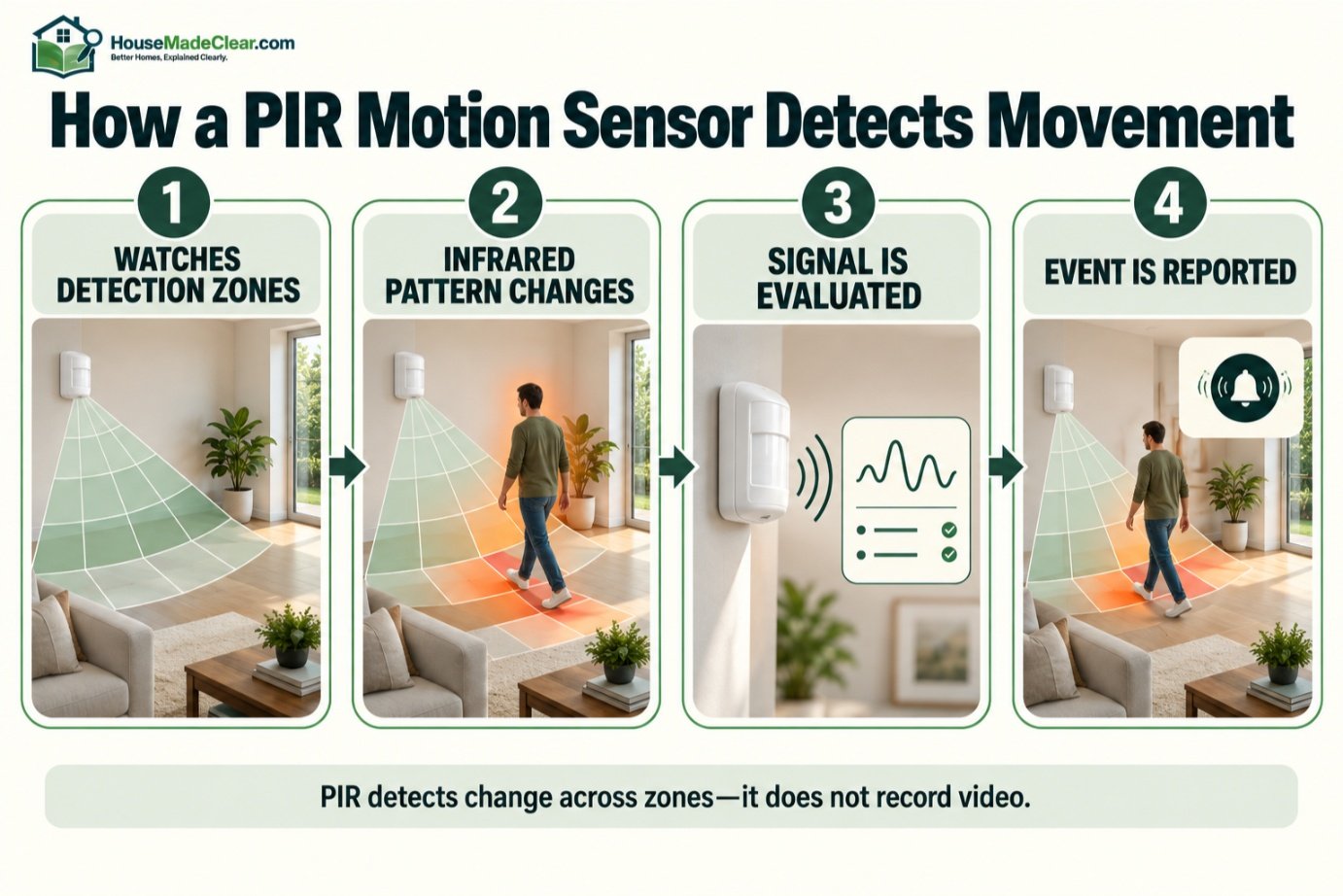
A typical PIR-based alarm sensor works broadly like this:
Step 1: Sensor Watches Its Detection Pattern
The detector monitors specific zones or beams within the room.
Step 2: Movement Changes the Infrared Pattern
A person moving through those detection areas changes the infrared energy reaching the sensor.
Step 3: Electronics Evaluate the Signal
The detector determines whether the change meets its alarm criteria.
Step 4: Sensor Reports the Event
If the criteria are met, it signals the alarm system.
Step 5: Security System Responds
Depending on how the system is armed, it may:
- Sound alarm
- Send app notification
- Contact monitoring center
- Trigger camera recording
- Start another programmed action
This entire process can happen without the sensor taking a photograph or recording video.
What Does PIR Mean?
PIR means:
Passive Infrared.
“Passive” means the detector is primarily receiving infrared energy rather than actively sending an infrared beam across the room.
People, pets, walls, furniture, and other objects emit or reflect different levels of infrared energy.
When a warm body moves through the sensor’s detection zones, the pattern changes.
The sensor’s electronics can interpret that change as movement.
Do Motion Sensors Detect Heat?
A PIR sensor is often described casually as a “heat detector,” but that description is incomplete.
It does not simply alarm because something is warm.
Instead, it responds to changes in infrared energy across its detection pattern.
A warm person sitting completely still is therefore different from that same person walking across several detection zones.
Movement is central to the detection process.
What Are Motion Sensor Detection Zones?
A motion detector does not necessarily monitor a room like a camera sees a continuous image.
Many PIR detectors use a lens that divides the protected area into multiple detection zones or beams.
As a person moves from one zone into another, the infrared pattern changes.
This explains several important limitations.
Motion sensors may be less effective when:
- Coverage is obstructed
- Detector is aimed incorrectly
- Person never enters a protected beam
- Movement occurs outside the intended range
DSC documentation specifically notes that motion detectors use multiple detection beams and only detect motion in unobstructed areas covered by those beams.
PIR Motion Sensor vs Motion Detector Camera
These devices are related but different.
PIR Alarm Motion Sensor
Primarily designed to:
- Detect movement
- Send alarm signal
Motion Detector Camera
Designed to:
- Detect activity
- Capture video
- Send visual alerts or recordings
A camera can help answer:
Who or what caused the movement?
while an alarm sensor may simply report:
Motion detected.
Our guide to motion detector cameras explains camera-based motion detection in detail.
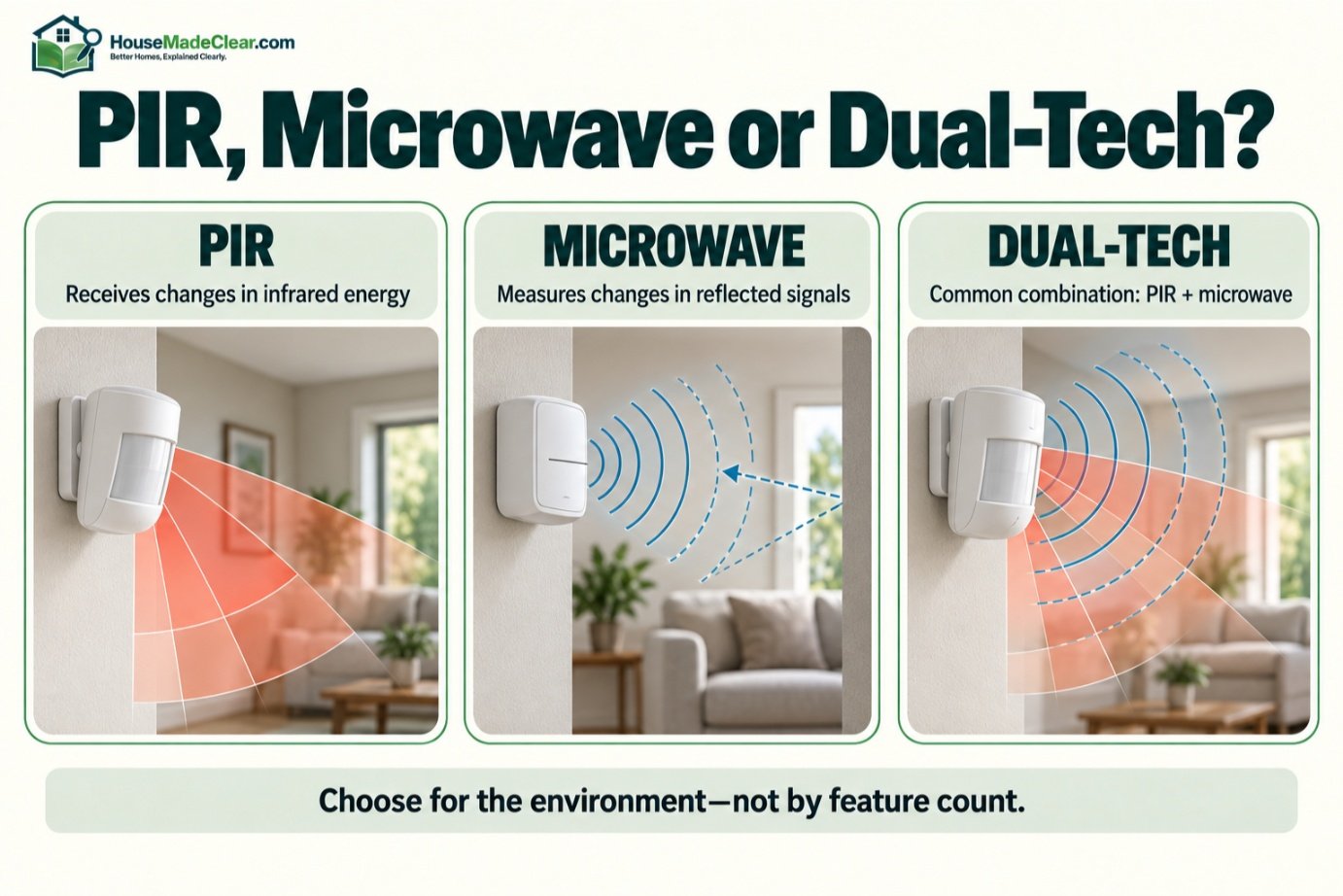
PIR vs Microwave Motion Sensor
Microwave detection uses electromagnetic energy differently from PIR.
A microwave detector can detect movement through changes in reflected microwave signals.
It may respond differently to:
- Temperature
- Movement
- Certain building materials
Because the technologies have different strengths and potential false-alarm sources, some alarm sensors combine them.
What Is a Dual-Technology Motion Sensor?
A dual-tech motion detector commonly combines:
- PIR
- Microwave
Some designs require both technologies to confirm activity before producing an intrusion alarm.
Resideo, for example, describes its Dual Tec sensors as using PIR and microwave technologies together so the two detection methods can confirm an event within the protected area.
This approach can improve resistance to certain environmental false alarms.
Is Dual-Tech Better Than PIR?
Not automatically.
A standard PIR detector may be perfectly suitable for:
- Bedroom hallway
- Living room
- Entry route
- Other stable indoor environment
Dual-technology detectors may be useful where conditions are more challenging.
However, they can:
- Cost more
- Consume more power
- Require different placement considerations
Choose the technology that fits the environment and alarm system rather than assuming more sensors always means better protection.
Where Should You Put Motion Sensors in a Home?
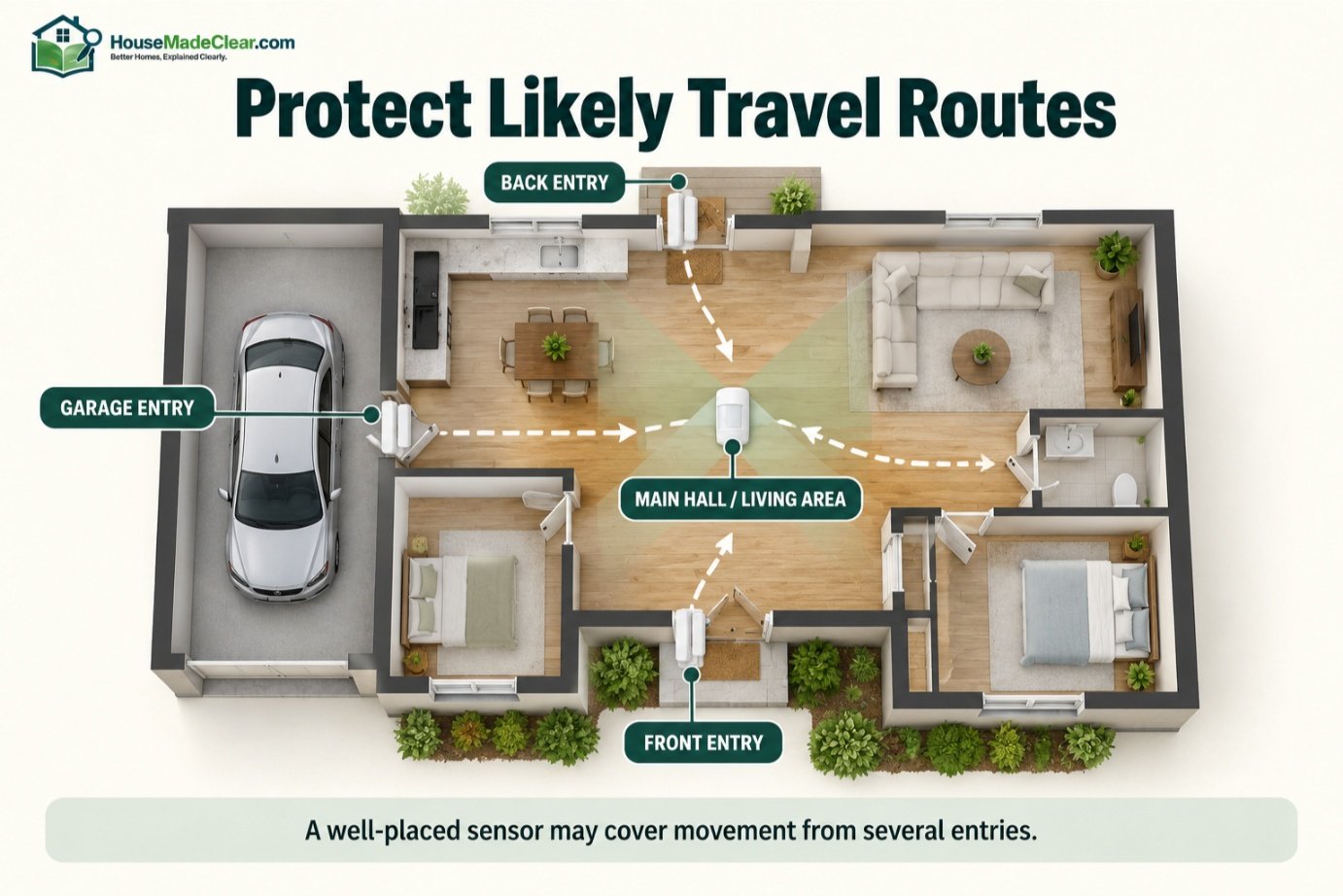
The most useful locations are generally routes that someone entering the home is likely to cross.
Good candidates may include:
- Main hallway
- Living room
- Staircase
- Central circulation area
- Basement route
- Garage entry area
- Open-plan space connecting exterior entrances
The goal is usually not:
Put one sensor in every room.
Instead:
Position a smaller number of sensors where movement through the home is difficult to avoid.
Best Motion Sensor Placement Strategy
Think about movement through the house.
Suppose someone enters through:
- Front door
- Back door
- Garage
Where do those routes eventually converge?
Perhaps:
main hallway
or:
living room.
A motion sensor covering that point may provide more useful interior detection than several sensors aimed at low-priority rooms.
Should a Motion Sensor Face the Front Door?
It depends on the sensor.
You generally want the detector to cover the route someone would take after entering.
However, many PIR detectors are more sensitive to people moving across the coverage pattern than directly toward the sensor.
Manufacturer installation instructions frequently recommend selecting a position where expected movement crosses the detection pattern.
So instead of automatically mounting a detector directly opposite the door, examine:
- Entry direction
- Room layout
- Sensor coverage diagram
and choose the position that provides the intended crossing pattern.
Why Is Side-to-Side Movement Easier to Detect?
A person crossing the sensor’s field may pass through multiple detection zones quickly.
That creates stronger infrared changes.
Someone walking directly toward certain PIR detectors may remain within fewer zones for longer.
This does not mean PIR sensors cannot detect forward movement.
It means coverage geometry matters.
That is why walk-testing from realistic approach directions is essential.
Should a Motion Sensor Be in the Hallway?
Hallways can be excellent locations.
They often:
- Connect several rooms
- Funnel movement
- Provide predictable travel paths
A detector at an appropriate hallway location may cover movement between:
- Bedrooms
- Main floor
- Exterior entrance
- Staircase
But narrow hallways require the correct detection pattern.
Check whether the detector is designed for:
- Wide-angle room coverage
- Corridor coverage
rather than assuming every sensor works identically.
Motion Sensor in the Living Room
A living room is another useful location because it may connect:
- Front entrance
- Hallway
- Kitchen
- Stairs
An open living area can sometimes let one appropriately selected detector cover a large circulation zone.
Avoid blocking it with:
- Tall furniture
- Plants
- Cabinets
- Curtains
that interfere with the intended detection pattern.
Motion Sensor Near Stairs
Staircases can be valuable detection points because they connect floors.
A sensor may be positioned to detect someone:
- Entering stair area
- Reaching upper landing
- Moving through adjacent hallway
But stair geometry can complicate coverage.
Use the manufacturer’s coverage diagram and test:
- Bottom approach
- Top approach
- Side approach
before relying on the sensor.
Motion Sensor in a Basement
A basement detector can make sense when the area contains:
- Exterior entrance
- Accessible windows
- Interior stairway
A common strategy is to protect the route from those access points toward the rest of the house.
Avoid mounting a detector in conditions outside its rated:
- Temperature
- Humidity
range.
Motion Sensor in a Garage
A garage can be a challenging environment.
Potential issues include:
- Large temperature swings
- Vehicles
- Air movement
- Insects
- Doors opening
- Direct sunlight
- Pets or wildlife
Not every indoor residential detector is suitable for a garage.
Use a device specifically approved for the environmental conditions where it will operate.
Should You Put Motion Sensors in Bedrooms?
Sometimes, but they are not always necessary.
Bedrooms may already be indirectly protected by:
- Exterior window sensors
- Door sensors
- Hallway motion detector
A bedroom motion sensor may make sense when:
- Bedroom has exterior access
- Room contains high-value property
- Layout requires additional detection
But remember that occupied bedrooms may create nuisance alarms if the system is armed in the wrong mode.
Should Motion Sensors Be Near Exterior Doors?
Often, yes—but usually as secondary detection.
A contact sensor should typically detect the door opening.
A nearby motion sensor can then detect someone moving farther into the home.
This gives two different types of information:
Door opened
followed by:
Interior movement detected.
Should Every Exterior Door Have a Motion Sensor?
No.
Door contacts are usually more direct for detecting door opening.
A single well-positioned motion detector may cover movement from several doors.
Installing too many motion sensors can add:
- Cost
- Maintenance
- False-alarm opportunities
- Complexity
without proportionally improving coverage.
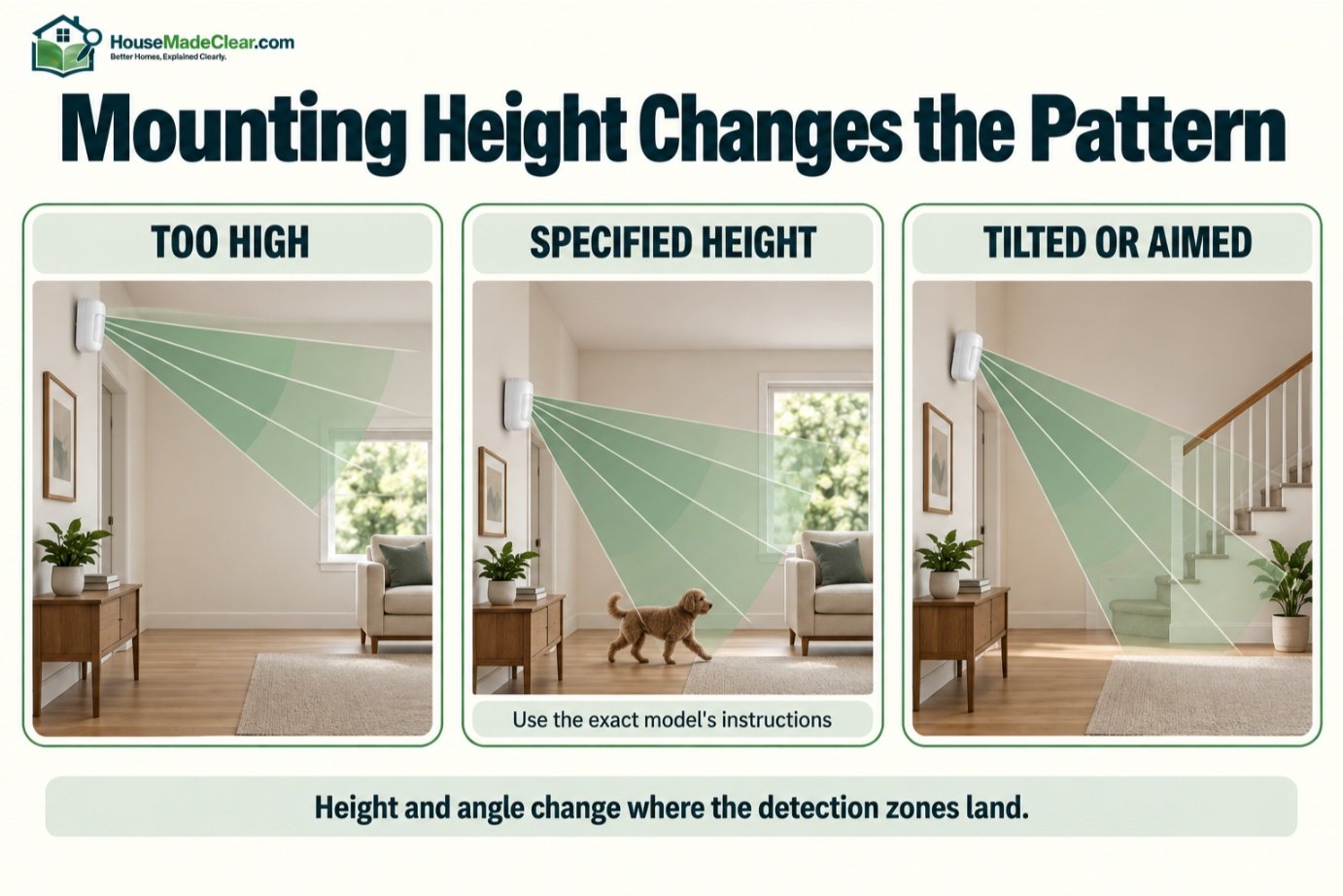
How High Should a Motion Sensor Be Mounted?
There is no universal mounting height for every motion sensor.
Many residential wall-mounted PIR detectors are designed for mounting somewhere around:
7–8 feet above the floor
but exact requirements vary significantly by model.
For example, one current DSC/Johnson Controls PIR installation guide specifies approximately 6–7 feet or around 7 feet depending on room depth and pet-immunity setup, while other detectors specify different mounting ranges.
Therefore:
Always use the mounting height specified for your exact detector.
Do not copy a height from another brand.
Why Does Mounting Height Matter?
Changing height changes the geometry of the sensor’s detection pattern.
Mounting too high can:
- Shift detection zones
- Change near-floor coverage
- Reduce expected detection performance
Mounting too low can also:
- Shorten range
- Alter pattern
- Affect pet immunity
A detector is designed around a specific optical pattern.
Treat mounting height as part of the sensor design—not just an aesthetic choice.
Does Tilting the Sensor Change Its Range?
Yes, on many detectors.
Tilting or angling a motion detector can shift where its detection beams fall.
That may produce:
- Too much floor coverage
- Missed distant coverage
- Dead zones
unless the product is specifically designed for adjustable aiming.
Install it according to its instructions and then perform a walk test.
Where Should You NOT Place a Motion Sensor?
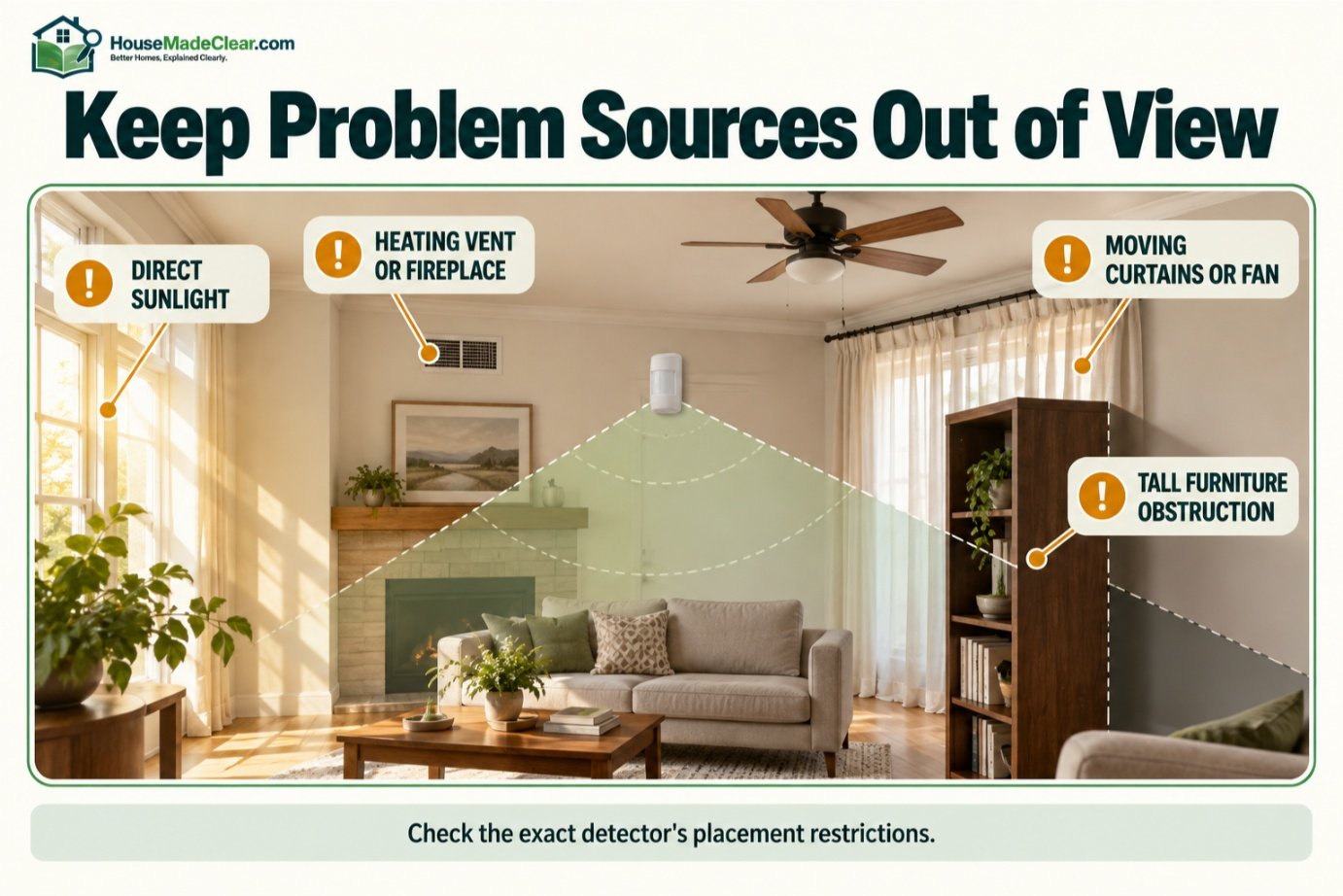
Common problematic locations include positions aimed toward or affected by:
- Direct sunlight
- Heating vents
- Fireplaces
- Radiators
- Strong air movement
- Moving curtains
- Ceiling fans in certain configurations
- Large obstructions
- Areas outside environmental specifications
Exact restrictions vary by sensor.
Resideo installation guidance for one residential PIR model, for example, advises avoiding windows with direct sunlight, heat sources, fans, and locations with unsuitable environmental conditions.
Should a Motion Sensor Face a Window?
Usually avoid aiming a typical PIR detector directly at a window unless the manufacturer’s instructions specifically allow that placement.
Potential issues include:
- Strong sunlight
- Rapid temperature changes
- Movement outside the protected area
- Heat patterns near glass
More importantly, the sensor should usually focus on movement inside the protected space, not activity beyond a window.
Can a Motion Sensor Detect Through Glass?
A conventional PIR intrusion sensor generally should not be relied on to detect a person through a closed window or glass door.
DSC’s system documentation notes that motion detectors cannot detect motion behind glass partitions, glass doors, or windows.
If you need to detect a window opening, use:
- Window contact sensor
If you need to monitor activity outside, use:
- Appropriate outdoor motion sensor
- Outdoor security camera
rather than expecting an indoor PIR detector to monitor through the glass.
Should a Motion Sensor Be Near a Heating Vent?
Usually not if the vent can create conditions the detector manufacturer warns against.
PIR detectors are designed to distinguish meaningful infrared changes, but strong or rapidly changing heat sources can complicate detection.
Examples include:
- Furnace vent
- Space heater
- Fireplace
- Radiator
Keep the sensor away from these sources according to the product instructions.
Can a Ceiling Fan Trigger a Motion Sensor?
It depends on the technology and installation.
A conventional PIR sensor does not simply detect every physical object moving.
However:
- Fan movement
- Airflow
- Changing temperature patterns
- Dual-tech microwave sensing
can make some placements less suitable.
Several manufacturers specifically caution installers about fans or moving objects in certain detector configurations.
So if a false alarm repeatedly coincides with fan operation, review:
- Sensor location
- Technology
- Installation manual
rather than simply lowering sensitivity.
Can Curtains Trigger a Motion Sensor?
Potentially.
Moving curtains can create a problem when they:
- Cross detection zones
- Move warm/cool air
- Expose changing sunlight
- Obstruct coverage
Keep frequently moving window coverings out of the detector’s key coverage area when practical.
Can Furniture Block a Motion Sensor?
Yes.
A PIR detector requires a usable line of sight into its intended coverage zones.
Large objects such as:
- Bookcase
- Cabinet
- Tall sofa
- Plant
can create blind areas.
DSC notes that motion can only be detected in unobstructed areas covered by the detector’s beams.
Recheck sensor coverage whenever furniture is significantly rearranged.
Do Motion Sensors Cover the Entire Room?
Not necessarily.
A sensor may advertise a nominal range such as:
- 30 ft
- 40 ft
- 50 ft
but actual coverage also depends on:
- Field of view
- Mounting height
- Lens pattern
- Room shape
- Obstructions
A “40-foot detector” does not mean every point within 40 feet is monitored equally.
Review the manufacturer’s coverage diagram.
Corner Mount vs Flat-Wall Mount
Many motion detectors are designed to mount:
- Flat on wall
- In corner
- On optional swivel bracket
A corner mount can provide broad room coverage because the sensor looks diagonally across the space.
A flat-wall position can be better when you need to control a specific:
- Hall
- Entry path
- Room section
Choose based on the actual coverage pattern.
Are Ceiling Motion Sensors Good for Home Security?
Ceiling-mounted detectors can provide:
- 360-degree coverage
- Central-room monitoring
- Less visually prominent placement
They can work well in open areas.
But they use different coverage geometry from ordinary wall-mounted PIR detectors.
For example, Bosch’s DS936 ceiling detector is designed for 360-degree coverage and supports specific installation heights rather than the mounting rules used for wall detectors.
Never substitute wall-detector placement rules for a ceiling model.
Wired vs Wireless Motion Sensors
Both can be effective.
Wired Motion Sensor
Connects physically to the alarm panel.
Advantages can include:
- No wireless sensor battery replacement
- Useful with existing alarm wiring
- Stable permanent installation
Wireless Motion Sensor
Communicates by radio with the alarm hub.
Advantages can include:
- Easier retrofit
- Less wiring
- Flexible placement
But wireless detectors typically require:
- Battery maintenance
- Adequate radio signal
The detector should also report:
- Low-battery condition
when supported.
Are Wireless Motion Sensors Reliable?
They can be.
Reliability depends on:
- Product quality
- Battery condition
- Wireless range
- Interference
- Installation
- Hub compatibility
During installation, test the detector at its final location rather than assuming that because it works beside the hub it will work at the far end of the house.
How Do Motion Sensors Work With a Home Alarm System?
When armed in an appropriate mode:
- Motion sensor detects activity.
- Sensor transmits alarm signal.
- Panel determines whether zone is active.
- System follows configured response.
That response may include:
- Entry delay
- Immediate siren
- App notification
- Monitoring-center signal
depending on the zone configuration.
What Is an Interior Follower Zone?
Alarm systems can treat motion detectors differently from exterior-door sensors.
For example, an interior motion detector may be programmed so that:
- Entering through a designated door starts an entry delay
- Walking through the motion zone during that entry route does not immediately trigger the siren
- Movement without a valid entry-delay condition may alarm immediately
The terminology varies by alarm platform.
This is why sensor programming matters just as much as physical placement.
Stay Mode vs Away Mode
Many alarm systems support modes similar to:
Stay/Home Mode
Often arms:
- Exterior doors
- Windows
while leaving interior motion sensors inactive so occupants can move around.
Away Mode
Typically arms:
- Exterior sensors
- Interior motion detection
because the home is expected to be unoccupied.
Exact behavior varies by system.
Do not assume every alarm platform uses identical logic.
Why Did My Motion Sensor Trigger While I Was Home?
Possible reasons include:
- System armed in Away mode
- Interior zone programmed incorrectly
- Sensor included in a custom arming mode
- Pet triggered sensor
- Household member entered protected area
Review:
- Alarm mode
- Event history
- Zone programming
before assuming the detector is defective.
Can Pets Trigger Home Motion Sensors?
Yes.
Dogs and cats can trigger ordinary PIR sensors.
A pet is:
- Warm
- Mobile
which makes it capable of creating the infrared changes a PIR detector is designed to notice.
This is why many manufacturers sell pet-immune or pet-tolerant motion sensors.
How Does Pet Immunity Work?
Pet-immunity designs attempt to reduce alarms caused by animals within specified:
- Weight
- Size
- Movement
- Coverage conditions
Manufacturers may use:
- Special optics
- Detection-zone geometry
- Signal processing
to discriminate between likely human movement and small-animal movement.
For example, Resideo markets residential PIR models with selectable pet immunity and publishes specific limits for supported products.
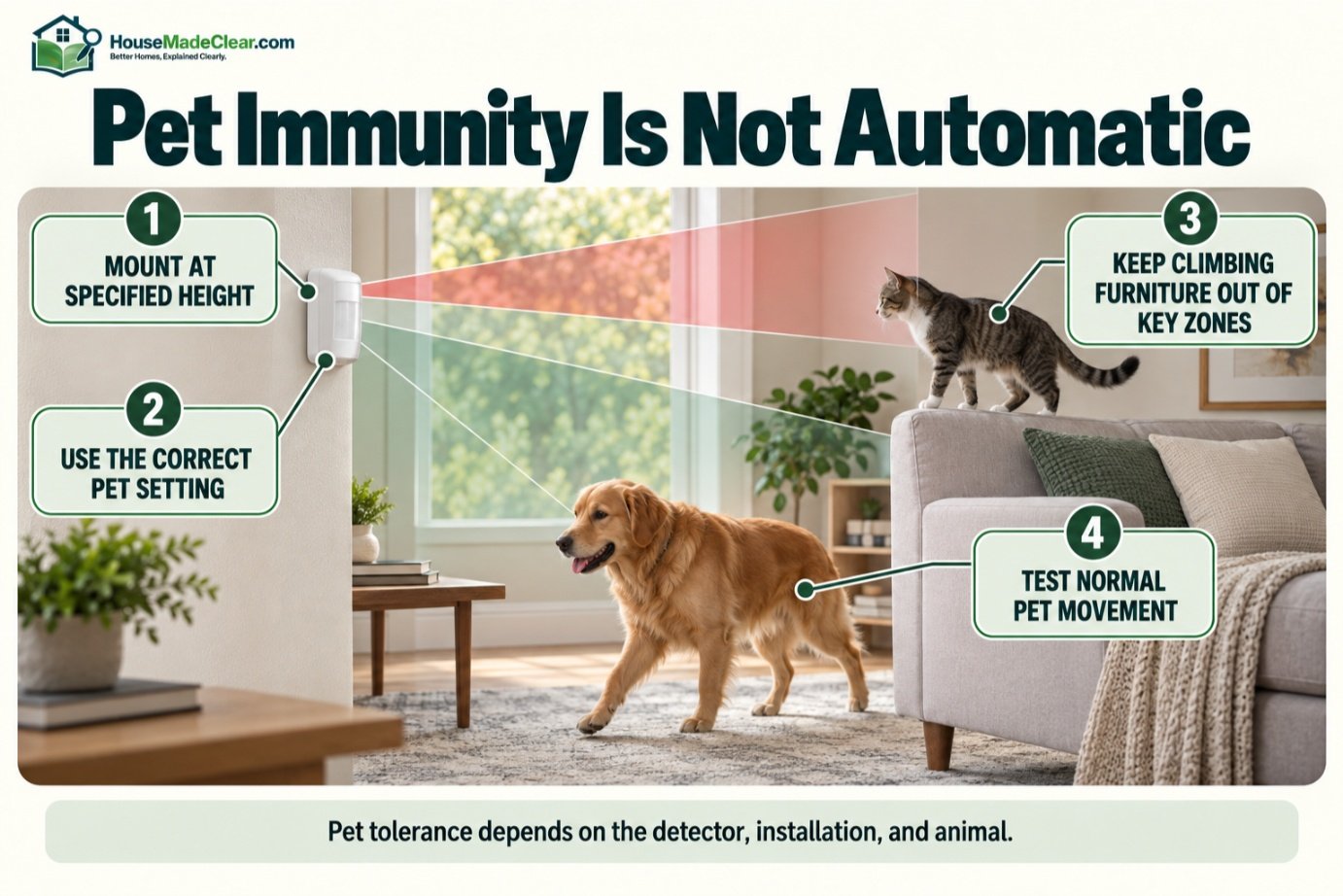
But pet immunity is not absolute.
Can a Pet-Immune Motion Sensor Still Detect a Dog?
Yes.
Pet immunity depends on the exact installation.
Problems can occur when pets:
- Jump on furniture
- Climb stairs near sensor
- Approach detector closely
- Exceed supported size
- Move through high-sensitivity zones
One DSC guide specifically warns that pet-immunity behavior depends on mounting height and configuration, while Bosch documentation advises against positioning certain pet-immune sensors where pets can climb into higher detection zones.
Should You Point a Pet-Immune Sensor Away From Furniture?
Often, yes.
If a cat can jump onto:
- Tall shelf
- Sofa back
- Cabinet
it may enter detection zones designed for human-height movement.
Follow the detector’s pet-installation diagram.
Do not rely only on a marketing statement such as:
“Pet friendly up to 80 lb.”
The installation conditions matter.
What Causes False Alarms From Motion Sensors?
Common causes can include:
- User error
- Incorrect placement
- Pets
- Environmental conditions
- Equipment problems
- Incorrect mounting height
- Obstructed or unsuitable coverage
- Wrong alarm programming
The U.S. Department of Justice’s COPS Office identifies user error, unsuitable or faulty equipment, and poor installation—including motion detectors placed in inappropriate areas or at inappropriate heights—as major contributors to false burglar alarms.
What Is a False Alarm?
In practical terms, a false burglar alarm occurs when a security system generates an alarm event even though there is no actual burglary or intrusion requiring the expected response.
For a motion sensor, that may happen because:
- Authorized person enters
- Pet triggers detector
- Sensor reacts to environment
- System is armed incorrectly
Not every false alarm means the sensor failed.
Many come from:
- Setup
- Usage
- Installation
problems.
Why Do False Alarms Matter?
False alarms are more than an annoyance.
They can:
- Cause unnecessary panic
- Wake occupants
- Generate monitoring calls
- Lead to unnecessary police response
- Create local false-alarm fees
- Train users to ignore alerts
DOJ guidance has long identified false burglar alarms as a significant burden on law-enforcement resources.
A reliable home security system should therefore aim for both:
good detection
and:
low unnecessary-alarm frequency.
How to Reduce Motion Sensor False Alarms
1. Follow Manufacturer Mounting Height
Do not guess.
2. Keep Problematic Heat Sources Out of View
Avoid placements restricted by the product manual.
3. Use Correct Pet Settings
Enable pet immunity only according to instructions.
4. Clear Obstructions
Make sure furniture does not block intended coverage.
5. Use Proper Alarm Mode
Use Stay mode where appropriate when occupants are home.
6. Walk-Test the Detector
Test realistic paths.
7. Check Battery and System Health
Wireless sensors need healthy batteries and reliable communication.
8. Train Everyone in the Home
Many alarm events result from user mistakes.
Our guide to common home security mistakes covers other setup and behavior problems that can reduce overall security performance.
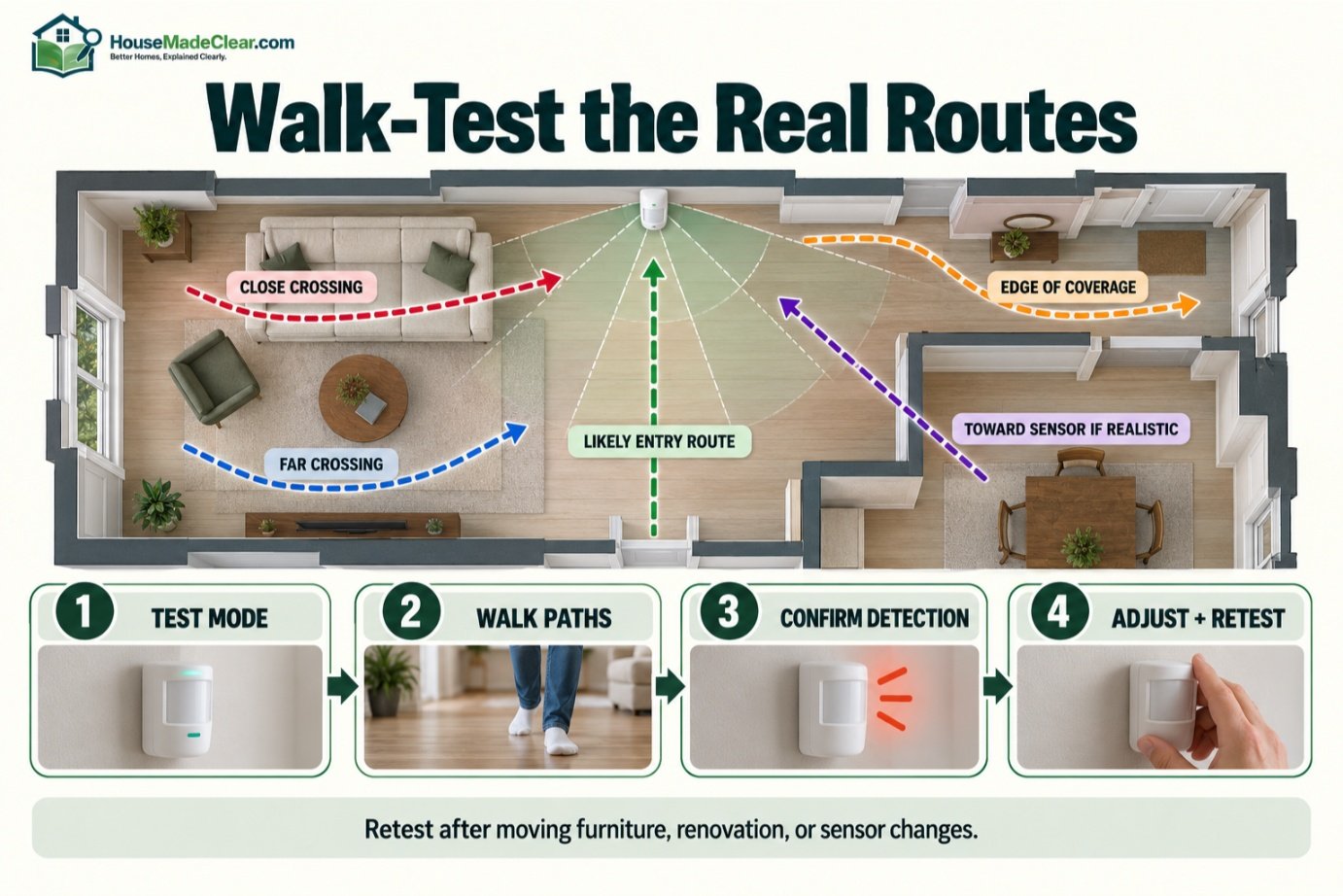
What Is a Motion Sensor Walk Test?
A walk test checks whether the detector sees movement where it is supposed to.
The basic process typically involves:
- Put detector/system into its designated test mode.
- Wait as required by manufacturer.
- Walk through the intended coverage.
- Confirm detector registers movement.
- Test several directions and distances.
- Repeat after adjustments.
Follow your specific product’s procedure because:
- LED behavior
- Test timing
- Sensor lockout
vary between models.
Which Paths Should You Walk-Test?
Test:
- Across sensor close to detector
- Across sensor far from detector
- From likely exterior entry
- Along edge of protected area
- Toward sensor if that is a real route
- Near stairs or hall intersection
If the detector is pet immune, test with normal pet movement as well.
Should You Test Motion Sensors Regularly?
Yes.
At minimum, test according to:
- Alarm manufacturer instructions
- Monitoring provider recommendations
Also retest after:
- Moving furniture
- Renovation
- Sensor replacement
- Battery change
- Major layout changes
A detector that worked perfectly before a large bookcase was added may no longer have the same coverage.
Motion Sensors and Security Cameras Together
Combining a PIR alarm detector with a camera provides two different types of information.
Motion Sensor
Reports:
Movement occurred.
Camera
May show:
This is what caused it.
That can help with alarm verification.
For example:
- Motion sensor triggers.
- Phone receives security alert.
- User checks camera.
- Video provides context.
This is often more useful than relying exclusively on either device.
Should a Camera Replace a Motion Sensor?
Not necessarily.
A camera may provide:
- Motion analytics
- Video
- Person detection
but a dedicated alarm motion sensor may provide:
- Independent intrusion zone
- Different detection technology
- Direct alarm-panel integration
Using multiple technologies can provide more robust situational awareness.
Motion Sensor vs Door/Window Sensor
| Motion Sensor | Door/Window Sensor |
|---|---|
| Detects movement in area | Detects opening |
| Covers interior space | Protects specific opening |
| Often PIR | Usually magnetic contact |
| Can cover several entry routes | Covers one door/window |
| Pets may affect it | Pets usually irrelevant |
| Useful secondary layer | Useful perimeter layer |
A strong basic system often uses both.
Motion Sensor vs Glass-Break Sensor
A glass-break sensor is designed to detect characteristics associated with:
- Breaking glass
depending on the technology.
A motion sensor detects:
- Movement after someone enters or moves within coverage.
So one may detect the entry event, while another detects movement afterward.
Again, the technologies complement rather than replace each other.
How Many Motion Sensors Does a House Need?
There is no universal number.
A small home may need only:
- One or two
strategically placed interior sensors.
A larger multi-story home may need:
- Several
because walls and room boundaries limit coverage.
Instead of counting rooms, count:
important movement routes.
Ask:
If someone entered from the major exterior access points, which interior areas would they probably have to cross?
Those locations are strong candidates.
Do You Need Motion Sensors Upstairs?
Possibly.
An upstairs hallway can be valuable because it may connect:
- Bedrooms
- Stair landing
- Balcony or secondary access
But if upstairs is occupied at night while the alarm is in Stay mode, interior detectors may be bypassed depending on programming.
Design the system around how the household actually uses the home.
Do You Need a Motion Sensor in Every Room With a Window?
Usually not.
Windows can be protected more directly with:
- Contact sensors
- Glass-break sensors
where appropriate.
A motion detector can then protect a larger interior route.
This often provides better coverage with fewer devices.
Outdoor Motion Sensors
Outdoor motion detection is more challenging than indoor detection because the environment contains:
- Animals
- Trees
- Wind
- Weather
- Temperature changes
- Vehicles
- Sunlight
Use detectors specifically designed for outdoor conditions.
Resideo’s outdoor PIR, for example, uses two PIR sensors that must both trigger before an alarm and includes adjustable detection ranges intended to help reduce unwanted alarms from animals and other sources.
Outdoor Motion Sensor vs Motion Light
A motion-activated light typically uses motion detection to:
- Turn on lighting
A security-system motion detector may instead:
- Trigger an alarm
- Send security notification
Some devices can perform both through automation.
But do not assume an outdoor motion light is equivalent to an alarm sensor.
They serve different purposes.
Can Outdoor Motion Sensors Detect Cars?
Depending on technology and configuration, they can.
An outdoor detector may respond to:
- Person
- Vehicle
- Large animal
Some advanced outdoor sensors are specifically designed to discriminate between certain targets.
If vehicle detection is your primary goal, select a device designed for that purpose rather than using a general indoor PIR detector outdoors.
Home Security Motion Sensors and Smart Homes
Smart security platforms may allow motion sensors to trigger automations such as:
- Turn lights on
- Send notification
- Start camera recording
- Adjust another device
But distinguish between:
Security Automation
Used as part of alarm protection.
Convenience Automation
Used to control lights or other smart-home functions.
A motion sensor that turns hallway lights on is not automatically configured as an intrusion sensor.
Should Motion Sensors Turn Lights On?
They can.
For example:
Motion after sunset → hallway light on
can be convenient.
But security-system behavior should be configured carefully so automation does not interfere with:
- Arming logic
- Alarm response
- Battery life
Use the manufacturer’s supported integrations.
Home Motion Sensors Without Wi-Fi
Many alarm motion sensors do not communicate through ordinary Wi-Fi.
They may use:
- Proprietary RF
- Z-Wave
- Zigbee
- Wired alarm loops
- Other security protocols
The central hub then connects to:
- Internet
- Cellular network
for remote communication.
That means the motion detector itself may continue communicating with the alarm panel even if home internet fails.
Exact behavior depends on the system.
Do Motion Sensors Work During a Power Outage?
Wireless battery sensors can often continue operating locally.
But the complete alarm system also needs:
- Control-panel power
- Backup battery
- Communication path
If professional monitoring matters to you, verify:
- Panel backup duration
- Cellular backup
- Internet dependency
Our guide discussing whether home security systems are worth it explains why outage behavior should be checked before choosing a system.
Motion Sensors for Renters
Wireless motion sensors can work well for renters because they may require less wiring.
Consider:
- Approved mounting method
- Lease restrictions
- Removability
- Hub placement
Avoid compromising installation just to avoid all mounting hardware.
If the detector requires a specific angle and stable mounting surface, install it appropriately within the rules that apply to the property.
Motion Sensors for Homes With Children
Motion sensors detect movement regardless of why someone is moving.
If children walk through protected areas while the system is armed:
- Sensor may trigger
Use appropriate arming modes.
Teach household members:
- When system is armed
- Which zones are active
- How to disarm correctly
User education is an important part of false-alarm prevention.
Motion Sensors for Homes With Pets
Choose a detector specifically designed for pet environments.
Then follow:
- Weight guidance
- Mounting height
- Furniture restrictions
- Sensitivity instructions
Pet immunity should be treated as:
conditional resistance to pet-triggered alarms
rather than:
guaranteed pet invisibility.
Can a Burglar Avoid a Motion Sensor?
Any single security measure has limitations.
A motion detector:
- Has defined coverage
- Can be obstructed
- Cannot see through solid barriers
- Depends on correct installation
That is another reason not to rely on one interior sensor as the entire security strategy.
A layered home may also include:
- Door/window contacts
- Better locks
- Cameras
- Lighting
- Alarm siren
Motion Sensors and Physical Security
Electronic detection does not physically stop a door from opening.
A motion sensor tells you movement has occurred.
Physical security measures help:
- Delay
- Resist
unauthorized entry.
That distinction is important when deciding where to spend a limited security budget.
Our guide to improving home security with better locks covers the physical-security side.
Are Home Security Motion Sensors Worth It?
For many homes:
yes.
They are relatively simple devices that can provide broad interior detection with fewer sensors than protecting every possible location individually.
They are especially valuable when:
- Several entrances lead into one common area
- Home is unoccupied during Away mode
- Alarm system already has perimeter contacts
Their value decreases when:
- Placement is poor
- Pets constantly trigger them
- Users arm system incorrectly
- Coverage isn’t tested
A motion sensor is only as useful as the installation and system configuration around it.
How to Plan Motion Sensors for a Typical House
Consider this example.
Front Door
Install:
- Door contact
Back Door
Install:
- Door contact
First-Floor Hall or Living Room
Install:
- Motion sensor covering likely movement route
Garage Entry
Install:
- Door contact
- Possibly interior motion coverage nearby
Upstairs
Consider:
- Hall motion sensor if needed
Exterior
Use:
- Outdoor-rated camera or motion detection where useful
This provides layers without filling every room with detectors.
Example: Small One-Story Home
Imagine:
- Front entrance
- Back entrance
- Open living/kitchen area
- Bedroom hallway
A possible strategy is:
Motion Sensor 1: Open living area
Motion Sensor 2: Bedroom hallway if needed
Combined with:
- Exterior-door sensors
- Selected window protection
that may provide stronger practical coverage than installing five randomly placed PIRs.
Example: Two-Story Home
A two-story layout might benefit from:
Ground Floor
Motion detector covering:
- Main circulation area
Stair/Upper Hall
Second detector covering:
- Upper-floor movement
This makes it difficult to move through major sections of the house without crossing a protected area.
Motion Sensor Placement Checklist
Before mounting a detector, ask:
- What route am I protecting?
- Will a person cross its pattern?
- Is the sensor at the manufacturer-specified height?
- Is sunlight a concern?
- Is a heater or vent nearby?
- Can curtains move through its view?
- Will furniture block coverage?
- Are pets present?
- Is pet immunity configured correctly?
- Is wireless signal adequate?
- Have I checked the coverage diagram?
- Can I walk-test this exact route?
If several answers are unclear, do more planning before permanently mounting it.
How to Install a Home Motion Sensor
Step 1: Identify the Purpose
Decide whether the sensor is protecting:
- Hallway
- Living space
- Stair route
- Garage entry
Step 2: Read the Coverage Diagram
Check:
- Range
- Field of view
- Mounting height
- Pet guidance
Step 3: Choose the Location
Prioritize a likely travel path.
Step 4: Check Environmental Restrictions
Avoid prohibited:
- Heat
- Sunlight
- Humidity
- Airflow
conditions.
Step 5: Check for Obstructions
Visualize where furniture will sit.
Step 6: Mount at Correct Height
Use the manufacturer’s specified range.
Step 7: Enroll or Wire Sensor
Follow alarm-system instructions.
Step 8: Configure Zone
Select appropriate interior-zone behavior.
Step 9: Walk-Test
Test all realistic routes.
Step 10: Test Arming Modes
Confirm expected behavior in:
- Stay
- Away
modes.
Step 11: Test Pets if Applicable
Observe normal movement.
Step 12: Review Alarm History
Investigate any unnecessary events instead of accepting repeated false alarms.
For more complex systems, our guide to DIY vs professional home security installation can help you decide whether professional installation makes sense. You may also read about Home Lock Security Checklist.
Common Motion Sensor Placement Mistakes
1. Installing Directly Opposite Every Door
Problem:
Movement may approach detector rather than cross pattern.
Better approach:
Use the manufacturer’s coverage diagram.
2. Mounting at a Random Height
Problem:
Coverage changes.
Better approach:
Follow the exact detector specification.
3. Aiming at Strong Heat Sources
Problem:
Can contribute to undesirable PIR behavior.
Better approach:
Choose a stable environment.
4. Ignoring Pets
Problem:
Repeated alarms.
Better approach:
Choose/configure appropriate pet-immune detector.
5. Placing Sensor Behind Furniture
Problem:
Coverage is blocked.
Better approach:
Maintain clear detection zones.
6. Assuming It Detects Through Glass
Problem:
Important exterior movement can be missed.
Better approach:
Use correct exterior devices.
7. Skipping the Walk Test
Problem:
Dead zones remain undiscovered.
Better approach:
Test every realistic approach.
8. Using Indoor Detector Outdoors
Problem:
Environment exceeds product design.
Better approach:
Use outdoor-rated equipment.
9. Installing Too Many Sensors
Problem:
Added complexity and false-alarm opportunities.
Better approach:
Protect strategic movement routes.
10. Treating Motion Detection as Complete Security
Problem:
Entry points remain physically weak.
Better approach:
Use layered security.
Quick Placement Recommendations
| Area | Motion Sensor Value | Main Consideration |
|---|---|---|
| Main hallway | High | Cover crossing movement |
| Living room | High | Avoid windows/heat problems |
| Stair landing | High | Test both approach directions |
| Bedroom | Moderate | Consider occupancy/Stay mode |
| Basement | Moderate–High | Environment and access routes |
| Garage | Conditional | Use suitable environmental rating |
| Kitchen | Often challenging | Heat and movement sources |
| Bathroom | Usually low | Humidity and occupancy |
| Behind glass | Poor choice for PIR | Does not reliably detect through glass |
| Outdoors | Only outdoor-rated sensor | Weather, animals, temperature |
Final Answer: Where Should Home Security Motion Sensors Go?
For most homes, the best location for a motion sensor is:
a stable indoor position that covers a likely travel route and causes a person to move across the detector’s intended coverage pattern.
Strong candidates include:
- Main hallways
- Living areas connecting entrances
- Stair routes
- Interior paths from garage or basement
Avoid choosing locations simply because they look central.
A motion detector also needs:
- Correct mounting height
- Clear coverage
- Suitable temperature/environment
- Proper pet configuration
- Reliable communication
Most importantly:
follow the exact installation instructions for the sensor you own.
Different detectors have different:
- Heights
- Ranges
- Detection patterns
- Pet-immunity rules
After installation, perform a thorough walk test from every realistic direction.
For a typical home security system, motion sensors work best alongside:
- Door/window contacts
- Appropriate locks
- Cameras
- Alarm siren
- Monitoring if desired
rather than replacing those layers.
A well-positioned motion sensor can provide broad interior detection.
A poorly positioned one can create:
- Blind spots
- Missed events
- False alarms
which is why placement and testing matter at least as much as the detector itself.
Frequently Asked Questions
What are home security motion sensors?
Home security motion sensors are intrusion-detection devices that identify movement within a defined coverage area and can signal a security panel, siren, monitoring service, or app when activity is detected.
How do home motion sensors work?
Most residential motion sensors use passive infrared technology. They detect changes in infrared energy as a person or animal moves through different detection zones within the sensor’s coverage pattern.
Where should motion sensors be placed in a home?
Good locations include main hallways, living areas, stair routes, and other places someone entering the home is likely to cross. Exact placement should follow the detector manufacturer’s coverage instructions.
How high should a home motion sensor be mounted?
Many residential wall-mounted sensors are installed around 7–8 feet high, but there is no universal height. Use the mounting range specified for your exact model because height affects the detection pattern.
Should a motion sensor face the front door?
It can cover the route from the front door, but many PIR sensors detect crossing movement better than movement directly toward them. Use the manufacturer’s coverage diagram and walk-test the actual approach.
Can pets trigger home security motion sensors?
Yes. Dogs and cats can trigger ordinary motion detectors. Pet-immune sensors can reduce pet-related alarms when installed and configured according to their specifications, but pet immunity is not absolute.
What causes motion sensor false alarms?
Possible causes include pets, incorrect mounting, unsuitable placement, environmental conditions, equipment issues, and user error. Heat sources, sunlight, moving objects, and wrong alarm modes can also contribute depending on the detector.
Can a PIR motion sensor detect through glass?
A conventional PIR security sensor generally should not be relied on to detect movement through closed glass doors or windows. Use appropriate door/window contacts or outdoor detection equipment instead.
Do motion sensors work when the internet is down?
Many alarm motion sensors communicate directly with a local security panel rather than through Wi-Fi, so local detection may continue. Remote alerts or monitoring depend on the system’s internet, cellular, and backup configuration.
How many motion sensors does a house need?
There is no universal number. A small home may need only one or two strategically placed sensors, while larger multi-story homes may require several. Focus on important movement routes rather than placing a sensor in every room.
Are PIR or dual-tech motion sensors better?
PIR sensors are suitable for many residential environments. Dual-tech sensors combine technologies such as PIR and microwave and can provide additional false-alarm resistance in some applications, but they are not necessary everywhere.
How do you test a home security motion sensor?
Use the sensor or alarm system’s walk-test mode and walk through the intended coverage from multiple directions and distances. Confirm that the detector registers movement in every important part of the protected route.







[…] Home Security Motion Sensors: How They Work, Placement & False Alarms […]
[…] Home Security Motion Sensors: How They Work, Placement & False Alarms […]