
















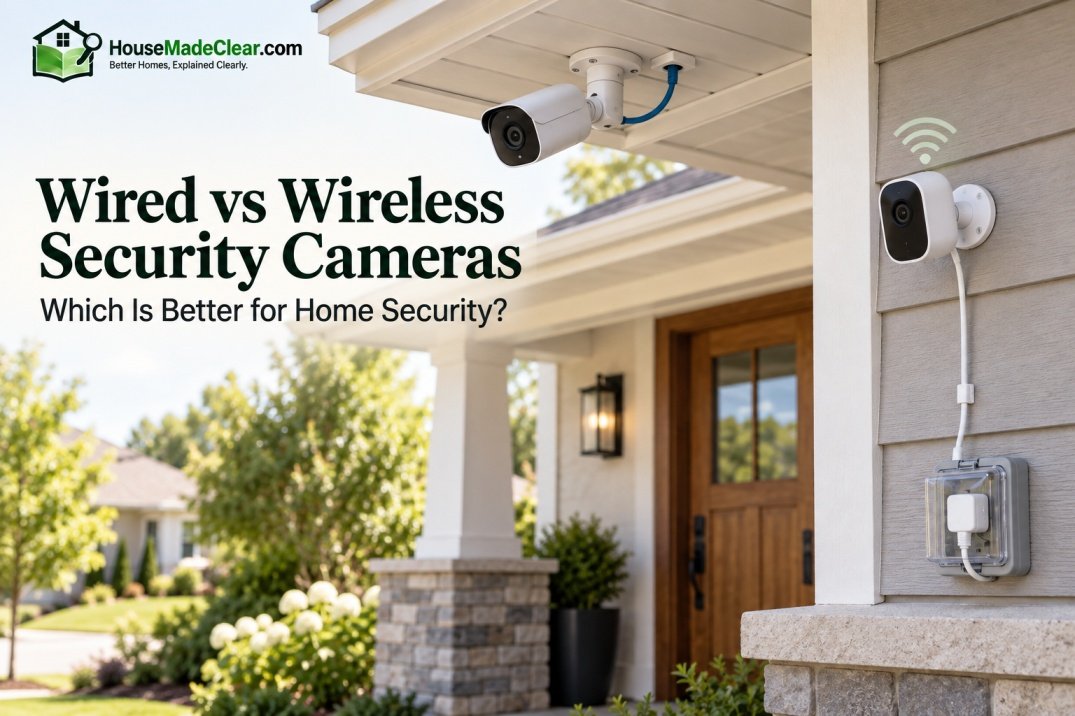
Choosing between wired vs wireless security cameras is less about which technology is universally “better” and more about which one fits your home, installation constraints, recording needs, network reliability, and willingness to maintain the system.
For a permanent multi-camera home security setup, wired cameras—especially PoE cameras—usually provide the most predictable connection and are easier to centralize around local recording.
For renters, smaller homes, and locations where running cable is difficult, wireless cameras are usually faster and easier to install.
There is one important distinction, however:
Wireless does not always mean wire-free.
Many wireless security cameras use Wi-Fi for data but still require a power cable. Battery-powered cameras are closer to being truly wire-free because they do not need either Ethernet or a permanent power connection during normal operation.
Quick Answer
Choose wired security cameras if you prioritize:
- Stable data connections
- Multiple cameras
- Continuous recording
- Local NVR storage
- Long-term installation
- Less dependence on Wi-Fi quality
Choose wireless security cameras if you prioritize:
- Easier installation
- Fewer data cables
- Flexible camera placement
- Easier relocation
- A smaller camera system
Choose battery-powered cameras when running both power and data cables is difficult, but expect to manage battery charging and understand that many battery cameras emphasize motion-triggered recording rather than continuous recording.
For many homeowners building a permanent four-camera-or-larger system, PoE is one of the strongest wired options. For apartments or a simple front-door/backyard setup, Wi-Fi or battery cameras may be more practical.
Wired vs Wireless Security Cameras at a Glance
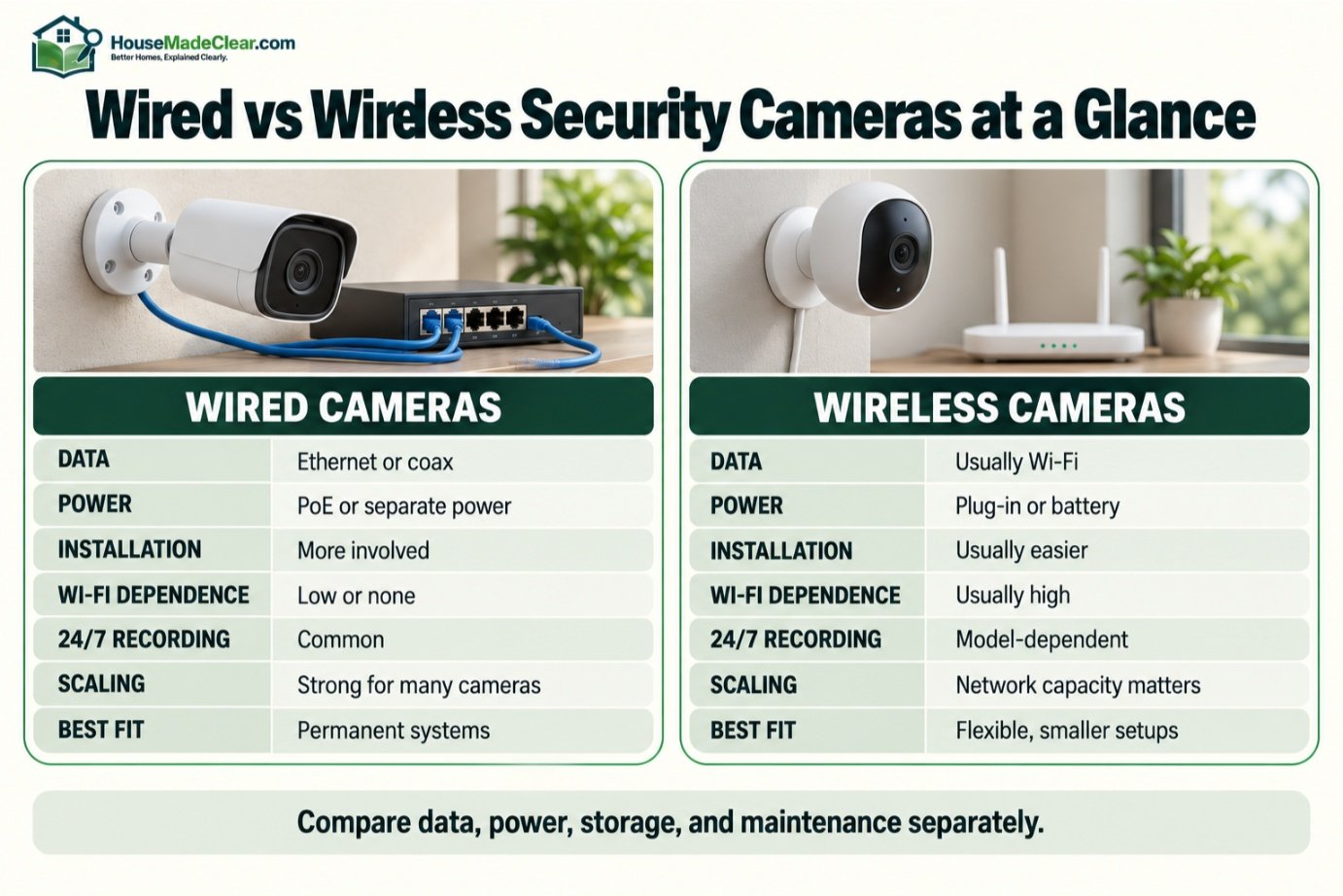
| Feature | Wired Cameras | Wireless Cameras |
|---|---|---|
| Data connection | Ethernet or coaxial cable | Usually Wi-Fi |
| Power | PoE, separate power, or coax/power arrangement | Plug-in power or battery |
| Installation | More involved | Usually easier |
| Wi-Fi dependence | Low or none | Usually high |
| Continuous recording | Common | Depends on model |
| Local NVR recording | Very common | Possible on some systems |
| Camera scalability | Excellent | Network capacity becomes important |
| Relocation | More difficult | Easier |
| Battery maintenance | None for PoE/plug-in | Required for battery models |
| Internet outage resilience | Can be very good with local recording | Highly system-dependent |
| Power outage resilience | Requires backup power | Battery camera can remain powered |
| Best for | Permanent home systems | Flexible/smaller installations |
What Is a Wired Security Camera?
A wired security camera uses physical cabling for at least its video/data connection.
Modern wired home cameras usually fall into two broad categories:
Ethernet/IP Cameras
These cameras transmit digital video over an Ethernet network.
Many use:
Power over Ethernet (PoE)
so a single Ethernet cable can carry:
- Network data
- Electrical power
between the camera and compatible PoE equipment.
Coaxial Cameras
Traditional CCTV systems may send video through coaxial cable to a:
- DVR
- Recorder
and commonly require a separate or combined power arrangement.
For a new residential installation, IP/PoE systems are particularly relevant because they integrate with modern networked recording systems.
What Is a PoE Security Camera?
PoE means:
Power over Ethernet.
Instead of running:
- Network cable
- Separate electrical cable
to each camera, compatible PoE equipment can deliver both through one Ethernet cable.
A typical configuration looks like:
PoE Camera → Ethernet Cable → PoE NVR or PoE Switch
This simplifies permanent wired-camera installations.
PoE should not be confused with:
Wi-Fi + power cable.
Both systems have wires, but the network architecture is different. Power over Ethernet (PoE) allows compatible network cameras to receive power through Ethernet cabling, which can simplify permanent wired installations.
What Is a Wireless Security Camera?
A wireless security camera generally transmits video and network data wirelessly—most commonly using Wi-Fi.
However, the camera may still need electrical power.
For example:
Wi-Fi camera + wall outlet
is wireless in terms of network communication but not truly wire-free.
Wireless cameras may use:
- Wi-Fi
- Proprietary wireless connection
- Cellular connection in specialized products
For typical homes, Wi-Fi is by far the most familiar form.
Wireless vs Wire-Free Security Cameras
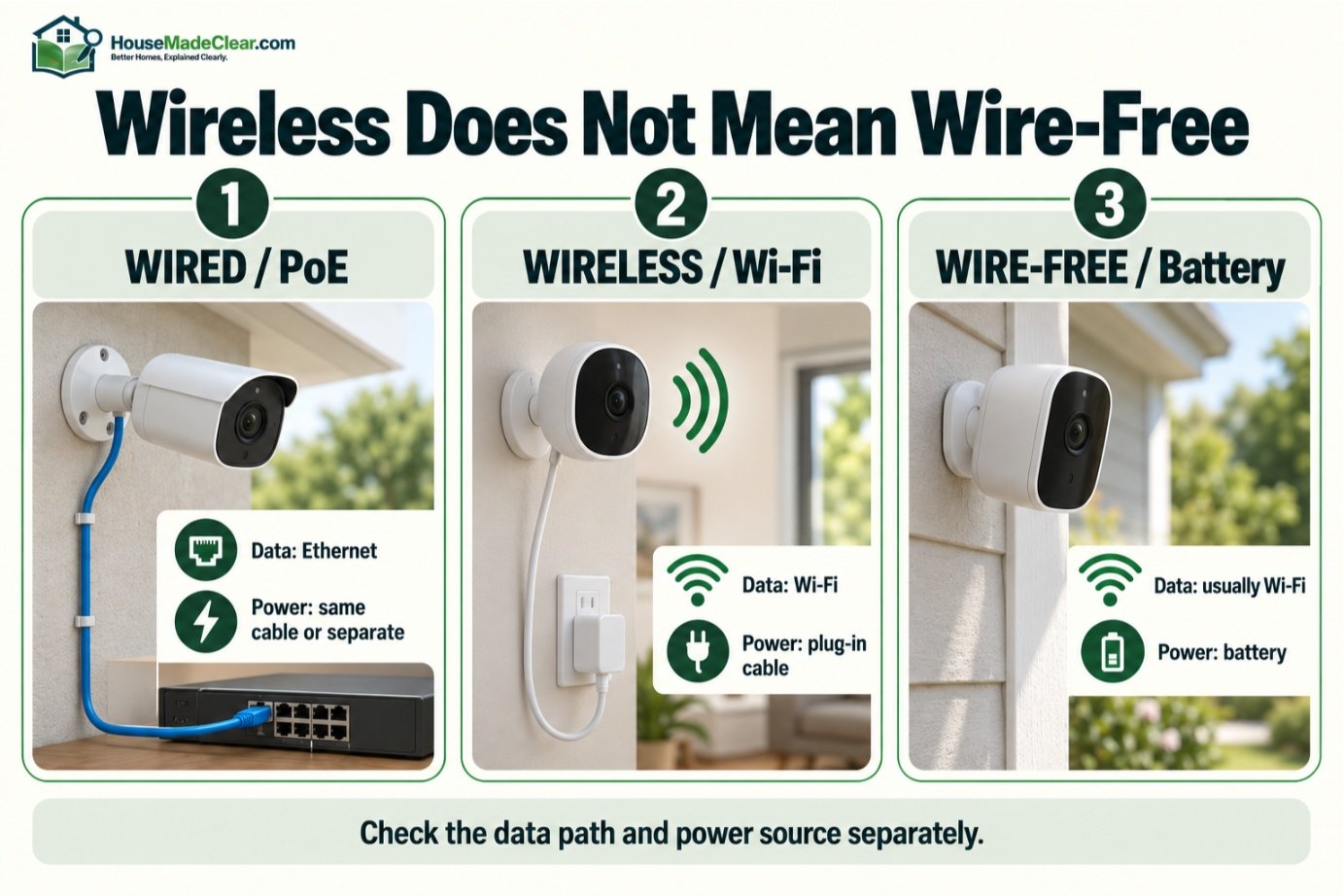
These terms are often mixed together.
Wireless Camera
Usually:
Wireless data + wired power
Example:
Wi-Fi camera plugged into outlet.
Wire-Free Camera
Usually:
Wireless data + battery power
Example:
Battery camera connected to Wi-Fi.
This distinction matters when comparing installation effort and maintenance.
A wireless camera can still require an electrician or nearby power outlet if there is no convenient electrical source.
Wired vs Wireless Cameras: Which Is More Reliable?
For a permanent security system, wired networking generally provides the more predictable data connection.
A wired Ethernet camera does not have to compete with:
- Weak Wi-Fi signal
- Thick walls
- Wireless congestion
- Distance from router
- Interference
in the same way a Wi-Fi camera does.
That does not mean wireless cameras are unreliable.
A well-designed Wi-Fi network can support security cameras very effectively.
Problems become more likely when:
- Camera is far from access point
- Signal passes through masonry
- Outdoor camera is mounted beyond good coverage
- Several cameras transmit simultaneously
- Home network is already heavily loaded
Does Wired Mean the Camera Never Disconnects?
No.
Wired systems can still experience problems from:
- Damaged cable
- Failed switch
- Failed NVR
- Power loss
- Network configuration
- Camera hardware failure
The advantage is simply that the data path is generally more controlled and does not depend on radio coverage.
Are Wireless Security Cameras Reliable?
Yes, when the wireless network is strong enough.
A Wi-Fi security camera can work very well if:
- Signal is strong at camera location
- Router/access point is reliable
- Internet connection supports required cloud features
- Wireless network is not overloaded
Before permanently mounting an outdoor Wi-Fi camera, test it at the exact location.
Do not assume Wi-Fi is strong merely because your phone shows a signal nearby.
Wired vs Wireless Security Cameras for Video Quality
Connection type alone does not determine image quality.
Video quality depends on factors such as:
- Camera sensor
- Lens
- Resolution
- Bitrate
- Compression
- Lighting
- Night performance
A high-quality wireless camera can produce better images than a low-quality wired camera.
However, higher-quality video generally requires more network bandwidth.
That makes a wired network particularly useful when you want:
- Several high-resolution cameras
- High bitrates
- Continuous streams
- Reliable local recording
Does Wi-Fi Reduce Security Camera Resolution?
Not automatically.
A Wi-Fi camera can record high-resolution video.
The challenge is whether the wireless connection can reliably carry the required data.
If network conditions deteriorate, a particular system may:
- Lower streaming quality
- Buffer
- Lose connection
- Delay live viewing
depending on how it is designed.
So the better question is not:
Can Wi-Fi handle high resolution?
but:
Can your network at that camera location handle that camera reliably?
Wired Cameras for Continuous Recording
Wired cameras are particularly well suited to 24/7 continuous recording.
A typical PoE system can send continuous video streams to a local:
- NVR
- NAS
- Server
without relying entirely on cloud storage.
This is useful when you want a complete timeline rather than only motion-triggered clips.
Wireless Cameras and Continuous Recording
Some plug-in Wi-Fi cameras can support continuous recording.
Others are designed primarily for:
- Motion events
- Cloud clips
- Local memory cards
Battery-powered cameras are especially likely to prioritize motion-triggered recording because continuous video would consume battery power much faster.
Always check:
Does this exact camera support continuous recording?
Do not assume based solely on whether it is wired or wireless.
Motion Recording vs Continuous Recording
Motion Recording
Camera records when activity meets configured criteria.
Advantages:
- Less storage
- Easier event review
- Lower power use
Limitations:
- Depends on detection working correctly
Continuous Recording
Camera records continuously.
Advantages:
- Full timeline
- Does not rely solely on event triggers
Limitations:
- More storage
- Greater network/power demand
Many serious home systems combine:
continuous recording + motion event markers.
Our guide to motion detector cameras explains how motion-triggered recording works.
Wired vs Wireless Security Cameras During an Internet Outage
This is where system architecture matters more than the words “wired” or “wireless.”
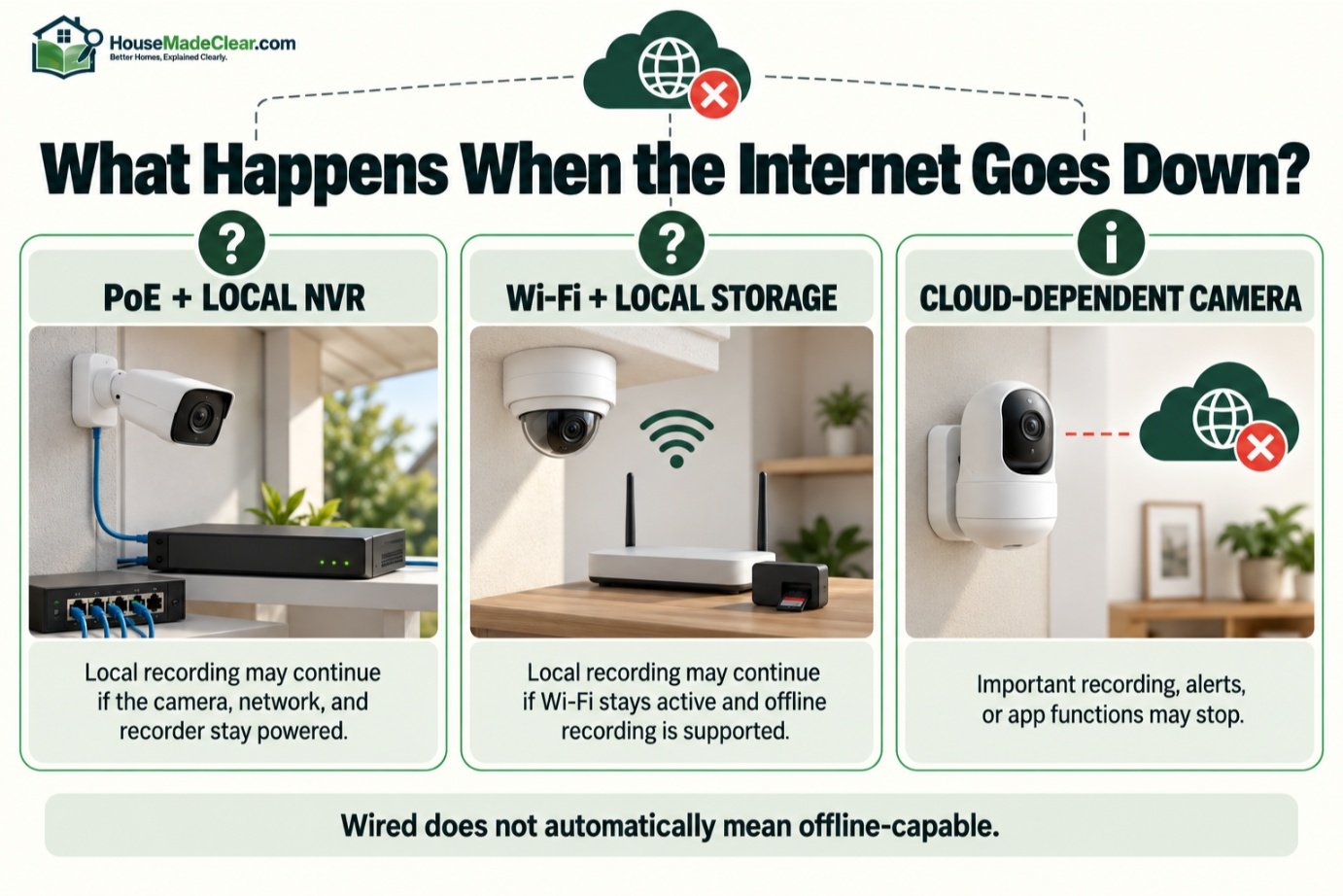
Wired PoE Camera + Local NVR
If:
- Camera
- Network switch/NVR
- Local network
are still powered, local recording may continue even when the internet connection fails.
Remote viewing from outside the home may stop.
Wi-Fi Camera + Local Storage
A Wi-Fi camera may also continue recording locally during an internet outage if:
- Camera remains powered
- Local Wi-Fi network remains active
- Device supports offline/local recording
Cloud-Dependent Camera
A camera that depends heavily on cloud services may lose important functionality when internet access fails.
So:
Wired does not automatically mean offline-capable, and wireless does not automatically mean internet-dependent.
Check the specific system.
Does Wi-Fi Work When the Internet Is Down?
Your local Wi-Fi network and internet connection are different things.
A router/access point can sometimes continue providing a local network even when the internet service is unavailable.
Therefore, local devices may still communicate.
Whether your security camera continues working depends on:
- Camera architecture
- Recording location
- App design
- Authentication
- Cloud dependencies
This is worth verifying before buying.
Wired vs Wireless Cameras During a Power Outage
Neither type is automatically immune to a power failure.
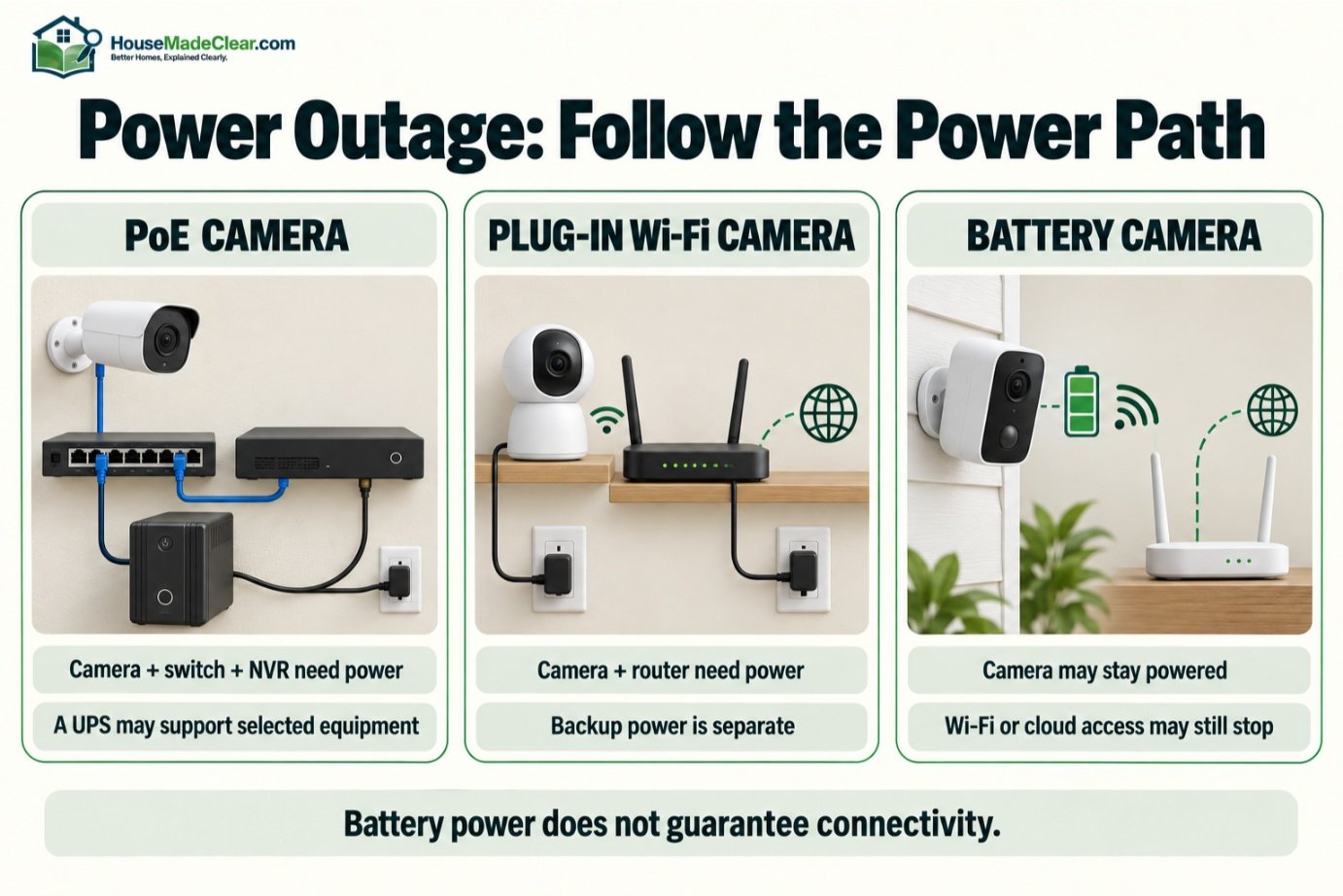
PoE Camera
If the:
- PoE switch
- NVR
loses power, cameras generally lose power too.
A UPS can help keep selected equipment operating temporarily.
Plug-In Wi-Fi Camera
Loses power when its outlet loses power unless backup power is provided.
Battery Camera
Can remain powered because it has its own battery.
However, remote connectivity may disappear if the:
- Router
- Modem
- Access point
loses power.
That is why whole-system planning matters.
Battery Cameras During an Outage
A battery camera has one clear advantage:
The camera itself does not depend on household AC power at every moment.
But if its normal operation requires:
- Wi-Fi
- Cloud connection
and those services go down, some features may still be unavailable.
Possible differences include:
- Local motion detection continues
- Local recording continues
- Remote alerts stop
- Live view becomes unavailable
depending on the product.
Wired vs Wireless Cameras for Local Storage
Wired IP camera systems commonly pair with an:
NVR — Network Video Recorder.
That provides centralized local storage.
Wireless cameras can also support local storage through:
- microSD card
- Base station
- NVR
- NAS
depending on the manufacturer.
Local storage can reduce dependence on cloud subscriptions, although it introduces responsibility for:
- Drive capacity
- Backup
- Recorder security
Cloud Storage vs Local Storage
Local Storage
Advantages:
- Recording remains physically local
- No cloud subscription may be required
- Can support continuous recording
Potential disadvantages:
- Recorder can fail
- Recorder can be stolen/damaged
- Remote access still needs network configuration
Cloud Storage
Advantages:
- Off-site recording
- Easy remote access
- Less local hardware
Potential disadvantages:
- Subscription fees
- Internet dependency
- Privacy considerations
- Retention limits
Some systems support both.
Wired vs Wireless Security Camera Installation
Wireless cameras usually win on installation simplicity.
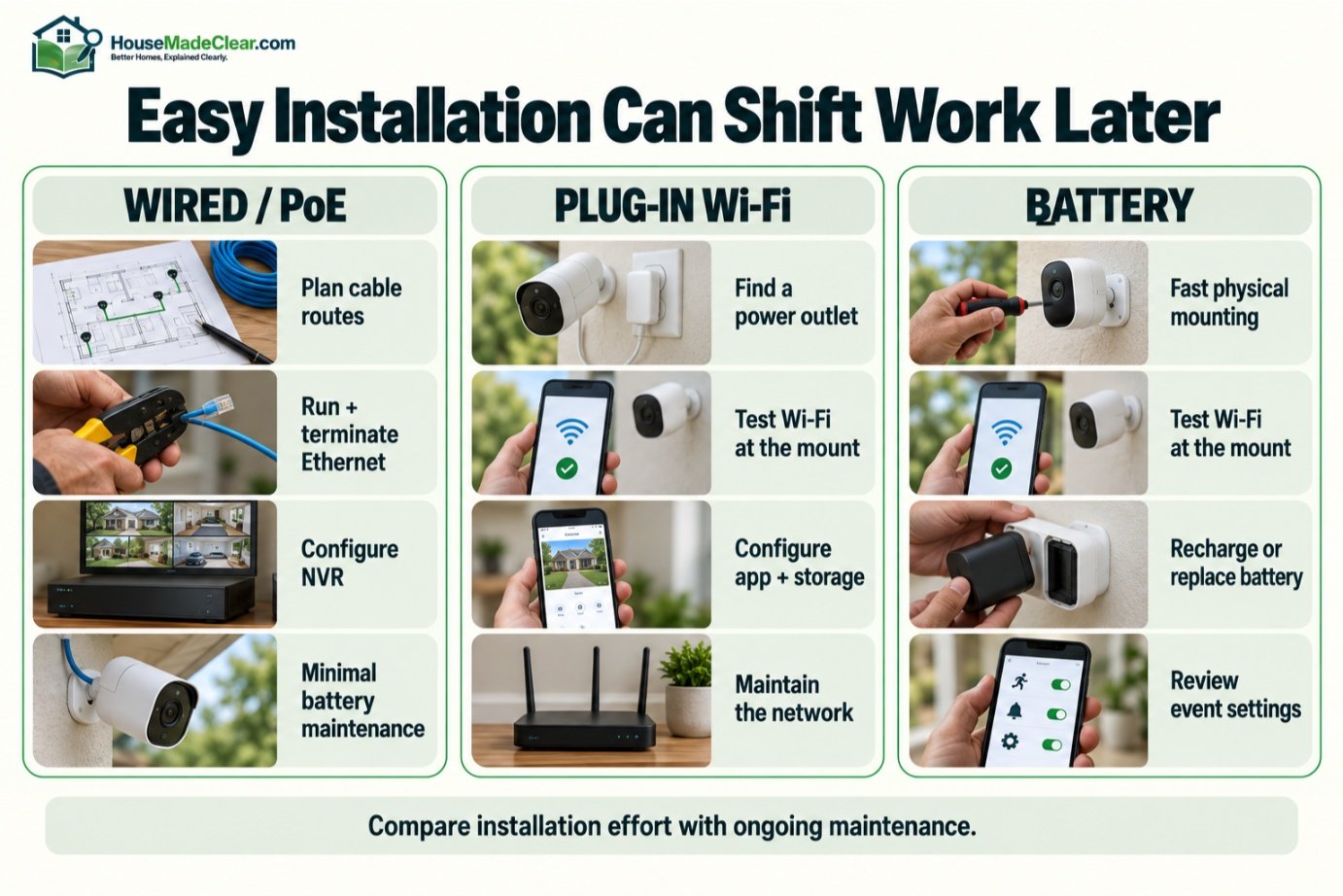
A basic Wi-Fi camera may require:
- Mount camera
- Provide power
- Connect to Wi-Fi
- Configure app
A PoE installation may require:
- Plan cable routes
- Drill access holes
- Run Ethernet
- Terminate/connect cables
- Install switch/NVR
- Configure network
- Mount camera
That is more work—but once installed, the cabling becomes part of the building’s security infrastructure.
Are Wired Cameras Hard to Install?
They can be, particularly in an existing finished house.
Running cable may require access through:
- Attic
- Basement
- Crawlspace
- Wall cavities
- Exterior penetrations
A single-story house with an accessible attic may be relatively straightforward.
A finished multi-story home can be much more difficult.
Should You Professionally Install Wired Cameras?
Consider professional installation when:
- Multiple cameras are planned
- Cable routes are difficult
- Exterior penetrations are required
- You want hidden wiring
- Cameras are mounted high
- Network configuration is complex
A simple one- or two-camera Wi-Fi setup is much more DIY-friendly.
Our comparison of DIY vs professional home security installation can help with that decision.
Wireless Camera Installation Advantages
Wireless systems reduce the need to route network cables through the house.
That makes them particularly useful for:
- Apartments
- Rental homes
- Finished homes
- Detached garages within network range
- Locations difficult to cable
Battery cameras reduce cabling even further.
Wireless Camera Installation Limitations
Wireless does not eliminate planning.
You still need to consider:
- Wi-Fi strength
- Charging access
- Mounting surface
- Weather exposure
- Camera angle
And a plug-in Wi-Fi camera still needs:
- Nearby electrical power
which can be just as challenging as Ethernet in some locations.
Wired vs Wireless Outdoor Security Cameras
Both can work outdoors.
The important factors are:
- Weather/environment rating
- Network connection
- Power
- Night image quality
- Mounting
- Camera placement
Wired Outdoor Camera
Strong option for:
- Permanent installation
- Driveway
- Front yard
- Side yard
- Garage
Wireless Outdoor Camera
Strong option where:
- Cable is difficult
- Wi-Fi is good
- Fewer cameras are needed
Battery Outdoor Camera
Strong option where:
- Neither Ethernet nor convenient power is available
but maintenance becomes part of the tradeoff.
Which Is Better for a Driveway?
For a permanent driveway camera, wired PoE is often an excellent choice.
Reasons include:
- Continuous power
- Stable connection
- Continuous recording options
- High data capacity
A Wi-Fi camera can still work very well if the driveway falls within strong wireless coverage.
For a driveway far from the house, you may need:
- Outdoor wireless access point
- Network extension
- Wired run
- Different camera architecture
rather than simply buying a stronger camera.
Which Is Better for a Front Door?
At the front door, either technology can work.
A:
- Wired camera
- Plug-in Wi-Fi camera
- Battery video doorbell
may all be reasonable.
The decision depends on:
- Existing doorbell wiring
- Available Ethernet
- Wi-Fi coverage
- Recording requirements
For a single front-door view, wireless installation simplicity often has substantial value.
Which Is Better for a Backyard?
If the backyard camera can be reached easily with Ethernet:
PoE is excellent.
If cabling would require substantial construction:
Wi-Fi or battery may be more practical.
The location itself matters more than technology.
Before selecting the connection type, decide where the camera should actually go. See our guide to home security camera placement for that planning step.
Wired vs Wireless Night Vision
Connection type does not determine nighttime image quality.
Night performance depends more on:
- Image sensor
- Lens
- Infrared illumination
- Visible lighting
- Camera exposure
- Distance to subject
A poor camera remains poor at night whether it uses:
- Ethernet
- Wi-Fi
Do not choose a camera solely because it advertises a long night-vision distance.
Look at how well it captures people at the distances that matter around your home.
Wired vs Wireless Camera Security
Both wired and wireless cameras can have cybersecurity considerations.
Wireless cameras deserve particular attention because they commonly communicate over:
- Wi-Fi
- Internet
- Cloud platforms
But wired IP cameras are also network-connected devices.
Good practices include:
- Strong unique account passwords
- Multifactor authentication when available
- Current firmware
- Secure router settings
- Removing unused remote-access features
- Buying equipment from vendors with ongoing software support
A cable alone does not make an internet-connected camera cybersecure. Whether cameras are wired or wireless, it is important to secure your home security cameras with strong account credentials, current software, and a properly protected home network.
Can Someone Jam a Wireless Security Camera?
Wireless systems use radio communications and therefore have potential interference risks.
Those can include:
- Ordinary network congestion
- Environmental interference
- Deliberate interference
How a camera behaves when wireless connectivity disappears depends on the system.
A camera with local storage may continue recording.
A cloud-dependent camera may lose more functionality.
This is another reason to ask:
What does the camera do when the network is unavailable?
Can Someone Cut a Wired Camera Cable?
A physical cable can potentially be damaged or cut if it is accessible.
Good installations protect cable runs by routing them:
- Inside walls
- Through attic
- Through conduit where appropriate
- Directly behind camera mount
rather than leaving long exposed runs.
No system is invulnerable.
The goal is to reduce obvious failure points.
PoE vs Wi-Fi Security Cameras
This is one of the clearest modern comparisons.
| PoE Camera | Wi-Fi Camera |
|---|---|
| Ethernet data | Wireless data |
| Power over same Ethernet cable | Plug-in or battery power |
| Very stable connection | Depends on Wi-Fi coverage |
| Excellent for multi-camera systems | Excellent for easier installation |
| Common NVR integration | Often app/cloud oriented |
| Cable installation required | Network cable unnecessary |
| Great for continuous recording | Depends on camera |
| Best for permanent system | Best for flexibility |
For a homeowner planning cameras during:
- Renovation
- New construction
I would strongly consider running Ethernet to likely camera locations even if cameras are installed later.
Cable is much easier to add while walls or ceilings are accessible.
Battery vs Wired Security Cameras
Battery and wired cameras represent the biggest contrast.
Battery Camera
Best advantages:
- Quick installation
- No permanent power cable
- Flexible placement
Main disadvantages:
- Charging/replacement
- Power-saving behavior
- Often event-focused recording
Wired/PoE Camera
Best advantages:
- Continuous power
- Stable data
- Continuous recording
- Better fit for larger systems
Main disadvantages:
- Cable installation
If you want:
set it up and avoid routine charging
wired power has a clear advantage.
How Often Do Battery Security Cameras Need Charging?
There is no reliable universal answer.
Battery life varies with:
- Number of motion events
- Recording duration
- Live viewing
- Temperature
- Wi-Fi quality
- Detection settings
- Camera features
A camera facing a quiet backyard might last much longer than one facing:
busy sidewalk + street.
Treat manufacturer battery-life figures as estimates under specified conditions rather than guarantees for your home.
Can Solar Panels Solve Battery Maintenance?
Compatible solar charging can reduce how often some outdoor battery cameras need manual charging.
But solar performance depends on:
- Sun exposure
- Weather
- Camera activity
- Season
- Panel orientation
It should be viewed as:
battery support
rather than proof that the camera will never need attention.
Wired vs Wireless for Multiple Cameras
The more cameras you add, the stronger the argument for a structured wired system becomes.
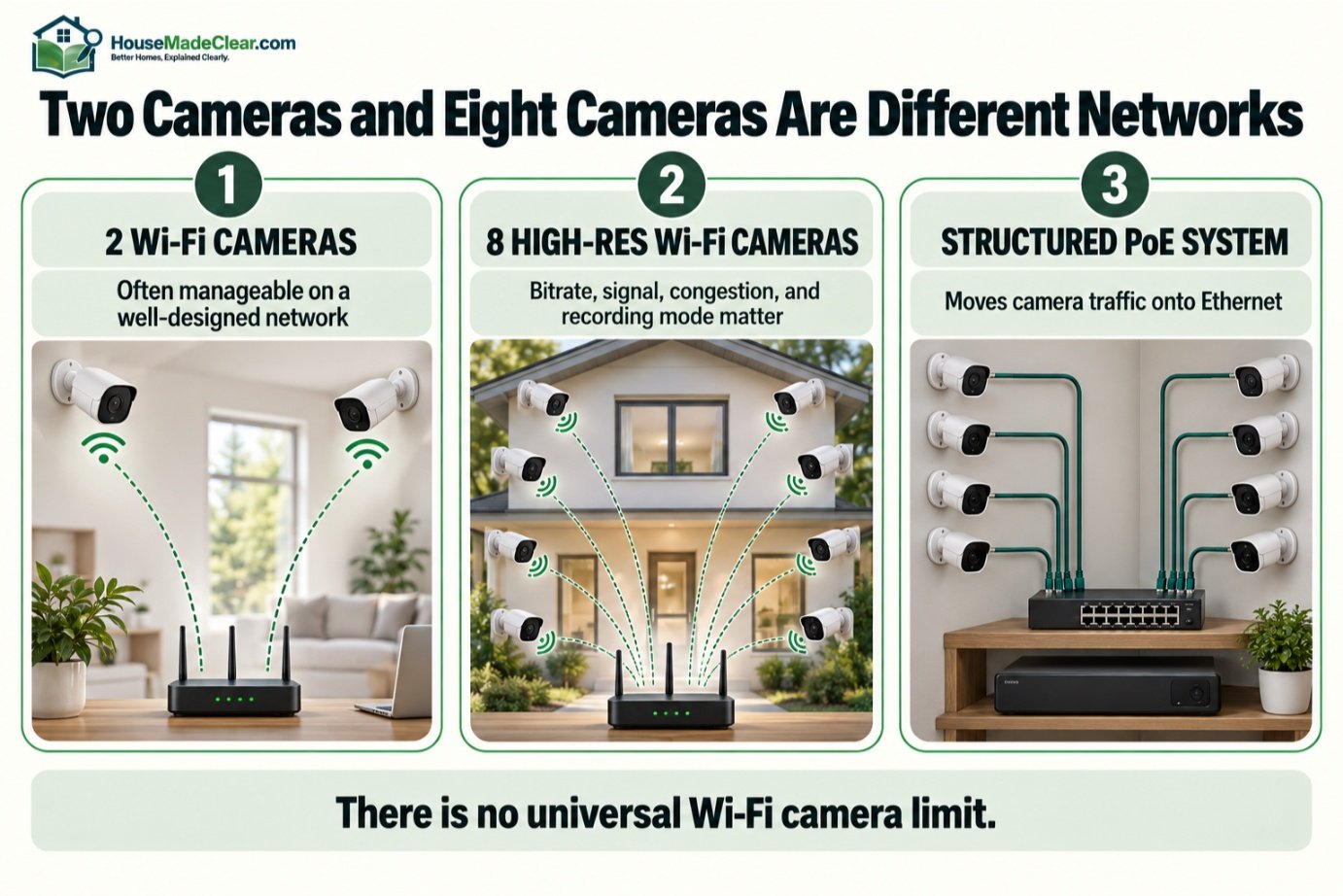
Consider:
Two Wi-Fi Cameras
Usually easy for a decent network.
Eight High-Resolution Wi-Fi Cameras
Now the wireless network must handle significantly more:
- Data
- Device connections
- Simultaneous streaming
A PoE system moves that traffic onto Ethernet instead.
For larger permanent deployments, that can simplify performance planning.
How Many Wi-Fi Cameras Can a Home Network Handle?
There is no meaningful universal number.
It depends on:
- Router/access points
- Wi-Fi standard
- Camera bitrate
- Resolution
- Recording mode
- Other network devices
- Distance
- Interference
A network that works perfectly with two cameras may struggle after adding several more.
Plan capacity instead of counting devices alone.
Wired vs Wireless for Large Homes
For a large home, wired networking has major advantages.
Wireless signals can weaken through:
- Brick
- Concrete
- Multiple floors
- Metal
- Long distances
A properly designed wired system gives each camera a dedicated physical network path.
Wireless can still work in a large home if you have:
- Multiple access points
- Proper network design
but that infrastructure itself requires planning.
Wired vs Wireless for Small Homes
For a small home or apartment with:
- One doorbell
- One indoor camera
- One outdoor camera
Wi-Fi can be entirely sufficient.
Running Ethernet through finished walls may add complexity without much practical benefit.
This is why the right answer changes with system size.
Wired vs Wireless Cameras for Apartments
Wireless cameras are generally the more practical choice for renters.
Reasons:
- Fewer permanent cable routes
- Easier relocation
- Easier removal
Battery products can reduce installation further.
However, renters should consider:
- Lease restrictions
- Exterior/common-area rules
- Drilling permissions
- Privacy
before installing any camera.
Wired vs Wireless Cameras for Homeowners
Homeowners can justify more permanent infrastructure.
If you expect to remain in the home for years and want several exterior cameras:
running Ethernet once can be worth the installation effort.
It gives future flexibility even when cameras are eventually replaced.
Wired Security Cameras for New Construction
New construction is one of the best opportunities to install camera cabling.
Before drywall:
- Ethernet runs are easier
- Camera locations can be planned
- Cables can terminate centrally
Even if cameras are not purchased immediately, prewiring gives future options.
Potential locations include:
- Front entrance
- Driveway
- Garage
- Side access
- Backyard entrance
Plan placement before wiring; do not just put a cable at every roof corner.
Camera Placement Is More Important Than Wired vs Wireless
An expensive PoE camera installed badly can be less useful than a modest Wi-Fi camera installed correctly.
Poor positions may produce:
- Backlit faces
- Excessively high viewing angles
- Obstructed views
- Too much distance
Choose:
camera purpose → camera location → connection method
in that order.
Do not buy a camera system first and then try to invent locations for it.
Wired vs Wireless Camera Cost
Cost should be evaluated as the complete system, not simply camera price.
Wired System Costs May Include
- Cameras
- NVR
- Hard drives
- PoE switch
- Ethernet cable
- Installation labor
- Mounting
Wireless System Costs May Include
- Cameras
- Wi-Fi upgrades
- Cloud subscription
- Replacement/charging accessories
- Local storage/base station
- Mounting
A wireless system may be cheaper to install initially while becoming more expensive over time if cloud subscriptions are required.
A wired system may cost more to install but have lower recurring storage costs if local recording is used. You may also want to know about Home Security Motion Sensors.
Are Wired Cameras Cheaper Long Term?
Sometimes.
A locally recorded PoE system may avoid recurring cloud-storage subscriptions.
But there can still be costs for:
- Hard-drive replacement
- NVR replacement
- Maintenance
Wireless systems can also operate without subscriptions when they support sufficient local storage.
Compare actual products rather than assuming one category is always cheaper.
Are Wireless Cameras Easier to Expand?
For small expansions:
yes.
Adding another Wi-Fi camera can be as simple as:
- Mount
- Power
- Pair
But as the system becomes larger, Wi-Fi capacity becomes increasingly important.
A PoE system requires a cable for each new camera but can provide a more structured long-term expansion path.
Wired vs Wireless Cameras With Smart Homes
Wi-Fi cameras often integrate easily with:
- Smart displays
- Voice assistants
- Mobile apps
PoE camera systems may integrate through:
- NVR platform
- Home automation
- Network APIs
depending on manufacturer.
Smart-home integration is convenient, but do not make it your only selection criterion.
A security camera’s primary job is still to provide useful:
- Detection
- Video
- Recording
when needed.
Do Wired Cameras Need Wi-Fi?
No.
A PoE camera can operate entirely over Ethernet.
However, your phone may still use Wi-Fi to view the local system while you are at home.
Remote viewing from outside the home usually involves an internet connection.
Do Wired Cameras Need Internet?
Not necessarily for local operation.
A local IP-camera/NVR system can potentially operate on a local network without internet access.
But internet may be required for:
- Remote viewing
- Push notifications
- Firmware updates
- Cloud services
depending on the system.
This distinction is one of the biggest advantages of understanding the network architecture before purchasing.
Do Wireless Cameras Need Internet?
Not always.
A Wi-Fi camera can technically connect to a local wireless network without internet access.
But many consumer Wi-Fi cameras rely heavily on cloud services for:
- Setup
- Authentication
- Notifications
- Recording
- Remote access
so internet availability can be much more important in practice.
Check the exact product.
Which Type Is Better for Privacy?
Neither connection type is automatically more private.
Privacy depends on:
- Where footage is stored
- Whether cloud services are used
- Account security
- Encryption
- Camera placement
- Vendor practices
A locally recorded PoE system can provide greater control over where recordings live.
But an insecurely configured local system can still be vulnerable.
A well-secured cloud camera may be a better choice for someone who cannot maintain network infrastructure properly.
Security Camera Privacy Around Neighbors
Whether cameras are wired or wireless, aim them responsibly.
Avoid unnecessarily monitoring:
- Neighboring windows
- Private yards
- Areas unrelated to your security need
Also understand local requirements regarding:
- Audio recording
- Shared areas
Camera technology does not change those considerations.
Wired vs Wireless Security Cameras: Pros and Cons
Wired Camera Pros
- Stable network connection
- Excellent for multiple cameras
- Strong fit for continuous recording
- Easy centralized NVR architecture
- Less dependence on Wi-Fi coverage
- PoE can provide power and data through one cable
Wired Camera Cons
- More difficult installation
- Cable routing required
- Harder to relocate
- Professional installation may be useful
Wireless Camera Pros
- Faster installation
- Flexible placement
- Easier relocation
- Excellent for smaller systems
- Good renter option
Wireless Camera Cons
- Depends on wireless network quality
- More potential for signal issues
- Large systems can stress Wi-Fi
- Cloud dependency varies by product
Battery Camera Pros
- Minimal cabling
- Easy installation
- Can remain powered during AC outage
Battery Camera Cons
- Requires charging
- Battery life varies
- Continuous recording may be limited
- Network/cloud services may still be needed
Which Security Camera Type Is Best for You?
Choose PoE/Wired If:
- You own the home
- You want 4+ permanent cameras
- You want 24/7 recording
- You prefer local NVR storage
- You can run Ethernet
- Reliability is a top priority
Choose Plug-In Wi-Fi If:
- You want simple installation
- Only a few cameras are needed
- Strong Wi-Fi is available
- Nearby power exists
- You want app-based convenience
Choose Battery Cameras If:
- No outlet is available
- Cable routing is difficult
- You rent
- Camera is in a difficult location
- Motion-event recording meets your needs
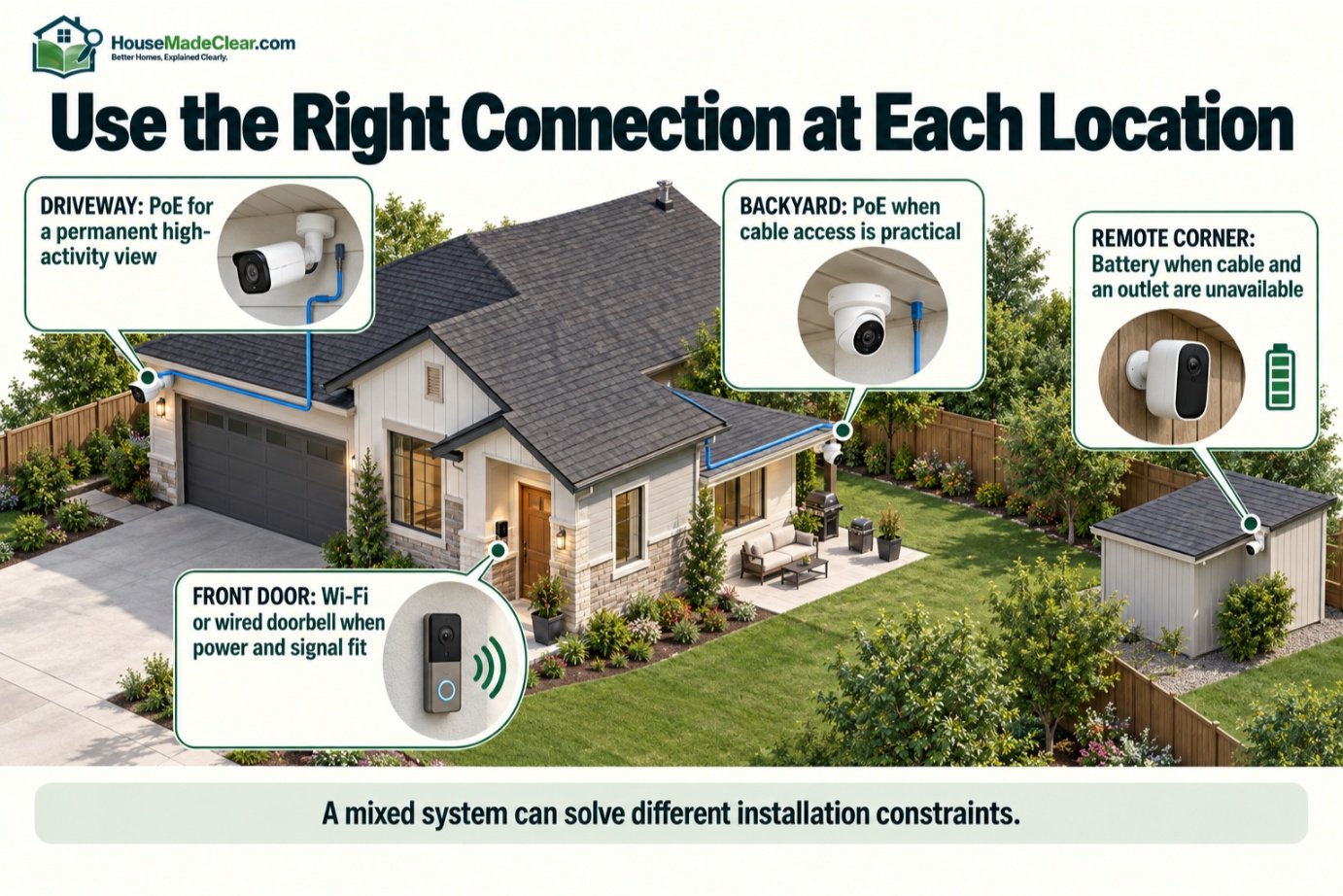
Can You Mix Wired and Wireless Cameras?
Yes, depending on the ecosystem.
A home could use:
- PoE cameras around exterior
- Wi-Fi doorbell
- Battery camera at detached structure
There is no requirement that every camera use the same connection technology.
However, using too many separate platforms can create:
- Multiple apps
- Multiple subscriptions
- Fragmented notifications
A mixed system is most useful when each technology solves a specific installation problem.
Example: Four-Camera Detached House
Suppose you need cameras at:
- Front door
- Driveway
- Side gate
- Backyard
If attic access makes Ethernet installation practical, I would strongly consider:
PoE cameras + local NVR
for a permanent setup.
Why?
All four cameras can receive:
- Power
- Data
through structured cabling and record centrally.
Example: Apartment
Suppose you need:
- Front entrance
- Living room while away
Running network cable is probably unnecessary.
A:
- Wi-Fi video doorbell
- Wi-Fi indoor camera
may be much more practical.
Example: Detached Garage
If the garage is too far for good Wi-Fi but has a network path available:
wired Ethernet may be preferable.
If cable is impossible but cellular or strong point-to-point wireless coverage exists, another solution may be required.
Do not install a Wi-Fi camera first and discover afterward that connectivity is unreliable.
Example: Remote Backyard Corner
No Ethernet.
No outlet.
Good Wi-Fi.
A battery camera may be the simplest option.
Just remember:
Easy installation transfers some work into ongoing battery maintenance.
How to Choose Between Wired and Wireless Cameras
Step 1: Decide What You Want to Record
Do you need:
- Events only
- Continuous recording
Step 2: Count Cameras
One or two cameras are very different from eight.
Step 3: Check Cable Access
Can Ethernet reasonably reach the camera locations?
Step 4: Test Wi-Fi
Test at the exact outdoor mounting points.
Step 5: Determine Power Availability
Is there:
- Outlet
- Existing wiring
- PoE route
Step 6: Choose Storage
Decide between:
- NVR
- microSD
- Cloud
- Hybrid
Step 7: Consider Outages
Ask what happens during:
- Internet outage
- Power outage
- Wi-Fi failure
Step 8: Review Subscription Requirements
Determine which features require recurring fees.
Step 9: Consider Maintenance
Ask whether you are comfortable:
- Charging batteries
- Maintaining NVR
- Managing network equipment
Step 10: Choose Technology Per Location
You do not have to force every location into the same solution.
Common Wired vs Wireless Camera Mistakes
1. Assuming Wireless Means No Wires
Problem:
Camera still needs power.
Better approach:
Check whether it is Wi-Fi plug-in or battery-powered.
2. Buying Wi-Fi Cameras Without Testing Signal
Problem:
Camera disconnects after mounting.
Better approach:
Test exact installation location.
3. Assuming Wired Cameras Work Without Internet
Problem:
Cloud-dependent functions still fail.
Better approach:
Understand local vs cloud architecture.
4. Running Exposed Camera Cable
Problem:
Cable can be damaged.
Better approach:
Protect cable routing appropriately.
5. Choosing Battery Cameras for Constant Activity
Problem:
Frequent events reduce battery life.
Better approach:
Use permanent power where activity is heavy.
6. Putting Too Many Cameras on Weak Wi-Fi
Problem:
Network performance suffers.
Better approach:
Upgrade network or use wired connections.
7. Ignoring Storage Cost
Problem:
Subscription becomes unexpected expense.
Better approach:
Compare long-term storage cost.
8. Choosing Connection Before Placement
Problem:
Camera ends up in a poor location.
Better approach:
Choose security objective and location first.
9. Assuming Higher Resolution Solves Everything
Problem:
Poor angle still creates poor evidence.
Better approach:
Prioritize position and lighting.
10. Treating Cameras as the Whole Security System
Problem:
Doors, locks, and sensors remain weak.
Better approach:
Use layered security.
Our guide to common home security mistakes covers several of these broader problems. Also read about Basic Home Security System Flow.
Wired vs Wireless Security Cameras: Final Comparison
| If Your Priority Is… | Better Starting Choice |
|---|---|
| Maximum network stability | Wired/PoE |
| 24/7 local recording | Wired/PoE |
| 6–10 camera system | Wired/PoE |
| New construction | Wired/PoE |
| No recurring charging | Wired/plug-in |
| Fast installation | Wireless |
| Rental property | Wireless/battery |
| 1–2 camera setup | Wireless often sufficient |
| No power at camera location | Battery |
| Easy relocation | Wireless/battery |
| Local NVR | Wired usually easiest |
| Weak Wi-Fi | Wired |
| Difficult cable routing | Wireless |
| Internet-independent local recording | Local wired system often strongest |
Final Answer: Wired or Wireless Security Cameras?
For most permanent whole-home security-camera systems:
Wired PoE cameras are usually the stronger long-term choice when Ethernet can be installed reasonably.
They provide:
- Stable network connections
- Continuous power
- Excellent multi-camera scalability
- Strong support for local NVR recording
- Less dependence on Wi-Fi conditions
For smaller and more flexible installations:
Wireless cameras are often the better practical choice.
They provide:
- Faster installation
- Easier relocation
- Fewer network cables
- Good flexibility for renters and finished homes
And when neither data nor power cabling is practical:
Battery cameras offer the easiest installation, provided you are comfortable with charging and the recording limitations of the particular model.
The key is not to ask:
“Are wired cameras better than wireless cameras?”
Instead ask:
“Which connection method best supports the recording, reliability, installation, and maintenance requirements at this specific location?”
A front door may be ideal for Wi-Fi.
A driveway may benefit from PoE.
A remote backyard corner may justify battery power.
A strong home-security camera system can use different technologies where each one makes sense.
Whatever you choose, do not let connectivity distract from the basics:
- Place cameras where they capture useful activity
- Test nighttime footage
- Secure camera accounts
- Understand recording/storage
- Maintain the system
- Combine cameras with good locks, sensors, lighting, and other appropriate security measures
Cameras improve visibility and awareness, but they are only one part of a broader home-security strategy. You may also read about How to Improve Home Security. Also check our Free security camera coverage planner tool.
Frequently Asked Questions
Are wired or wireless security cameras better?
Wired cameras are generally better for permanent multi-camera systems, continuous recording, and locations where network reliability is a priority. Wireless cameras are better when easy installation and flexible placement are more important.
Are wired security cameras more reliable than wireless?
A wired Ethernet connection is generally more predictable because it does not depend on Wi-Fi signal quality or radio conditions. However, wired systems can still fail because of power, cable, network, recorder, or equipment problems.
Do wired security cameras need Wi-Fi?
No. Ethernet or PoE cameras can communicate over a wired local network without using Wi-Fi. Internet may still be needed for remote viewing, notifications, cloud features, or updates.
Do wired security cameras need internet?
Not necessarily. A properly designed local camera and NVR system can potentially record without internet access. Remote and cloud-dependent features may require an internet connection.
Do wireless security cameras need internet?
Not all wireless cameras require internet for every function, but many consumer Wi-Fi systems depend on cloud services for features such as remote access, notifications, authentication, or storage.
Do wireless cameras work during a power outage?
Battery-powered cameras can remain powered during an AC outage, but Wi-Fi and internet services may stop if the router or modem loses power. Plug-in wireless cameras normally lose power unless backup power is provided.
What is the difference between wireless and wire-free security cameras?
A wireless camera usually sends data over Wi-Fi but may still require a power cord. A wire-free camera typically uses both wireless communication and battery power.
Is PoE better than Wi-Fi for security cameras?
PoE is generally excellent for permanent multi-camera installations because one Ethernet cable can provide network data and power. Wi-Fi is easier to install and may be more practical for smaller systems.
Can wireless security cameras record continuously?
Some plug-in wireless cameras can record continuously, but support varies by model. Battery-powered cameras more commonly emphasize motion-triggered recording to preserve battery life.
Are battery security cameras worth it?
Battery cameras can be very useful where running power or Ethernet is difficult. Their main tradeoffs are charging, variable battery life, and potential limitations on continuous recording.
Which security cameras are best for renters?
Wireless or battery-powered cameras are generally easier for renters because they require less permanent cabling and can often be moved to a new property. Always check lease and installation restrictions.
Can I use wired and wireless security cameras together?
Yes, if your chosen systems support the arrangement. A home can use PoE cameras in permanent exterior locations and Wi-Fi or battery cameras where cabling is difficult.







[…] Wired vs Wireless Security Cameras: Which Is Better for Home Security? […]