

















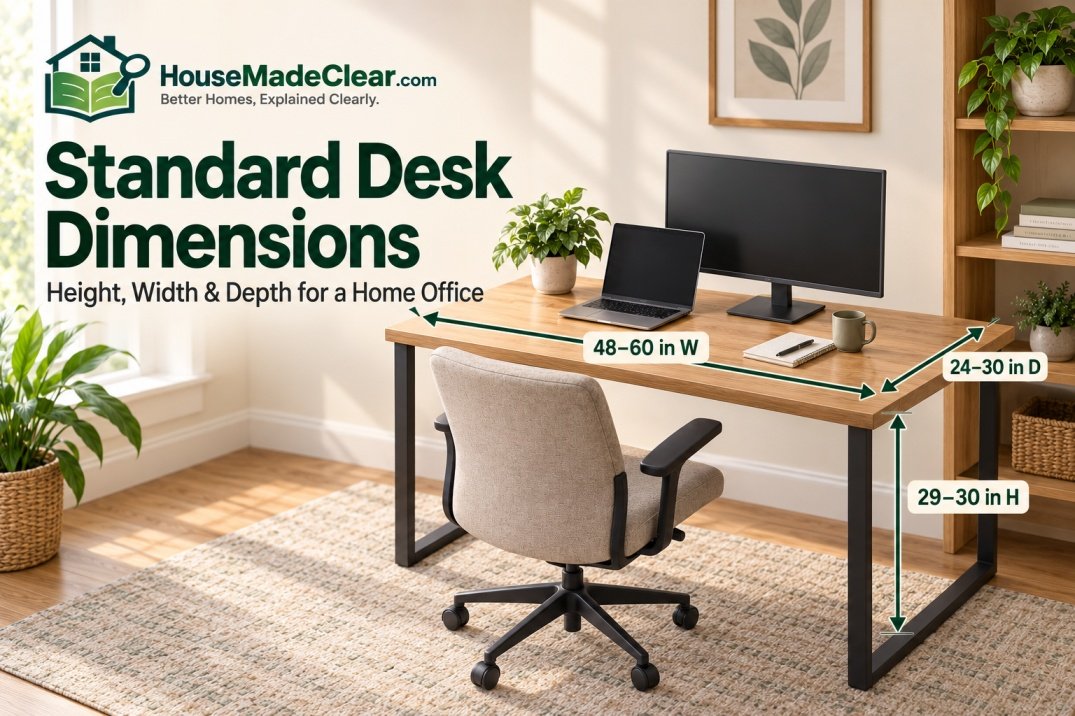
A typical home-office desk is approximately 29–30 inches high, 24–30 inches deep, and 48–60 inches wide.
Those measurements are a useful starting point, but there is no single universal standard desk size.
Compact desks may be only 36–48 inches wide and around 20–24 inches deep, while larger computer or executive desks can be 60–72 inches wide and 30 inches deep or more. Height is more consistent among traditional fixed desks, with many current models sitting close to 29½ inches high.
The right desk size depends on what you actually put on it, how much room the chair needs, whether you use one or multiple monitors, and the dimensions of your home office.
Quick Answer
For a typical home office, useful standard desk dimensions are:
- Height: about 29–30 inches
- Depth: about 24–30 inches
- Width: about 48–60 inches
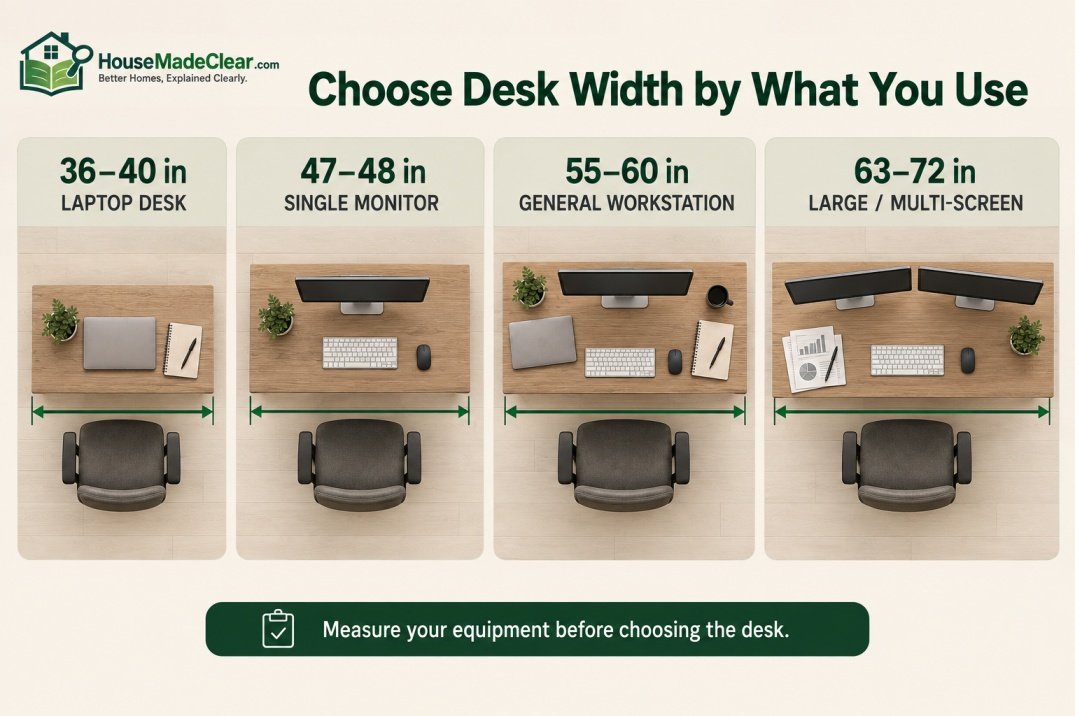
Common desk-width categories include:
- 36–40 inches: compact laptop desk
- 47–48 inches: small home-office desk
- 55–60 inches: comfortable general-purpose desk
- 63–72 inches: large workstation
If you use a computer monitor, desk depth matters as much as width. OSHA recommends enough work-surface depth to position a monitor at least 20 inches from the user’s eyes, while also providing adequate space for the keyboard and other frequently used equipment.
Always measure the room, chair clearance and equipment before choosing a desk rather than buying solely from a nominal “standard” size.
Current furniture provides a useful reality check. For example, IKEA currently sells one home-office desk at approximately 47¼ × 24¾ × 29½ inches, a 55⅛ × 23⅝-inch desk, and a larger office desk measuring approximately 63 × 31½ × 29½ inches. These examples show why desk width and depth vary substantially while fixed desk height tends to stay closer to the 29–30-inch range.
Standard Desk Dimensions at a Glance
| Desk Type | Typical Width | Typical Depth | Typical Height |
|---|---|---|---|
| Compact laptop desk | 36–44 in | 18–24 in | 29–30 in |
| Small home-office desk | 47–48 in | 23–24 in | 29–30 in |
| Standard home-office desk | 48–60 in | 24–30 in | 29–30 in |
| Large computer desk | 60–72 in | 28–32 in | 29–30 in |
| Executive desk | 60–72+ in | 30–36+ in | Around 29–30 in |
| Sit-stand desk | 48–72 in | 24–32 in | Adjustable |
| Writing desk | 36–60 in | 18–24 in | 24-Inch vs 30-Inch Desk DepthAround 29–30 in |
These are practical planning ranges rather than mandatory furniture standards.
What Are the Standard Dimensions of a Desk?
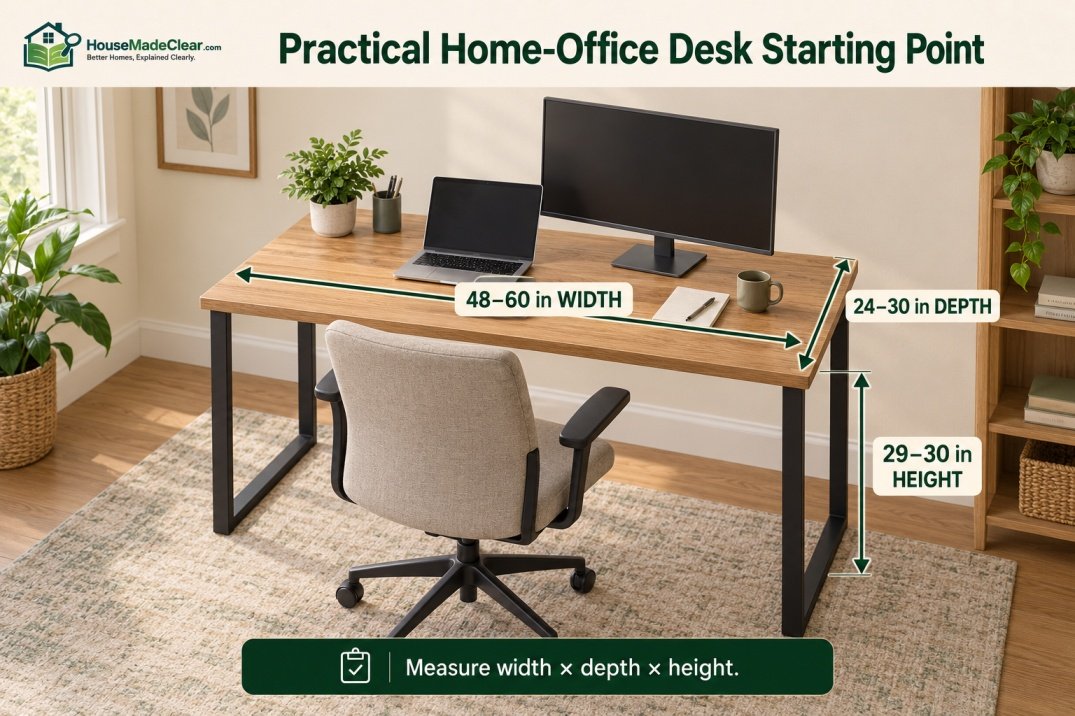
If you are looking for the simplest answer to what are the standard dimensions of a desk, start with approximately:
48–60 inches wide × 24–30 inches deep × 29–30 inches high
That gives enough work surface for many home-office setups without requiring an unusually large room.
However, the three measurements serve different purposes.
Desk Height
Determines how the work surface relates to your:
- Chair
- Arms
- Keyboard
- Legs
Desk Width
Determines how much equipment can sit side by side.
Desk Depth
Determines how far the monitor can sit from you and how much front-to-back work surface you have.
For a computer workstation, depth is often underestimated.
A 60-inch-wide desk can still feel cramped if it is only 18 inches deep and a large monitor occupies most of that depth.
What Is a Regular Desk Size?
A regular desk size for modern home-office use is roughly:
48–60 inches wide
by:
24–30 inches deep
with a fixed height near:
29–30 inches.
A useful middle-ground desk might therefore measure approximately:
55–60 W × 24–30 D × 29–30 H
This size can work well for:
- Laptop
- Desktop monitor
- Keyboard
- Mouse
- Notebook
- Small accessories
without dominating a normal bedroom or home office.
Standard Desk Height
The most common standard desk height for a conventional fixed-height desk is approximately:
29–30 inches
from the floor to the top of the work surface.
Many current desks are approximately:
29½ inches high.
For example, IKEA’s MITTPLAN and TROTTEN fixed desks are both listed at approximately 29½ inches high.
But this does not mean 29½ inches is ergonomically ideal for every person.
People vary considerably in:
- Height
- Arm length
- Leg length
- Chair height
That is why desk height should be considered together with the chair and keyboard position.
Average Desk Height
If someone asks for the average desk height, approximately:
29–30 inches
is a useful reference for a traditional fixed office desk.
This measurement has remained common because it accommodates many general office tasks and chair designs.
However, an average furniture dimension should not be confused with a personalized ergonomic position.
A desk that is comfortable for someone who is 6’2″ may feel too high for someone who is 5’2″.
Is a 30-Inch Desk Too High?
For many adults:
30 inches is normal for a fixed desk.
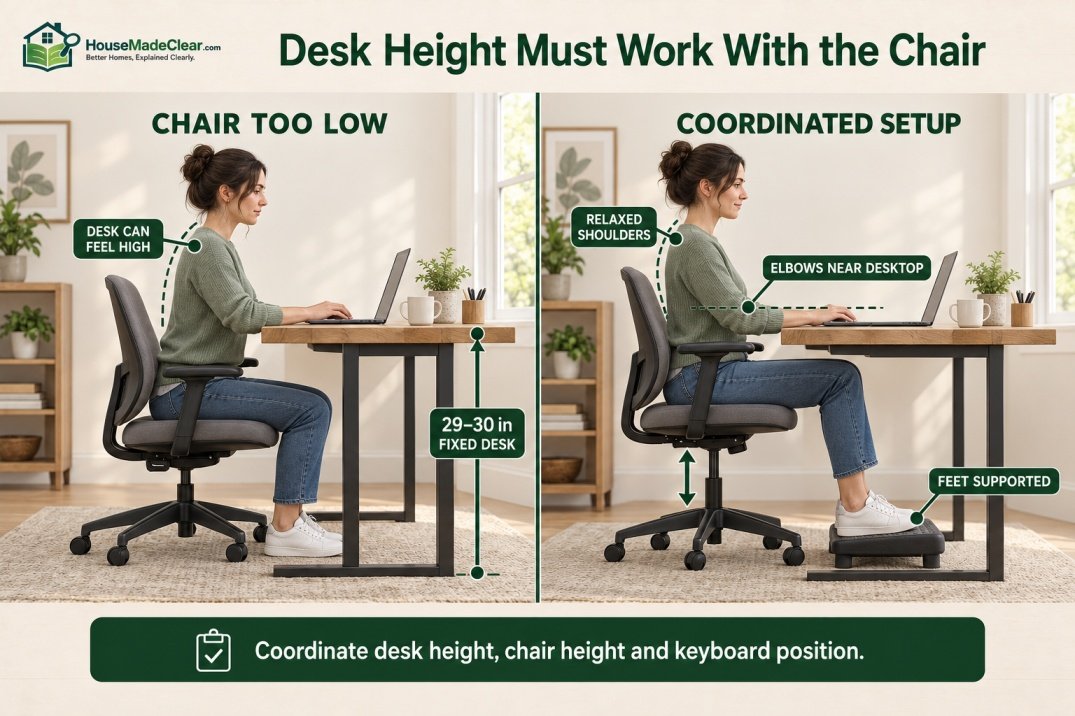
But whether it feels high depends on your chair.
If the desktop causes you to:
- Raise your shoulders
- Reach upward for the keyboard
- Bend your wrists excessively
the working surface may be too high relative to your seated position.
OSHA’s computer-workstation guidance recommends keeping elbows close to the body and using workstation dimensions that allow comfortable, neutral postures.
Possible solutions include:
- Adjusting chair height
- Using a footrest
- Using a keyboard tray
- Choosing a height-adjustable desk
rather than assuming every person must work comfortably at one fixed height.
Desk Height for Shorter Users
A traditional 29–30-inch fixed desk may feel high for some shorter users.
Raising the chair can improve the relationship between:
- Elbows
- Keyboard
- Desktop
but if doing so leaves the feet unsupported, a footrest may be useful.
The objective should be a workstation that fits the user rather than forcing the user to fit the furniture.
Desk Height for Taller Users
A taller person may find a 29-inch desk comfortable, but the more important issue can be under-desk clearance.
Check whether:
- Knees hit drawers
- Thighs touch the underside
- Crossbars interfere with legs
A desk with the correct overall height can still be uncomfortable if storage or structural components reduce the usable space underneath.
Standard Desk Width
Desk width varies more than height.
For home offices, common planning widths include:
- 36 inches
- 40 inches
- 47–48 inches
- 55 inches
- 60 inches
- 63 inches
- 72 inches
There isn’t one universal standard desk width.
Instead, choose width according to:
- Equipment
- Work style
- Available wall space
36-Inch Desk
A:
36-inch-wide desk
is compact.
It works best for:
- Laptop
- Tablet
- Writing
- Occasional home-office work
There may be limited space for a large monitor plus paperwork.
This size can work particularly well in:
- Bedroom corner
- Small apartment
- Guest room
40-Inch Desk
A:
40-inch desk
provides slightly more flexibility while remaining compact.
It can accommodate:
- Laptop
- Small monitor
- Keyboard
- Basic accessories
but it is not ideal if you regularly spread out:
- Documents
- Books
- Multiple devices
48-Inch Desk
A:
48-inch-wide desk
is one of the most useful sizes for a small-to-medium home office.
It provides four feet of horizontal work surface.
That is enough for many setups involving:
- Laptop
- Monitor
- Keyboard
- Mouse
while still fitting into a modest room.
Current manufactured desks close to this size include IKEA’s approximately 47¼-inch-wide MITTPLAN.
Is a 48-Inch Desk Big Enough?
For many home-office users:
yes.
A 48-inch desk can be an excellent choice if:
- You use one monitor
- Paperwork is limited
- Space is important
It may feel tight if you use:
- Two large monitors
- Desktop speakers
- Printer
- Large notebook
- Multiple accessories
Measure the actual equipment instead of deciding by width alone.
55-Inch Desk
A desk around:
55 inches wide
provides a useful middle ground between compact 48-inch desks and larger 60–72-inch workstations.
IKEA currently sells LAGKAPTEN/ALEX configurations around:
55⅛ inches wide × 23⅝ inches deep.
This width is particularly useful when you want:
- More room than a compact desk
- Space for a monitor plus laptop
- Storage unit underneath
without using an entire wall.
60-Inch Desk
A:
60-inch desk
is approximately:
5 feet wide.
For a dedicated home office, this is one of the most versatile sizes.
It can provide room for:
- Monitor
- Laptop
- Keyboard
- Speakers
- Notebook
- Accessories
while leaving some clear workspace.
For many users, 60 inches is an excellent general-purpose desk width.
Is a 60-Inch Desk a Good Size?
Yes.
A 60-inch desk is large enough for many serious home-office setups but still fits comfortably along a typical wall.
Before buying one, remember that the desk itself is only part of the room.
You also need space for:
- Office chair
- Chair movement
- Storage
- Door clearance
Our guide to how much space you need behind a desk chair explains why desk width should never be considered without circulation space.
63-Inch Desk
Around:
63 inches
is another common larger-office size.
IKEA’s current fixed TROTTEN desk measures approximately:
63 inches wide × 31½ inches deep × 29½ inches high.
A desk this size provides substantially more work surface than a compact 47–48-inch model.
It may suit:
- Multiple screens
- Paperwork
- Creative work
- Larger dedicated office
provided the room can accommodate its depth. Current furniture also shows how these measurements appear in real products. For example, IKEA’s 63-inch office desk is approximately 63 inches wide, 31½ inches deep and 29½ inches high.
72-Inch Desk
A:
72-inch desk
is:
6 feet wide.
This is a large workstation.
It makes sense when:
- Multiple monitors are used
- You need significant paperwork space
- Two work zones are required
- Office is spacious
In a small bedroom office, 72 inches can overwhelm the wall and make circulation more difficult.
Measure the room before assuming bigger is better.
Standard Desk Depth
For a general home office, approximately:
24–30 inches
is a useful standard desk depth range.
Depth affects:
- Monitor distance
- Keyboard position
- Writing space
- Overall room footprint
A deeper desk can improve computer-workstation flexibility, but it also occupies more floor space. Calculate a comfortable monitor distance using our free tool available.
Is 20 Inches Deep Enough for a Desk?
A:
20-inch-deep desk
can work for:
- Laptop
- Writing
- Tablet
- Very compact workspace
It becomes more challenging with a desktop monitor.
You may have limited ability to position:
- Screen
- Keyboard
- Forearms
comfortably.
If the room permits, around 24 inches is generally more versatile for a computer desk.
Is a 24-Inch-Deep Desk Enough?
For many home offices:
yes.
A 24-inch-deep desk works well for:
- Laptop
- Smaller monitor
- Keyboard
- Routine office tasks
It is also space-efficient.
Current home-office products near this depth are common—for example, the approximately 47¼ × 24¾-inch MITTPLAN and 55⅛ × 23⅝-inch LAGKAPTEN/ALEX.
If you use a large display, check viewing distance before assuming 24 inches is sufficient.
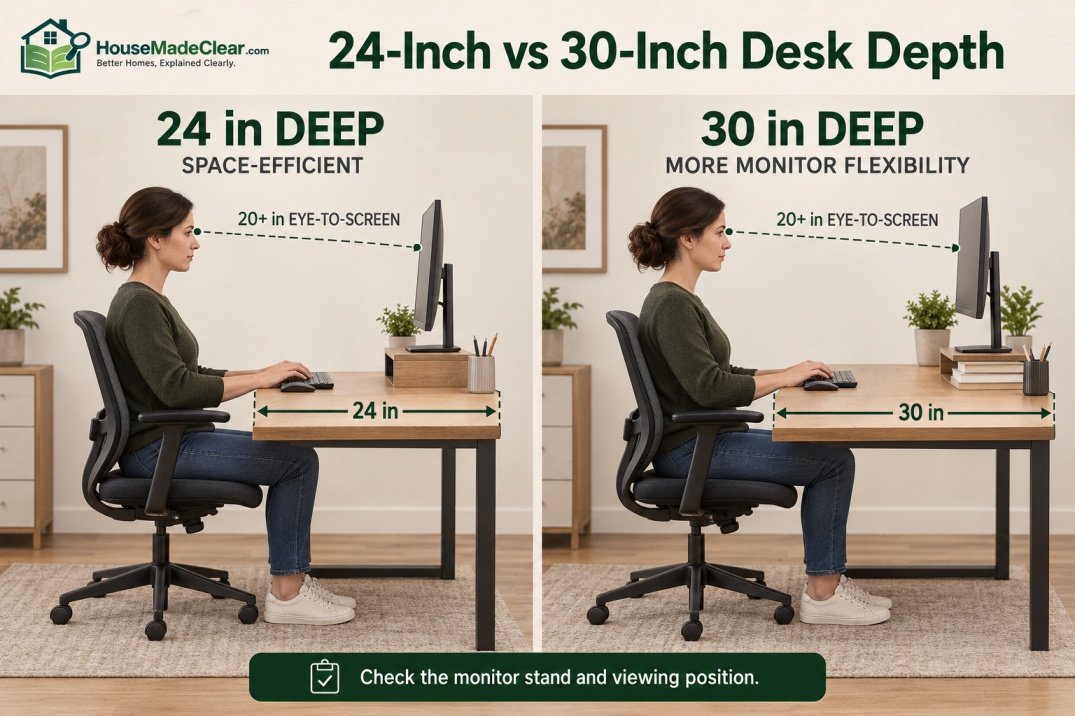
Is a 30-Inch-Deep Desk Better?
A:
30-inch-deep desk
gives you considerably more front-to-back flexibility.
It can provide extra space for:
- Large monitor
- Monitor stand
- Keyboard
- Documents
OSHA notes that work-surface depth should allow the monitor to be positioned at least 20 inches from the user’s eyes.
A deeper desktop can make that easier, especially with a monitor that has a large stand.
24-Inch vs 30-Inch Desk Depth
| 24-Inch Desk | 30-Inch Desk |
|---|---|
| Uses less room | Uses more floor area |
| Good for laptop | Better flexibility for monitors |
| Suitable for small office | Good for dedicated office |
| Often enough for one compact setup | More room for documents |
| Can feel shallow with large screen | More flexible equipment placement |
Neither is automatically better.
The correct choice depends on your equipment and available room depth.
Desk Depth for One Monitor
For a typical one-monitor setup:
24–30 inches
of desk depth is a useful starting range.
A 24-inch desk can work well when:
- Monitor has compact stand
- Screen isn’t unusually large
- Desk can sit slightly away from wall if required
A 30-inch desk provides more flexibility.
Check your actual monitor stand dimensions before buying the desk. Desk depth should provide enough room for the screen, keyboard and other frequently used equipment while maintaining a comfortable computer workstation desk setup.
Desk Depth for Two Monitors
Two monitors do not automatically require a deeper desk.
They primarily require:
more width.
However, if the displays are large or angled inward, additional depth can help maintain comfortable viewing distance.
A monitor arm can also change the amount of usable desktop space.
The better approach is to measure:
- Display width
- Stand depth
- Desired viewing position
instead of relying on a generic dual-monitor desk size.
Standard Office Desk Dimensions
A useful set of standard office desk dimensions is approximately:
48–72 inches wide × 24–30 inches deep × 29–30 inches high
but office desks cover a very broad range.
A compact residential workstation may be:
48 × 24 inches
while a large commercial-style workstation may approach:
60–72 × 30 inches
or more.
The right size is therefore driven more by task and room than by the word “office.”
Standard Office Desk Measurements
When recording standard office desk measurements, list them consistently as:
Width × Depth × Height
For example:
60 W × 30 D × 29.5 H
This prevents confusion.
Some furniture listings place dimensions in a different order, so always check the labels.
Average Desk Dimensions vs Standard Desk Dimensions
These terms are related but not identical.
Standard Desk Dimensions
Common sizes used in furniture manufacturing and space planning.
Average Desk Dimensions
A generalized description of what typical desks tend to measure.
Ideal Desk Dimensions
The dimensions that actually suit:
- Your room
- Your equipment
- Your body
- Your work
The third measurement matters most.
A common dimension is useful for shopping, but it does not guarantee a comfortable workstation.
How Big Is a Desk?
If you are trying to visualize how big a desk is, these categories are useful:
| Desk Size | Approximate Width | Typical Use |
|---|---|---|
| Very compact | 30–36 in | Laptop / occasional work |
| Compact | 36–44 in | Laptop / small monitor |
| Small-medium | 47–48 in | One-person home office |
| Medium | 50–60 in | General computer work |
| Large | 60–72 in | Larger workstation |
| Oversized | 72+ in | Executive / specialized use |
Depth should still be considered separately.
A:
48 × 30-inch desk
may occupy more room than a:
60 × 20-inch desk
even though it is narrower.
Desk Dimensions in Feet
| Desk Size in Inches | Approximate Feet |
|---|---|
| 36 × 24 in | 3 × 2 ft |
| 48 × 24 in | 4 × 2 ft |
| 55 × 24 in | 4.6 × 2 ft |
| 60 × 24 in | 5 × 2 ft |
| 60 × 30 in | 5 × 2.5 ft |
| 72 × 30 in | 6 × 2.5 ft |
Thinking in feet can make it easier to compare the desk with the overall room.
Standard Desk Dimensions in Centimeters
Approximate conversions:
| Inches | Centimeters |
|---|---|
| 24 in | 61 cm |
| 29 in | 74 cm |
| 30 in | 76 cm |
| 36 in | 91 cm |
| 48 in | 122 cm |
| 55 in | 140 cm |
| 60 in | 152 cm |
| 63 in | 160 cm |
| 72 in | 183 cm |
A typical:
60 × 30 × 30-inch desk
is therefore approximately:
152 × 76 × 76 cm.
Use the manufacturer’s exact metric dimensions where precision matters.
What Desk Size Do You Need for a Home Office?
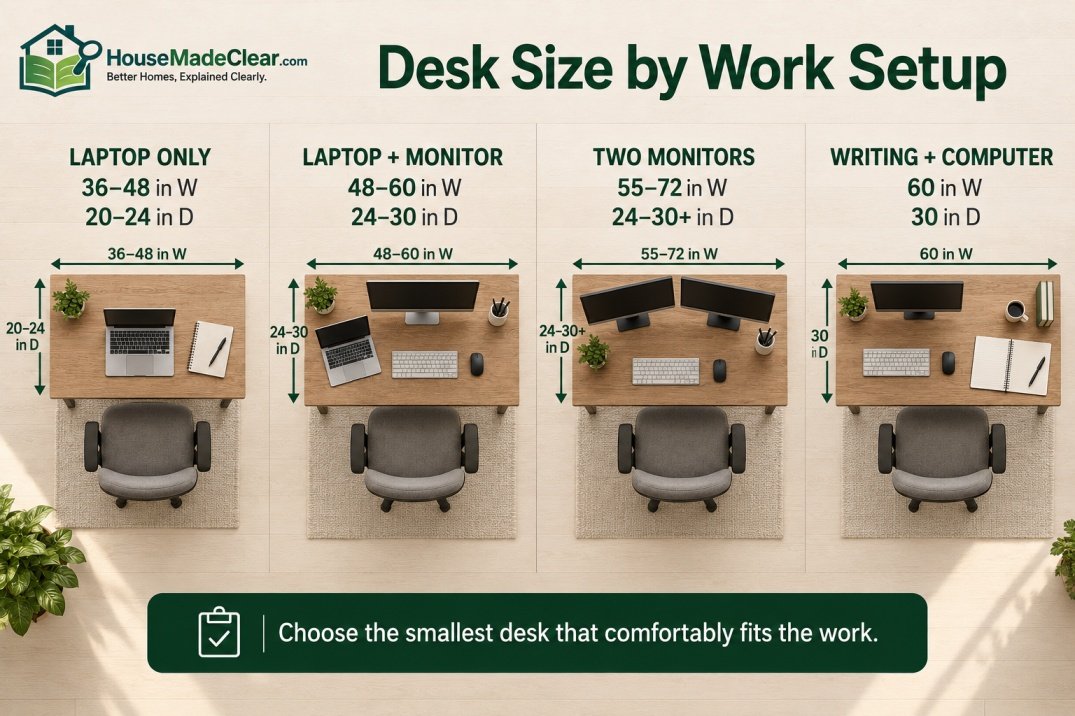
The answer depends primarily on what sits on the desk.
Laptop-Only Desk
For a laptop-only setup:
36–48 inches wide × 20–24 inches deep
may be sufficient.
This is a good option when:
- Office is small
- Desk is used occasionally
- Paperwork is minimal
Laptop Plus Monitor
Consider around:
48–60 inches wide
and:
24–30 inches deep.
This provides room for the monitor plus an open laptop or docking setup.
Desk for One Monitor
Approximately:
48 inches wide
can work well for one-monitor setups.
Move toward:
55–60 inches
if you also need:
- Documents
- Speakers
- Laptop
- Notebook
Desk for Two Monitors
For two monitors, consider:
55–72 inches wide
depending on:
- Monitor size
- Monitor arms
- Speaker placement
Do not assume 60 inches is automatically enough.
Place the two displays side by side and measure their combined width.
Desk for Writing and Paperwork
Paper-intensive work benefits from:
- Wider surface
- More depth
A:
60 × 30-inch desk
can provide useful space for:
- Computer
- Open notebook
- Documents
without requiring constant rearrangement.
Desk for a Small Home Office
For a small room:
40–48 inches wide × 20–24 inches deep
is worth considering.
A shallower desk can preserve:
- Chair clearance
- Walking space
better than a deep executive desk.
Desk for a Dedicated Home Office
If the room is used primarily for work, a desk around:
55–63 inches wide × 24–30 inches deep
provides more flexibility.
A 72-inch desk may work well if:
- Room is large
- Equipment requires it
but it is not necessary for most users.
Desk Size for a 6 × 8 Home Office
A 6 × 8-foot room contains:
72 × 96 inches
of floor area.
A:
48 × 24-inch desk
can fit comfortably along a suitable wall while leaving significantly more floor area for the chair than a 60 × 30 desk.
In a room this small, prioritize:
- Chair movement
- Door clearance
over maximizing desktop area.
Desk Size for an 8 × 8 Home Office
An:
8 × 8-foot office
is:
96 × 96 inches.
A desk around:
48–60 inches wide
and:
24 inches deep
can work well.
A 30-inch-deep desk may also fit, but check what remains behind the chair.
Desk Size for an 8 × 10 Home Office
An 8 × 10-foot room provides more flexibility.
You may comfortably consider:
- 55-inch desk
- 60-inch desk
- 63-inch desk
depending on the door and storage arrangement.
This room size can also support a:
30-inch-deep workstation
more easily than a tiny bedroom office.
Desk Size for a 10 × 10 Home Office
A:
10 × 10-foot office
can accommodate many standard desk sizes.
Options may include:
- 60 × 30
- 63 × 30
- 72 × 30
depending on:
- Storage
- Guest chairs
- Bookshelves
Do not fill the room simply because space is available.
Circulation still matters.
Desk Dimensions and Chair Clearance
One of the most common planning mistakes is measuring only the desk.
Suppose your room is:
8 feet deep = 96 inches
and you install a:
30-inch-deep desk.
You have:
96 − 30 = 66 inches
remaining between the desk front and opposite wall.
That sounds generous.
But part of that space must accommodate:
- User
- Chair
- Rolling back
- Walking
Our guide to space behind a desk chair explains why around 36 inches may be a compact minimum while 42–48 inches often feels more comfortable.
Desk Depth vs Chair Space
In a small room, choosing:
24-inch desk depth
instead of:
30 inches
gives you an extra:
6 inches
of room behind the chair.
That can have more practical value than the extra six inches of desktop.
Example:
Option A
30-inch desk
36-inch chair zone
Total:
66 inches
Option B
24-inch desk
42-inch chair zone
Total:
66 inches
Both use the same room depth, but Option B provides more movement space.
Desk Dimensions and Distance From the Wall
Desk size and desk-to-wall spacing are separate issues.
A desk may be:
- Directly against wall
- Slightly away from wall
- Floating in room
The right placement depends on:
- Cables
- Monitor
- Baseboards
- Curtains
- Heat vents
For the full layout question, see how far a desk should be from the wall.
Desk Size and Window Placement
A large desk placed in front of a window can:
- Block lower portion
- Interfere with curtains
- Affect radiator/vent access
Monitor placement also matters.
A screen facing strong window light can create visibility problems, while a window directly behind the monitor may cause brightness contrast.
If glare is a concern, see our guide to reducing screen glare in a home office.
The overall orientation is covered in where your desk should face in a home office.
Standard Standing Desk Dimensions
Sit-stand desks often use similar desktop sizes to fixed desks.
Common widths include:
- 48 inches
- 55 inches
- 60 inches
- 63 inches
- 72 inches
Depth commonly falls around:
24–32 inches.
The major difference is height.
A standing desk should not be treated as having one fixed “standard” height because its purpose is adjustability.
For example, IKEA’s current TROTTEN sit/stand desk is approximately 63 × 31½ inches and adjusts from roughly 28⅜ to 48 inches high.
Other products use different ranges.
How High Should a Standing Desk Be?
There is no universal standing height.
The work surface should relate to:
- User height
- Elbow position
- Keyboard
- Footwear
OSHA’s purchasing guidance gives a broader workstation reference: keyboard height should be adjustable approximately 22–30 inches for seated tasks and 36–46½ inches for standing tasks, with keyboard height around elbow level.
That is a workstation/keyboard recommendation—not a declaration that every desktop must fit those exact numbers.
Standard L-Shaped Desk Dimensions
L-shaped desks vary considerably.
Typical overall sides might be:
- 48 × 48 inches
- 60 × 48 inches
- 60 × 60 inches
- 72 × 60 inches
or larger.
The important measurements are:
- Main desk length
- Return length
- Desktop depth
- Chair zone inside the L
A large L-shaped desk can consume much more floor area than its individual desktop widths suggest.
Should You Use an L-Shaped Desk?
An L-shaped configuration is useful when you want separate zones for:
- Computer
- Writing
- Printer
- Documents
It can also use a corner efficiently.
However, in a narrow room it may restrict:
- Door movement
- Chair rotation
- Storage access
Measure the complete footprint rather than only the main work surface.
Executive Desk Dimensions
An executive desk is usually larger and deeper than a compact home-office desk.
Typical planning dimensions might be:
- 60–72+ inches wide
- 30–36 inches deep
- Around 29–30 inches high
Large desks may also include:
- Pedestals
- Drawers
- Modesty panel
which reduce usable knee and leg space.
If the home office is small, a simpler desk often provides better movement.
Writing Desk Dimensions
Writing desks tend to be shallower.
A useful range is:
- 36–60 inches wide
- 18–24 inches deep
- Around 29–30 inches high
They work well for:
- Laptop
- Journaling
- Study
- Light paperwork
A very shallow writing desk may be less suitable for a large monitor.
Computer Desk Dimensions
For regular computer work, prioritize:
depth + usable width
rather than decorative appearance.
A good starting range is:
- 48–60 inches wide
- 24–30 inches deep
- Around 29–30 inches high
Large monitor setups may benefit from additional width or depth.
Desk Knee and Leg Space
The dimensions underneath the desk matter just as much as the top.
OSHA recommends adequate under-work-surface clearance so users can change working positions. Its workstation guidance includes minimum clearance references such as about 20 inches of width, 17 inches of knee-level depth, and 24 inches of foot-level depth for the described seated workstation method.
Do not fill this area with:
- Computer tower
- Boxes
- Trash can
- Storage
if doing so prevents comfortable leg movement. The dimensions underneath the desk matter just as much as the desktop. OSHA provides guidance for under-desk knee and leg clearance so users have enough room to change posture and move their legs comfortably.
Desk Drawers Can Reduce Usable Height
A 30-inch-high desk with a deep center drawer may provide less useful leg clearance than a simpler desk of the same height.
Before buying, check:
height under desk
rather than only:
overall desk height.
For example, IKEA’s approximately 29½-inch-high MITTPLAN lists about 28⅜ inches of height under the furniture for the relevant configuration.
How to Measure Your Room for a Desk
Do this before buying.
Step 1: Measure Available Wall Width
Record the distance between:
- Corners
- Door trim
- Windows
- Cabinets
Step 2: Measure Room Depth
Determine how much room exists perpendicular to the desk.
Step 3: Mark the Desk Footprint
Use painter’s tape.
Mark:
- Width
- Depth
Step 4: Mark Chair Clearance
Start with the space you need for normal chair movement.
Step 5: Open the Door
Make sure the door swing does not hit:
- Desk
- Chair
Step 6: Open Storage
Check:
- Closet
- Filing cabinet
- Desk drawers
Step 7: Check Window Access
Make sure the desk does not prevent:
- Opening window
- Adjusting blinds
Step 8: Check Power
Locate:
- Outlets
- Ethernet
- Cable paths
Step 9: Place Equipment on the Mock Desk
Use approximate measurements for:
- Monitor
- Laptop
- Speakers
Step 10: Choose the Smallest Desk That Comfortably Meets Your Needs
A desk that leaves more room for movement can often make the entire office feel larger and function better.
How Much Wall Space Does a Desk Need?
Give yourself slightly more wall width than the desk itself.
For example, a:
60-inch desk
on a:
61-inch wall
technically fits, but leaves almost no flexibility.
A wider wall gives room for:
- Cable access
- Baseboards
- Curtains
- Floor molding
A few extra inches on each side generally makes installation easier.
Standard Desk Size for a Bedroom Office
If the desk shares a room with a bed, consider:
40–48 inches wide × 20–24 inches deep.
This is often sufficient for:
- Laptop
- Single monitor
without consuming too much bedroom circulation.
If work is full-time, a larger 55-inch desk may be worthwhile if the room can accommodate it comfortably.
Standard Desk Size for an Apartment
In a small apartment, depth often matters more than width.
A:
48 × 24-inch desk
may fit much more comfortably than:
48 × 30 inches
because the extra six inches project into the room every day.
Wall-mounted or compact desks can reduce footprint further.
Standard Desk Size for Two People
Two people can use:
- One very long desk
- Two separate desks
For side-by-side work, each person generally benefits from a clearly defined working zone.
A:
72-inch desk
may be workable for two compact laptop setups, but can feel tight for two full computer workstations.
Two separate:
48–60-inch desks
provide much more flexibility if the room allows.
Does a Bigger Desk Improve a Home Office?
Not automatically.
A bigger desk provides more surface area.
But it can also:
- Reduce chair clearance
- Narrow walkways
- Block storage
- Encourage clutter
The best desk is generally the smallest size that comfortably accommodates the actual work setup while preserving good room circulation.
Common Desk Sizing Mistakes
1. Buying Based Only on Width
Problem:
Desk fits wall but is too deep for room.
Better approach:
Measure width and depth.
2. Ignoring Chair Clearance
Problem:
Chair hits wall every time you stand.
Better approach:
Plan chair movement before buying.
3. Choosing a Desk That Is Too Shallow for the Monitor
Problem:
Screen sits too close.
Better approach:
Measure monitor stand and intended viewing position.
4. Assuming 30 Inches High Fits Everyone
Problem:
User raises shoulders or sits awkwardly.
Better approach:
Coordinate desk with chair and keyboard.
5. Ignoring Under-Desk Storage
Problem:
Drawers reduce leg space.
Better approach:
Check clear dimensions underneath.
6. Buying a 72-Inch Desk for a Small Room
Problem:
Office becomes difficult to move around.
Better approach:
Prioritize room function over maximum surface.
7. Forgetting Doors and Drawers
Problem:
Furniture collides.
Better approach:
Measure everything when fully open.
8. Ignoring Window Position
Problem:
Desk blocks blinds or creates poor monitor placement.
Better approach:
Plan desk and window together.
9. Assuming a Standing Desk Has One Correct Height
Problem:
Desk isn’t adjusted to user.
Better approach:
Choose sufficient adjustment range.
10. Measuring Furniture but Not Equipment
Problem:
Monitor, laptop and speakers don’t fit comfortably.
Better approach:
Mock up the complete workstation.
Quick Desk Size Recommendations
| Work Setup | Useful Starting Size |
|---|---|
| Laptop only | 36–48 W × 20–24 D |
| Laptop + monitor | 48–60 W × 24–30 D |
| Single-monitor workstation | 48–60 W × 24–30 D |
| Two monitors | 55–72 W × 24–30+ D |
| Writing + computer | 60 W × 30 D |
| Small bedroom office | 40–48 W × 20–24 D |
| Dedicated home office | 55–63 W × 24–30 D |
| Large workstation | 60–72+ W × 30+ D |
These are starting points.
Measure the actual equipment before selecting furniture.
Which Desk Size Should You Choose?
Choose Around 40 Inches If:
- You work primarily on a laptop
- Space is extremely limited
Choose Around 48 Inches If:
- Small home office
- One monitor
- Minimal paperwork
Choose Around 55 Inches If:
- You want more room without a large footprint
- Laptop + monitor setup
Choose Around 60 Inches If:
- Home office is used daily
- You want a versatile work surface
Choose Around 63 Inches If:
- Larger computer setup
- More documents or equipment
Choose Around 72 Inches If:
- Multiple monitors
- Large dedicated office
- Significant work surface required
Final Answer: What Are Standard Desk Dimensions?
For most home offices, a useful set of standard desk dimensions is:
29–30 inches high
24–30 inches deep
48–60 inches wide
A desk around:
55–60 inches wide × 24–30 inches deep × approximately 29–30 inches high
is a very versatile starting point for a dedicated one-person home office.
For compact spaces:
36–48 inches wide × 20–24 inches deep
may be enough.
For larger computer setups:
60–72 inches wide × 30 inches deep or more
can provide additional working room.
But don’t choose a desk solely because its dimensions are described as “standard.”
Measure:
- Room
- Chair
- Monitor
- Laptop
- Storage
- Door
- Window
before buying.
The best desk is not necessarily the biggest one that fits.
It is the one that gives you enough work surface without sacrificing comfortable chair movement and room circulation.
Frequently Asked Questions
What are standard desk dimensions?
A typical home-office desk is approximately 29–30 inches high, 24–30 inches deep and 48–60 inches wide. Compact and large desks can fall outside these ranges.
What are the standard dimensions of a desk?
For general planning, approximately 48–60 inches wide by 24–30 inches deep by 29–30 inches high is a useful reference for a conventional home-office desk.
What is a regular desk size?
A regular one-person home-office desk is often around 48–60 inches wide and 24–30 inches deep, with a fixed height close to 29–30 inches.
What is the average desk size?
There is no single official average, but many residential desks fall somewhere around 48–60 inches wide, 24–30 inches deep and approximately 29–30 inches high.
How big is a standard office desk?
A standard office desk may be around 48–72 inches wide and approximately 24–30 inches deep. Larger executive desks can be wider and deeper.
What is the standard desk height?
Traditional fixed desks are commonly around 29–30 inches high. The best working height still depends on the user, chair and keyboard position.
What is the standard desk width?
There is no single standard width. Common home-office desks range from roughly 36–72 inches wide, with approximately 48–60 inches being particularly useful for many one-person workstations.
What is the standard desk depth?
Approximately 24–30 inches is a common and practical depth range for a home-office computer desk. Shallower writing and laptop desks may be around 18–24 inches deep.
Is a 48-inch desk big enough?
Yes. A 48-inch desk can work very well for a laptop or single-monitor home-office setup. More equipment or paperwork may justify a 55- or 60-inch desk.
Is a 60-inch desk a good size?
Yes. A 60-inch-wide desk is one of the most versatile sizes for a dedicated home office because it offers substantial work surface without being as large as a 72-inch workstation.
Is a 24-inch-deep desk deep enough?
For many laptop and single-monitor setups, yes. If you use a large monitor or need more distance between yourself and the screen, a desk closer to 30 inches deep may provide more flexibility.
What size desk do I need for two monitors?
Approximately 55–72 inches of width is a useful starting range for many dual-monitor setups, but the correct size depends on the actual monitor widths, stands or arms, speakers and other equipment.









[…] Standard Desk Dimensions: Height, Width & Depth for a Home Office […]