

















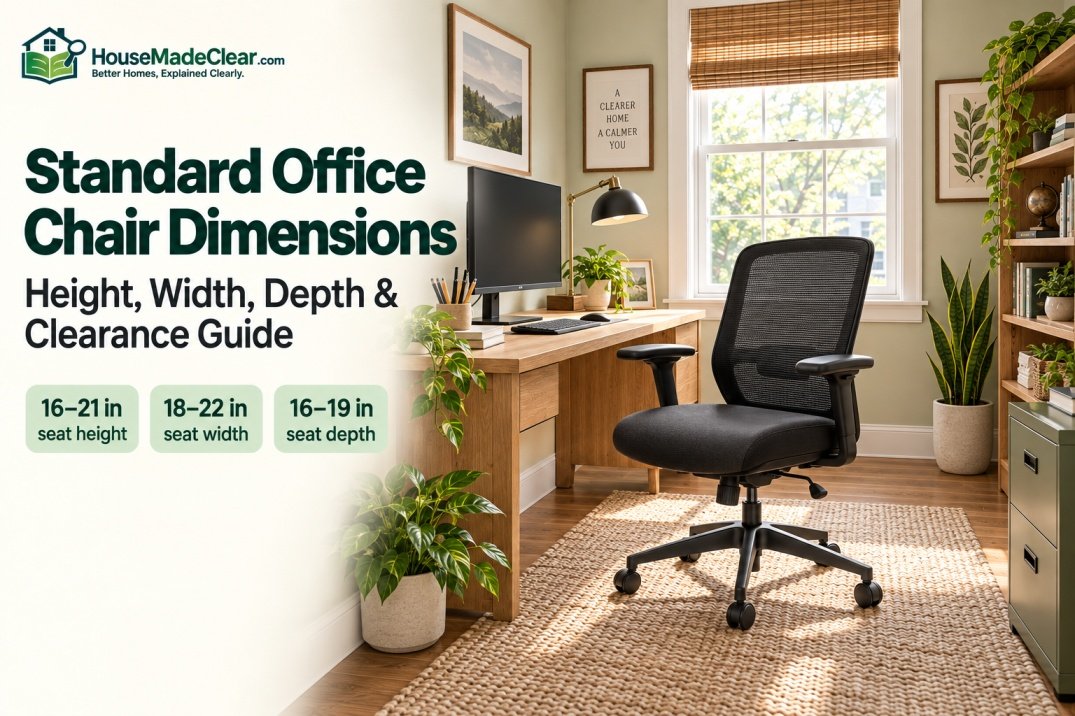
Office chairs do not come in one universal standard size. A compact armless task chair, a full-size ergonomic chair and a high-back executive chair can have substantially different footprints, even when they are all designed for an ordinary office desk.
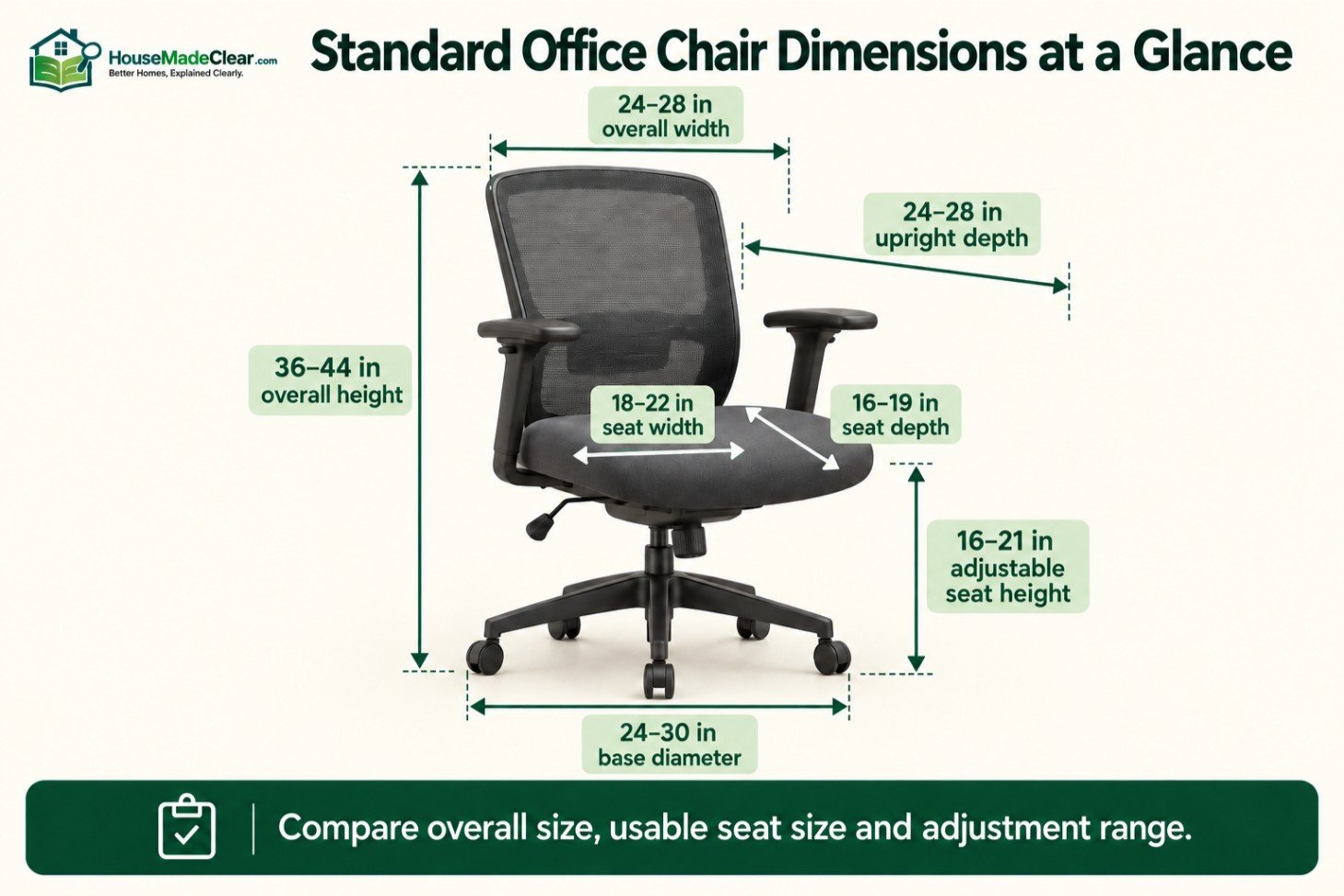
For space planning, a typical office chair is approximately 24 to 28 inches wide, 24 to 28 inches deep and 36 to 44 inches high. The seat is commonly about 18 to 22 inches wide, 16 to 19 inches deep and adjustable from roughly 16 to 21 inches above the floor.
These measurements are useful starting points, but they do not guarantee that a chair will fit the user, desk or room. Seat height, usable seat width, seat depth, armrest position, base diameter, recline and clearance behind the chair must be evaluated together.
Quick Answer
Common office chair dimensions are:
- Overall width: approximately 24–28 inches
- Overall depth: approximately 24–28 inches when upright
- Overall height: approximately 36–44 inches for many task chairs
- Seat width: approximately 18–22 inches
- Seat depth: approximately 16–19 inches
- Adjustable seat height: commonly about 16–21 inches
- Five-star base diameter: commonly about 24–30 inches
- Desk-edge-to-wall clearance: about 36 inches as a practical minimum
- Comfortable chair clearance: approximately 42–48 inches
Treat these as shopping and layout ranges rather than mandatory furniture standards. Always compare the complete manufacturer specifications with the user, desk and available room.
Standard Office Chair Dimensions at a Glance
| Measurement | Common Planning Range | What It Affects |
|---|---|---|
| Overall width | 24–28 in | Desk fit, furniture spacing and side clearance |
| Overall upright depth | 24–28 in | Chair footprint and room depth |
| Overall height | 36–44 in | Visual scale and overhead clearance |
| Adjustable seat height | About 16–21 in | Foot support and desk relationship |
| Seat width | 18–22 in | Hip room and armrest spacing |
| Seat depth | 16–19 in | Thigh support and knee clearance |
| Backrest height above seat | 18–25 in | Back, shoulder and head support |
| Armrest height above seat | About 7–10 in | Forearm support and desk clearance |
| Five-star base diameter | 24–30 in | Floor footprint and stability |
| Desk edge to wall behind chair | About 36 in minimum | Sitting, rolling back and standing |
| Comfortable desk edge to wall | 42–48 in | Easier movement and reclining |
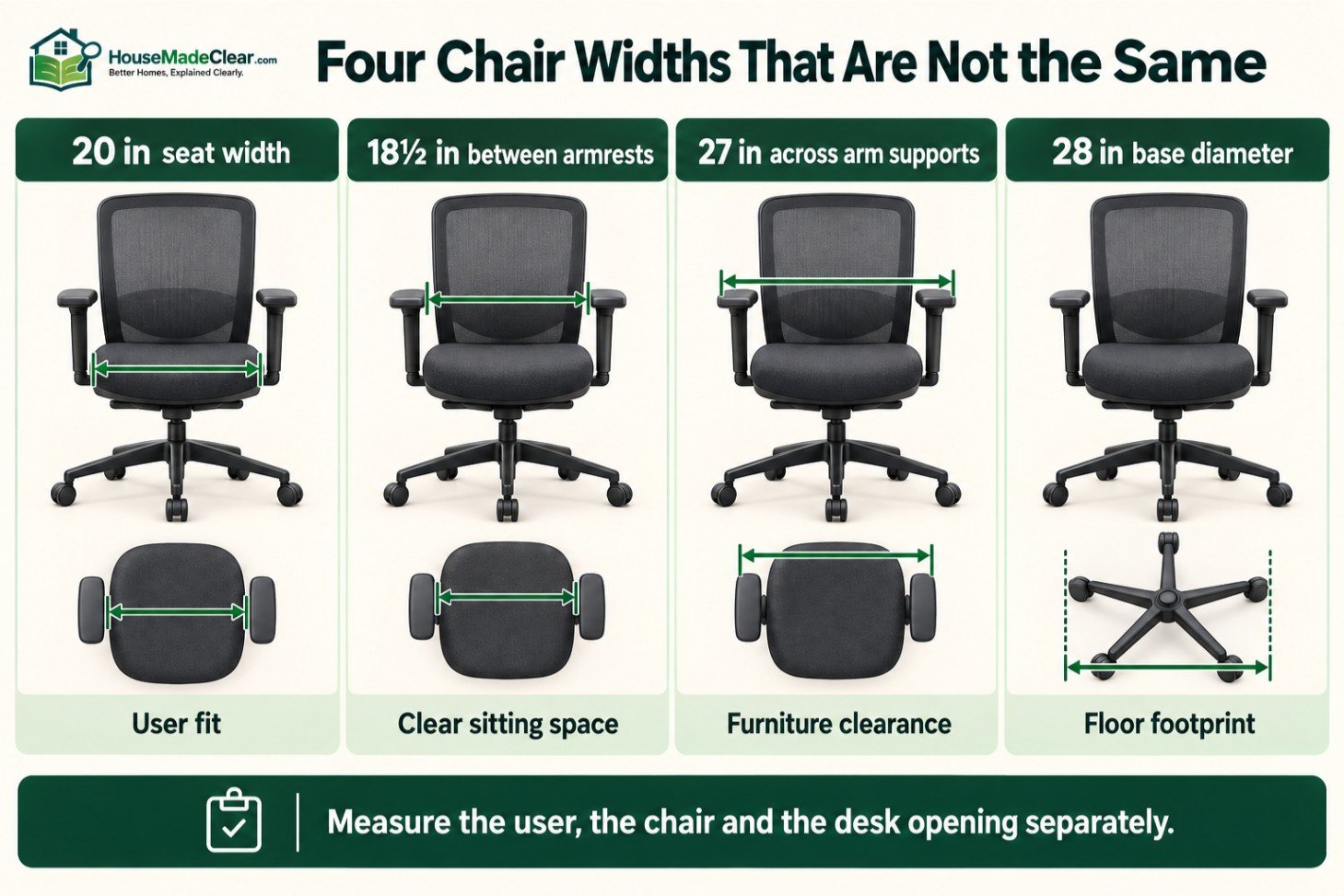
One measurement cannot substitute for another. A chair with a 20-inch-wide seat may measure 28 inches across its armrests, while a 26-inch-deep chair may need considerably more space when fully reclined.
Is There a Standard Office Chair Size?
There is no single required width, height or depth for every office chair sold in the United States.
Furniture standards and ergonomic guidance focus on factors such as durability, safety, adjustability and accommodation of intended users. They do not make every chair the same physical size.
The Business and Institutional Furniture Manufacturers Association’s standards descriptions demonstrate that different standards apply to general office seating, large-occupant seating, lounge seating and other furniture categories.
“Standard office chair dimensions” should therefore be understood as common market ranges used for comparison and room planning.
Before buying, distinguish between:
- Overall chair dimensions
- Usable seat dimensions
- Adjustment ranges
- Static floor footprint
- Reclined footprint
- Space required for movement
- Space required by the person using the chair
A manufacturer’s dimensional drawing is generally more useful than a basic width × depth × height listing.
Standard Office Chair Width
A standard task or ergonomic office chair commonly measures approximately 24 to 28 inches wide overall.
The widest part may be the:
- Armrests
- Armrest supports
- Backrest frame
- Five-star base
- Control housing
- Casters
The seat itself is usually narrower, commonly measuring around 18 to 22 inches wide.
Overall Width vs Seat Width
Do not confuse overall width with usable sitting width.
For example, one chair could have:
- 20-inch seat width
- 18½ inches between the armrests
- 27-inch width across the arm supports
- 28-inch base diameter
Each measurement answers a different question.
Seat width helps determine whether the chair fits the user. Overall width determines whether it fits between furniture. Base diameter determines the chair’s actual footprint near the floor.
How Much Space Should Be Between the Armrests?
The clear distance between armrests should accommodate the user without squeezing the hips or forcing the elbows outward.
When testing the chair:
- Sit fully against the backrest.
- Confirm that the hips do not press against the arm supports.
- Check that clothing and pockets do not catch on the arms.
- Leave room for normal repositioning.
- Ensure the forearms can rest without raising the shoulders.
An excessively wide chair is not necessarily better. Armrests positioned too far apart may force the user to spread the elbows to reach them.
Office Chair Width for a Small Desk
A compact chair may measure approximately 22 to 25 inches wide, particularly when it has no arms or narrow flip-up arms.
That can help in a bedroom office or desk nook, but the chair still needs to fit the user.
Measure the clear opening between:
- Desk legs
- Drawer pedestals
- Storage units
- Cross braces
- Cable-management components
Our standard desk dimensions guide explains why a desk’s overall width can be much greater than its usable chair opening.
Standard Office Chair Height
Many mid-back task chairs measure approximately 36 to 44 inches high overall.
Compact chairs can be shorter, while executive chairs with tall backrests or headrests may reach 45 to 50 inches or more.
Overall height is measured from the floor to the highest part of the chair, normally the top of the backrest or headrest. Because the seat, backrest and headrest may adjust independently, manufacturers frequently provide a height range.
Overall chair height matters when positioning the chair beneath:
- Wall shelves
- Upper cabinets
- Sloped ceilings
- Window sills
- Overhanging desk storage
For ergonomic fit, however, seat height is more important than total chair height.
Standard Office Chair Seat Height
An adjustable office chair commonly provides a seat-height range of approximately 16 to 21 inches above the floor.
Some chairs extend lower or higher. Alternative gas cylinders may also be available for petite or tall users.
Measure seat height from the floor to the upper surface of the seat where the user sits. Thick cushioning compresses under body weight, so the occupied seat height may differ from the unloaded measurement.
How Should Seat Height Fit the User?
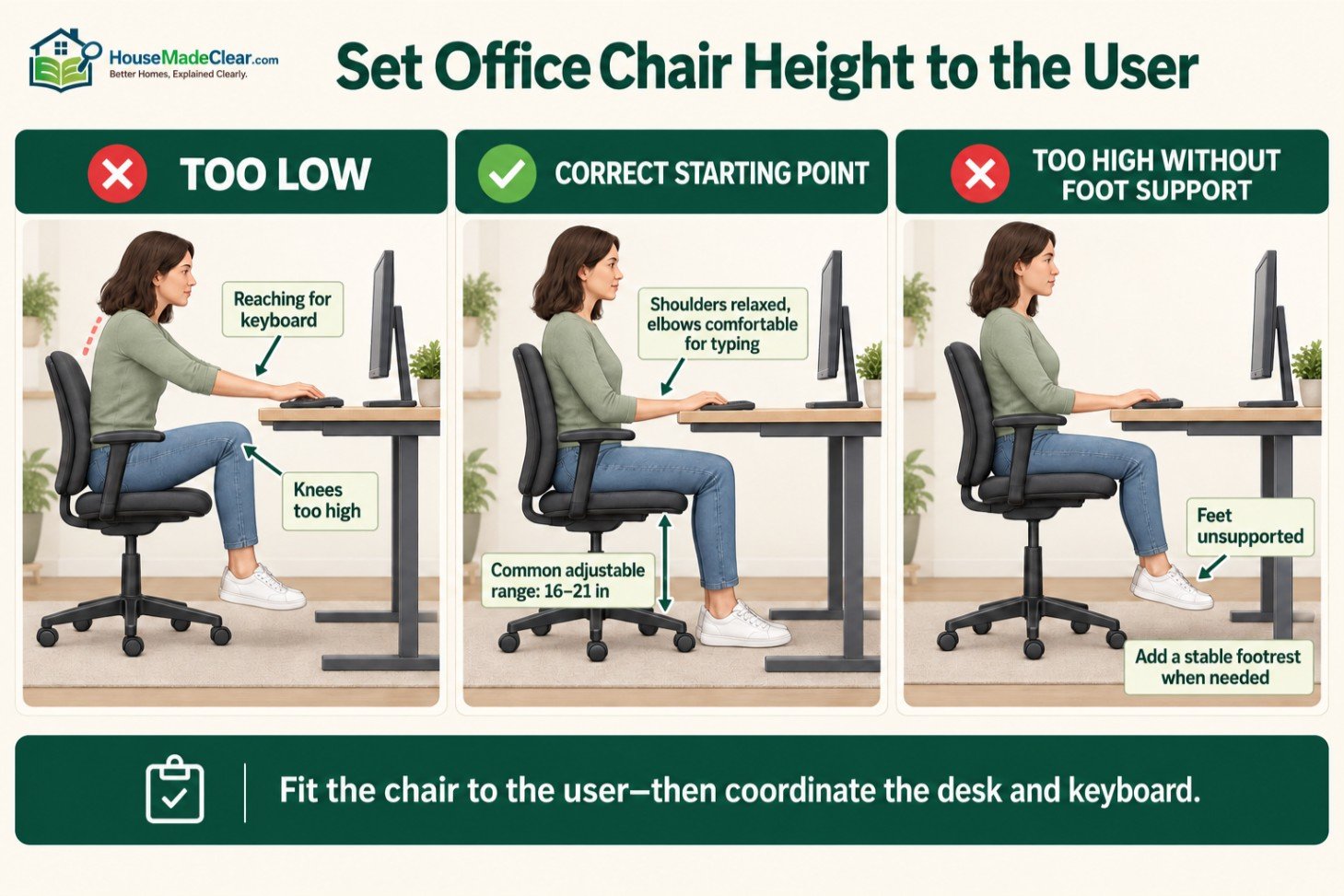
A suitable chair height should allow the user to sit with:
- Feet supported by the floor or a stable footrest
- Knees approximately level with or slightly below the hips
- No hard pressure beneath the thighs
- Back supported by the backrest
- Shoulders relaxed
- Elbows positioned comfortably for typing
The OSHA Computer Workstations guidance for chairs emphasizes adjustability, lower-back support, appropriate seat-pan depth and a stable base.
The chair and desk must be treated as one workstation. A chair can fit the user but still be incompatible with an unusually high or low desk.
What If the Desk Is Too High?
A conventional fixed desk is commonly around 29 to 30 inches high. Shorter users may need to raise their chair to reach the keyboard comfortably, causing their feet to lose contact with the floor.
Possible solutions include:
- A stable footrest
- Lower keyboard tray
- Height-adjustable desk
- Chair with a suitable lower adjustment range
- Desk selected for the user’s seated elbow height
Do not lower the chair solely to place the feet on the floor if that forces the user to lift the shoulders or reach upward while typing.
Office Chair Height for a Standing Desk
A standard task chair can be used with a sit-stand desk when the desktop lowers to a suitable seated position.
A drafting chair is different. It has a taller cylinder and normally includes a foot ring for supported elevated sitting.
If you are coordinating seated and standing work, our guide to standing desk height explains how the desktop should relate to the elbows and keyboard.
Standard Office Chair Depth
A typical office chair measures approximately 24 to 28 inches deep overall when upright.
Large executive chairs may be deeper, and the occupied footprint can increase substantially when the backrest reclines.
Overall depth may be measured from:
- Seat front to backrest
- Front caster to rear caster
- Frontmost component to rearmost component
Check the manufacturer’s drawing to determine which reference points were used.
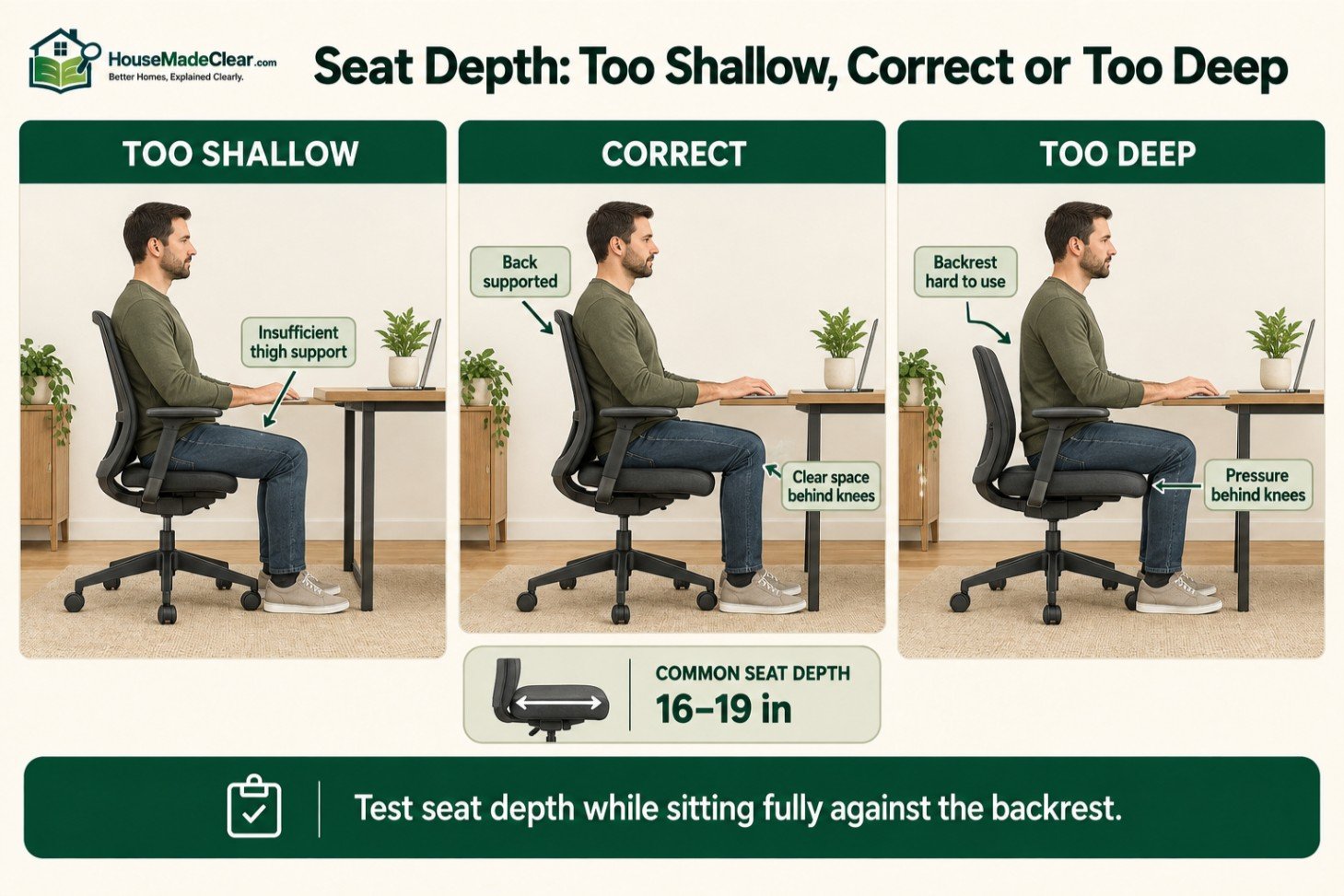
Standard Seat Depth
Usable office-chair seat depth commonly falls around 16 to 19 inches.
Some ergonomic chairs allow the seat pan to slide forward and backward. This can help one chair accommodate people with different thigh lengths.
The seat should support the thighs while leaving comfortable clearance behind the knees.
A seat that is too deep may:
- Press behind the knees
- Restrict circulation
- Prevent use of the backrest
- Cause the user to slide forward
A seat that is too shallow may leave too much of the thighs unsupported.
How to Test Seat Depth
Sit with your back supported and your feet placed normally.
Check the space between the front edge of the seat and the back of your lower legs. The edge should not press against the knees, and you should not need to slide forward to become comfortable.
Do not evaluate seat depth while perched on the chair’s front edge. That hides poor fit and prevents the backrest and lumbar support from functioning properly.
Overall Depth When Reclined
A chair listed as 26 inches deep may occupy several additional inches when reclined.
Check:
- Maximum reclined depth
- Backrest travel
- Seat movement during recline
- Headrest movement
- Extendable footrest
- Wall clearance
- Clearance from drawers or furniture
Reclining chairs need movement space, not merely enough room to stand upright.
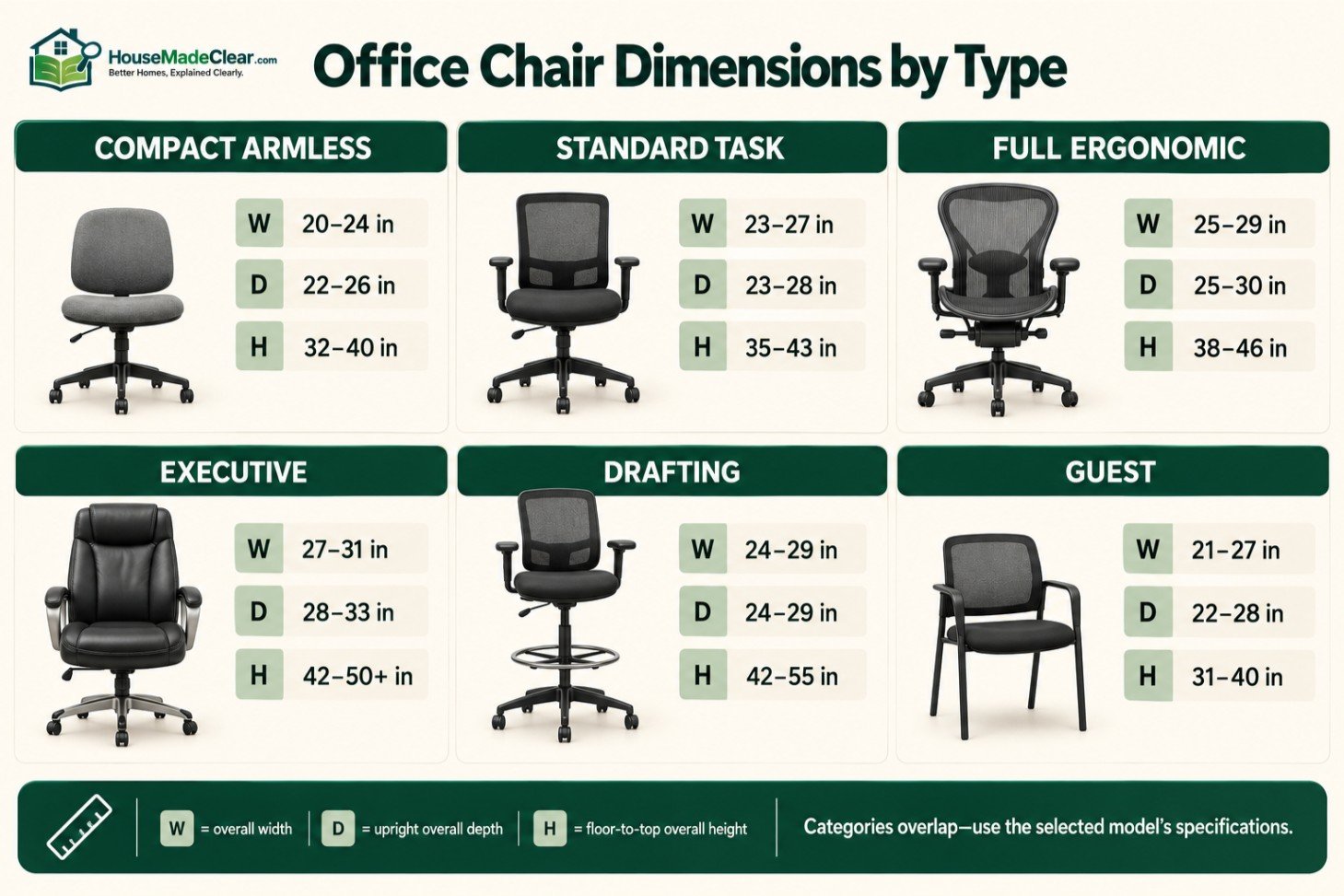
Office Chair Dimensions by Type
| Chair Type | Typical Width | Typical Depth | Typical Height |
|---|---|---|---|
| Compact armless task chair | 20–24 in | 22–26 in | 32–40 in |
| Standard task chair | 23–27 in | 23–28 in | 35–43 in |
| Full ergonomic chair | 25–29 in | 25–30 in | 38–46 in |
| High-back executive chair | 27–31 in | 28–33 in | 42–50+ in |
| Drafting chair | 24–29 in | 24–29 in | 42–55 in |
| Office guest chair | 21–27 in | 22–28 in | 31–40 in |
These categories overlap. Always use the selected model’s specifications for purchasing and layout decisions.
Compact Task Chair Dimensions
Compact task chairs often have:
- Lower backrests
- Smaller seats
- Narrow or flip-up arms
- Limited recline
- Reduced adjustment ranges
They can work well for occasional use and small rooms. For full-time work, confirm that the smaller footprint has not removed an adjustment the user needs.
Ergonomic Office Chair Dimensions
“Ergonomic” does not describe one standardized size.
The term usually refers to features such as:
- Adjustable seat height
- Adjustable seat depth
- Lumbar adjustment
- Recline tension
- Adjustable armrests
- Backrest tilt
- Headrest adjustment
These mechanisms can make an ergonomic chair larger than it appears. Levers, backrest frames and movable arm pads may project beyond the seat.
Executive Office Chair Dimensions
Executive chairs are usually wider, deeper and taller than ordinary task chairs.
A full-size executive model may measure approximately:
- Width: 27–31 inches
- Depth: 28–33 inches
- Height: 42–50 inches or more
Check that it will not block drawers, hit the wall when reclined or consume the walking route behind the desk.
Drafting Chair Dimensions
Drafting chairs have a higher seat range for drafting tables, counters and standing-height work surfaces.
They normally include a foot ring. Verify:
- Seat-height range
- Foot-ring height and diameter
- Work-surface height
- Armrest clearance
- Base stability
- Manufacturer weight rating
The base, cylinder and foot support must be designed for elevated use.
Armless Office Chair Dimensions
Removing the arms reduces overall width and may allow the chair to move closer to the desk.
The tradeoff is reduced forearm support. An armless chair works best when the desktop can support the forearms without causing uncomfortable shoulder or wrist positioning.
Office Guest Chair Dimensions
Fixed-height guest chairs commonly measure approximately 21 to 27 inches wide and 22 to 28 inches deep.
Allow enough space for a visitor to approach, sit and stand without colliding with the desk or another chair.
How Much Floor Space Does an Office Chair Need?
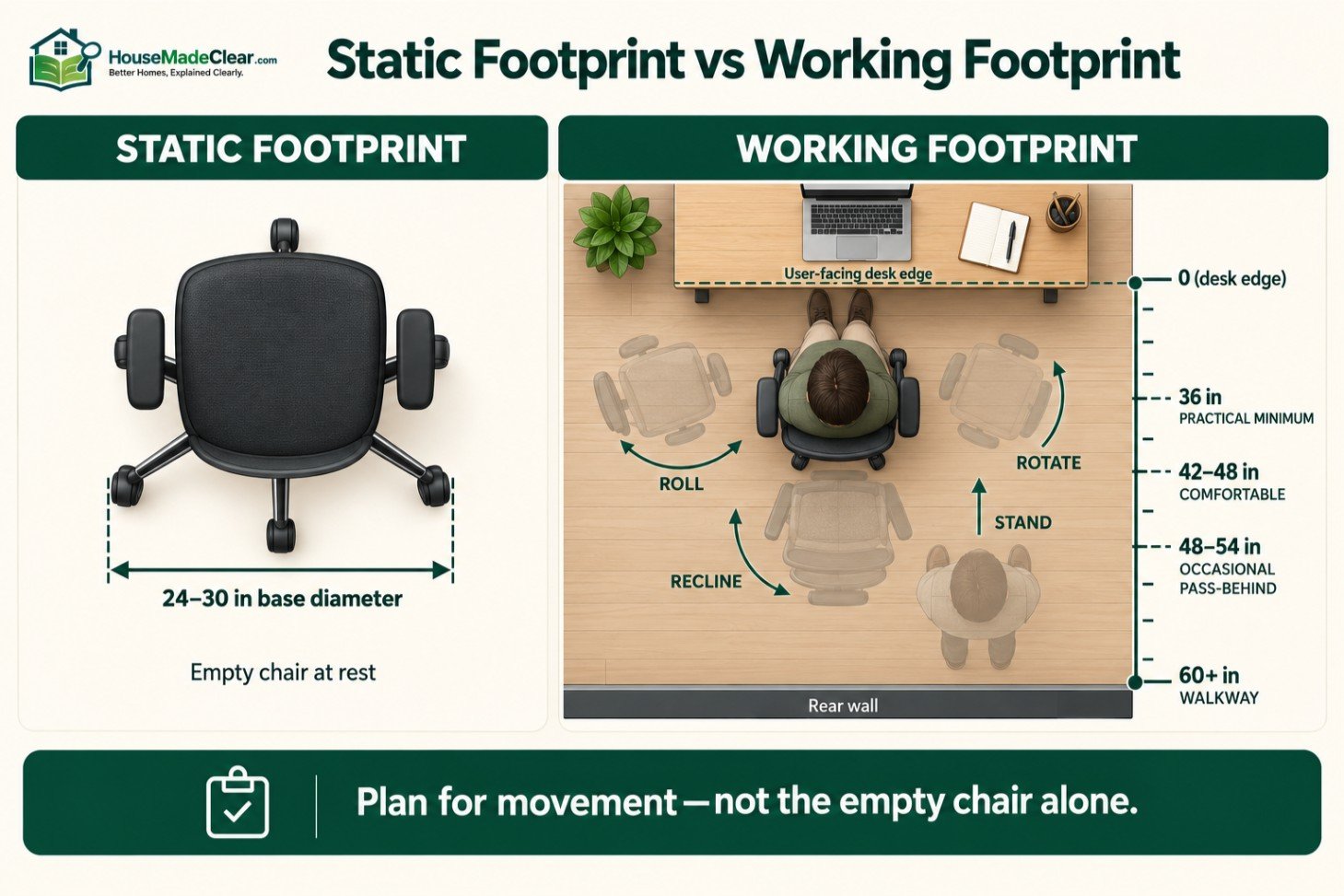
An office chair’s static footprint is not its complete floor-space requirement.
A five-star chair base commonly measures approximately 24 to 30 inches in diameter. The person using the chair must also be able to roll backward, rotate and stand up.
For a desk positioned against a wall, measure from the front edge of the desk to the wall or obstruction behind the chair.
Useful planning ranges include:
- About 36 inches: practical minimum for many chair-only arrangements
- 42–48 inches: more comfortable for regular use
- 48–54 inches: better when someone occasionally passes behind
- Around 60 inches or more: useful when the area is also a walkway
These are planning ranges, not universal residential code requirements.
Our complete guide to space behind a desk chair explains how chair movement space differs from circulation space.
Static Footprint vs Working Footprint
The static footprint is the floor area occupied by the empty chair in one position.
The working footprint includes:
- The occupied chair
- Pulling toward the desk
- Rolling backward
- Rotating
- Reclining
- Standing
- Leaving the workstation
A chair that physically fits inside a 30-inch gap may still be unusable because the person cannot move normally.
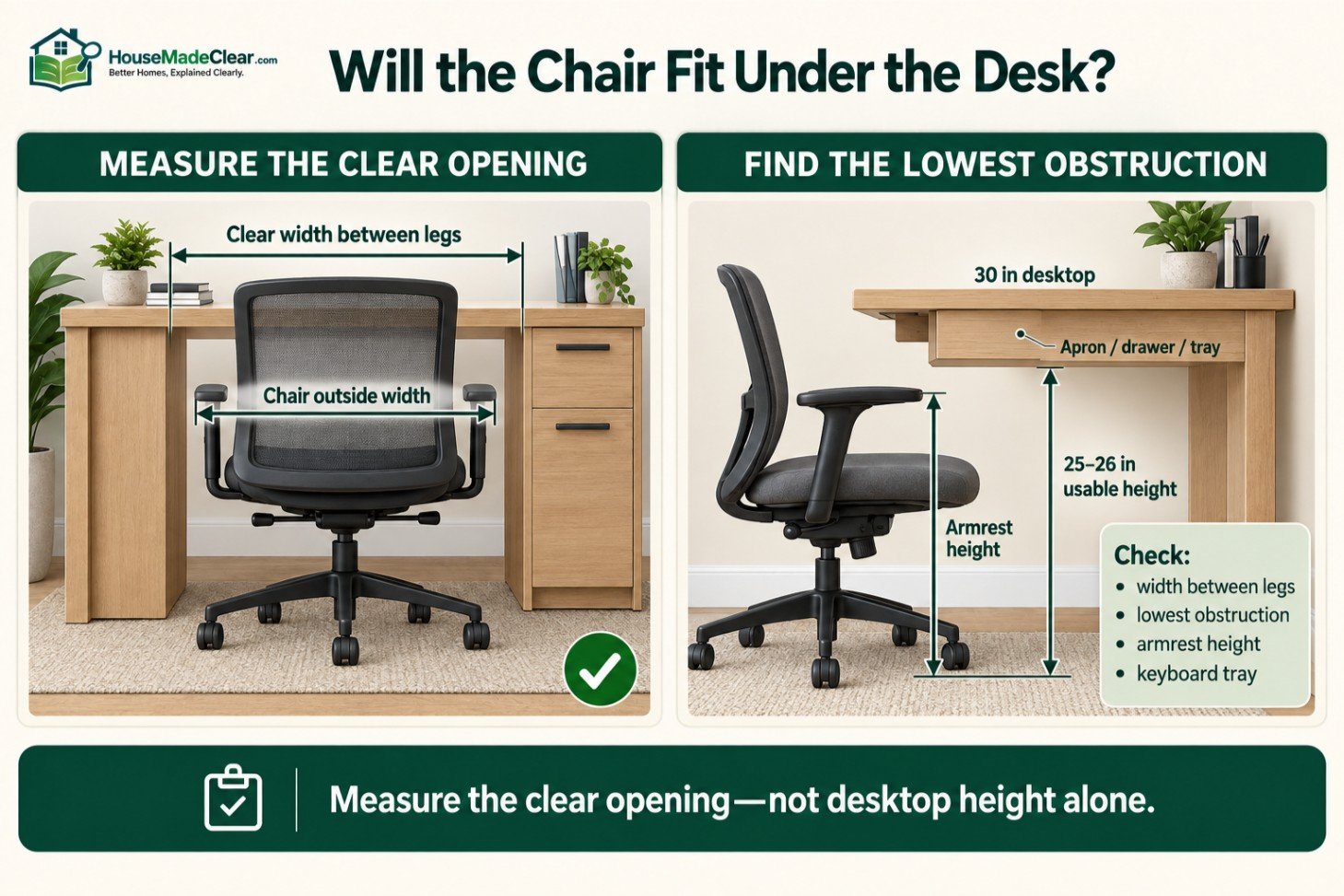
Will an Office Chair Fit Under a Desk?
Measure the actual opening beneath the desk instead of relying on desktop height.
Check:
- Clear height beneath the desktop
- Width between desk legs
- Drawer-pedestal spacing
- Desk apron
- Keyboard tray
- Crossbars
- Cable trays
- Armrest height
- Chair base and caster clearance
Armrests Are Often the Controlling Measurement
A chair may have a sufficiently low seat while its armrests strike the front of the desktop.
Adjustable or flip-up arms can help, but only if they remain comfortable in the working position.
Do not lower the armrests to an ineffective position solely to slide the chair beneath the desk.
Desk Aprons and Drawers Reduce Clearance
A desktop may be 30 inches above the floor while an apron, drawer or keyboard tray reduces the usable height to 25 or 26 inches.
Measure to the lowest obstruction.
Under-desk storage can also force the user to sit off-center or prevent the chair from approaching the keyboard.
Matching an Office Chair to the User
Body height alone does not determine chair fit. Two people of the same height may have different leg, torso, hip and arm dimensions.
Office Chairs for Shorter Users
Prioritize:
- Low minimum seat height
- Shallow or adjustable seat depth
- Armrests that lower sufficiently
- Correctly positioned lumbar support
- Headrest that does not push the head forward
- Stable footrest when necessary
A chair marketed as “small” may only have a narrow seat while retaining a relatively tall minimum seat height.
Office Chairs for Taller Users
Prioritize:
- Adequate maximum seat height
- Deeper or adjustable seat pan
- Sufficient backrest height
- Appropriate armrest height
- Adjustable headrest
- Suitable weight and structural rating
A tall backrest alone does not make a chair suitable for a tall user. Seat height and depth are often more important.
Office Chairs for Larger-Bodied Users
Verify:
- Clear width between armrests
- Usable seat width
- Usable seat depth
- Overall product width
- Manufacturer weight capacity
- Cylinder, base and caster specifications
- Desk and room clearance
Weight capacity does not describe physical width. A high-capacity chair may still have closely spaced arms.
Office Chair Dimensions and Ergonomics
A chair must work with the desk, keyboard, monitor, flooring and user.
| Chair Element | Useful Fit Check |
|---|---|
| Seat height | Feet are supported and the keyboard is reachable with relaxed shoulders |
| Seat depth | Thighs are supported without pressure behind the knees |
| Backrest | Lower back is supported without forcing the torso forward |
| Armrests | Forearms are supported without lifting the shoulders |
| Headrest | Supports the intended posture without pushing the head forward |
Chair height changes the user’s eye position. Adjust the chair and desk relationship before finalizing the monitor.
Our ideal monitor height guide covers screen position, viewing distance and multiple-monitor arrangements.
No chair eliminates the need to change posture and move periodically. Adjustability supports different working positions; it does not make remaining motionless comfortable indefinitely.
Office Chair Clearance in a Small Home Office
Reducing chair width by two inches may help in a small room, but eliminating essential movement space is usually the larger mistake.
Before selecting the chair:
- Mark the desk footprint with painter’s tape.
- Mark the chair’s base diameter.
- Add the occupied sitting position.
- Mark its fully reclined position.
- Open the room door, closet and drawers.
- Test the walking path.
Our guide to choosing a comfortable home office size compares complete layouts instead of relying only on square footage.
Chair Near a Filing Cabinet
Allow room for the drawer to extend fully and for a person to stand in front of it.
A cabinet may fit behind the chair while remaining inaccessible during normal use. Compare its open footprint using our standard file cabinet dimensions guide.
Chair Near a Door
Draw the complete door swing. The door should not strike the occupied chair, trap the person at the desk or block the practical exit route.
Chair on Carpet or a Rug
Thick carpet and rug edges increase rolling resistance. A chair may require more effort and movement space than it does on a hard showroom floor.
Use casters suitable for the flooring and follow the chair manufacturer’s instructions. Any chair mat should lie flat without creating a trip edge.
Accessible Office Planning
An ordinary rolling office chair is not a substitute for accessibility planning.
Where the ADA Standards apply, the U.S. Access Board explains that a basic clear floor or ground space is 30 by 48 inches, with additional requirements for approach, knee and toe clearance, accessible routes and maneuvering.
Its guide to clear floor and turning space also explains that turning-space requirements depend on the type of room and applicable provisions.
A 30 × 48-inch rectangle alone does not create an accessible office. The user may also need to:
- Enter and close the door
- Approach the work surface
- Transfer where applicable
- Reach controls and storage
- Turn or reverse direction
- Use knee and toe space
- Leave without moving furniture
Private homes are not automatically governed by the ADA Standards. Other federal, state, local, housing or project-specific requirements may apply.
Design around the person’s actual mobility device, reach and working needs rather than copying one commercial dimension.
How to Measure an Office Chair
Record both minimum and maximum adjusted dimensions.
- Overall width: Measure across the arms, backrest and base.
- Overall depth: Measure front to back when upright and fully reclined.
- Overall height: Measure from the floor to the highest point.
- Seat height: Measure from the floor to the top of the seat surface.
- Seat width: Measure the usable supportive area rather than raised edges.
- Seat depth: Measure from the effective back-support point to the seat front.
- Armrest spacing: Record inside width, outside width and height.
- Base diameter: Measure across opposite casters.
If a footrest, headrest or armrest changes position, record the minimum and maximum footprint it creates.
How to Choose the Right Office Chair Size
- Measure the user’s seated leg length, thigh length, hip width and elbow position.
- Measure the clear width, height and depth beneath the desk.
- Include desk aprons, drawers, braces and cable trays.
- Measure the room behind and beside the chair.
- Include door swings and storage access.
- Compare the chair’s minimum and maximum adjustment ranges.
- Check overall and reclined dimensions.
- Verify base diameter, armrest ranges and weight rating.
- Test every adjustment at the actual desk when possible.
- Check return shipping, restocking fees and assembly restrictions before purchasing online.
Common Office Chair Sizing Mistakes
- Buying according to overall height instead of seat dimensions
- Confusing seat width with width across the arms or base
- Checking maximum seat height but ignoring the minimum
- Choosing a seat too deep to use with the backrest
- Measuring the static chair but not its movement zone
- Ignoring the desk apron or drawers
- Lowering armrests solely to store the chair
- Treating weight capacity as proof of adequate seat width
- Buying an oversized executive chair for a compact room
- Treating one accessibility dimension as evidence of compliance
Office Chair Measurement Checklist
| Item | What to Verify |
|---|---|
| Overall width | Widest point across arms, frame or base |
| Upright depth | Frontmost to rearmost point |
| Reclined depth | Include backrest travel and footrest |
| Overall height | Lowest and highest configurations |
| Seat-height range | Floor to top of seat |
| Usable seat width | Supportive area and arm spacing |
| Seat-depth range | Back-support point to front edge |
| Armrest range | Height, width, pivot and desk interference |
| Backrest and headrest | Alignment with the user |
| Base diameter | Maximum span across casters |
| Weight rating | Manufacturer’s stated limit |
| Desk opening | Clear width, height and depth |
| Movement zone | Rolling, rotating, reclining and standing |
| Storage access | Drawer and cabinet extension |
| Door clearance | Complete room and closet swings |
| Flooring | Compatible casters or chair mat |
| Return policy | Costs, timing and assembly restrictions |
Frequently Asked Questions
What are the standard dimensions of an office chair?
A typical office chair is approximately 24–28 inches wide, 24–28 inches deep and 36–44 inches high. Executive and drafting chairs can be substantially larger.
How wide is a standard office chair?
Many task and ergonomic office chairs measure approximately 24–28 inches wide overall. The usable seat is commonly around 18–22 inches wide.
How deep is a standard office chair?
Many office chairs are approximately 24–28 inches deep when upright. The seat itself is commonly around 16–19 inches deep. Reclining increases the occupied depth.
How high is a standard office chair?
Mid-back task chairs commonly measure around 36–44 inches high overall. High-back executive chairs and drafting chairs may reach 45–50 inches or more.
What is the standard office chair seat height?
Many adjustable office chairs provide a seat-height range of approximately 16–21 inches above the floor. The correct setting depends on the user and work-surface height.
What is a good office chair seat width?
Office-chair seats commonly measure approximately 18–22 inches wide. The seat should accommodate the user without pressure from the armrests while allowing comfortable movement.
What is a good office chair seat depth?
A common seat-depth range is approximately 16–19 inches. The seat should support the thighs without pressing behind the knees or preventing use of the backrest.
How much space does an office chair need?
Approximately 36 inches from the desk edge to the wall behind the chair is a practical minimum for many home offices. Around 42–48 inches provides more comfortable movement.
Will a 28-inch-wide office chair fit under a desk?
It may, but compare the chair’s width and armrest height with the clear opening between the desk legs, drawers and apron. Desktop width alone does not determine whether the chair will fit.
Should office chair arms fit under the desk?
They do not have to fit completely beneath the desk, but the chair must move close enough for comfortable working. Do not lower the arms to an ineffective position solely for storage.
Are executive chairs larger than task chairs?
Usually. Executive chairs commonly have wider seats, deeper frames and taller backrests. They also need more reclining and circulation space.
How can I tell whether an office chair fits me?
You should be able to sit against the backrest with supported feet, comfortable thighs, no hard pressure behind the knees, relaxed shoulders and arms positioned naturally for work.
Final Answer
A useful planning size for a standard office chair is approximately 24–28 inches wide, 24–28 inches deep and 36–44 inches high.
The seat is commonly around 18–22 inches wide, 16–19 inches deep and adjustable from roughly 16–21 inches above the floor.
These measurements help with shopping and layouts, but they do not prove that the chair will fit. Check usable seat dimensions, adjustment ranges, base diameter, desk opening and reclined footprint.
For most home offices, also allow at least 36 inches from the desk edge to the wall behind the chair, with 42–48 inches preferable for comfortable daily movement.
The correct office chair is one that fits the user, desk and complete room—not merely one that matches an average dimension.









[…] Standard Office Chair Dimensions: Height, Width, Depth & Clearance Guide […]
[…] Standard Office Chair Dimensions: Height, Width, Depth & Clearance Guide […]
[…] Standard Office Chair Dimensions: Height, Width, Depth & Clearance Guide […]
[…] Standard Office Chair Dimensions: Height, Width, Depth & Clearance Guide […]