















Where your desk faces can change how comfortable and functional a home office feels.
A desk facing a window may provide daylight and a pleasant view but can create screen glare or distraction. A desk facing a wall may help reduce visual interruptions but can feel enclosed. Facing the door may give you a clearer view of the room, yet it can require more floor space and make cable management harder.
There is no single direction that works for every home office.
The best position depends on:
- Window direction
- Screen glare
- Room dimensions
- Door movement
- Privacy
- Video calls
- Natural light
- Electrical outlets
- Storage
- The type of work you perform
Quick answer:
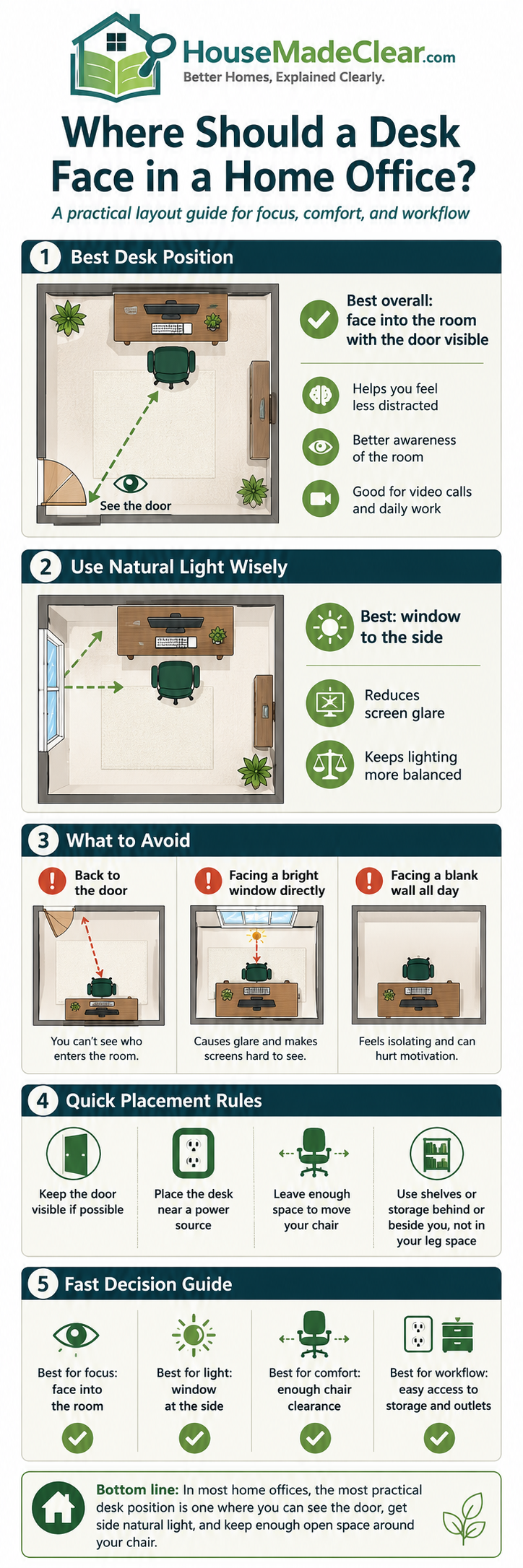
For computer-based work, a desk positioned perpendicular to a window is often the strongest starting point because daylight reaches the workspace from the side rather than directly behind or in front of the screen. OSHA similarly recommends positioning display screens at right angles to windows and other strong light sources to reduce glare.
That does not make a side-facing window arrangement mandatory. A different orientation may work better once you consider the entire room.
Why Desk Direction Matters
A desk is not just another piece of furniture.
Its position affects:
- What you see while working
- What appears behind you on video calls
- How daylight reaches the screen
- Whether people walk behind your chair
- Where cables need to travel
- Whether storage remains accessible
- How easily you can move around the room
Poor workstation placement can also encourage awkward screen viewing when glare or reflections make information harder to see. OSHA recommends considering monitor placement together with the desk, chair and keyboard rather than treating each component separately.
Before deciding which direction the desk should face, think about the workstation as one complete system.
The Best Starting Position: Desk Perpendicular to a Window
For many home offices, positioning the desk at a right angle to the window is a useful first layout to test.
This means the window is beside you rather than directly ahead or behind.
Potential advantages include:
- Natural light from the side
- Less direct screen glare
- Easier use of blinds or curtains
- Better control of video-call lighting
- A clearer wall behind the desk or user
- Less visual distraction than facing directly outside
OSHA specifically recommends placing the face of a display screen at right angles to windows and light sources where possible to reduce reflected glare.
Which side should the window be on?
Either side can work.
The better side depends on:
- Sun direction
- Room layout
- Whether you write by hand
- Where the door is
- Available electrical outlets
- Your dominant hand
- Other furniture
For example, someone who frequently writes on paper may prefer natural light coming from the side opposite their writing hand to reduce shadows.
However, screen glare should remain the first thing you test.
Should a Desk Face a Window?
It can, but this arrangement has both advantages and disadvantages.
Advantages of facing a window
A window-facing desk may provide:
- A pleasant view
- Natural light
- A more open feeling
- Something distant to look at during short visual breaks
It can work particularly well when:
- The window does not receive harsh direct sunlight
- You mainly use a laptop occasionally
- Adjustable blinds or curtains are available
- The view is not overly distracting
- The monitor can be positioned without severe brightness contrast
Problems with facing a window
Potential issues include:
- Bright daylight behind the monitor
- Strong contrast between window and screen
- Heat from direct sun
- Distraction from street activity
- Reduced privacy
- Difficulty placing external monitors
OSHA’s workstation guidance warns that direct light sources such as windows can create glare and reflections that make screens harder to see.
When facing the window works best
Consider it when:
- The window faces a shaded area
- Light can be controlled easily
- You work primarily with paper rather than screens
- You value the outdoor view
- The desk does not block access to the window
When to avoid it
A different direction may be better when:
- Afternoon sun shines directly through the window
- The screen becomes difficult to read
- You constantly close the blinds anyway
- The view creates frequent distraction
- The desk prevents opening or cleaning the window
Should Your Back Face the Window?
This can be more problematic for video calls.
When a bright window sits directly behind you, the webcam may expose for the brighter background and leave your face looking relatively dark.
It can also create screen reflections if daylight falls directly onto the monitor.
Potential disadvantages
- Backlighting during video calls
- Glare on screen
- Heating from direct sunlight
- Reduced privacy if the window is visible on camera
- Difficulty balancing room lighting
When it can still work
A window behind you may be manageable if you have:
- Effective blinds or curtains
- Diffused daylight
- Good front lighting
- A window that receives little direct sun
If video meetings are a major part of your work, test the actual camera view before deciding.
House Made Clear’s broader guide to designing a functional home office also covers screen glare, video-call backgrounds, lighting, storage and equipment placement.
Should a Desk Face a Wall?
Facing a wall is one of the most space-efficient home-office layouts.
It often works particularly well in:
- Small bedrooms
- Alcoves
- Apartments
- Shared rooms
- Narrow home offices
Advantages
A wall-facing desk can provide:
- Fewer visual distractions
- Easy access to wall storage
- Simple cable routing
- Efficient use of floor space
- A potentially cleaner video-call background behind you
The wall can also support:
- Shelving
- Pegboard
- Whiteboard
- Task lighting
- Monitor arm
- Small organizers
Disadvantages
The arrangement may feel enclosed when:
- The desk is pushed tightly into a dark corner
- There is no nearby daylight
- The wall is crowded with storage
- The desk is very deep
- The user spends long periods at the workstation
How to improve a wall-facing desk
Keep the wall relatively restrained.
Consider:
- One shelf rather than many
- Task lighting
- A small piece of artwork
- A pinboard
- Light wall finishes
- Enough desk depth for the monitor
The wall does not need to become a complete storage system simply because it is available.
Should Your Desk Face the Door?
Some people prefer to see the door while working.
This can make the workspace feel more open and allows you to see someone entering the room.
It can work well in a dedicated office.
Advantages
- Clear view of room entrance
- Easier awareness of household movement
- Potentially more professional layout
- Wall behind you may work well for video calls
Disadvantages
- Desk may need to float away from the wall
- Cables become more visible
- More floor space is required
- Chair movement can interfere with circulation
- The desk may dominate a small room
Facing the door is therefore usually easier in a larger dedicated office than in a compact bedroom workspace.
Should the Desk Face Away From the Door?
This can be efficient when the desk sits against a wall.
However, it means household members may approach from behind.
That may matter if you:
- Work with confidential information
- Take private video calls
- Have children frequently entering
- Prefer visual awareness of the room
If privacy matters, consider the relationship between:
- Door
- Monitor
- Webcam
- Paperwork
rather than desk direction alone.
Window vs Wall vs Door: Quick Comparison
| Desk Position | Main Advantage | Main Drawback | Best For |
|---|---|---|---|
| Perpendicular to window | Side daylight with better glare control | Requires suitable side wall/floor space | Computer work |
| Facing window | View and natural light | Brightness and distraction | Controlled daylight |
| Back to window | Frees other walls | Video-call backlighting | Rooms with effective blinds |
| Facing wall | Efficient and focused | Can feel enclosed | Small spaces |
| Facing door | Open room view | Uses more floor space | Dedicated offices |
Treat this table as a starting point rather than a ranking.
The best arrangement is the one that works with the actual room.
Start With the Window, Not the Desk
Before placing furniture, study the natural light.
Check the room at:
- Morning
- Midday
- Afternoon
- Late afternoon
A desk that looks perfect at 9 a.m. may become difficult to use when direct sun hits the monitor at 3 p.m.
Look for:
- Direct sunlight
- Screen reflections
- Very bright window backgrounds
- Heat
- Shadows
- Changing sun angles
If possible, leave the desk temporarily in the proposed position for a full working day before making the layout permanent.
Use Curtains or Blinds to Control Glare
Window treatments can make an otherwise difficult desk position more usable.
Options include:
- Curtains
- Roller shades
- Venetian blinds
- Cellular shades
- Solar shades
OSHA recommends blinds or drapes as one way to control glare from windows.
The aim is not necessarily to block all daylight.
Instead, use window treatments to reduce:
- Direct sun
- Screen reflection
- Excessive brightness contrast
while preserving useful daylight where possible.
If you are also planning the window treatment itself, see our guide to how high to hang curtains, which covers rod height, width and floor clearance.
How Desk Direction Affects Monitor Placement
The desk may face the right direction while the monitor is still poorly positioned.
OSHA recommends positioning the primary monitor directly in front of the user where practical so repeated head turning is not required.
For a typical workstation:
- Keep the primary monitor in front of the main seated position
- Avoid placing it far to one side
- Keep multiple monitors close together
- Position the most frequently used screen most centrally
OSHA’s general workstation guidance also recommends positioning the top of the monitor at or just below eye level.
Individual requirements can vary, particularly for people using bifocals or other specialized eyewear.
Desk Direction for Two Monitors
Dual-monitor setups need additional width.
If both monitors are used equally
Place them:
- Close together
- Angled slightly toward you
- With the center between them near your natural forward viewing direction
If one monitor is primary
Keep the primary screen more directly in front.
Place the secondary screen beside it.
OSHA recommends minimizing repeated head and neck movement when working with multiple monitors.
This can affect where the desk fits because dual monitors usually require more usable wall or desktop width.
Desk Direction for a Laptop
Laptop-only setups allow more flexibility because the equipment occupies less space.
However, a laptop screen and keyboard are physically connected, which limits independent adjustment.
For longer periods of work, you may benefit from:
- Laptop stand
- External keyboard
- External mouse
- External monitor
The broader workstation layout should still be tested for glare and comfortable viewing.
Best Desk Position in a Small Home Office
In a small office, prioritize:
- Chair movement
- Screen glare
- Door access
- Storage
- Desk direction
A desk should not be placed facing the “perfect” direction if doing so blocks the room.
Useful small-office arrangements include:
Desk against side wall
Often provides a compact setup while allowing side daylight.
Desk beneath a window
Can work when:
- Window sill is high enough
- Glare can be controlled
- Window remains accessible
Desk in an alcove
Efficient for compact homes.
Check:
- Desk depth
- Lighting
- Ventilation
- Wall outlets
Floating desk
Usually less efficient in a very small room because it consumes circulation space.
Desk Position in a Bedroom Office
A bedroom office needs to support both work and rest.
Potential desk locations include:
- Empty wall
- Window side
- Alcove
- Foot of bed
- Corner
Avoid positioning the desk where:
- The chair blocks the bed
- Equipment dominates the sleeping area
- Video calls show the entire bed
- Cables cross the walking route
If you are working with very limited bedroom space, our guide to small bedroom storage when you have no closet can help you consolidate clothing and storage so the office does not compete with unnecessary furniture.
Should a Bedroom Desk Face the Bed?
It can, but consider what happens outside working hours.
A computer monitor, office chair and paperwork directly facing the bed can make the work area visually dominant.
Possible alternatives include:
- Desk facing side wall
- Desk perpendicular to bed
- Secretary desk that closes
- Screen or curtain separating work area
The goal is to make the office functional during the day without allowing it to take over the bedroom.
Desk Position in a Living Room
Living-room workspaces need to respect the room’s primary function.
A desk may fit:
- Behind the sofa
- Along an unused wall
- Beside a window
- Inside an alcove
Avoid:
- Blocking circulation
- Interfering with TV viewing
- Creating visible cable clutter
- Positioning the chair in a main walkway
If the desk is being added to a shared living room, start with the room’s main furniture plan. House Made Clear’s functional living room layout guide explains how to map circulation and fixed features before adding more furniture.
Desk Behind a Sofa
A narrow desk behind a sofa can sometimes turn unused space into a compact workspace.
It can work when:
- There is enough chair clearance
- The desk does not block the main route
- Cables can be managed safely
- The desk height works with the sofa
This arrangement is generally better for:
- Laptop work
- Occasional work
- Small equipment
than a large multi-monitor workstation.
Desk Facing a TV
This is usually less desirable for focused work if the television is frequently in use.
Possible issues include:
- Visual distraction
- Reflections
- Competing household activity
If the television is rarely used during working hours, it may not matter.
Again, actual household routine is more important than a rigid design rule.
Desk Position for Video Calls
Video calls introduce another direction to consider:
What is behind you?
Check the webcam view before finalizing the desk.
A useful background might include:
- Plain wall
- Closed storage
- Artwork
- Restrained shelving
- Plant
Avoid showing:
- Private paperwork
- Doorway with constant traffic
- Laundry
- Bed where possible
- Bright window
- Sensitive household information
The background should be appropriate for your work without requiring the room to look staged.
Do Not Ignore Electrical Outlets
A theoretically perfect desk orientation may create poor cable routing.
Before moving the desk, check:
- Wall outlets
- Power-strip location
- Ethernet
- Router
- Printer
- Monitor power
- Charging equipment
Avoid routinely stretching extension cords across walking routes.
If the preferred position requires permanent electrical changes, use an appropriately qualified professional and follow applicable local requirements.
Think About Storage Before Floating the Desk
A floating desk may look attractive because you can face into the room or toward the door.
But storage becomes more difficult.
Ask:
- Where will files go?
- Where will the printer sit?
- How will cables reach the desk?
- Can drawers open?
- Can someone walk behind you?
If the office is small, a wall-facing or side-wall layout may offer more useful storage.
Desk Facing a Window in a Hot Climate
Direct sun can create both glare and heat.
If the workstation receives strong sunlight:
- Use adjustable blinds or shades
- Consider moving the desk sideways
- Keep electronics out of prolonged direct sun where manufacturer guidance requires
- Review room cooling
The UK HSE also recommends using blinds and positioning workstations away from direct sunlight where heat becomes uncomfortable.
For US homes, the exact heat-control solution will depend on climate, glazing and the room’s HVAC system.
Desk Position With an East-Facing Window
An east-facing window generally receives stronger morning sunlight.
That means a desk arrangement may feel comfortable later in the day but suffer from glare during morning work.
Test the room during your actual work hours.
Desk Position With a West-Facing Window
West-facing windows can receive stronger late-afternoon sunlight.
This may affect people who work later in the day.
Again, test the actual room rather than relying only on compass direction.
Desk Position With North- or South-Facing Windows
Light behavior varies by:
- Hemisphere
- Season
- Building orientation
- Exterior shading
- Nearby buildings
- Trees
For a US-focused home office in the Northern Hemisphere, south-facing windows can receive substantial sun over parts of the day and year, while north-facing windows often provide more indirect daylight.
But surrounding conditions can change this significantly.
Do not select a desk position from window direction alone.
Should You Use Feng Shui to Position a Desk?
Some people prefer desk arrangements based on feng shui principles, such as seeing the room entrance while avoiding a direct line with the door.
That can be a personal design preference.
However, House Made Clear’s approach here is based primarily on practical factors:
- Glare
- Circulation
- Privacy
- Equipment
- Lighting
- Storage
- Video calls
If you value feng shui, you can consider it after making sure the workstation functions safely and comfortably.
What About Desk Direction for Productivity?
There is no universal desk direction that guarantees better productivity.
A person’s ability to work can be affected by many factors, including:
- Noise
- Distraction
- Lighting
- Screen setup
- Room temperature
- Work habits
- Household interruptions
A window view may help one person feel comfortable while becoming distracting for someone else.
Do not choose a desk orientation because it is described online as inherently “productive.”
Test it against the work you actually perform.
Common Desk-Placement Mistakes
1. Putting the Desk Directly in Front of a Bright Window
Problem:
Strong brightness behind the monitor can make viewing uncomfortable.
Better approach:
Test a side-facing position or use suitable window treatments.
2. Placing the Window Directly Behind You
Problem:
It can create screen reflections and poor video-call lighting.
Better approach:
Control daylight or rotate the desk.
3. Facing the Door at Any Cost
Problem:
The desk consumes too much floor space.
Better approach:
Protect circulation first.
4. Facing a Wall With No Light
Problem:
The workspace may feel dark or enclosed.
Better approach:
Add task lighting and preserve nearby daylight.
5. Ignoring the Webcam Background
Problem:
Personal clutter or strong backlighting appears on calls.
Better approach:
Open your actual video application and test the view.
6. Letting Outlets Decide Everything
Problem:
The easiest outlet location may produce a poor workstation.
Better approach:
Consider safe cable-management options before accepting an uncomfortable layout.
7. Blocking the Window
Problem:
The desk prevents normal opening, cleaning or operation.
Better approach:
Protect functional access.
8. Blocking the Door
Problem:
Chair movement interferes with entry.
Better approach:
Measure the chair in the pulled-back position.
9. Ignoring Storage
Problem:
The desk works but files and supplies have nowhere to go.
Better approach:
Plan the entire work zone.
10. Choosing Direction Before Testing Glare
Problem:
The layout looks good but performs poorly during actual work.
Better approach:
Test it at different times of day.
Step-by-Step: How to Choose Which Direction Your Desk Should Face
Step 1: Identify Your Main Work
Ask whether you primarily use:
- Laptop
- Desktop
- Multiple monitors
- Paperwork
- Video calls
- Creative equipment
Step 2: Map the Fixed Features
Mark:
- Windows
- Door
- Outlets
- Vents
- Built-in storage
- Radiators
Step 3: Start With the Desk Perpendicular to the Window
This is often the best first position to test for computer work because it can reduce direct window glare.
Step 4: Test the Screen
Check the monitor:
- Morning
- Midday
- Afternoon
Look for glare and reflections.
Step 5: Check Chair Movement
Pull the chair back fully.
Confirm that you can:
- Stand
- Turn
- Walk behind it
- Open doors and drawers
Step 6: Check the Video Background
Open your webcam.
Review:
- Light on face
- Background
- Privacy
- Door movement
Step 7: Check Cables
Make sure power and data cables can reach safely.
Step 8: Check Storage
Confirm frequently used items are accessible.
Step 9: Work There for Several Days
Temporary testing is more useful than deciding entirely from a floor plan.
Step 10: Adjust Before Making It Permanent
Only then install:
- Shelving
- Wall lighting
- Monitor arms
- Cable trays
Quick Desk-Direction Guide
| Situation | Position Worth Testing First |
|---|---|
| Heavy computer use | Perpendicular to window |
| Small room | Against side wall |
| Good shaded view | Facing window |
| Frequent video calls | Side window with controlled background |
| Dedicated large office | Facing door may work |
| Bedroom office | Wall or side-window position |
| Dual monitors | Wide wall/perpendicular window |
| Strong window glare | Turn screen 90° to window |
These are starting points, not universal rules.
Home Office Desk Placement Checklist
Before finalizing your desk position, confirm:
- Window direction checked
- Glare tested
- Desk does not block window operation
- Door opens normally
- Chair has enough movement
- Main walkway stays clear
- Primary monitor is in front of you
- Monitor height can be adjusted
- Window treatments are usable
- Video-call background checked
- Face lighting tested
- Outlets accessible
- Cables do not cross walkways
- Storage remains reachable
- HVAC vents are not blocked
- Printer or accessories have a location
- Room still functions outside work hours
- Layout has been tested during actual work
Final Thoughts
If you are unsure which direction your desk should face, start by placing it perpendicular to the window.
That arrangement often provides the best compromise between useful daylight and screen-glare control, and it aligns with OSHA’s guidance to position display screens at right angles to windows and other strong light sources.
Then test the room.
A desk facing a window can work when the light is controlled.
A desk facing a wall can be excellent in a small space.
Facing the door can suit a larger dedicated office.
What matters most is not the compass direction of the desk. It is whether the entire workstation supports:
- Clear screen visibility
- Comfortable movement
- Practical storage
- Privacy
- Useful lighting
- Safe cable management
- The work you actually do
For the wider room-planning process, see House Made Clear’s functional home-office guide, which covers desks, chairs, monitors, lighting, storage and video-call planning in more detail.
Frequently Asked Questions
What is the best direction for a desk to face in a home office?
There is no universal best direction, but positioning a desk perpendicular to a window is often a useful starting point for computer work because it can provide side daylight while reducing direct window glare on the screen.
Should my home-office desk face the window?
It can if the daylight is comfortable and controllable. However, a bright window directly behind the monitor can create strong contrast, glare or distraction. Test the position at different times of day.
Is it better for a desk to face a wall or window?
A wall-facing desk can reduce distraction and save space, while a window-facing desk can provide daylight and a view. The better option depends on glare, room size, your work and the window conditions.
Should my desk face the door?
It can work well in a dedicated office because you can see the room entrance. However, it may require the desk to float away from the wall, which uses more space and makes cable management more difficult.
Is it bad to have a window behind your desk?
Not necessarily, but a window behind you may create screen reflections and can make your face appear dark during video calls. Curtains, blinds and front lighting can help.
Where should a desk go in a small home office?
A desk against a side wall or perpendicular to a window is often efficient. Prioritize clear chair movement, door access and manageable screen glare over achieving a specific direction.
How should I position a desk with two monitors?
Keep the primary monitor directly in front of your main working position. If both monitors are used equally, place them next to each other within a comfortable viewing angle to minimize repeated head turning.
Should a desk be directly under a window?
It can be if the window remains accessible and glare can be controlled. Check the sill height, direct sunlight, window operation, heat and cable routing before committing to the arrangement.
What is the best desk position for video calls?
A position with controllable side or front daylight and a simple background generally works well. Avoid placing a very bright window directly behind you unless you can control it effectively.
Does desk direction affect productivity?
There is no single desk direction proven to make everyone more productive. A practical setup should instead reduce distraction, glare and awkward movement while supporting your particular work routine.