















A home security system works by using sensors and other devices to detect specific events, sending that information to a control panel or security hub, and then triggering a response such as a siren, phone notification, camera recording, or professional monitoring alert.
A basic system might detect that a front door has opened. A more advanced system may combine:
- Door and window sensors
- Motion detectors
- Security cameras
- Video doorbells
- Glass-break sensors
- Sirens
- Keypads
- Smart locks
- Smoke or carbon monoxide monitoring
- Professional monitoring
The exact response depends on how the system is armed, what type of sensor triggered, and whether the household uses self-monitoring or a professional monitoring service.
Quick Answer
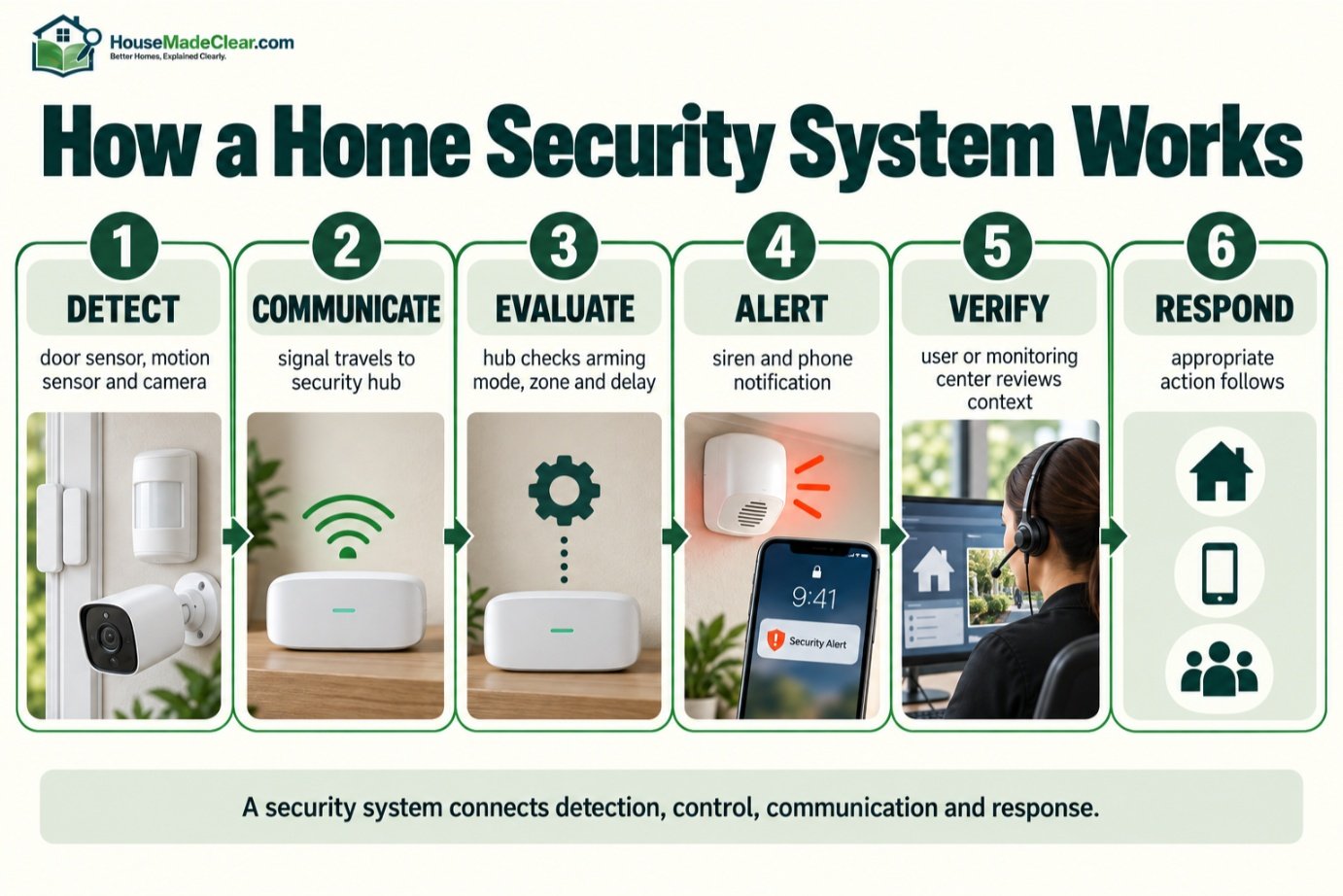
Most home security systems follow this basic sequence:
1. Detect: A door sensor, motion detector, camera, or other device recognizes an event.
2. Communicate: The device sends a signal to the security hub or control panel.
3. Evaluate: The system checks whether that sensor is active under the current arming mode and whether an entry delay or other rule applies.
4. Respond: The system may sound a siren, send an app notification, start a camera recording, or transmit an alarm signal.
5. Monitor or verify: You or a professional monitoring center reviews or responds to the alert, depending on the system.
A home security system improves detection, awareness, and response options, but it does not physically reinforce doors or guarantee that an incident will be prevented.
How a Home Security System Works at a Glance
| Stage | What Happens |
|---|---|
| Detection | Sensor identifies an opening, movement, sound, or camera event |
| Communication | Device reports the event to the security hub or panel |
| Processing | System applies arming mode, zone type, delays, and rules |
| Local response | Siren, chime, light, or camera recording may activate |
| Remote response | Phone/app notification may be sent |
| Monitoring | Professional monitoring center may receive qualifying alarms |
| Verification | User or monitoring service may evaluate the event |
| Escalation | Appropriate contacts or responders may be notified according to procedures |
The key point is that a security system is not a single device.
It is a network of detection, control, communication, and response components.
What Is a Home Security System?
A home security system is a collection of devices designed to help detect, record, communicate, or respond to events around a home.
Depending on the system, it may monitor:
- Exterior doors
- Windows
- Interior movement
- Breaking glass
- Exterior activity
- Smoke
- Carbon monoxide
- Water leaks
- Other environmental conditions
Some systems are very simple.
For example:
Front-door sensor → security hub → phone alert
Other systems are significantly more complex:
Multiple sensors + cameras + smart locks + cellular backup + professional monitoring
Neither is automatically better.
The best system is the one that addresses the home’s actual security needs without unnecessary complexity.
The Basic Home Security System Flow
The easiest way to understand how home security systems work is to follow an example.
Imagine the home is empty and the alarm is armed in Away mode.
Step 1: Someone Opens a Protected Door
The door contact changes state.
Step 2: The Sensor Sends a Signal
The door sensor communicates with the security panel or hub.
Step 3: The Panel Checks the Zone
The panel determines:
- Which door opened
- Whether the system is armed
- Whether an entry delay applies
Step 4: Entry Delay May Begin
For a normal entrance used by household members, the system may give an authorized user time to enter and disarm it.
Step 5: The System Is Not Disarmed
If the entry delay expires, the system may enter an alarm condition.
Step 6: Local Alarm Activates
The siren may sound.
Step 7: Notifications Are Sent
The homeowner may receive:
- Push notification
- Text
- Other configured alert
Step 8: Monitoring May Receive the Signal
If the system is professionally monitored, an alarm signal may also be transmitted to the monitoring service.
Step 9: Monitoring Procedure Begins
The monitoring service follows its procedures, which may include contacting:
- Account holder
- Emergency contacts
- Appropriate responders
depending on the alarm type, provider, local requirements, and verification procedure.
That is the complete system concept:
detect → communicate → evaluate → alert → verify → respond
What Is the Security Control Panel or Hub?
The control panel, sometimes called the:
- Security hub
- Alarm panel
- Base station
- Central controller
is the core of the system.
It receives information from the security devices and decides what to do with it.
A modern hub may communicate with:
- Door sensors
- Window sensors
- Motion detectors
- Keypads
- Sirens
- Glass-break sensors
- Smart locks
- Environmental detectors
It may also connect to:
- Internet
- Cellular network
- Professional monitoring service
- Smartphone app
The hub is effectively the system’s decision-making center.
What Does a Security Hub Actually Do?
Depending on the system, the hub may:
- Track sensor status
- Arm and disarm zones
- Apply entry/exit delays
- Sound the siren
- Send remote notifications
- Communicate with monitoring
- Store event history
- Trigger automations
- Report low battery or communication problems
A smart camera by itself can provide useful security information, but it is not necessarily a full security hub.
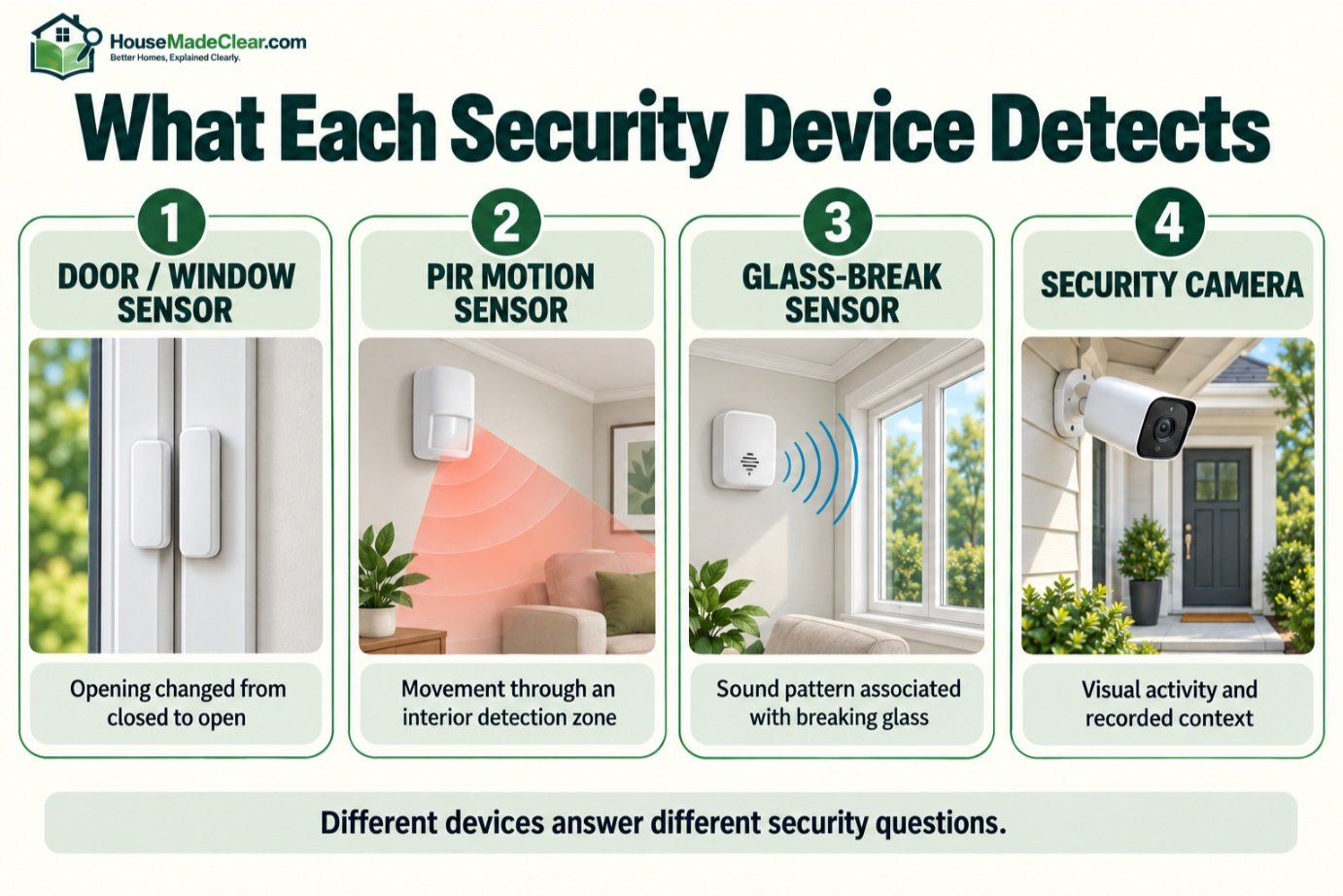
How Do Door and Window Sensors Work?
Door and window sensors are usually among the simplest security-system components.
Many use a two-part contact arrangement:
- Sensor
- Magnet
When the door or window is closed, the two parts are aligned.
When it opens, they separate.
The security system detects that change.
This lets the panel answer:
Did this protected opening change from closed to open?
These sensors are particularly useful on:
- Front doors
- Back doors
- Patio doors
- Garage-entry doors
- Accessible windows
Door Sensors vs Motion Sensors
These devices detect different events.
Door Sensor
Detects:
A specific door opened.
Motion Sensor
Detects:
Movement occurred inside a protected area.
That makes them complementary.
For example:
Back door contact triggers
and then:
Hallway motion sensor triggers
giving the system two different indications of activity.
Our guide to home security motion sensors explains PIR detection, placement, pets, and false alarms in more detail.
How Do Home Security Motion Sensors Work?
Most residential motion sensors use passive infrared, or PIR, technology.
A PIR detector monitors changes in infrared energy within its coverage pattern.
When a person moves through the detector’s zones, the changing infrared pattern can cause the sensor to report movement.
Motion detectors are useful because one properly placed device may monitor movement through a large interior route.
Good locations can include:
- Hallway
- Living room
- Stair route
- Central circulation area
They generally work best as a second layer behind perimeter sensors rather than as the only detection method.
How Do Glass-Break Sensors Work?
Glass-break sensors are designed to detect characteristics associated with breaking glass.
Some use acoustic analysis to listen for sound patterns associated with glass breakage.
They may be useful where you have:
- Several nearby windows
- Large glass doors
- Windows that are difficult to protect individually
However, they do not replace:
- Window contacts
- Motion detectors
in every situation.
A contact sensor tells you that a window opened.
A glass-break sensor attempts to detect a different type of event.
How Do Security Cameras Fit Into a Home Security System?
Cameras provide something most ordinary alarm sensors cannot:
visual context.
A door sensor may tell you:
Back door opened.
A camera may help show:
who opened it.
Cameras can provide:
- Live view
- Recorded footage
- Motion detection
- Person/vehicle detection on compatible systems
- Event alerts
- Visual verification
Their usefulness depends heavily on placement.
Our guide to home security camera placement explains how to position cameras around entrances, driveways, and other key areas.
How Does Camera Motion Detection Work?
Security cameras may detect activity using:
- PIR sensors
- Changes in the video image
- Smart object classification
- Combinations of these approaches
When activity is detected, a camera may:
- Begin recording
- Save an event
- Send a notification
- Trigger a spotlight
- Trigger another automation
For the technical differences, see our guide to motion detector cameras.
Do You Need Cameras for a Home Security System?
No.
A functioning alarm system can use:
- Door contacts
- Window contacts
- Motion detectors
- Siren
without cameras.
However, cameras can add:
- Verification
- Documentation
- Remote visibility
which can make alarm information more useful.
For example, if you receive:
“Front door alarm”
and also have a front-door camera, you may be able to quickly determine whether the activity involves:
- Family member
- Delivery
- Unknown visitor
What Is a Video Doorbell?
A video doorbell combines:
- Camera
- Doorbell function
- Motion or person detection on compatible models
- Two-way communication on many products
It is primarily designed around the front entrance.
A video doorbell can be useful for:
- Visitors
- Packages
- Door approaches
but it does not automatically replace a broader exterior camera system.
A driveway or side gate may require a separate camera angle.
Wired vs Wireless Security Systems
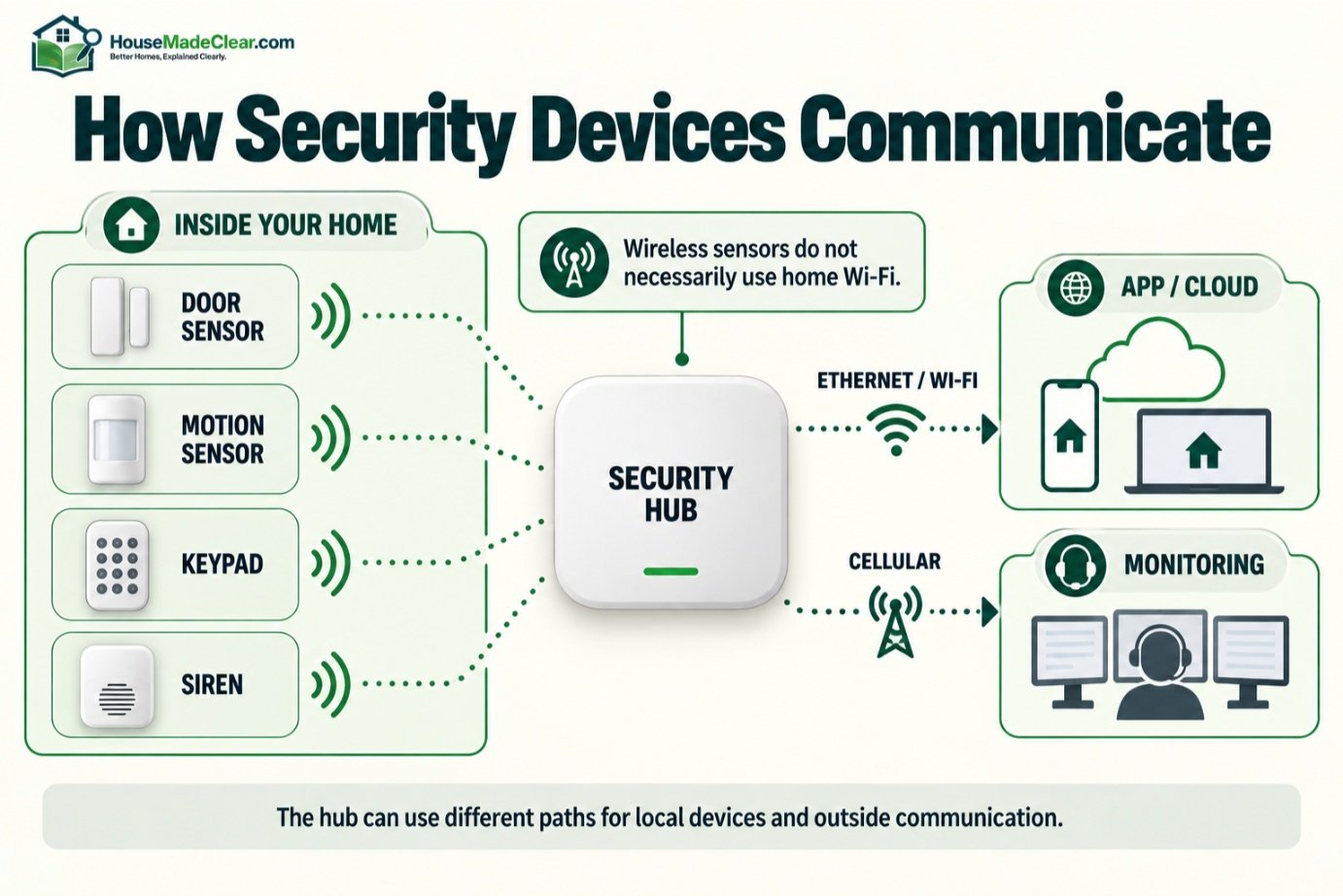
Home security devices can communicate in different ways.
A system may use:
- Hardwired connections
- Proprietary wireless radio
- Wi-Fi
- Ethernet
- Cellular communication
- Combinations
Modern residential alarm systems commonly use wireless sensors because they simplify installation.
Security cameras may use:
- PoE/Ethernet
- Wi-Fi
- Battery + Wi-Fi
Our comparison of wired vs wireless security cameras explains the camera side in detail.
Does Wireless Mean Everything Uses Wi-Fi?
No.
This is an important distinction.
A wireless alarm sensor may communicate with the security hub using a proprietary radio protocol rather than your home Wi-Fi.
Then the hub may use:
- Ethernet
- Wi-Fi
- Cellular
to communicate externally.
This means:
A motion detector can still communicate with the security panel even if your home’s internet connection is down.
The exact behavior depends on the system.
How Does a Security System Communicate With You?
A modern system may communicate through:
App Notifications
Sent over the internet to your smartphone.
Text or Email
Available on some platforms.
Local Siren
Does not depend on you checking a phone.
Monitoring Signal
Sent to a professional monitoring center.
Cellular Backup
Can provide an alternate communication path when ordinary internet connectivity fails on compatible systems.
The more important question is not simply:
“Is the system wireless?”
It is:
“What communication paths does this system use, and what happens when one fails?”
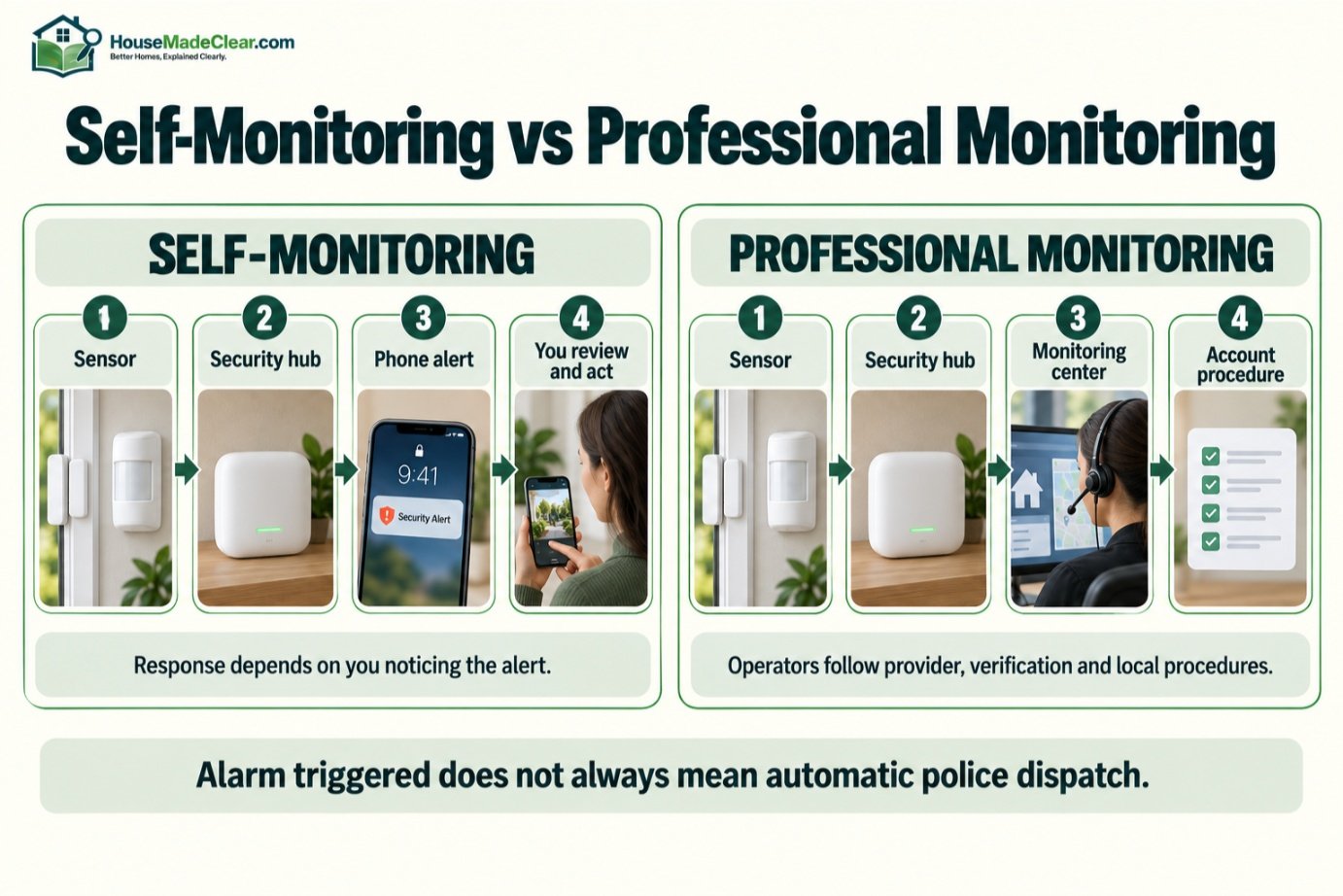
What Is Self-Monitoring?
With a self-monitored security system, you are responsible for receiving and evaluating most remote alerts.
Example:
- Motion sensor detects activity.
- App sends alert.
- You check camera.
- You decide what action is appropriate.
Advantages can include:
- Lower recurring costs
- More direct control
- No monitoring contract
The limitation is straightforward:
You need to notice and respond to the alert.
If your phone is:
- Off
- On silent
- Without service
- Unavailable
the alert may not receive immediate attention.
What Is Professional Home Security Monitoring?
Professional monitoring adds a monitoring center between your home security system and the response process.
UL Solutions describes a central station monitoring service as a facility that receives security or other alarm signals from protected premises, where trained operators record and process the signal and initiate the appropriate response. Learn how central station monitoring works.
A professionally monitored system might follow a process such as:
- Alarm is triggered.
- Panel sends a signal.
- Monitoring center receives it.
- Operator follows account procedures.
- Verification or contact attempts may occur.
- Appropriate escalation may follow.
The exact process varies by provider and alarm type.
Does Professional Monitoring Mean Police Are Automatically Dispatched?
No.
Do not assume:
Alarm triggered = police automatically arrive.
The response procedure can depend on:
- Monitoring provider
- Alarm type
- Verification
- Local policy
- Alarm permit requirements
- Ability to reach account holders
The Federal Trade Commission recommends asking a monitoring provider what happens when an alarm goes off, whether they contact you before or after notifying authorities, and what happens if they cannot reach you. See the FTC’s home security system contract and monitoring questions before signing up for a service.
What Happens When a Home Security Alarm Goes Off?
A typical intrusion event may look like this:
Sensor Activates
For example:
- Door opens
- Motion detected
Panel Evaluates the Event
The system checks:
- Arming mode
- Zone type
- Delay settings
Alarm Condition Starts
If appropriate, the siren may sound.
Remote Alerts Are Sent
You may receive:
- App alert
- Monitoring notification
Cameras May Record
Depending on integration.
Monitoring Responds
If professional monitoring is enabled, the center follows its procedures.
This process may happen differently for:
- Fire
- Carbon monoxide
- Medical
- Intrusion
signals.
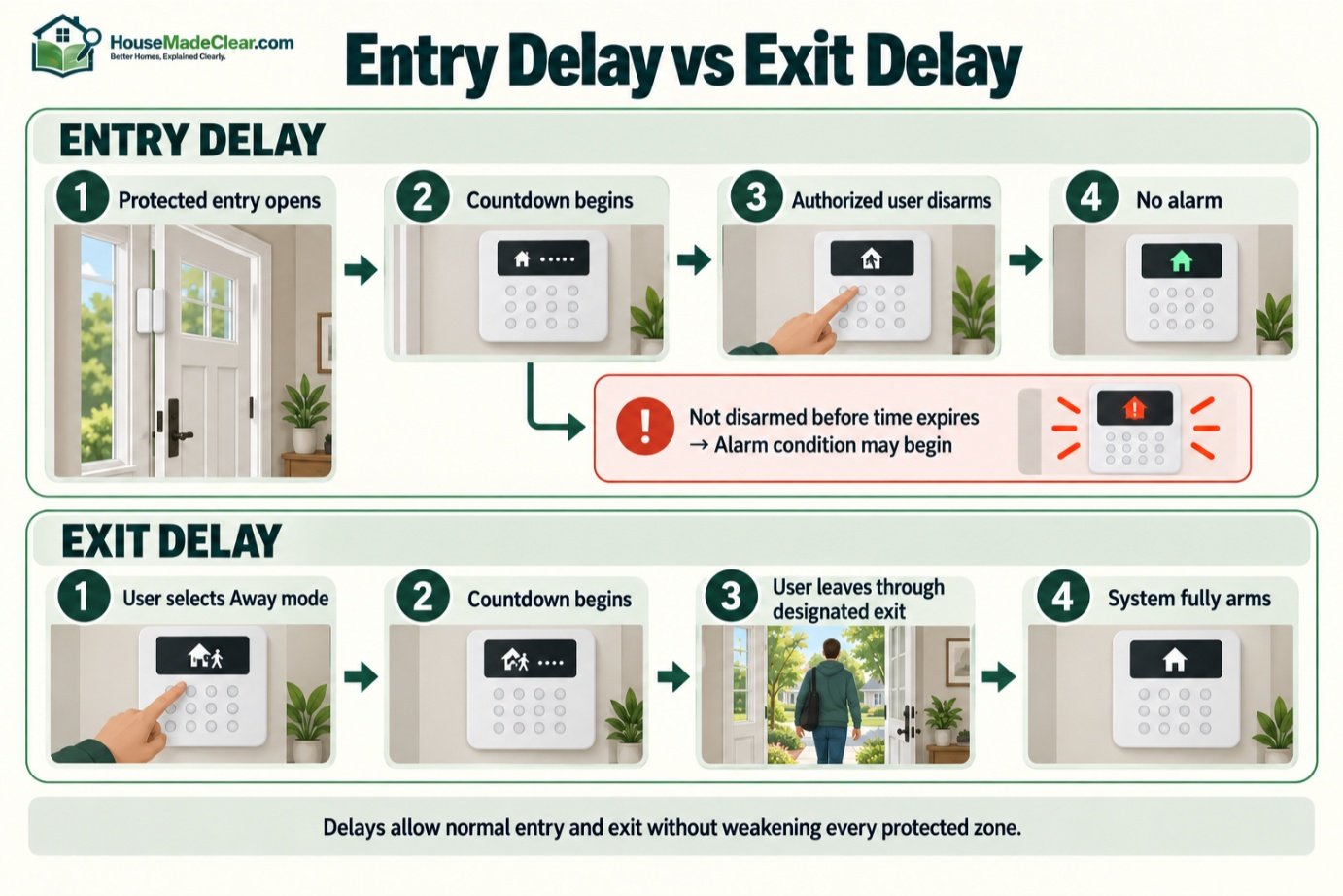
What Is an Entry Delay?
An entry delay gives an authorized user time to enter through a designated door and disarm the system.
For example:
- Front door opens.
- Entry countdown starts.
- User enters code or disarms through approved method.
- Alarm is canceled.
If the system is not disarmed before the delay expires, an alarm condition may begin.
Entry delays reduce false alarms from normal household entry.
What Is an Exit Delay?
An exit delay gives users time to leave after arming the system.
Example:
- User selects Away mode.
- Countdown begins.
- User leaves through designated exit.
- System fully arms.
Without this delay, leaving the house could immediately trigger a sensor.
Stay Mode vs Away Mode
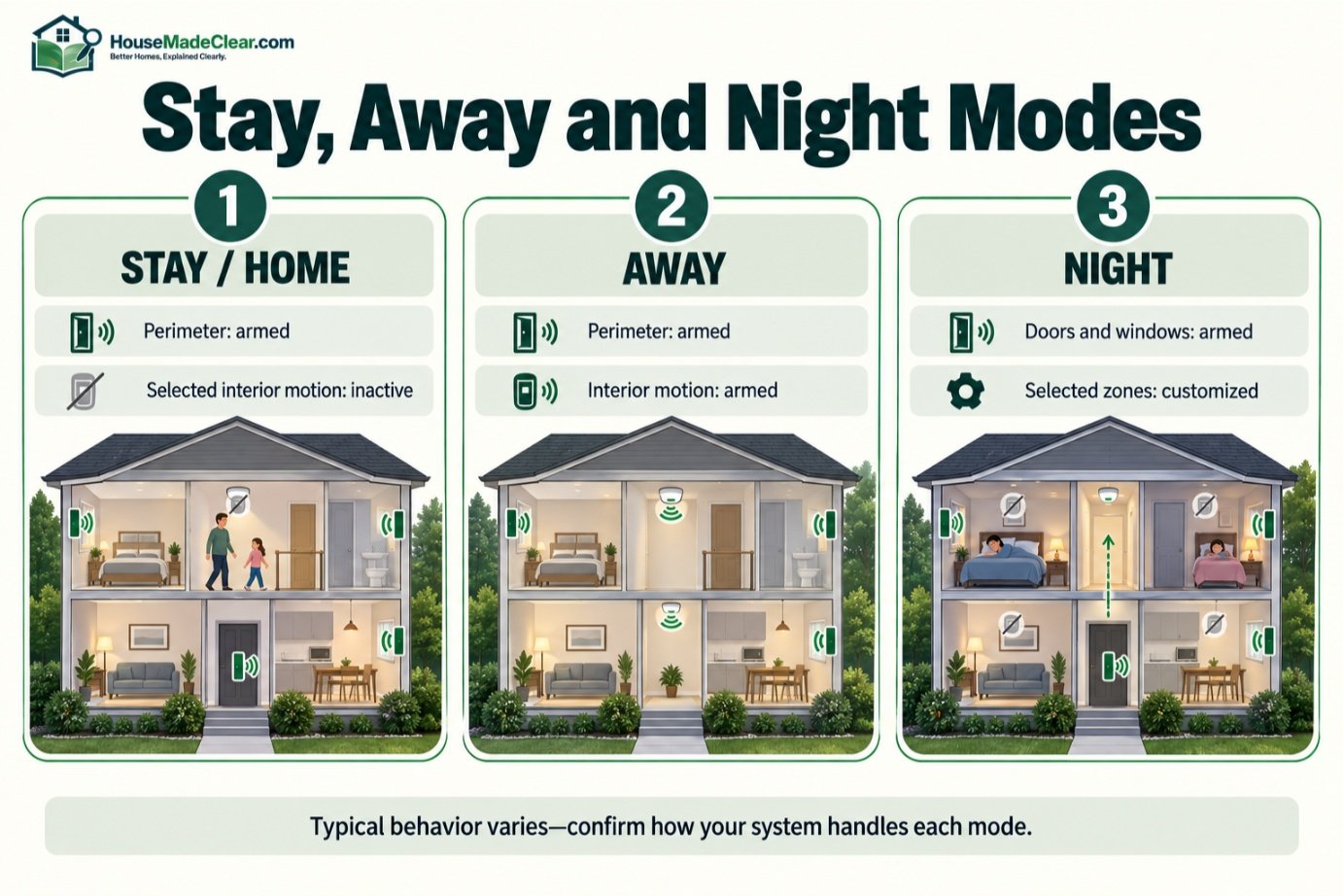
Many security systems support variations of these arming modes.
Stay/Home Mode
Often arms:
- Exterior doors
- Windows
while leaving selected interior motion sensors inactive.
This lets people move around inside.
Away Mode
Usually arms:
- Exterior perimeter sensors
- Interior motion detectors
because the home is expected to be empty.
Exact behavior varies by system.
Always learn how your specific platform handles each mode.
What Is Night Mode?
Some systems provide a Night mode or customizable nighttime configuration.
It might arm:
- Doors
- Windows
- Selected interior zones
while allowing movement in:
- Bedrooms
- Hallways
depending on the setup.
Night mode should reflect the actual household layout rather than simply turning every available sensor on.
What Is a Security Siren For?
A siren provides a local audible alarm.
Its purposes can include:
- Alerting occupants
- Drawing attention
- Signaling that detection occurred
A siren is different from an app notification because it works locally.
Even if nobody is looking at a phone, occupants can hear it.
However, a siren should not be described as guaranteeing that an intruder will leave.
It is one response component.
What Is Alarm Verification?
Alarm verification is the process of gathering additional information about an alarm before or during response.
That information may come from:
- User contact
- Camera footage
- Multiple sensor triggers
- Audio
- Other system data
For example:
Door sensor + interior motion + camera event
can provide more context than a single isolated sensor activation.
Verification procedures vary by provider and local policy.
Why Do Home Security Systems Have False Alarms?
False alarms can happen for many reasons.
Common causes include:
- User mistakes
- Doors left open
- Incorrect codes
- Pets
- Poor sensor placement
- Equipment problems
- Incorrect installation
The U.S. Department of Justice’s Office of Justice Programs identifies user error, inappropriate or faulty equipment, and poor installation as major contributors in its research on false burglar alarms.
Why False Alarms Matter
Repeated false alarms can:
- Reduce confidence in the system
- Cause household members to ignore warnings
- Generate unnecessary monitoring calls
- Potentially result in local fees
- Consume responder resources
The answer is not necessarily to reduce sensitivity everywhere.
Instead:
- Install sensors correctly
- Train users
- Maintain devices
- Use suitable arming modes
- Investigate recurring alarms
Our guide to common home security mistakes covers several system and behavior problems that can reduce reliability.
What Happens If the Internet Goes Down?
The answer depends entirely on the architecture.
Consider a system with:
- Wireless door sensor
- Local hub
- Cellular backup
The door sensor may still communicate with the hub even when home internet fails.
The hub may then use cellular communication for monitoring.
But a cloud-dependent camera may lose:
- Remote live viewing
- Cloud recording
- Some notifications
at the same time.
So there is no universal answer.
Ask:
Which features continue working without internet?
Can a Security System Work Without Wi-Fi?
Yes.
Many alarm systems do not require Wi-Fi for the fundamental sensor-to-panel communication.
They may use:
- Proprietary wireless protocols
- Wired connections
The panel itself may then use:
- Ethernet
- Cellular
- Wi-Fi
for remote communication.
Cameras are more likely to depend on network connectivity, particularly consumer Wi-Fi models.
What Happens During a Power Outage?
A properly designed security system may include a backup battery for its central panel.
But the whole system should be considered.
You may also rely on:
- Router
- Modem
- PoE switch
- NVR
- Wi-Fi access points
- Plug-in cameras
which may lose power separately.
The FTC recommends asking security providers what happens during a power outage and whether the system includes backup battery capability as part of evaluating a system.
Do Battery Sensors Keep Working During a Power Outage?
Battery-powered sensors themselves may continue operating.
But the central hub must also:
- Remain powered
- Receive their signal
- Communicate outward if needed
That is why backup planning should focus on the complete system rather than individual devices.
What Is Cellular Backup?
Cellular backup gives a compatible security hub another path for transmitting alarm signals if its ordinary internet connection fails.
It is particularly useful for professionally monitored systems.
However:
- Availability varies
- Plans may charge extra
- Cellular coverage matters
Ask whether cellular communication is:
- Primary
- Backup
- Included
- Subscription-dependent
before buying.
Local vs Cloud Security Systems
Modern home security systems can use:
- Local processing
- Cloud processing
- Combination
Local System
May keep:
- Sensor logic
- Video recordings
- Automations
inside the home network.
Cloud System
May rely on remote servers for:
- App access
- Video storage
- Notifications
- Smart detection
Hybrid System
Uses local operation for some functions and cloud services for others.
Understanding this distinction helps explain why some systems remain partially functional during an internet outage while others lose major features.
Local vs Cloud Camera Recording
Security cameras may save video to:
NVR
Common with wired/PoE systems.
microSD Card
Inside the camera.
Base Station
Used by some wireless systems.
Cloud Storage
Off-site recording tied to an account.
Combination
Local + cloud.
Our wired vs wireless security camera comparison explains these storage and network differences.
How Do Smart Locks Work With Security Systems?
A compatible smart lock may be integrated with the security platform.
Potential automations include:
- Lock doors when system arms
- Change security state after authorized unlock
- Show lock status in the same app
But automation should not override good physical security.
The lock, door, strike, and frame still matter.
For the physical side, see how to improve home security with better locks.
Does a Smart Lock Replace an Alarm?
No.
A smart lock controls access to a door.
An alarm system detects events and manages responses.
They solve different problems.
A smart lock may tell you:
Door was unlocked.
A security sensor may tell you:
Door opened while armed.
A motion detector may then tell you:
Movement occurred inside.
Using different layers creates more information.
Smart Home Integration
Security systems may integrate with:
- Lights
- Locks
- Thermostats
- Voice assistants
- Smart displays
Example:
Alarm armed Away → selected lights off → doors checked → cameras active
or:
Motion detected after dark → exterior light on
Convenience is useful, but security-critical functions should not become unnecessarily dependent on fragile automations.
Keep the core detection system simple and understandable.
Cybersecurity Matters Too
Internet-connected security equipment can contain sensitive information about:
- When you are home
- Camera views
- Door activity
- Alarm status
The FTC recommends securing internet-connected home devices by changing default credentials, protecting the router, enabling encryption, and keeping software updated. See its guidance on how to secure internet-connected devices at home.
For security accounts:
- Use strong unique passwords
- Enable multifactor authentication where available
- Install updates
- Review sharing permissions
- Remove unused user accounts
Do Home Security Systems Prevent Burglary?
A security system can improve:
- Detection
- Awareness
- Documentation
- Alarm response
but it cannot guarantee that an intrusion will not occur.
Physical security still matters.
A home with:
- Weak door
- Damaged lock
- Poor lighting
does not become physically strong simply because sensors are installed.
The better strategy is layered:
physical resistance + detection + visibility + response.
What Is Physical Security vs Electronic Security?
Physical Security
Directly creates a barrier or delays access.
Examples:
- Door
- Lock
- Window
- Reinforced hardware
Electronic Security
Detects, records, communicates, or controls.
Examples:
- Alarm
- Sensor
- Camera
- Smart lock electronics
Our guide to what is not a physical security measure for your home explains the distinction.
A strong home security plan uses both where appropriate.
What Does a Basic Home Security System Need?
A practical basic system might include:
Security Hub
Coordinates sensors and alerts.
Exterior Door Sensors
Protect important entrances.
Selected Window Sensors
Useful for vulnerable accessible windows.
Motion Sensor
Covers an important interior route.
Siren
Provides local alarm.
App or Keypad
Allows control and alerts.
Then add cameras or professional monitoring according to need.
Basic Security System for a Small Apartment
A simple apartment setup might include:
- Front-door contact sensor
- One motion sensor
- Video doorbell where permitted
- Indoor camera when away
A full large-house package may be unnecessary.
Renters should check lease and common-area rules before mounting equipment.
Basic Security System for a Detached House
A detached home might use:
- Sensors on main exterior doors
- Selected window sensors
- Interior motion detectors
- Front-door camera
- Driveway camera
- Exterior siren/interior siren as appropriate
- Monitoring if desired
The exact configuration should reflect:
- Home layout
- Access points
- Household use
not a generic equipment count.
Basic Security System for a Two-Story Home
Consider:
Ground Floor
- Exterior contacts
- Main movement route
- Cameras at exterior approaches
Upper Floor
- Additional motion detection only where it adds meaningful coverage
- Window sensors where access risk justifies them
You do not necessarily need a motion detector in every room.
How Many Security Sensors Does a House Need?
There is no universal number.
A better method is to identify:
Perimeter
Which exterior openings matter?
Interior Routes
Where would someone move after entering?
Visual Verification
Which exterior locations would benefit from cameras?
This prevents both:
- Under-protection
- Unnecessary device clutter
Self-Monitored vs Professionally Monitored Systems
| Feature | Self-Monitored | Professionally Monitored |
|---|---|---|
| Who receives alerts | Homeowner | Monitoring center + homeowner |
| Monthly fee | Often lower/none | Usually recurring |
| Response responsibility | User | Monitoring procedure |
| Works when user misses phone | Limited | Monitoring still receives qualifying signals |
| Contract | Often optional | May apply |
| User control | High | More service involvement |
| Best for | Hands-on users | Those wanting added response coverage |
Neither model is universally better.
The right choice depends on how much you value:
- Cost
- Independence
- Continuous monitoring availability
Our article on whether home security systems are worth it covers this cost-versus-benefit decision in detail.
DIY vs Professional Installation
A DIY installation is often practical when the system uses:
- Wireless contact sensors
- Wireless PIR detectors
- Battery cameras
- Simple hub
Professional installation may make more sense for:
- Hardwired alarms
- Multi-camera PoE systems
- Complex cable routing
- Large houses
- Integrated systems
See our DIY vs professional home security installation guide for a more detailed comparison.
What Happens After Installation?
Installation is not the final step.
A new system should be:
- Tested
- Walk-tested
- Reviewed in every arming mode
- Checked for notification delivery
- Tested for backup behavior where possible
- Explained to household members
If monitoring is used, confirm:
- Emergency contacts
- Verification instructions
- Local registration requirements
A system nobody understands is more likely to create false alarms.
Home Security System Maintenance
Regularly check:
- Sensor batteries
- Camera image
- Camera lens
- Siren
- Hub status
- Alarm history
- Firmware/software
- User accounts
Also retest after:
- Renovation
- Moving furniture
- Router changes
- New doors/windows
- Camera relocation
Security equipment should not be installed and forgotten indefinitely.
Common Home Security System Mistakes
1. Installing Sensors Without a Plan
Problem:
Too many devices in low-value locations.
Better approach:
Protect entry points and movement routes strategically.
2. Relying Only on Cameras
Problem:
Cameras cannot directly report every door or window opening.
Better approach:
Combine visual and nonvisual detection.
3. Relying Only on an Alarm
Problem:
Physical entry points remain weak.
Better approach:
Improve doors, locks, and other barriers too.
4. Ignoring Entry/Exit Delays
Problem:
Household members trigger alarms.
Better approach:
Understand system timing.
5. Using Away Mode While People Are Inside
Problem:
Interior motion sensors trigger.
Better approach:
Use the appropriate arming mode.
6. Poor Motion Sensor Placement
Problem:
Blind spots or repeated false alarms.
Better approach:
Follow product guidance and walk-test.
7. Poor Camera Placement
Problem:
Footage lacks useful detail.
Better approach:
Plan what each camera needs to see.
8. Not Understanding Internet Dependency
Problem:
Important features disappear unexpectedly during an outage.
Better approach:
Know the system architecture.
9. Weak Account Security
Problem:
Connected devices become a digital security risk.
Better approach:
Use unique passwords and MFA where available.
10. Never Testing the System
Problem:
Problems remain unnoticed until a real event.
Better approach:
Test devices periodically.
How to Plan a Home Security System Step by Step
Step 1: Inspect Your Exterior Doors
Check:
- Lock quality
- Door condition
- Frame
Step 2: Identify Vulnerable Windows
Prioritize:
- Ground-floor
- Easily accessible
openings.
Step 3: Map Likely Interior Routes
Choose strategic motion-sensor locations.
Step 4: Decide Where Cameras Add Value
Ask what you want each camera to answer.
Step 5: Choose Wired vs Wireless Equipment
Consider:
- Installation
- Power
- Network
Step 6: Choose Self or Professional Monitoring
Decide who will respond to alerts.
Step 7: Plan Outages
Understand:
- Internet behavior
- Backup power
- Cellular backup
Step 8: Secure the Digital Side
Protect:
- Security app
- Camera account
- Router
Step 9: Install and Test
Test every:
- Door
- Sensor
- Camera
- Arming mode
Step 10: Train the Household
Make sure regular users know:
- How to arm
- How to disarm
- What alerts mean
- What to do during an alarm
Home Security System Example: How Everything Works Together
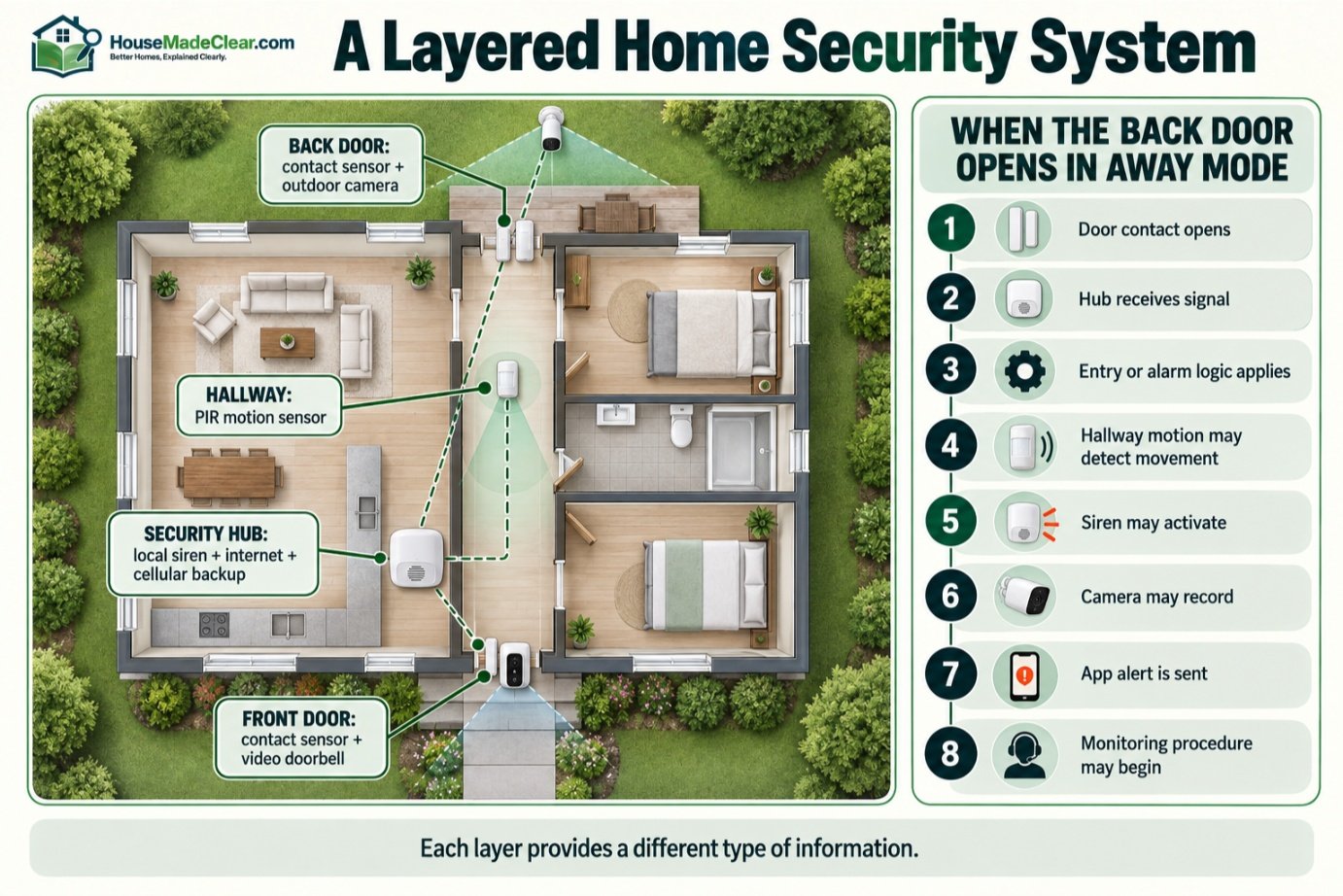
Imagine this setup:
Front Door
- Quality deadbolt
- Contact sensor
- Video doorbell
Back Door
- Contact sensor
- Outdoor camera
Interior Hallway
- PIR motion detector
Security Hub
- Local siren
- Internet communication
- Cellular backup
Monitoring
- Professional monitoring enabled
Now imagine the back door opens while the house is armed Away.
The sequence could be:
1. Door contact opens
↓
2. Hub receives signal
↓
3. Entry/alarm logic applies
↓
4. Interior motion detects movement
↓
5. Siren activates
↓
6. Camera records
↓
7. App notification is sent
↓
8. Monitoring center receives alarm
↓
9. Monitoring procedure begins
That is a complete layered security system.
Each component provides a different type of information.
Final Answer: How Do Home Security Systems Work?
A home security system works by connecting:
sensors + control panel + alarm/notifications + optional cameras + optional monitoring
into one coordinated system.
The basic process is:
Detect → Communicate → Evaluate → Alert → Verify → Respond
Door and window sensors detect openings.
Motion sensors detect interior movement.
Cameras provide visual context.
The control panel decides how the system should respond based on:
- Arming mode
- Zone type
- Delays
- Programming
The system may then:
- Sound a siren
- Send a phone alert
- Record video
- Contact a monitoring center
Professional monitoring adds another response layer, but it does not mean police are automatically dispatched for every alarm.
Internet-connected systems also need:
- Secure accounts
- Software updates
- Reliable network planning
and every system should be tested regularly.
Most importantly, electronic security does not replace physical security.
A strong home-security plan combines:
good locks + strong doors + appropriate sensors + useful cameras + reliable alerts + a response plan.
The goal is not to install the greatest number of devices.
It is to build a system in which every component has a clear purpose and works with the other layers.
Frequently Asked Questions
How do home security systems work?
Home security systems use sensors to detect events such as doors opening or interior movement. Those devices send signals to a control panel or hub, which can trigger a siren, send notifications, start camera recordings, or transmit an alarm to a monitoring service.
What are the main parts of a home security system?
Typical components include a control panel or hub, door/window sensors, motion detectors, sirens, keypads, cameras, video doorbells, and optional professional monitoring. Some systems also include environmental sensors and smart-home integrations.
What happens when a home security alarm goes off?
The security panel evaluates the triggered sensor and system status. It may sound a siren, send app notifications, activate related devices, and transmit an alarm signal to a professional monitoring service if monitoring is enabled.
Do home security systems automatically call the police?
Not necessarily. Monitoring procedures vary by provider, alarm type, verification process, local policy, and jurisdiction. Ask your monitoring provider exactly how it handles alarm signals and responder notification.
Do home security systems work without Wi-Fi?
Many alarm sensors communicate directly with a security hub using wired or proprietary wireless connections rather than Wi-Fi. Some local functions may continue without Wi-Fi, while remote access and cloud services may stop.
Do home security systems work without internet?
Some local alarm functions can continue without an internet connection. Systems with cellular backup may also retain monitoring communication. Cloud-dependent cameras and remote app functions may be affected.
What happens to a security system during a power outage?
It depends on the system. Many alarm panels include backup batteries, but routers, cameras, NVRs, and other equipment may require separate backup power. Check the complete system rather than assuming every device is protected.
What is the difference between self-monitoring and professional monitoring?
With self-monitoring, the homeowner receives and evaluates alerts. With professional monitoring, qualifying alarm signals are also sent to a monitoring center that follows established response procedures.
Do you need cameras for a home security system?
No. A home security system can operate with door sensors, window sensors, motion detectors, and a siren. Cameras add visual verification and recording but are not required for basic intrusion detection.
What is Stay mode on a home security system?
Stay mode generally arms perimeter sensors such as doors and windows while allowing occupants to move inside without triggering selected interior motion sensors. Exact behavior varies by system.
What is Away mode on a home security system?
Away mode generally arms both perimeter sensors and interior motion detection because the home is expected to be unoccupied. Exact zone behavior depends on the alarm configuration.
Can home security systems have false alarms?
Yes. False alarms can result from user mistakes, poor installation, pets, inappropriate sensor placement, equipment issues, or incorrect system configuration. Proper setup, testing, maintenance, and user training can reduce them.







[…] How Do Home Security Systems Work? Sensors, Alarms, Cameras & Monitoring… […]
[…] How Do Home Security Systems Work? Sensors, Alarms, Cameras & Monitoring… […]