

















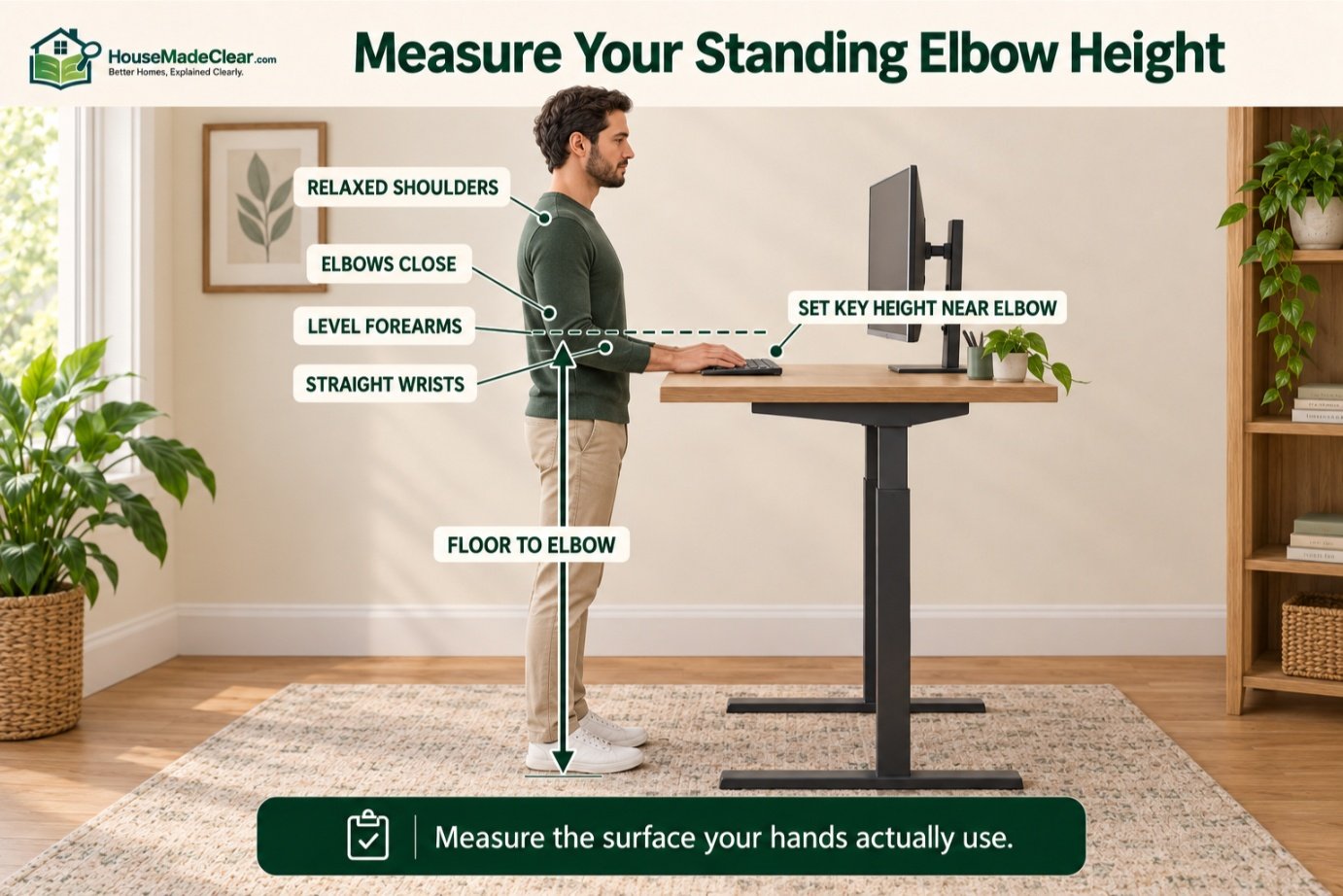
The best standing desk height is usually the height that lets you type with your shoulders relaxed, elbows close to your body, forearms roughly parallel to the floor, and wrists straight.
For most people, that means positioning the keyboard surface at or very close to standing elbow height.
There is no single desk height that works for everyone. Your ideal setting depends on:
- Your height
- Arm and torso proportions
- Keyboard thickness
- Shoes
- Desk-top thickness
- Monitor arrangement
- Type of work
As a broad reference, OSHA’s computer-workstation guidance lists an adjustable keyboard-height range of approximately 36 to 46.5 inches for standing computer work, while emphasizing that the keyboard should be around elbow height.
Quick Answer
To set a standing desk:
- Stand naturally with your shoulders relaxed.
- Keep your upper arms close to your sides.
- Bend your elbows to roughly 90–100 degrees.
- Raise or lower the desk until the keyboard is approximately level with your elbows.
- Keep your wrists straight while typing.
- Position the monitor separately so you do not have to bend your neck down or tilt your head back.
For many adults, standing keyboard height falls somewhere around 36–46.5 inches from the floor, but your own elbow height is a better reference than a generic chart.
Standing Desk Height at a Glance
| User Height | Approximate Starting Desk Height* |
|---|---|
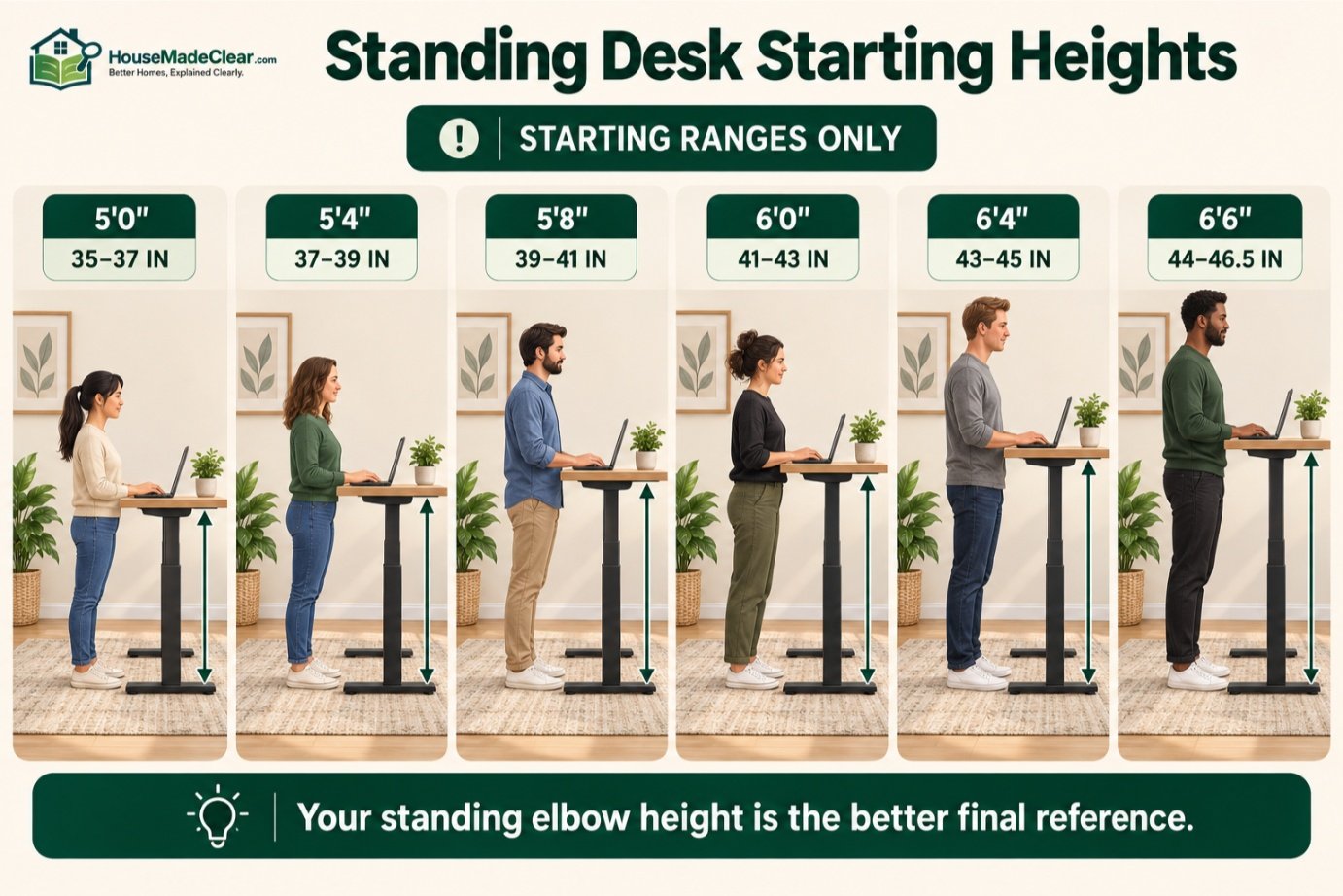
| 5’0″ | 35–37 in |
| 5’2″ | 36–38 in |
| 5’4″ | 37–39 in |
| 5’6″ | 38–40 in |
| 5’8″ | 39–41 in |
| 5’10” | 40–42 in |
| 6’0″ | 41–43 in |
| 6’2″ | 42–44 in |
| 6’4″ | 43–45 in |
| 6’6″ | 44–46.5 in |
*These are approximate starting ranges, not ergonomic standards. People of the same height can have different elbow heights because body proportions vary.
The best final setting is the one that supports a neutral working posture.
What Is the Standard Height of a Standing Desk?
There is no single standard standing desk height comparable to the familiar fixed height of many conventional desks.
Standing desks are designed to accommodate people with very different body dimensions.
OSHA’s workstation purchasing guidance recommends that keyboard height for standing computer tasks be adjustable across approximately 36–46.5 inches, with the keyboard positioned near elbow height.
That range is useful when shopping for a desk because it tells you whether the desk has enough adjustment for a broad range of users.
But it does not mean:
Everyone should set their desk somewhere in the middle.
A 5’2″ user and a 6’4″ user will probably need substantially different settings.
The Most Important Rule: Match the Desk to Your Elbow Height
Instead of starting with your overall height, start with your elbows.
Stand naturally.
Let your arms hang at your sides.
Then bend your elbows so your forearms extend forward.
Your keyboard should sit approximately around that level.
OSHA’s ergonomic guidance recommends keeping the elbows close to the body, shoulders relaxed, wrists aligned with the forearms, and elbows generally bent between about 90 and 120 degrees.
That neutral posture is much more useful than choosing a desk height solely because an online chart says:
“A person who is 5’10” needs a 41-inch desk.”
Use charts as starting points.
Use your body position to make the final adjustment.
How High Should a Standing Desk Be for Someone 5’0″?
A useful starting range is approximately:
35–37 inches
for the keyboard surface.
But check your actual elbow height.
If your shoulders rise while typing, the desk is probably too high.
If you have to reach downward or bend your wrists upward, the desk may be too low.
Shorter users should pay particular attention to the desk’s minimum standing height when shopping.
Some desks do not lower far enough to provide a comfortable standing keyboard position for every user.
Standing Desk Height for 5’2″
Start around:
36–38 inches
and adjust from there.
The keyboard should meet your hands without requiring you to:
- Raise your shoulders
- Reach downward
- Bend your wrists
A desk with a broad adjustment range is particularly useful if you switch between sitting and standing.
Standing Desk Height for 5’4″
A rough starting point is:
37–39 inches
from the floor to the working surface.
If you use a thick:
- Mechanical keyboard
- Desk mat
- Keyboard platform
the desktop itself may need to be slightly lower so the actual typing surface remains near elbow height.
Standing Desk Height for 5’6″
A person around 5’6″ may start around:
38–40 inches
and fine-tune from there.
If the desk feels correct for typing but the monitor feels too low, do not keep raising the entire desk.
Instead, adjust the:
- Monitor stand
- Monitor arm
separately.
Standing Desk Height for 5’8″
A reasonable initial range is approximately:
39–41 inches.
Again, the target is not the number.
The target is:
- Relaxed shoulders
- Elbows close to body
- Straight wrists
- Comfortable reach
If those conditions occur at 39 inches rather than 41 inches, use 39.
Standing Desk Height for 5’10”
A useful starting range is:
40–42 inches.
This is near the center of the adjustment range used by many electric sit-stand desks.
Do not assume the desk surface and keyboard surface are identical measurements.
The top of a thick keyboard may sit an inch or more above the desk.
Standing Desk Height for 6’0″
For someone around 6 feet tall, start around:
41–43 inches.
Then check:
- Elbow alignment
- Shoulder position
- Wrist angle
If your desk includes a keyboard tray, measure the keyboard tray height, not simply the top of the desk.
Standing Desk Height for 6’2″
A starting point of roughly:
42–44 inches
often makes sense.
Taller users should confirm that the desk’s maximum usable height remains stable.
A desk may technically rise high enough but become:
- Wobbly
- Uncomfortable
- Too low for the monitor
at its maximum extension.
Standing Desk Height for 6’4″
A useful starting range is approximately:
43–45 inches.
For tall users, desk-selection range matters considerably.
Before purchasing, check:
- Maximum desk height
- Whether that height includes the desktop
- Monitor-arm adjustment range
- Stability at maximum extension
Standing Desk Height for 6’6″
A tall user around 6’6″ may need approximately:
44–46.5 inches
for the keyboard surface.
This approaches the upper end of the standing keyboard-height range cited in OSHA’s workstation purchasing guidance.
If you are very tall, verify the actual desk specifications before buying rather than assuming every “standing desk” rises high enough.
How to Measure Your Ideal Standing Desk Height
You do not need a complicated ergonomic calculator.
Step 1: Put On Your Normal Work Shoes
Shoes can change your standing height.
If you usually work barefoot, measure barefoot.
If you normally wear shoes, wear them.
Step 2: Stand Normally
Do not:
- Stretch upward
- Slouch
- Lock yourself into a rigid pose
Stand comfortably.
Step 3: Relax Your Shoulders
Your shoulders should not lift toward your ears.
Step 4: Keep Your Elbows Near Your Body
Bend them approximately to a right angle or slightly more open.
Step 5: Measure From Floor to Elbow
Use this as your initial keyboard-height reference.
Step 6: Adjust the Desk
Raise or lower it until your hands rest naturally over the keyboard.
Step 7: Type for Several Minutes
Check whether:
- Shoulders remain relaxed
- Wrists stay neutral
- Elbows remain close to body
Fine-tune in small increments.
Should a Standing Desk Be Exactly at Elbow Height?
Approximately—not necessarily exactly.
Elbow height is an excellent starting reference for keyboard work.
But your preferred desk setting may be slightly different because of:
- Keyboard thickness
- Desk mat
- Wrist support
- Mouse design
- Task type
The goal is a neutral position.
OSHA recommends that the keyboard and mouse be placed so your shoulders remain relaxed and your wrists do not bend upward, downward, or sideways.
What Happens If a Standing Desk Is Too High?
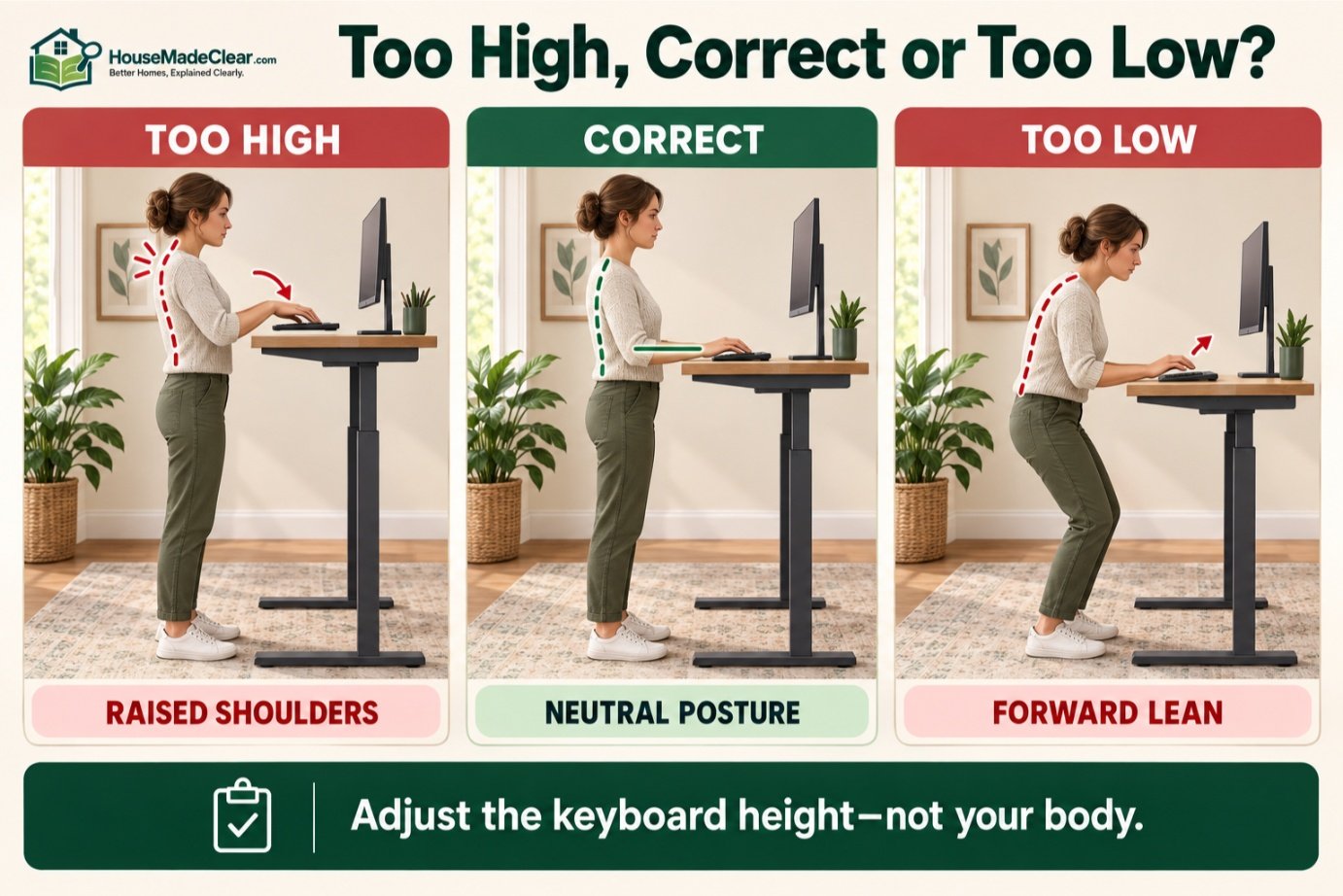
A desk that is too high often causes you to:
- Raise your shoulders
- Lift your elbows
- Bend your wrists downward
- Reach awkwardly for the mouse
Over time, this can make the workstation uncomfortable.
A quick visual sign is:
Your shoulders rise whenever your hands reach the keyboard.
If that happens, lower the desk gradually.
What Happens If a Standing Desk Is Too Low?
A standing desk that is too low can encourage:
- Forward leaning
- Wrist extension
- Rounded shoulders
- Neck flexion
You may find yourself bending toward the keyboard instead of bringing the keyboard to you.
Raise the desk until you can type without leaning forward.
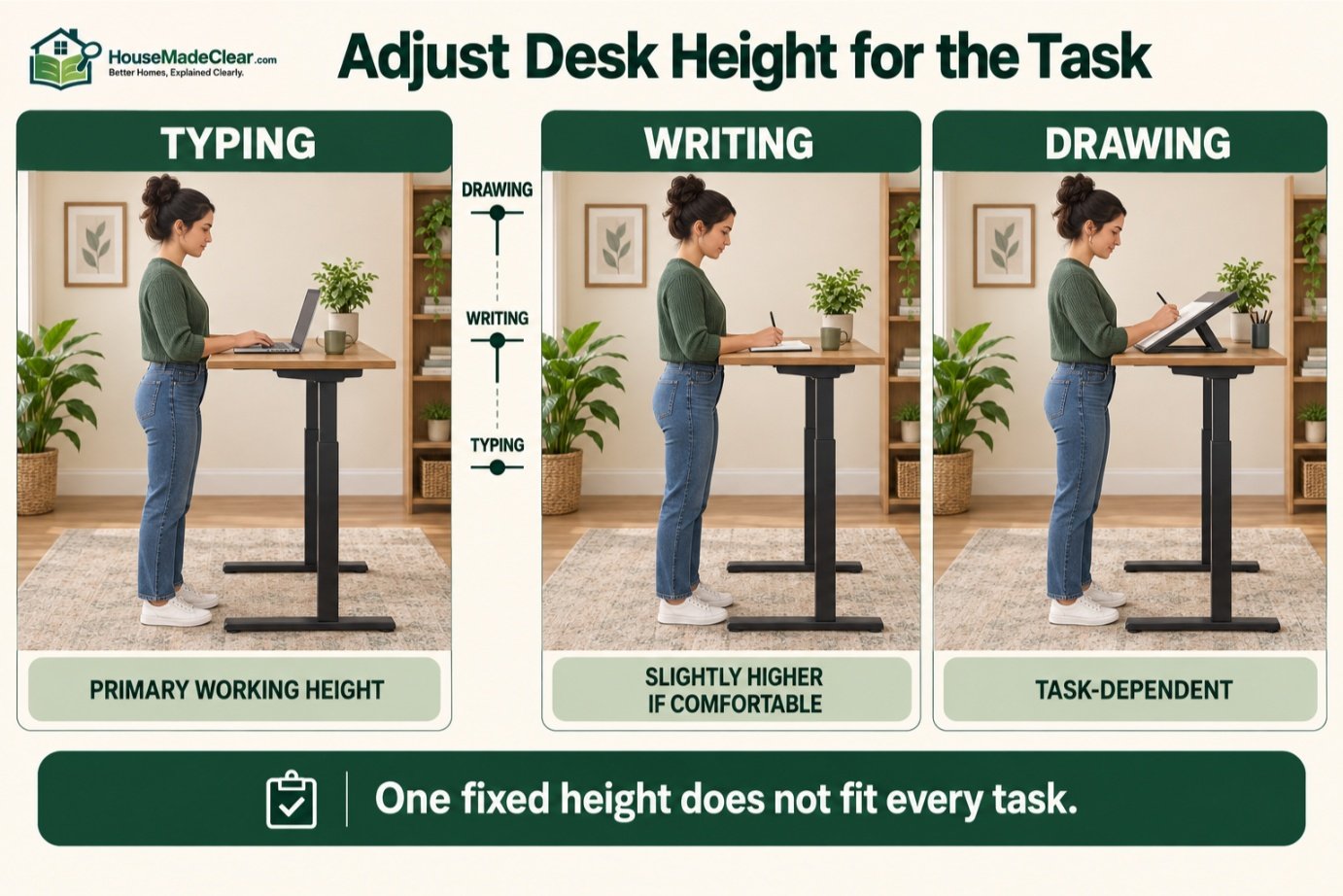
Standing Desk Height for Typing
Typing is the best task to use when setting the initial desk height.
Position the keyboard so:
- Elbows remain close to your sides
- Forearms are roughly horizontal
- Wrists remain straight
- Shoulders remain relaxed
This should be considered the primary working height for a computer-based standing desk.
Standing Desk Height for Using a Mouse
The mouse should be at approximately the same height as the keyboard.
Avoid placing the mouse:
- Farther away
- On a higher shelf
- On a lower surface
OSHA recommends positioning the keyboard and pointing device close together and keeping frequently used components within easy reach.
The goal is to avoid repeatedly moving your arm away from your body.
Standing Desk Height for Writing
Writing by hand can feel more comfortable on a slightly different surface height than intensive keyboard use.
Some people prefer the surface:
slightly above their typing height
for writing, drawing, or detailed visual tasks.
The ideal position depends on whether you need:
- Fine precision
- Downward pressure
- Visual inspection
An adjustable desk makes this easy because you can change the surface by an inch or two for different tasks.
Standing Desk Height for Drawing
Drawing often benefits from:
- Higher work surface
- Tilted work surface
- Separate drafting surface
depending on the type of work.
The general ergonomic principle is to reduce excessive:
- Neck bending
- Back bending
- Arm lifting
rather than trying to use one fixed height for every task.
Standing Desk Height for Laptop Use
A laptop creates an ergonomic compromise.
If the laptop keyboard is positioned correctly at elbow height, the screen may be too low.
If the laptop screen is raised to a comfortable viewing position, the keyboard becomes too high.
For extended work, consider:
- Laptop stand
- External keyboard
- External mouse
This allows the keyboard and screen to be adjusted independently.
OSHA’s workstation guidance similarly recommends auxiliary keyboards and monitors when laptops are used intensively as primary computers.
Standing Desk Monitor Height
Your desk height and monitor height should be treated as two separate adjustments.
Once the keyboard is positioned correctly, adjust the monitor.
OSHA’s computer-workstation guidance recommends positioning the top of the monitor at or below eye level and placing it directly in front of the user.
Our full guide on ideal monitor height explains screen position, viewing distance, monitor tilt, and dual-monitor setups in more detail.
How High Should a Monitor Be at a Standing Desk?
A good starting position is:
Top of the screen at or slightly below eye level.
Your eyes should naturally look slightly downward toward the center of the display.
Avoid positioning the screen so high that you need to tilt your chin upward.
OSHA specifically notes that monitors positioned too high can lead users to tilt their heads backward, increasing neck and shoulder fatigue.
How Far Away Should the Monitor Be?
OSHA recommends enough desk depth to allow a monitor to be placed at least 20 inches away from the eyes.
The exact comfortable distance depends on:
- Screen size
- Resolution
- Vision
- Text scaling
A larger display often works better farther away.
Avoid bringing the monitor unusually close simply because text is difficult to read.
Try increasing:
- Text size
- Display scaling
first.
Standing Desk With Two Monitors
If you use two monitors equally:
- Position them close together
- Center the gap between them in front of you
If one monitor is primary:
- Put the primary monitor directly in front
- Place the secondary display beside it
Avoid repeatedly rotating your head to one side throughout the workday.
Standing Desk With an Ultrawide Monitor
An ultrawide monitor can work very well with a standing desk.
Make sure:
- Center of main work remains in front of you
- Monitor isn’t so close that you constantly turn your head
- Screen height remains comfortable
A monitor arm can make vertical adjustment much easier when switching between sitting and standing.
Should the Monitor Move When the Desk Moves?
Usually, yes.
If the monitor is mounted to:
- Desk-mounted arm
then the screen rises and falls with the work surface.
This helps preserve the relationship between:
- Keyboard
- Monitor
when switching positions.
A wall-mounted monitor can also work, but it needs enough vertical adjustment to accommodate both seated and standing positions.
Standing Desk Height vs Sitting Desk Height
Sitting and standing require very different work-surface heights.
A conventional desk is commonly around:
29–30 inches high
while a standing keyboard position may be somewhere in the mid-30s to mid-40s depending on the user.
See our standard desk dimensions guide for typical seated desk height, depth, and width.
This difference is why a true sit-stand desk needs a substantial vertical adjustment range.
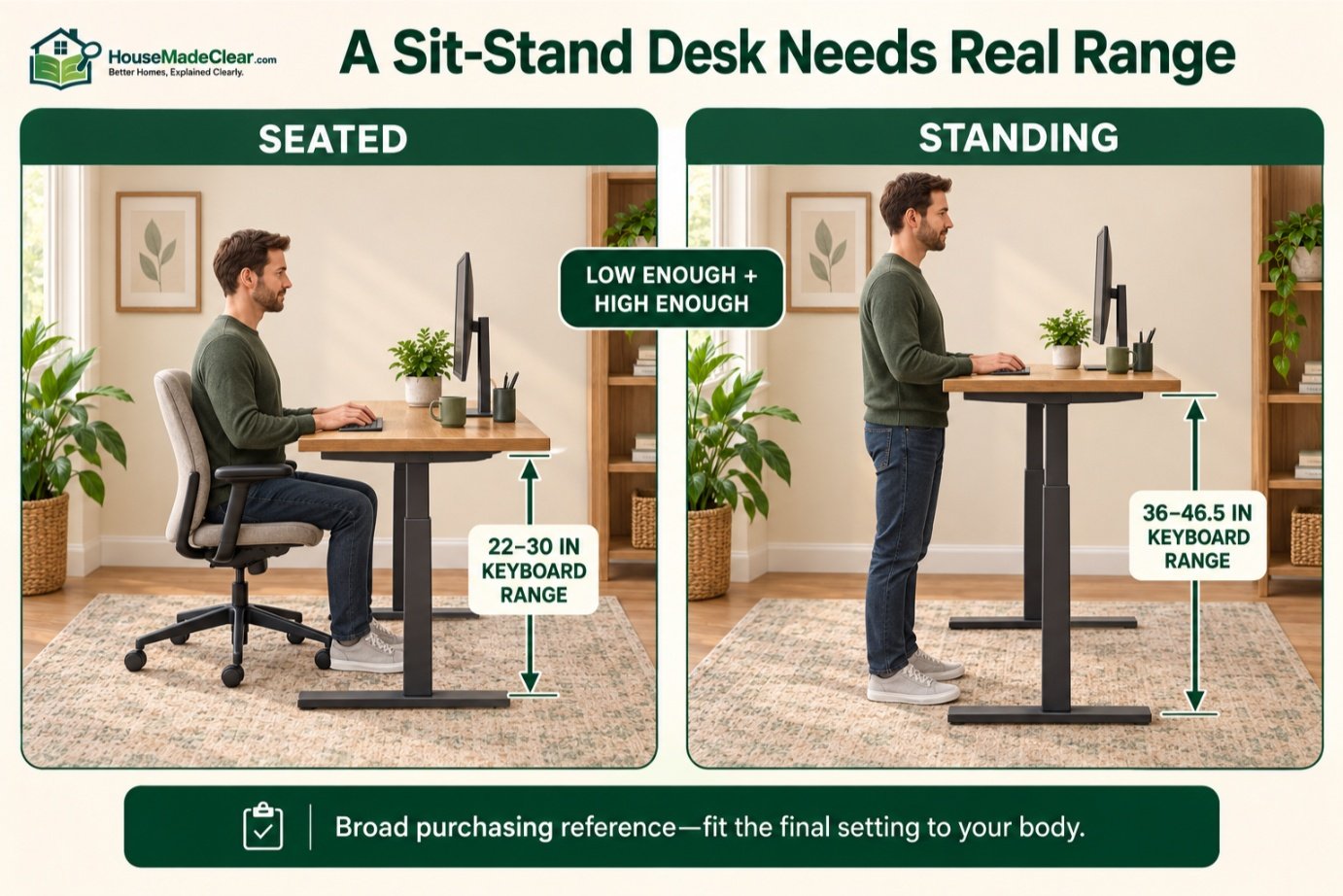
What Height Range Should a Sit-Stand Desk Have?
A desk should adjust low enough for your seated posture and high enough for your standing elbow height.
OSHA’s purchasing guidance suggests keyboard adjustability around:
- 22–30 inches for seated tasks
- 36–46.5 inches for standing tasks
as a broad purchasing reference.
You may not personally need that complete range.
But a wide range is useful if:
- Multiple people share the desk
- You are unusually short or tall
- You want flexibility for future setups
Minimum Standing Desk Height
There is no universal minimum.
What matters is whether the desk can lower to your elbow height while standing.
Shorter users should pay particular attention to this specification.
A desk with a minimum height that is too high can force:
- Raised shoulders
- Bent wrists
even though it is marketed as adjustable. Mayo Clinic’s office ergonomics guidance recommends placing the monitor directly in front of the user, approximately 20–40 inches away, with the top of the screen at or slightly below eye level.
Maximum Standing Desk Height
Tall users have the opposite concern.
Check whether the desk rises high enough to position the keyboard around your elbow level.
Also check whether the desk remains stable at that height.
Maximum height is especially important for users around:
- 6’2″
- 6’4″
- 6’6″ and taller
Electric vs Manual Standing Desk Height Adjustment
Both can work.
Electric Standing Desk
Advantages include:
- Quick adjustment
- Precise height changes
- Memory presets on many models
Manual Standing Desk
Advantages can include:
- Lower complexity
- Lower cost
The key ergonomic requirement is not the motor.
It is whether you will actually change positions throughout the day.
Are Standing Desk Memory Presets Useful?
Yes.
Once you find good positions, save:
- Sitting height
- Standing height
if your desk supports memory settings.
This makes switching fast and repeatable.
Without presets, users sometimes avoid changing positions because finding the right height becomes inconvenient.
What Should Your Standing Posture Look Like?
When working while standing:
- Head should remain balanced
- Neck should stay generally aligned with torso
- Shoulders should remain relaxed
- Upper arms should stay close to your sides
- Wrists should remain neutral
- Feet should be comfortably supported
OSHA describes a neutral standing position with the legs, torso, neck, and head generally aligned and the feet slightly apart.
The goal is comfortable alignment, not military-style rigidity.
Should You Stand Completely Still?
No.
One of the most important workstation principles is changing posture.
OSHA notes that even a good posture should not be held continuously and recommends changing working position frequently throughout the day.
That can include:
- Sitting
- Standing
- Walking briefly
- Shifting position
The advantage of a sit-stand desk is not that standing is automatically superior to sitting.
It is that you can avoid being locked into one posture for hours.
How Long Should You Stand at a Standing Desk?
There is no universal standing interval that works for everyone.
Avoid treating formulas such as:
- Stand exactly 30 minutes
- Sit exactly 30 minutes
as rigid rules.
Instead, alternate positions based on:
- Comfort
- Task
- Fatigue
- Work routine
If your legs, feet, or back are becoming uncomfortable, change position.
A standing desk should make movement easier—not turn standing into another fixed posture.
Should You Use an Anti-Fatigue Mat?
An anti-fatigue mat can make standing more comfortable for some users, especially on:
- Concrete
- Tile
- Hard flooring
But a mat does not fix an incorrectly adjusted workstation.
Set your:
- Desk
- Keyboard
- Monitor
correctly first.
Then evaluate whether a standing mat improves comfort.
What Shoes Are Best for a Standing Desk?
Comfortable, supportive footwear may improve standing comfort.
OSHA’s sit-stand workstation purchasing guidance specifically recommends comfortable and supportive shoes while standing.
However, your measured desk height can change slightly depending on whether you work in:
- Shoes
- Slippers
- Bare feet
Set your standing preset based on how you normally work.
Should You Use a Footrest While Standing?
A small footrest can be useful because it allows you to periodically place one foot slightly higher.
OSHA’s standing-posture illustration notes that a user may elevate one foot on a rest while standing.
The purpose is variation.
Switch feet periodically rather than using the same raised position all day.
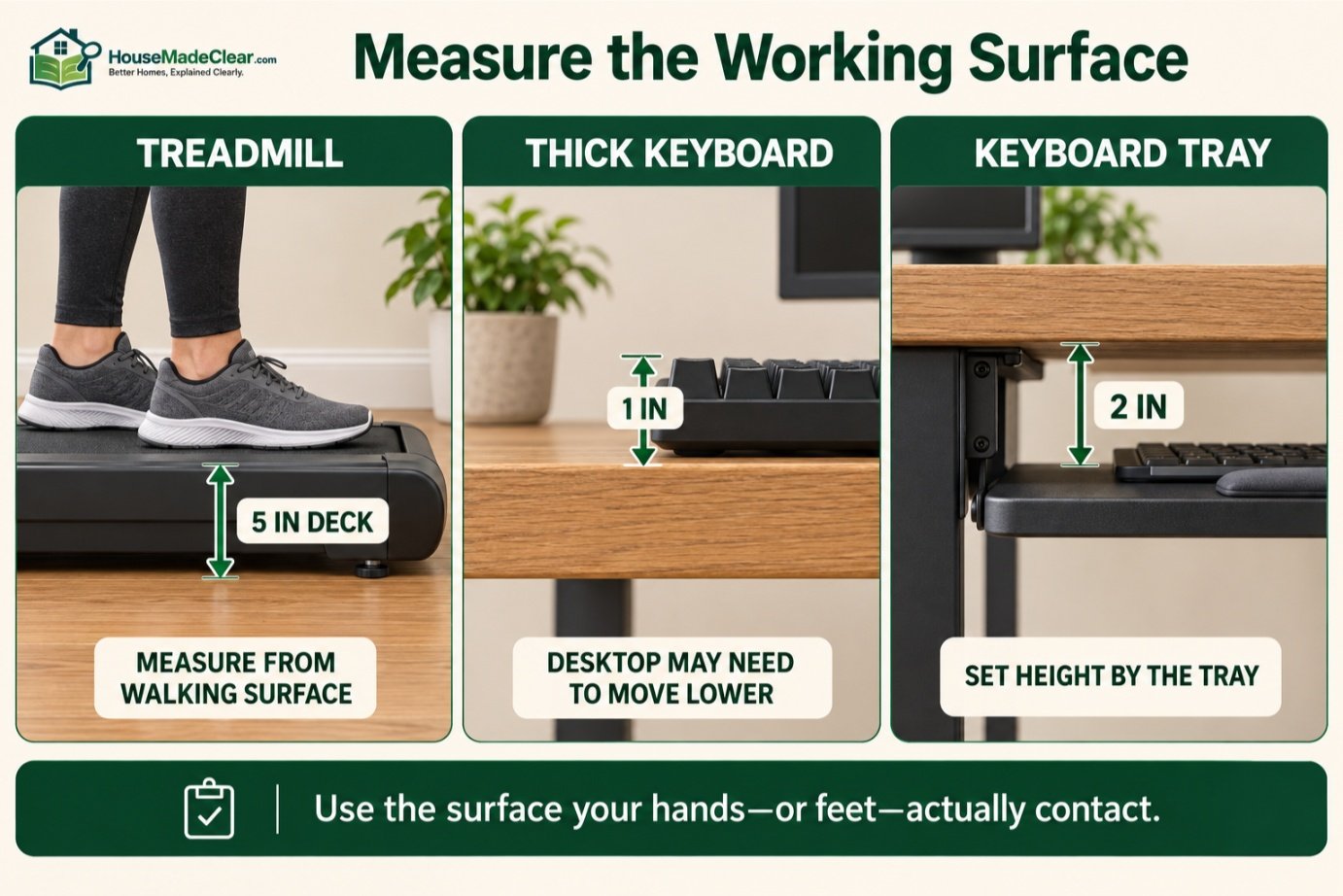
Standing Desk Height With a Treadmill
Walking desks require a different adjustment.
A treadmill adds height beneath your feet.
If the walking deck is:
5 inches above the floor
your desktop will also need to rise approximately that amount to preserve your normal elbow relationship.
Measure from:
the treadmill walking surface
rather than the room floor.
Do not assume your ordinary standing-desk preset will still work.
Standing Desk Height With a Thick Desk Mat
A desk mat adds relatively little vertical height.
But a thick:
- Keyboard
- Wrist rest
- Keyboard platform
can have a noticeable effect.
The important measurement is the height of the surface your hands actually use.
If your keyboard sits 1 inch above the desktop, you may prefer the desk itself approximately 1 inch lower than your bare elbow measurement.
Standing Desk Height With a Keyboard Tray
A keyboard tray changes the equation substantially.
If the tray sits:
2 inches below the desktop
you should adjust the desk according to the keyboard tray—not the desktop.
This may allow the monitor to sit higher while keeping your hands lower.
It can be particularly useful when the desk surface itself cannot reach the ideal typing height.
Standing Desk Height for a Mechanical Keyboard
Mechanical keyboards are often thicker than low-profile keyboards.
A thick keyboard raises the keys above the desk surface.
That means:
The desktop may need to be slightly lower.
Judge your posture at the key height, not the desk height.
If your wrists angle downward toward the keyboard, experiment with:
- Lower desk position
- Keyboard tilt
- Different wrist support
Should a Keyboard Be Flat at a Standing Desk?
The goal is a neutral wrist.
Some people work comfortably with:
- Flat keyboard
while others prefer:
- Slight negative tilt
depending on desk height and keyboard design.
Avoid aggressive positive tilt if it forces your wrists upward.
Your forearms and hands should remain approximately aligned.
Standing Desk Height for Short People
Shorter users often face two problems:
- Desk does not go low enough when sitting.
- Standing desk setting is still slightly too high.
Before buying, check the desk’s true minimum height.
Do not assume a desk marketed for “all users” will fit every body size.
If the desk remains too high, possible solutions may include:
- Lower-profile desktop
- Keyboard tray
- Different desk frame
rather than raising your shoulders to accommodate the furniture.
Standing Desk Height for Tall People
Tall users should focus on:
- Maximum height
- Stability
- Monitor-arm height
A desk that tops out at 44 inches may be comfortable for one tall user and too low for another.
The correct test is simple:
Can you type at maximum height with relaxed shoulders and neutral wrists?
If not, the desk does not have enough range for you.
Standing Desk Height for Couples Sharing a Home Office
If two people share the same desk, an electric sit-stand model with several memory presets can be particularly useful.
Each person can save:
- Sitting position
- Standing position
instead of manually adjusting every time.
This is one situation where a wide adjustment range has more value than choosing a desk based on one person’s measurements.
Standing Desk Height for Children or Teenagers
Growing users benefit from height adjustability.
The desk should be adjusted according to the same principles:
- Relaxed shoulders
- Neutral wrists
- Elbows near keyboard height
Do not use an adult standing-desk setting simply because the child can reach it.
As the user grows, the desk can be adjusted gradually.
Where Should the Standing Desk Go in a Home Office?
Desk height is only one part of the workspace.
Also consider:
- Window position
- Walking paths
- Wall clearance
- Lighting
- Monitor glare
If you’re planning the whole room, see our guide on where your desk should face in a home office.
Placement can affect whether you have enough room to stand comfortably and move around the desk.
How Much Space Should Be Behind a Standing Desk?
A standing desk still needs circulation space.
The amount depends on whether:
- You only stand
- You also use an office chair
- Other people pass behind you
If the desk switches between sitting and standing, plan around the chair clearance, because the chair usually needs more floor space.
Our guide to space behind a desk chair explains practical clearance ranges for chair movement and walkways.
How Far Should a Standing Desk Be From the Wall?
The desk can often sit relatively close to a wall, but allow enough room for:
- Cables
- Monitor arms
- Plugs
- Baseboards
- Desk movement
Some monitor arms extend behind the rear edge of the desk.
Check your equipment before pushing the desk tightly against the wall.
See our guide on how far a desk should be from the wall for layout details.
Standing Desk and Window Glare
Raising your desk can change your relationship with nearby windows.
At standing height, the monitor may receive glare that was not noticeable while seated.
If possible, avoid placing the screen where a bright window is:
- Directly behind it
- Directly reflected in it
OSHA recommends arranging office lighting to minimize screen glare.
Our guide to reducing screen glare in a home office covers additional placement and lighting strategies.
Standing Desk Depth
Height is not enough.
A standing desk should also be deep enough to support a comfortable monitor distance.
A common home-office desk depth is:
24–30 inches
with 30 inches providing greater flexibility for:
- Large monitors
- Monitor arms
- Keyboard positioning
OSHA recommends sufficient depth to keep a monitor at least 20 inches from the eyes.
If your desk is very shallow, achieving a comfortable viewing distance may be difficult. Check your monitor position by using our tool which is available for free.
Standing Desk Width
Common widths include:
- 40 inches
- 48 inches
- 55 inches
- 60 inches
- 72 inches
Width does not directly determine ergonomic height, but it affects whether you can keep:
- Keyboard
- Mouse
- Monitor
in comfortable positions.
For a full breakdown of desk sizing, see standard desk dimensions.
Standing Desk Stability
An often-overlooked issue is desk stability at full height.
A desk can feel solid while sitting but wobble more when raised.
This matters because monitor movement can become distracting while typing.
Before purchasing, consider:
- Frame design
- Desktop size
- Maximum height
- Weight capacity
- Monitor configuration
A large monitor arm can magnify small desk movements.
Cable Management for Standing Desks
Your cables need enough slack to accommodate the desk’s full travel.
Check:
- Monitor cables
- Laptop charger
- Power strip
- Speaker cables
- Ethernet
- USB accessories
Raise the desk to maximum height and confirm nothing becomes:
- Tight
- Pulled
- Disconnected
Then lower the desk and make sure excess cable does not:
- Tangle
- Drag
- Catch
A power strip mounted to the underside of the desk can simplify cable movement.
Standing Desk Setup Checklist
Before deciding the desk height is correct, check all of these:
Shoulders
Relaxed rather than raised.
Elbows
Close to the torso.
Forearms
Roughly parallel to the floor.
Wrists
Straight rather than sharply bent.
Keyboard
Close enough that you do not reach.
Mouse
Beside the keyboard.
Monitor
Directly ahead.
Head
Balanced over the torso.
Feet
Comfortably supported.
Posture
Able to change frequently.
If one adjustment fixes one problem but creates another, adjust the relevant component separately.
For example:
Keyboard correct + monitor too low
means:
Raise the monitor.
Not:
Raise the whole desk.
How to Set Up a Standing Desk Step by Step
Step 1: Lower the Desk
Start below your expected height.
Step 2: Stand Naturally
Wear your normal work footwear.
Step 3: Relax Your Arms
Bring your elbows to a comfortable typing angle.
Step 4: Raise the Desk Slowly
Stop when your keyboard reaches approximately elbow height.
Step 5: Type
Check your wrists and shoulders.
Step 6: Adjust the Mouse
Keep it beside the keyboard.
Step 7: Adjust the Monitor
Put the top at or slightly below eye level.
Step 8: Check Viewing Distance
Move the screen far enough away to view comfortably.
Step 9: Save the Height
Use a memory preset if available.
Step 10: Change Position Regularly
Alternate with sitting and movement.
Common Standing Desk Height Mistakes
1. Copying Someone Else’s Desk Height
Problem:
Body proportions differ.
Better approach:
Use your own elbow height.
2. Setting the Desk Based on Monitor Height
Problem:
Keyboard becomes too high.
Better approach:
Set keyboard first and monitor second.
3. Raising the Desk Too High
Problem:
Shoulders lift.
Better approach:
Lower until shoulders relax.
4. Setting the Desk Too Low
Problem:
You lean forward.
Better approach:
Raise until hands meet the keyboard naturally.
5. Ignoring Keyboard Thickness
Problem:
Actual typing surface becomes too high.
Better approach:
Measure at the keys.
6. Keeping the Monitor Too Low
Problem:
Neck bends downward.
Better approach:
Use a monitor stand or arm.
7. Standing All Day
Problem:
Standing becomes another prolonged static posture.
Better approach:
Alternate positions.
8. Locking the Knees
Problem:
Standing becomes rigid and uncomfortable.
Better approach:
Stand naturally and shift position.
9. Placing the Mouse Too Far Away
Problem:
Arm reaches repeatedly.
Better approach:
Keep it close to the keyboard.
10. Buying a Desk Without Checking Height Range
Problem:
Desk cannot reach your required seated or standing position.
Better approach:
Measure yourself before purchasing.
Standing Desk Height Calculator: Do You Need One?
A calculator can give you a useful starting number.
But you do not need one to set up your desk correctly.
Your own body provides a better reference.
Measure:
floor → relaxed elbow
then adjust based on your actual:
- Keyboard
- Shoes
- Posture
An ergonomic calculator cannot account perfectly for:
- Arm length
- Torso length
- Shoulder structure
- Keyboard thickness
Use the calculated value as a starting point, not a rule.
Is There a Perfect Standing Desk Height?
No.
Even for the same person, the ideal height can change slightly depending on the task.
You may prefer:
- Typing height
- Writing height
- Reading height
to differ.
An adjustable workstation is valuable precisely because it does not force every activity into one fixed position.
OSHA’s computer workstation guidance also emphasizes that there is no single correct workstation arrangement for everyone.
Is a Standing Desk Better Than a Regular Desk?
A standing desk’s main advantage is postural flexibility.
It allows you to move between:
- Sitting
- Standing
without abandoning your workstation.
That does not mean standing continuously is automatically healthier or more ergonomic.
The useful feature is the ability to change position.
If a standard seated desk is well adjusted and you take regular movement breaks, it can still provide an effective workspace.
Is a Standing Desk Worth It for a Home Office?
It can be, especially if you spend many hours at a computer.
A sit-stand desk may be particularly useful if you:
- Dislike sitting continuously
- Want more movement during the day
- Share a workstation
- Need adjustable furniture
However, adjustability alone does not guarantee comfort.
You still need proper:
- Keyboard position
- Monitor height
- Mouse placement
- Office layout
For broader workspace planning, see our guide on how to design a functional home office.
Standing Desk Height by Task
| Task | Good Starting Position |
|---|---|
| Typing | Keyboard around elbow height |
| Mouse work | Same level as keyboard |
| Writing | Around elbow height or slightly higher if comfortable |
| Drawing | Task-dependent; may benefit from a higher/angled surface |
| Laptop only | Compromise; external keyboard recommended for long sessions |
| Video calls | Keep camera near eye level |
| Reading | Raise material to reduce neck bending |
| Precision visual work | Surface may be somewhat higher |
Standing Desk Height by User Height
| Height | Approximate Starting Range |
|---|---|
| 4’10” | 34–36 in |
| 5’0″ | 35–37 in |
| 5’2″ | 36–38 in |
| 5’4″ | 37–39 in |
| 5’6″ | 38–40 in |
| 5’8″ | 39–41 in |
| 5’10” | 40–42 in |
| 6’0″ | 41–43 in |
| 6’2″ | 42–44 in |
| 6’4″ | 43–45 in |
| 6’6″ | 44–46.5 in |
These numbers are deliberately given as ranges because two people of identical height may have different:
- Arm length
- Shoulder height
- Torso proportions
Your elbows are the better measuring tool.
Final Answer: How High Should a Standing Desk Be?
For computer work, your standing desk should generally be high enough that:
the keyboard is approximately at your standing elbow height.
Your posture should look like this:
- Shoulders relaxed
- Elbows close to your body
- Elbows around 90–120 degrees
- Forearms roughly parallel to the floor
- Wrists straight
- Head balanced over your torso
For many adults, this places the keyboard somewhere within roughly 36–46.5 inches from the floor, which aligns with OSHA’s broad purchasing range for adjustable standing keyboard surfaces.
But do not choose your final height from a chart alone.
Instead:
- Stand naturally.
- Find your elbow height.
- Bring the keyboard to that level.
- Type for several minutes.
- Lower the desk if your shoulders rise.
- Raise it if you lean forward.
- Adjust your monitor separately.
For your monitor, use a stand or monitor arm so the top of the display sits around or slightly below eye level rather than raising the whole desk to fix the screen position.
Most importantly:
Do not turn standing into another all-day static posture.
A sit-stand desk is most useful when it helps you alternate comfortably between:
- Sitting
- Standing
- Moving
throughout the day.
The correct standing desk height is therefore not simply 40 inches, 42 inches, or 44 inches.
It is the height where your hands meet the keyboard naturally while the rest of your body remains relaxed and neutral.
Frequently Asked Questions
What is the standard standing desk height?
There is no single standard standing desk height. OSHA’s workstation purchasing guidance lists an adjustable keyboard range of approximately 36–46.5 inches for standing tasks, but the ideal setting depends on the user’s standing elbow height and body proportions.
How high should a standing desk be?
A standing desk should generally place the keyboard around your elbow height while your shoulders are relaxed, elbows remain close to your body, and wrists stay straight.
What height should a standing desk be for someone 5’6″?
A useful starting point for someone around 5’6″ is approximately 38–40 inches. Adjust the desk according to your actual elbow height and typing posture.
What height should a standing desk be for someone 5’8″?
Start around 39–41 inches and then adjust until your keyboard sits near elbow height without raising your shoulders or bending your wrists.
What height should a standing desk be for someone 5’10”?
A practical starting range is approximately 40–42 inches. The exact height depends on your arm length, shoes, keyboard thickness, and posture.
What height should a standing desk be for someone 6 feet tall?
Someone around 6 feet tall may start around 41–43 inches. Fine-tune the position so the keyboard is near elbow height and the shoulders remain relaxed.
Should a standing desk be at elbow height?
Approximately. Elbow height is a useful starting point for keyboard work, but the final desk setting may be slightly lower or higher depending on keyboard thickness and individual body proportions.
Should your arms be at 90 degrees at a standing desk?
A roughly right-angle elbow position is a useful starting point, but it does not need to be exactly 90 degrees. OSHA describes neutral computer-workstation positioning with the elbows close to the body and generally bent between about 90 and 120 degrees.
Where should the monitor be on a standing desk?
The monitor should generally be directly in front of you with the top of the screen at or slightly below eye level. Adjust the monitor independently from the keyboard height whenever possible.
Is it bad if a standing desk is too high?
A desk that is too high can cause raised shoulders, elevated elbows, and awkward wrist positions. Lower the desk until you can type with relaxed shoulders and neutral wrists.
How do I know if my standing desk is too low?
The desk may be too low if you repeatedly lean forward, round your shoulders, or bend your wrists upward while typing. Raise it gradually until your hands meet the keyboard naturally.
Should you stand all day at a standing desk?
No. Even a good standing posture should not be maintained continuously. Change working positions regularly by alternating between sitting, standing, and brief movement throughout the day.