










Smart plugs are one of the simplest ways to automate an existing appliance without replacing the appliance itself.
Plug a compatible lamp, fan or other device into the smart plug, connect the smart plug to its supported app or smart-home platform, and you may be able to control power using:
- Schedules
- Timers
- Voice commands
- Automations
- Remote controls
- Energy monitoring on supported models
But that does not mean every device in your home should be connected to one.
Some appliances do not resume operating when power returns. Others draw more current than a particular smart plug is designed to handle. And equipment that produces substantial heat deserves particular caution rather than casual remote automation.
Quick answer: Smart plugs are most useful with relatively simple devices that safely resume operation when power is restored—such as lamps, decorative lighting and some fans. They can also help control standby power from compatible electronics. Before connecting any appliance, check both the appliance instructions and the smart plug’s electrical rating. Avoid assuming that heaters, cooking appliances, motorized equipment or other high-load devices are automatically suitable for unattended smart-plug control.
The U.S. Department of Energy specifically recommends smart plugs and power strips as tools that can cut power to electronics that otherwise continue consuming electricity in standby mode. (energy.gov)
What Does a Smart Plug Actually Do?
A smart plug sits between a wall outlet and an electrical device.
At its simplest, it works as a remotely controlled switch.
Instead of manually unplugging a lamp, for example, you can tell the smart plug to:
- Supply power
- Stop supplying power
More capable models may also support:
- Daily schedules
- Sunrise/sunset routines
- Countdown timers
- Away-mode routines
- Energy-use reporting
- Integration with sensors
- Voice assistants
Some newer smart plugs also support the Matter smart-home standard.
Matter is designed to improve interoperability between compatible smart-home products and major smart-home ecosystems. The Connectivity Standards Alliance lists smart-home platforms including Amazon Alexa, Apple, Google and others among the ecosystems Matter is intended to work across. (csa-iot.org)
Compatibility still needs to be checked on the individual product.
Before Using a Smart Plug, Ask One Question
Before thinking about apps or automations, ask:
What happens to this device when power is disconnected and then restored?
Try it manually.
- Turn the device on.
- Unplug it.
- Wait briefly.
- Plug it back in.
If the device automatically returns to its previous operating state, smart-plug control may be practical.
If it remains off until you press a physical or electronic button, a smart plug may be able to supply power but cannot necessarily make the appliance start.
This is common with many devices that use electronic controls.
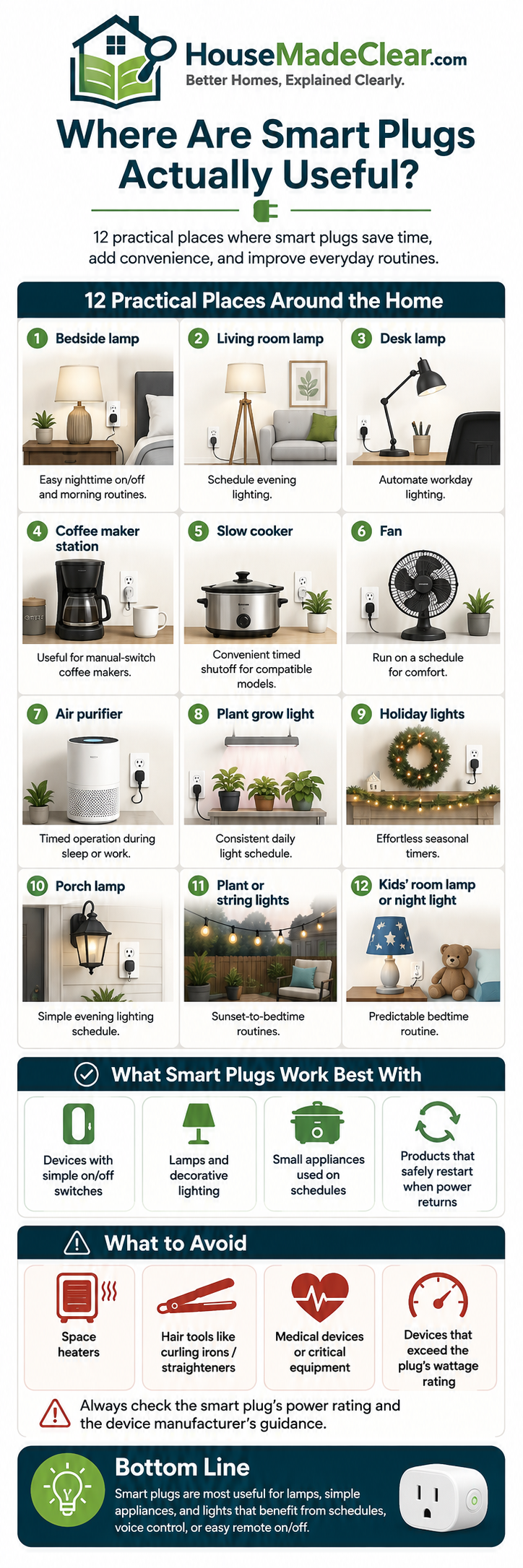
1. Table and Floor Lamps
Lighting is one of the easiest and most practical uses for smart plugs.
A conventional lamp with a physical on/off switch can often be automated without replacing the bulb or fixture.
Useful locations include:
- Living-room lamp
- Bedroom lamp
- Entryway lamp
- Reading lamp
- Home-office lamp
Possible routines include:
Evening schedule
Turn the lamp on shortly before sunset and off at bedtime.
Vacation routine
Operate selected lamps at different times while you are away.
Voice control
Turn a difficult-to-reach lamp on or off without reaching behind furniture.
Bedtime routine
Switch several lamps off together.
For existing lamps, a smart plug can therefore be a more practical solution than replacing every bulb with a connected bulb.
When a Smart Bulb May Be Better
Use a smart bulb instead if you want:
- Dimming
- Color temperature adjustment
- Color-changing light
- Individual bulb control
A smart plug normally controls power, not the light’s color or brightness.
If your lamp already has a dimmer, check compatibility before placing it on any external smart control.
2. Home-Office Desk Lamps
A smart plug can be particularly useful in a home office.
You might create a workday routine such as:
8:30 a.m.
- Desk lamp on
5:30 p.m.
- Desk lamp off
Or combine the lamp with other compatible devices in a “Start Work” scene.
House Made Clear’s guide to designing a functional home office recommends separating general room lighting from task lighting. A smart plug can automate an existing task lamp without requiring a complete lighting-system replacement.
Do not automate the office purely for novelty
The lamp should still have an easy manual control.
If the internet, app or smart-home platform is unavailable, you should still be able to operate an important light normally.
3. Holiday and Decorative Lights
Holiday lighting is another strong smart-plug use.
Instead of manually connecting and disconnecting lights every evening, create a schedule.
For example:
- On at sunset
- Off at 11 p.m.
This can work for:
- Christmas tree lights
- Window decorations
- Mantel lights
- Seasonal displays
- Decorative string lights
Important outdoor distinction
An indoor smart plug should not be used outdoors merely because the device connected to it is an outdoor decoration.
For exterior decorations, use equipment specifically rated for the outdoor environment and follow its installation requirements.
Current Matter-certified product listings, for example, include purpose-built outdoor smart plugs with outdoor environmental ratings, illustrating that outdoor smart plugs are a distinct product category rather than interchangeable with ordinary indoor models.
4. Fans With Mechanical Controls
Some basic fans work very well with smart plugs.
Examples may include certain:
- Pedestal fans
- Box fans
- Desk fans
- Floor fans
The key requirement is that the fan should return to its operating state when power is restored.
A fan with a physical rotary switch may do this.
A fan with electronic touch controls may not.
Useful automation
You might schedule a compatible fan to:
- Start before a home office becomes warm
- Turn off automatically at bedtime
- Stop after a set period
However, always stay within the electrical ratings and operating instructions of both devices.
5. Living-Room Accent Lighting
Smart plugs can help create different lighting layers without installing smart switches.
Potential devices include:
- Floor lamp behind sofa
- Console lamp
- Shelf lighting
- Decorative light
- Reading lamp
You could group them into an evening routine.
For example:
Living Room Evening
- Main bright light off
- Floor lamp on
- Console lamp on
This can create a more comfortable room without rewiring.
If you are still arranging the room itself, start with the furniture rather than automation. House Made Clear’s guide to planning a functional living room layout explains why circulation, furniture placement and fixed features should be settled before decorative technology is added.
6. Hard-to-Reach Lamps and Devices
Some outlets are awkwardly positioned behind:
- Sofa
- Bed
- Cabinet
- Bookshelf
A smart plug can eliminate repeated reaching behind furniture to operate a compatible device.
This is particularly useful for:
- Lamps
- Decorative lights
- Some low-power electronics
But do not push furniture tightly against the smart plug or cord.
Maintain enough space for:
- Plug body
- Cord bend
- Ventilation where required
- Safe access
7. Entertainment Equipment — Selectively
Televisions, streaming devices, speakers and game consoles may continue using some power when they appear to be turned off.
The Department of Energy calls this standby power: electricity consumed by devices when they appear off or are in standby states.
Smart plugs or smart power strips can sometimes help reduce that load.
DOE specifically notes that smart power strips can cut power to equipment that has entered standby mode.
But do not automatically cut power to everything
Some equipment may need standby power for:
- Software updates
- Recording
- Network operation
- Remote-start features
- Scheduled downloads
- Clock settings
Examples that may be poor candidates for complete overnight disconnection include:
- Wi-Fi router
- Network storage
- DVR
- Certain smart TVs
- Security-system hubs
Before automating power-off, understand what the equipment does in standby.
8. TV Accessories
Instead of cutting power to the television itself, you may find better opportunities among accessories.
Possible candidates include:
- Decorative TV backlighting
- Powered speakers when not needed
- Some streaming accessories
- Entertainment-center accent lights
This can also reduce cable clutter if devices are grouped carefully.
House Made Clear’s guide to hiding TV cords without cutting into the wall covers cable raceways, media-console organization and why electrical cords should remain safely routed and accessible.
9. Chargers — With Some Practical Limits
A smart plug can switch off a charging station on a schedule.
For example:
- Charging station on from 6 p.m. to 11 p.m.
- Off overnight
This may be convenient where multiple devices share one location.
However, modern chargers and devices already have their own charging and power-management systems, so a smart plug should not be presented as a magic battery-preservation tool.
Its main benefits are:
- Convenience
- Scheduling
- Turning a group of chargers off together
not guaranteed dramatic energy savings.
10. Aquarium or Terrarium Accessories — Only When Appropriate
Some non-critical accessories may be suitable for schedules, such as certain lighting systems.
But be careful.
Aquariums and terrariums can include equipment essential to animal welfare, such as:
- Filters
- Pumps
- Heaters
- Temperature-control systems
Do not place critical life-support equipment on an automation that could accidentally turn it off unless the complete setup was explicitly designed for that control strategy.
For these uses, dedicated equipment controllers are often more appropriate than a generic smart plug.
11. Outdoor Decorative Lighting
An outdoor-rated smart plug can control compatible:
- Patio string lights
- Porch decorations
- Landscape accent lights
- Seasonal lighting
Useful automation might be:
Sunset: lights on
10:30 p.m.: lights off
That provides evening ambience without leaving decorative lighting running all night.
If the lighting is being installed for security rather than decoration, motion-based control may be more appropriate. See House Made Clear’s guide to outdoor motion sensor light placement for doors, driveways, side passages and security-camera areas.
12. Devices You Want to Shut Down Automatically
Sometimes the most useful smart-plug feature is not turning something on.
It is making sure it turns off.
A countdown timer can help with compatible devices that are easy to forget.
Examples could include:
- Decorative lighting
- Some fans
- Hobby lighting
- Nonessential electronics
For example:
Turn off automatically after 45 minutes.
This can be more useful than remote control because it solves an actual household problem.
Can Smart Plugs Really Save Electricity?
Potentially—but the amount depends on what you connect.
Some electronics continue drawing electricity while in standby. DOE recognizes standby power as a real component of equipment energy use and recommends smart plugs and power strips as one way consumers can disconnect unnecessary standby loads.
ENERGY STAR’s Smart Home Energy Management Systems criteria also include smart plugs, smart power strips and other plug-load monitoring/control devices as part of home energy management.
But a smart plug itself also uses some electricity.
And modern devices vary considerably in standby consumption.
Therefore, do not assume:
one smart plug = major electricity savings.
Energy monitoring is especially helpful because it allows you to identify which devices are actually worth controlling.
Smart Plugs With Energy Monitoring
Some smart plugs can report:
- Current power
- Daily energy use
- Monthly consumption
- Historical trends
This can help answer questions such as:
- Is this old entertainment system using meaningful standby power?
- How much electricity does this fan consume?
- Is switching this device off overnight worth automating?
ENERGY STAR includes plug-load devices capable of reporting power or energy consumption within its Smart Home Energy Management Systems criteria.
Use monitoring to make decisions rather than guessing.
What Should You NOT Put on a Smart Plug?
This is more important than the list of convenient uses.
A smart plug should never be assumed safe for an appliance simply because the plug physically fits.
Check:
- Smart plug maximum load
- Voltage
- Current
- Appliance wattage
- Appliance instructions
- Whether unattended operation is permitted
Be particularly cautious with equipment that:
- Produces substantial heat
- Uses a large motor
- Has high startup current
- Can create danger if it starts unexpectedly
Be Very Careful With Space Heaters
Do not casually connect a portable space heater to a generic smart plug.
Portable heaters draw substantial electrical power and have significant fire-safety implications.
CPSC has repeatedly emphasized heater electrical safety, and a 2024 recall of certain connected space heaters specifically cited overheating and fire hazards related to wireless-control functionality.
That does not mean all smart heating is inherently unsafe.
It means you should use heating equipment only in accordance with its manufacturer’s instructions and avoid improvising remote control with a generic smart plug unless the complete setup is explicitly approved for that use.
Coffee Makers Need Similar Caution
A common smart-home suggestion is:
“Put your coffee maker on a smart plug so coffee starts automatically every morning.”
That only makes sense if the appliance is specifically suitable for that operating method.
Questions to ask include:
- Does it restart when power is restored?
- Does the manufacturer permit timer or unattended operation?
- Does it have its own automatic-start function?
- Could it heat with no water present?
If the coffee maker already includes a built-in programmable timer, use the manufacturer’s intended function instead of adding unnecessary external automation.
Avoid Automatically Starting Cooking Appliances
Do not treat a smart plug as a universal remote-start system for:
- Toaster
- Toaster oven
- Hot plate
- Electric grill
- Similar heating/cooking appliances
Remote or unattended activation of heating equipment can create unnecessary risk.
Use the controls and automation methods approved by the appliance manufacturer.
Be Careful With Irons and Hair Appliances
Devices such as:
- Clothing iron
- Hair straightener
- Curling iron
should not become remotely automated simply because you occasionally forget whether they were turned off.
A smart plug that allows you to confirm power is off may sound appealing, but introducing remote switching does not remove the underlying heat risk.
Prefer appliances with appropriate built-in automatic shutoff and use them according to their instructions.
Do Not Use a Smart Plug Above Its Electrical Rating
Every smart plug has limits.
Check its stated:
- Voltage
- Maximum current
- Maximum load
Then check the appliance.
Do not rely only on the fact that the plug physically connects.
An overloaded smart plug can become an electrical hazard.
If the manufacturer’s instructions are unclear, do not guess.
Check for Recognized Safety Certification
For electrical products in the US, look for appropriate certification from a recognized Nationally Recognized Testing Laboratory where applicable.
Do not buy unknown electrical devices solely because:
- They are inexpensive
- They have many app features
- They look identical to a known brand
For a device sitting continuously between household mains electricity and an appliance, electrical construction matters more than novelty features.
Wi-Fi Smart Plug vs Matter Smart Plug
Traditional smart plugs may connect directly to Wi-Fi and a manufacturer’s app.
Matter-compatible smart plugs are designed around a common smart-home interoperability standard.
Matter can make it easier for compatible products to work with multiple supported smart-home ecosystems rather than locking a device completely to one proprietary platform.
Matter has continued evolving; the Connectivity Standards Alliance released Matter 1.5 in November 2025 with additional device categories and energy-management capabilities.
For a plug, however, the practical buying questions remain:
- Does it work with your existing platform?
- Does it support schedules?
- Does it work locally or require cloud access?
- Does it measure energy if you need that?
- Is its electrical rating appropriate?
- Does it have suitable safety certification?
Do not buy solely because “Matter” appears on the packaging.
Do You Need a Smart-Home Hub?
Not always.
Some Wi-Fi smart plugs connect directly to:
- Home Wi-Fi
- Manufacturer app
Other smart plugs may use technologies that rely on:
- Hub
- Border router
- Smart-home controller
Check the product before buying.
If you are building a larger smart-home system, compatibility becomes more important than when buying one isolated plug.
What Happens if the Internet Goes Down?
This varies by product.
Possible behavior includes:
- Physical button still works
- Local schedules continue
- App control within the home may continue
- Cloud-based remote access stops
- Voice control may stop
A useful smart-home device should not make a simple household function unnecessarily difficult when connectivity fails.
This is why House Made Clear consistently recommends keeping practical manual controls alongside automation.
What Happens After a Power Outage?
Smart plugs can behave differently after power returns.
They may:
- Remain off
- Return to previous state
- Switch on
- Follow a configurable setting
This matters significantly.
You may not want every connected device to restart automatically after an outage.
Check the product’s power-loss recovery behavior and configure it appropriately if the option exists.
Smart Plugs for Renters
Smart plugs are particularly useful for renters because they usually require:
- No rewiring
- No wall opening
- No switch replacement
You can add scheduling to an existing lamp and take the smart plug with you when moving.
This makes them one of the easier entry points into smart-home automation.
Renters should still avoid:
- Overloading outlets
- Using indoor plugs outdoors
- Blocking access
- Connecting inappropriate heating appliances
Smart Plugs in Bedrooms
Useful bedroom applications can include:
- Bedside lamp
- Reading lamp
- Decorative lights
A bedtime routine might:
- Switch off living-room lamps
- Turn off bedroom accent lighting after a delay
Avoid creating overly complicated automations for something a simple bedside switch handles perfectly well.
Smart-home technology should remove friction, not add it.
Smart Plugs in Living Rooms
Living rooms usually provide several good opportunities:
- Floor lamps
- Table lamps
- Accent lights
- Seasonal decorations
- Selected entertainment accessories
They are especially useful for lamps whose switches are hidden behind:
- Sofa
- Side table
- Cabinet
If you are trying to improve the entire room rather than simply automate it, House Made Clear’s article on affordable ways to update a living room explains why layout, lighting and clutter should be addressed before buying more décor.
Smart Plugs in Home Offices
Potential uses include:
- Task lamp
- Selected charging station
- Decorative background lighting
- Some nonessential desk electronics
But do not put the Wi-Fi router on an automation that shuts off the network required to control the smart plug unless you fully understand the consequences.
Likewise, avoid automatically disconnecting:
- Computer during operation
- External drive while in use
- Network storage
The smart plug should solve a real workflow problem rather than create a new one.
Smart Plugs in Bathrooms
Use particular caution.
Bathrooms combine electricity and water.
Do not add portable plug-in smart devices near showers, tubs or other wet areas without confirming that:
- The location is permitted
- The product is appropriate
- Electrical requirements are satisfied
For bathroom lighting or ventilation, purpose-designed fixed controls are often more appropriate than a generic smart plug.
For example, House Made Clear’s guide to how long to run a bathroom fan after a shower explains why a dedicated timer or humidity-sensing fan control is usually a better solution for bathroom ventilation.
Smart Plugs Outdoors
Use only an outdoor-rated smart plug for exposed exterior use.
Outdoor conditions can include:
- Rain
- Snow
- Humidity
- Temperature changes
- Dust
The plug, receptacle and connected equipment all need to be suitable for the location.
An indoor smart plug inside a plastic bag or improvised cover is not an appropriate outdoor installation.
Smart Plug vs Smart Switch
A smart plug is usually better when:
- You rent
- Device plugs into an outlet
- You want easy installation
- You may move the device
A smart wall switch may be better when:
- Several fixed lights need controlling
- You want a cleaner permanent installation
- The lighting is controlled from a wall circuit
Fixed electrical work should follow local electrical requirements and be handled by an appropriately qualified professional when necessary.
Smart Plug vs Smart Bulb
Choose a smart plug when you want:
- Simple on/off control
- Existing lamp retained
- Multiple bulbs in one lamp controlled together
Choose a smart bulb when you need:
- Dimming
- Color adjustment
- Individual bulb control
You can technically combine smart bulbs and smart plugs, but this often creates unnecessary complexity because cutting power to the plug makes the smart bulb unavailable.
Smart Plug vs Smart Power Strip
A smart plug controls one receptacle.
A smart power strip may offer:
- Multiple outlets
- Individually controlled outlets
- USB charging
- Energy monitoring
- Standby-power management
DOE specifically discusses advanced or smart power strips as a way of reducing standby electricity use in entertainment centers and home offices.
Choose according to how many devices genuinely need control.
Do You Need a Smart Plug on Every Appliance?
No.
That would add:
- Cost
- More apps/devices
- Additional network complexity
- More points of failure
A better strategy is to identify repeated household annoyances.
Ask:
What do I regularly forget to turn off?
Which lamp is difficult to reach?
Which device runs at predictable times?
Which electronics consume measurable standby power?
If there is no clear answer, you probably do not need a smart plug there.
12 Good Smart-Plug Uses at a Glance
| Location / Device | Why It Can Be Useful |
|---|---|
| Living-room lamp | Scheduling and voice control |
| Bedroom lamp | Bedtime routines |
| Home-office task lamp | Work schedule |
| Holiday lights | Automatic daily timing |
| Decorative lighting | Group control |
| Compatible fan | Timer or schedule |
| Hard-to-reach lamp | Easier control |
| Selected electronics | Standby-power control |
| TV accent lighting | Automatic shutoff |
| Charging station | Scheduled power |
| Outdoor-rated decorative lights | Sunset schedules |
| Hobby/utility lighting | Automatic shutoff |
Always confirm compatibility and electrical ratings before use.
Common Smart-Plug Mistakes
1. Connecting Every Appliance
Problem:
Automation is added where it provides no real benefit.
Better approach:
Start with one or two genuine problems.
2. Ignoring the Electrical Rating
Problem:
The appliance may draw more power than the plug is designed to handle.
Better approach:
Check both devices before connecting them.
3. Using an Indoor Plug Outside
Problem:
The product is exposed to conditions it was not designed for.
Better approach:
Use appropriately rated outdoor equipment.
4. Automating a Space Heater
Problem:
Heat-producing appliances require greater caution and may not be suitable for generic remote switching.
Better approach:
Use heaters only according to manufacturer instructions.
5. Assuming a Device Will Restart
Problem:
Electronic controls may remain off after power returns.
Better approach:
Test power-loss behavior first.
6. Turning Off the Router
Problem:
Your smart-home network may disappear.
Better approach:
Keep essential network infrastructure separate.
7. Cutting Power During Software Updates
Problem:
Some electronics need standby connectivity.
Better approach:
Understand device behavior before scheduling disconnection.
8. Depending Entirely on Voice Control
Problem:
A network or service outage can make basic control inconvenient.
Better approach:
Keep manual operation available.
9. Chasing Tiny Energy Savings
Problem:
The smart plug may cost more than the energy it saves.
Better approach:
Use energy monitoring where savings are the goal.
10. Creating Too Many Automations
Problem:
Household behavior becomes confusing.
Better approach:
Automate predictable routines only.
Step-by-Step: Decide Whether a Device Needs a Smart Plug
Step 1: Identify the Problem
Is the device:
- Hard to reach?
- Frequently forgotten?
- Used on a schedule?
- Consuming standby power?
Step 2: Check Power-Restoration Behavior
Unplug and reconnect it.
Does it resume correctly?
Step 3: Check the Appliance Instructions
Confirm whether external switching is appropriate.
Step 4: Check Electrical Load
Make sure the smart plug supports the device.
Step 5: Choose the Right Environment Rating
Indoor vs outdoor matters.
Step 6: Check Smart-Home Compatibility
Confirm:
- Wi-Fi
- Matter
- Platform support
- Hub requirements
Step 7: Keep Manual Control
Make sure the device is still practical without an app.
Step 8: Start With One Automation
For example:
Living-room lamp: sunset to 11 p.m.
Step 9: Use It for a Week
See whether it actually improves daily life.
Step 10: Expand Only When Useful
Do not automate the entire home simply because you can.
Smart Plug Buying Checklist
Before purchasing, check:
- Appliance load supported
- Voltage appropriate
- Indoor/outdoor rating appropriate
- Recognized safety certification
- Physical plug does not block adjacent outlet
- Manual button available
- Schedule support
- Timer support
- Energy monitoring if wanted
- Power-outage behavior
- Smart-home platform compatibility
- Matter support if important
- Hub requirements
- Privacy/account requirements
- Firmware-update support
A Simple Beginner Smart-Plug Setup
If you are new to smart-home technology, begin with three practical uses:
1. Living-room lamp
Schedule it for evening use.
2. Home-office task lamp
Match it to your workday.
3. Holiday or decorative lighting
Use automatic shutoff.
These uses are:
- Easy to understand
- Low complexity
- Easy to reverse
- Immediately noticeable
They are better beginner experiments than remotely controlling high-powered appliances.
Final Thoughts
The best smart-plug use is not the most technically impressive one.
It is the one that removes a small repeated inconvenience.
For most households, that means starting with:
- Lamps
- Decorative lighting
- Compatible fans
- Selected entertainment accessories
- Devices with measurable standby power
Then use:
- Schedules
- Timers
- Energy monitoring
- Simple automations
only where they improve everyday use.
Smart plugs can also contribute to home energy management. The Department of Energy recommends smart plugs and power strips as tools for disconnecting unnecessary standby loads, while ENERGY STAR includes plug-load monitoring and control within its smart-home energy-management framework. (energy.gov) (energystar.gov)
But smart does not mean suitable for everything.
Be especially cautious with:
- Space heaters
- Cooking appliances
- High-load devices
- Equipment that could create risk if it starts unexpectedly
Always check appliance instructions and the smart plug’s electrical rating.
A good smart home should make ordinary tasks simpler without making essential household functions dependent on complicated technology.
For related practical automation ideas, explore House Made Clear’s Smart Home guides and our guide to outdoor motion sensor light placement.
Frequently Asked Questions
What are smart plugs most useful for?
Smart plugs are especially useful for lamps, decorative lights, compatible fans, hard-to-reach devices and some electronics that you want to control on a schedule or disconnect from standby power.
Can you use a smart plug with any appliance?
No. The appliance must be compatible with external power switching, and its electrical load must stay within the smart plug’s rating. Always check both manufacturers’ instructions.
Can a smart plug save electricity?
It can reduce electricity used by compatible devices that consume standby power, particularly when it automatically disconnects equipment that does not need to remain powered. Actual savings vary by device and usage.
Can I use a smart plug with a space heater?
Do not assume a generic smart plug is suitable for a portable heater. Space heaters draw substantial power and involve fire-safety considerations. Use heating equipment only according to its manufacturer’s approved control methods.
Can I use a smart plug with a coffee maker?
Only if the coffee maker’s manufacturer permits that operating method and the appliance safely resumes operation when power is restored. If it has a built-in programmable timer, that is generally the more appropriate automation method.
Do smart plugs work when the internet is down?
It depends on the model. Physical buttons usually remain usable, while local schedules may continue on some products. Cloud-based remote control and some voice features may stop when internet access is unavailable.
Do smart plugs use electricity when turned off?
Yes, smart plugs need a small amount of electricity to maintain their electronics and network connection. Whether they produce net energy savings depends on the standby consumption of the device they control.
Should I buy a Matter smart plug?
Matter can make compatibility across supported smart-home ecosystems easier, but it is not the only consideration. Also check electrical rating, safety certification, energy monitoring, app quality and whether the plug works with your existing setup.
Can smart plugs be used outdoors?
Only use a smart plug designed and rated for outdoor conditions in exposed locations. Do not use a standard indoor smart plug outside simply because it fits the receptacle.
Are smart plugs good for renters?
Yes. They can add basic automation without replacing switches or modifying fixed wiring, making them one of the easier renter-friendly smart-home upgrades.