

















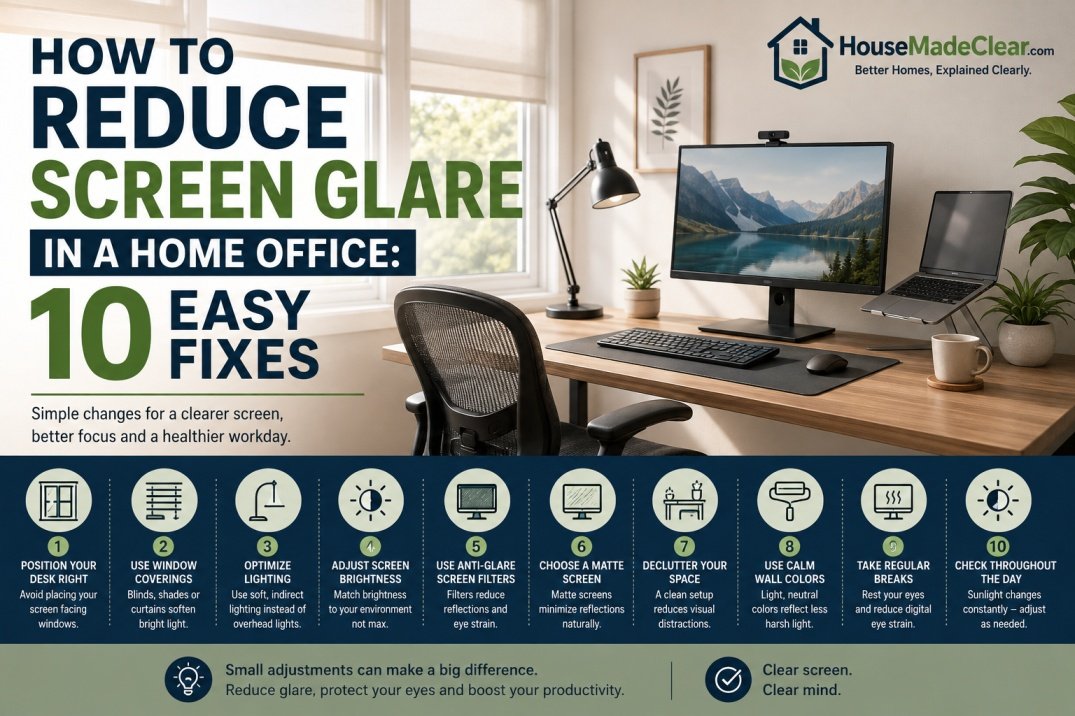
Screen glare can make a home office uncomfortable very quickly.
You may notice:
- Bright reflections on the monitor
- A window reflected across the screen
- Overhead lights creating white spots
- Eye strain after long work sessions
- Difficulty reading dark text
- The need to constantly increase screen brightness
The problem is usually not the monitor alone.
Screen glare is often caused by a combination of:
- Desk position
- Window direction
- Artificial lighting
- Screen angle
- Brightness differences between the screen and room
The good news is that many glare problems can be improved without rebuilding the room or buying expensive equipment.
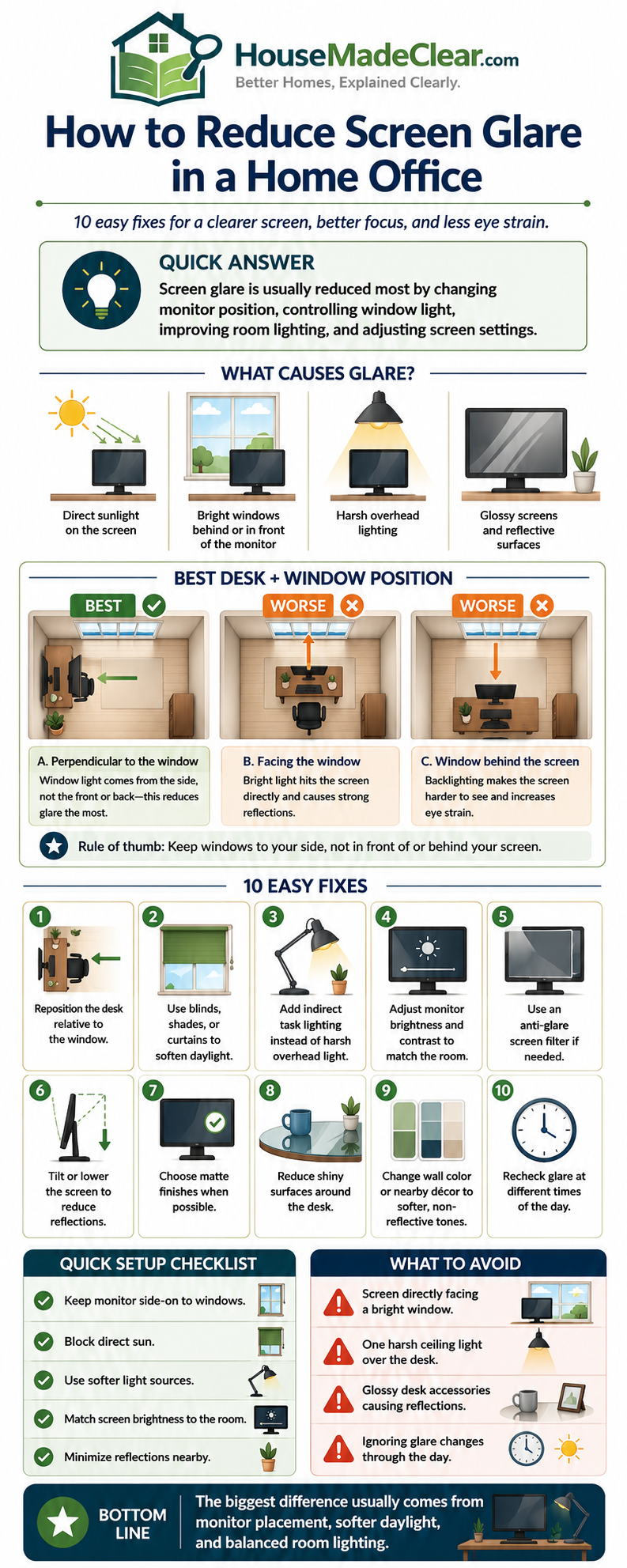
Quick Answer
To reduce screen glare in a home office:
- Place the desk perpendicular to windows where practical
- Avoid positioning the monitor directly in front of or directly opposite a bright window
- Use blinds, curtains or shades to control direct daylight
- Position desk lamps so light falls on the work area rather than the screen
- Reduce harsh overhead lighting
- Match monitor brightness more closely to the room
- Adjust the monitor angle if reflections remain
OSHA specifically recommends arranging computer workstations so monitors are positioned at right angles to windows and other bright light sources where possible.
If you are still deciding which direction your desk should face, House Made Clear’s guide to where a desk should face in a home office explains the advantages and disadvantages of facing a wall, window or doorway.
What Causes Screen Glare in a Home Office?
Screen glare happens when bright light reflects from the display surface or creates such a large brightness difference that viewing becomes uncomfortable.
Common sources include:
- Direct sunlight
- Bright windows
- Ceiling lights
- Desk lamps
- Glossy walls
- Light-colored furniture
- Reflections from nearby glass
You may have one source or several.
For example:
A monitor can receive daylight from a window on one side and overhead LED light from above at the same time.
The first step is identifying the source.
Two Types of Screen Glare
It helps to separate glare into two broad categories.
Reflected Glare
This is when you can actually see something reflected on the monitor.
Examples:
- Window
- Lamp
- Ceiling fixture
The reflection competes with the image on the screen.
Excessive Brightness Contrast
Sometimes you do not see a clear reflection, but the area behind or around the monitor is much brighter than the screen.
For example:
Monitor sits directly in front of a sunny window.
Your eyes constantly move between:
- Bright outdoor light
- Darker screen
That can become tiring.
The Best Desk Position for Reducing Screen Glare
One of the best starting positions is usually:
Desk perpendicular to the window
This means the window is to your left or right rather than:
- Directly behind monitor
- Directly behind your head
OSHA guidance for computer workstations recommends placing screens at right angles to windows where practical to help reduce reflected glare.
Why Side Daylight Works Better
Side light can illuminate the room and desk without shining directly onto the screen.
It also avoids placing a very bright window directly in your field of view.
This is not a rule that every office must follow.
But it is an excellent starting point.
Should Your Monitor Face a Window?
Usually, it is not the best arrangement.
If the monitor faces the window:
- Bright daylight may be directly behind the screen
- Your eyes must adapt between dark display and bright outdoors
- You may squint
This can be especially uncomfortable on sunny days.
When It Can Still Work
A window-facing desk can work if:
- Window light is soft
- Blinds are adjustable
- There is no direct sun
- Monitor sits below the main window brightness
But if the room receives strong daylight, another orientation is often easier.
Should the Window Be Behind the Monitor?
This can also create problems.
When the window sits directly behind the monitor, you may see a bright background around the screen.
That can produce:
- High visual contrast
- Eye fatigue
- Difficulty seeing darker content
Window treatments can help, but moving the desk sideways is often the cleaner solution.
What If the Window Is Behind You?
This arrangement frequently creates the most obvious reflections.
Light from the window travels toward the screen.
You may see:
- Window frame
- Sky
- Trees
- Bright outdoor areas
reflected directly across the monitor.
If possible, rotate the desk so the window sits to one side.
How Far Should Your Desk Be From the Window?
There is no universal distance.
What matters more is:
- Direction of daylight
- Sun angle
- Curtain position
- Screen reflection
- Window operation
A desk can be quite close to a window if the monitor is perpendicular to it.
A desk farther away can still suffer severe glare if the window reflects directly on the screen.
So orientation usually matters more than distance.
Use Blinds or Shades to Control Daylight
Window treatments are one of the most effective ways to control glare.
Useful options include:
- Roller shades
- Cellular shades
- Venetian blinds
- Vertical blinds
- Solar shades
- Curtains
The best choice depends on how much light control you need.
Blinds Can Redirect Light
Slatted blinds are particularly useful because they can change the direction of incoming light.
Instead of fully closing them, you may be able to tilt the slats so daylight reaches:
- Ceiling
- Upper wall
without hitting the monitor directly.
This lets you keep useful daylight while reducing reflections.
Curtains Can Reduce Strong Window Glare
Curtains are useful when the window receives intense daylight.
Sheer Curtains
They soften daylight but do not eliminate it.
Useful for:
- Moderate glare
- Privacy
- Diffused light
Blackout Curtains
They provide much stronger control.
Useful for:
- Direct sun
- Video editing
- Gaming
- Rooms with severe glare
However, fully closing blackout curtains all day can make the office unnecessarily dark.
A layered setup can be more flexible.
For curtain planning, see House Made Clear’s guides to how high to hang curtains and how wide curtains should be.
Solar Shades Can Help With Bright Windows
Solar shades reduce brightness while maintaining some outside visibility.
They can be useful when you want:
- Daylight
- View
- Reduced glare
without completely darkening the room.
Different openness factors provide different levels of light reduction.
Use Diffused Light Instead of Harsh Light
A home office should ideally have even light rather than one extremely bright source.
Good lighting usually combines:
- Ambient light
- Task light
- Daylight
The objective is to reduce extreme differences between bright and dark areas.
What Is Ambient Lighting?
Ambient lighting is the general background illumination in the room.
Examples include:
- Ceiling fixtures
- Wall sconces
- Floor lamps
It should provide enough overall light that the monitor does not appear like a bright rectangle in an otherwise dark room.
What Is Task Lighting?
Task lighting is aimed at a specific activity.
Examples:
- Desk lamp
- Reading lamp
It helps illuminate:
- Notebook
- Keyboard
- Documents
without making the entire room brighter.
How Should a Desk Lamp Be Positioned?
Desk lamps should illuminate the work surface without shining directly into:
- Your eyes
- Monitor
If you are right-handed, placing the lamp on the left side can reduce hand shadows when writing.
If left-handed, the opposite may work better.
For computer work, the more important rule is:
Keep the lamp out of the screen’s reflection angle.
Test the Desk Lamp With the Screen Off
This is a simple trick.
Turn the monitor off.
The dark screen becomes easier to inspect for reflections.
If you clearly see the lamp bulb or shade reflected:
- Move lamp
- Change angle
- Lower brightness
Then turn monitor back on.
Avoid Pointing a Desk Lamp at the Monitor
A desk lamp should illuminate the desk surface, not the screen.
Aim it toward:
- Papers
- Keyboard
- Writing area
rather than:
- Display
Direct illumination of the screen can reduce contrast and create reflections.
Overhead Lighting Can Cause Glare Too
Ceiling lights are often overlooked.
You may position the desk perfectly relative to the window and still see bright ceiling fixtures reflected on the monitor.
This is especially common with:
- Recessed downlights
- Bright LED panels
- Bare bulbs
How to Reduce Glare From Ceiling Lights
Try:
- Moving the desk slightly
- Tilting the monitor
- Dimming overhead lights
- Turning off lights directly above monitor
- Using indirect lighting
Sometimes shifting the desk just a few inches can remove a ceiling fixture from the reflection angle.
Indirect Lighting Often Works Better
Indirect light reflects off surfaces such as:
- Ceiling
- Wall
before reaching the workspace.
Examples include:
- Floor lamp aimed upward
- Wall washer
- Lamp with diffused shade
This produces softer illumination and reduces sharp reflections.
Should You Work With the Overhead Light Off?
Not necessarily.
A completely dark room with only a bright monitor can also be uncomfortable.
Instead, reduce:
- Harsh direct light
while maintaining:
- Comfortable background illumination
The room should not be extremely dark compared with the monitor.
Match Monitor Brightness to the Room
Many people automatically set monitors too bright.
If your display looks like a light source rather than part of the room, brightness may be excessive.
At the same time, if the monitor is too dim compared with a bright window, you may struggle to read it.
The goal is a comfortable balance.
Should Monitor Brightness Be 100%?
Usually not by default.
The correct setting depends on:
- Room brightness
- Monitor
- Content
- Time of day
During bright daylight, you may need more brightness.
At night, you may prefer less.
Automatic brightness can help if your monitor supports it.
Reduce Glare Before Increasing Monitor Brightness
If the screen looks difficult to read because a window reflects on it, increasing brightness is only a partial solution.
A better order is:
- Control light source
- Adjust desk position
- Adjust screen angle
- Then set brightness
This avoids using maximum brightness to overpower preventable glare.
Adjust the Monitor Angle
Small angle changes can dramatically affect reflections.
Try tilting the monitor:
- Slightly upward
- Slightly downward
or rotating it a few degrees.
Watch the reflection move.
The goal is to direct reflected light away from your eyes.
Monitor Height Also Matters
OSHA recommends positioning the monitor so the top of the screen is at or slightly below eye level for most users.
If the screen is too high, tilting it may produce awkward neck posture.
Do not solve glare by placing the monitor in an uncomfortable position.
Both:
- Visual comfort
- Physical ergonomics
matter.
How Far Should the Monitor Be From Your Eyes?
OSHA generally recommends a viewing distance of around:
20–40 inches
from the eyes to the screen.
If your desk is too shallow, you may have trouble getting the monitor far enough back.
House Made Clear’s guide to how far a desk should be from the wall explains how desk depth, monitor arms and cable space affect screen positioning.
Glossy vs Matte Monitors
Screen finish affects reflections.
Glossy Screen
Advantages:
- Strong contrast
- Vibrant appearance
Disadvantage:
- More visible reflections
Matte Screen
Advantages:
- Diffuses reflections
- Often easier in bright rooms
Disadvantage:
- Can slightly soften image clarity depending on coating
If glare remains severe after room adjustments, screen finish may be worth considering.
Can an Anti-Glare Screen Protector Help?
It can help reduce visible reflections.
Anti-glare films or filters work by diffusing reflected light.
They may be useful for:
- Glossy laptop displays
- Fixed workstations near windows
But there can be tradeoffs.
Some filters may affect:
- Sharpness
- Contrast
- Color
So they should usually be a secondary solution rather than the first fix.
Laptop Screen Glare
Laptop users often have an easier option:
move the entire device.
Try:
- Rotating laptop
- Moving farther from window
- Adjusting lid angle
But if you work long hours, a laptop-only setup may create ergonomic problems.
You may benefit from:
- Laptop stand
- External keyboard
- External mouse
- External monitor
This gives you more flexibility in screen positioning.
Dual-Monitor Glare
Two monitors make glare management harder because each screen faces a slightly different angle.
Equal Use
If both monitors are equally important:
- Place them symmetrically
- Angle slightly toward you
- Check both for reflections
Primary + Secondary
If one is used most:
- Put primary directly in front
- Place secondary beside it
Adjust each independently.
One monitor may require a different tilt to avoid window reflection.
Ultrawide Monitor Glare
Ultrawide monitors have a large reflective surface.
A single bright window may appear across a substantial part of the screen.
Solutions include:
- Side-window orientation
- Better window shading
- Slight screen rotation
- Controlled artificial lighting
Because these monitors are wide, even small desk-angle changes can help.
Home Office Lighting for Video Calls
Video calls create a different lighting problem.
You want your face lit without producing monitor glare.
A practical setup is:
Soft light in front or slightly to one side of face
Avoid:
- Bright window directly behind you
- Bare lamp beside screen
- Overhead-only lighting
A bright window behind you can cause the camera to expose for the background and make your face appear dark.
Window in Front of You During Video Calls
A window in front of the desk can provide flattering natural light.
But it can also create eye strain if it is too bright.
Use:
- Sheer curtain
- Blind
- Shade
to reduce intensity.
This creates softer facial light without extreme glare.
Ring Lights and Monitor Glare
Ring lights are popular for calls.
But they may appear as a bright circular reflection in:
- Glasses
- Glossy monitor
Try:
- Raising light
- Moving it farther away
- Shifting slightly off-axis
You do not always need the light directly centered above the monitor.
Best Color Temperature for Home Office Lighting
Color temperature is measured in Kelvin.
Common ranges include:
- 2700K: warm
- 3000K: warm-neutral
- 3500K: neutral
- 4000K: cooler neutral
- 5000K+: daylight-like
For home offices, many people prefer somewhere around:
3000K–4000K
depending on personal preference and daylight conditions.
The exact number matters less than:
- Adequate brightness
- Consistency
- Low glare
Avoid Mixing Extreme Color Temperatures
For example:
- Very warm 2700K lamp
- Cool 6000K overhead light
may create an inconsistent visual environment.
You do not need every bulb to match perfectly, but a coherent lighting scheme generally feels more comfortable.
Daylight Is Useful but Needs Control
Natural light can improve a home office.
It can:
- Reduce reliance on artificial lighting
- Make room feel more open
- Support video calls
But uncontrolled direct sun can cause:
- Glare
- Heat
- Reflections
The goal is not to eliminate daylight.
It is to control it.
Morning vs Afternoon Glare
Sun direction changes throughout the day.
A desk that works at 9 a.m. may become unusable at 3 p.m.
Test your workstation at:
- Morning
- Midday
- Afternoon
This is especially important for:
- East-facing windows
- West-facing windows
Low-angle sun can create strong glare.
East-Facing Home Office
East-facing windows receive stronger morning sun.
If you work early:
- Adjustable blinds
- Solar shade
can be especially useful.
By afternoon, glare may become less severe.
West-Facing Home Office
West-facing rooms often experience strong late-afternoon sun.
This can be particularly challenging if you work until evening.
Use:
- Adjustable shading
- Side desk orientation
- Solar shade
to control direct light.
North-Facing Home Office
In much of the Northern Hemisphere, north-facing windows tend to provide softer indirect daylight.
This may create fewer direct-glare problems.
But brightness still varies with:
- Climate
- Building orientation
- Nearby surfaces
South-Facing Home Office
South-facing windows can receive strong daylight for much of the day.
Good shading becomes more important.
This may include:
- Blinds
- Curtains
- Solar shades
Small Home Office Glare
Small offices offer fewer desk-placement options.
If the desk cannot move:
- Control window light
- Adjust monitor angle
- Improve artificial lighting
- Use anti-glare treatment if needed
A compact room does not automatically require a poor setup.
Small adjustments can make a large difference.
Home Office in a Bedroom
Bedroom offices often have competing furniture priorities.
The desk may share the room with:
- Bed
- Dresser
- Wardrobe
If wall space is limited, the window may seem like the only desk location.
In that case:
- Position monitor perpendicular where possible
- Use blinds
- Avoid placing lamp directly behind screen
House Made Clear’s guide to where to put a dresser in a small bedroom can help prevent bedroom storage from forcing the desk into an unnecessarily poor position.
Dark Home Office
A dark office has a different problem.
Instead of excessive daylight, the monitor may be much brighter than the room.
Useful improvements include:
- Ambient lamp
- Wall lighting
- Brighter ceiling illumination
- Bias lighting behind monitor
House Made Clear’s guide to how to make a dark room brighter without adding windows covers mirrors, layered lighting and surface choices in more detail.
What Is Bias Lighting?
Bias lighting is a soft light placed behind the monitor.
It illuminates the wall behind the screen.
This can reduce the brightness difference between:
- Monitor
- Dark wall
It does not directly remove reflections, but it can improve visual comfort in a dark room.
How Bright Should Bias Lighting Be?
It should be subtle.
The wall should glow gently rather than become a second bright focal point.
If the light is brighter than the monitor, it defeats the purpose.
Can Smart Lighting Help Reduce Glare?
Yes.
Smart bulbs or switches can make it easier to change lighting by:
- Time of day
- Brightness
- Color temperature
For example:
Daytime
Lower artificial lighting because daylight is available.
Evening
Increase ambient lighting while reducing screen brightness.
The objective is not automation for its own sake.
It is maintaining a comfortable lighting balance.
Home Office Lighting With No Window
A windowless office needs fully artificial lighting.
Use layers.
Ambient Light
General room illumination.
Task Light
Desk work.
Optional Bias Light
Behind monitor.
Avoid relying on one very bright ceiling fixture.
A single harsh source often creates shadows and reflections.
Home Office Lighting With One Window
This is usually easier to manage.
Place the desk:
perpendicular to the window
where possible.
Then use blinds or curtains to fine-tune daylight.
Artificial lighting fills in darker hours.
Home Office Lighting With Multiple Windows
Multiple windows can create reflections from several directions.
You may need:
- Shades on one window
- Desk repositioning
- Monitor rotation
Do not assume every shade must be fully closed.
Control only the light that causes the problem.
Wall Color Can Affect Glare
Very glossy paint can reflect light.
For offices, matte or eggshell surfaces may reduce visible reflections compared with high-gloss finishes.
Light-colored walls can still help distribute light, but high reflectivity near the monitor may become distracting.
White Desk and Glare
A bright white desk can reflect daylight upward.
This is not always a problem.
But under strong sun, it may become visually bright.
Possible solutions:
- Desk mat
- Different desk position
- Diffused daylight
Do not replace furniture until you have tested simpler fixes.
Glass Desks Can Reflect Light
Glass desktops can reflect:
- Ceiling lights
- Window light
- Monitor glow
If reflections are distracting, a desk mat can reduce them.
Can Plants Reduce Screen Glare?
Plants do not directly solve glare.
However, a large plant can sometimes partially block or diffuse light from a side window.
Use this only as a minor adjustment.
Proper desk and lighting placement is more reliable.
Screen Glare From Glasses
If you wear glasses, reflections may come from:
- Window
- Desk lamp
- Ring light
rather than the monitor itself.
For video calls, move lights slightly:
- Higher
- To the side
until reflections disappear from lenses.
Anti-reflective lens coatings may also help, but lighting position should be corrected first.
Screen Glare at Night
At night, the window usually stops being the main issue.
Instead, glare comes from:
- Ceiling lights
- Lamps
You may also see your own reflection in the dark window.
Close:
- Curtains
- Blinds
and use balanced ambient lighting.
Is Dark Mode Better for Glare?
Dark mode can reduce overall screen brightness in some situations.
But it does not eliminate reflections.
If a bright window reflects on a dark screen, the reflection can actually become more visible.
Dark mode is a preference and software setting, not a replacement for proper lighting.
Should You Use Night Light Mode?
Night-light or warm-screen modes reduce blue-toned display output in the evening.
They may make the screen feel warmer.
But they do not fix physical glare.
Use them separately from room-lighting adjustments.
Common Home Office Glare Mistakes
1. Putting the Window Directly Behind You
Problem:
Window reflects on monitor.
Better approach:
Rotate desk perpendicular to window.
2. Putting Monitor Directly in Front of Bright Window
Problem:
Large brightness contrast.
Better approach:
Move screen sideways or control daylight.
3. Increasing Monitor Brightness to Maximum
Problem:
Does not remove reflection.
Better approach:
Fix light source first.
4. Using One Bright Ceiling Light
Problem:
Creates harsh reflections.
Better approach:
Use layered lighting.
5. Pointing Desk Lamp at Screen
Problem:
Creates direct glare.
Better approach:
Aim lamp at work surface.
6. Closing Blackout Curtains All Day
Problem:
Removes useful daylight unnecessarily.
Better approach:
Use adjustable shading.
7. Ignoring Afternoon Sun
Problem:
Morning setup stops working later.
Better approach:
Test throughout the day.
8. Tilting Monitor Too Far
Problem:
May reduce glare but create poor neck posture.
Better approach:
Balance visual and ergonomic comfort.
9. Using Extremely Cool Bright Lighting at Night
Problem:
Can create harsh contrast.
Better approach:
Use comfortable balanced ambient light.
10. Buying Anti-Glare Accessories Before Fixing the Room
Problem:
Treats symptom rather than cause.
Better approach:
Correct desk and lighting placement first.
Step-by-Step: Fix Screen Glare in 10 Minutes
Step 1: Turn the Monitor Off
Look for reflections.
Step 2: Identify the Brightest Reflection
Is it:
- Window
- Ceiling light
- Lamp?
Step 3: Rotate the Monitor
Try a few degrees.
Step 4: Adjust the Desk
If possible, make monitor perpendicular to window.
Step 5: Adjust Blinds or Curtains
Reduce direct daylight.
Step 6: Turn Off One Overhead Light
See whether reflection improves.
Step 7: Reposition Desk Lamp
Aim it toward documents, not screen.
Step 8: Turn Monitor Back On
Check visibility.
Step 9: Adjust Brightness
Match it more closely to room brightness.
Step 10: Test Later in the Day
Sun direction changes.
Home Office Glare Troubleshooting Table
| Problem | Likely Cause | First Fix |
|---|---|---|
| Window visible on screen | Window behind user | Rotate desk |
| Bright background behind monitor | Window in front | Use shade or move desk |
| White ceiling spot | Overhead light | Move/angle screen |
| Lamp reflected | Poor lamp placement | Reposition lamp |
| Screen too bright at night | Room too dark | Add ambient light |
| Screen too dim in daylight | Strong daylight | Reduce window brightness |
| Glare only afternoon | Sun angle | Use adjustable shade |
| Dual monitor reflections | Different screen angles | Adjust individually |
Best Home Office Lighting Setup
A practical setup might look like this:
Window: to side of desk
Monitor: directly in front
Ambient light: soft and even
Desk lamp: to side, aimed downward
Curtain/blind: adjustable
Monitor brightness: matched to room
Optional bias light: behind monitor for evening work
This setup reduces the likelihood of both:
- Direct reflection
- Extreme brightness contrast
Home Office Screen Glare Checklist
Before buying additional equipment, check:
- Desk is perpendicular to window where practical
- Window is not directly behind user
- Bright window is not directly behind monitor
- Blinds or curtains are adjustable
- Monitor angle has been tested
- Monitor height remains ergonomic
- Viewing distance is comfortable
- Desk lamp does not reflect
- Overhead light is not visible on screen
- Room is not excessively dark
- Monitor is not excessively bright
- Afternoon sunlight has been tested
- Dual monitors are adjusted individually
- Video-call lighting does not reflect on screen
- Glasses reflections have been checked
- Anti-glare filter considered only after room fixes
Final Thoughts
Reducing screen glare in a home office usually does not require expensive equipment.
The biggest improvements often come from three changes:
Move the desk
Control the window
Improve the lighting
Start by positioning the monitor perpendicular to the window where possible.
Then use:
- Blinds
- Shades
- Curtains
to manage direct daylight.
Next, adjust artificial lighting so lamps and ceiling fixtures illuminate the room and work surface without reflecting directly on the screen.
Finally, adjust:
- Monitor angle
- Brightness
- Viewing distance
for comfort.
OSHA’s workstation guidance supports this general approach by recommending that monitors be positioned at right angles to windows and bright light sources where practical and that users control glare through workstation arrangement and lighting.
For the broader room layout, continue with House Made Clear’s guides to where a desk should face in a home office, how far a desk should be from the wall and how to design a functional home office.
Frequently Asked Questions
How do I reduce screen glare in my home office?
Position the monitor perpendicular to windows where possible, use blinds or curtains to control direct daylight, reposition lamps so they do not reflect on the screen and adjust monitor brightness to match the room.
Should a computer monitor face a window?
Usually not if the window is very bright. A bright window directly behind the monitor can create excessive visual contrast. Positioning the desk perpendicular to the window is often more comfortable.
Should the window be behind your computer monitor?
A window directly behind the monitor can create a very bright background around the screen. Moving the desk sideways or using adjustable window treatments can reduce the contrast.
Is it bad to have a window behind you when using a computer?
It can cause strong reflections because the window may appear directly on the monitor. If possible, rotate the desk so the window is to one side.
What is the best lighting for a home office computer?
A combination of soft ambient lighting, controlled daylight and a properly positioned task lamp usually works better than one harsh overhead light.
Where should a desk lamp be placed to avoid screen glare?
Place the lamp to the side of the work area and aim it toward documents or the keyboard rather than directly toward the monitor. Adjust its position until it is no longer visible in screen reflections.
Can curtains reduce computer screen glare?
Yes. Sheer curtains can diffuse moderate daylight, while blackout curtains provide stronger control. Adjustable blinds or shades may offer more flexibility throughout the day.
Does an anti-glare screen protector work?
An anti-glare filter can reduce reflections, especially on glossy displays, but it may slightly affect image clarity. Desk position and lighting should usually be corrected first.
How bright should my monitor be in a home office?
Monitor brightness should feel balanced with the surrounding room. Avoid setting it unnecessarily high in a dark room or too low in very bright daylight.
Why does my screen glare get worse in the afternoon?
The angle of sunlight changes during the day. East- and west-facing windows can receive strong low-angle sun during morning or afternoon hours, making adjustable blinds or shades useful.